
Investigating issues with Unmanaged Memory. First steps. (转载)
原文:http://kate-butenko.blogspot.tw/2012/07/investigating-issues-with-unmanaged.html
I want to write this blogpost really fast, until I forget everything, despite I have absolutely no time and need to work on other cases :( Let's count this as part of my work, okay?
Prologue.
You can scroll it down to scene 1, if you want to concentrate on concrete steps.
This case had a long story - starting from OOM troubles on 32-bit process, when process 32-bit mode was considered as main boundary for a large solution. BTW, my troubles with opening dumps at that point resulted in this blog post, if you remember it.
After switching to 64bit solution was running smoothly for some time, we even closed the support case. Suddenly (oh, I love this word!) our poor process had eaten 66Gb of memory, which is unbelievably huge. Actually, it was all of the memory available - 16Gb of RAM and 50Gb of page file.
Customer managed to gather a dump when process memory usage was at something like 6Gb. I was almost sure, that issue solution is struggling because of was this bad guy - Lucene analyzer. Luckily, we have script that counts all related to this issue data structures (and also counts cache sizes), so I thought that I will just run this script on the dump and confirm my assumptions.
I was a bit shocked when script has shown only 140Mb of Lucene-related things in memory. Cache sizes were in healthy range. So this is something new. I loaded our good old friend WinDBG and started analyzing memory as usually.
Scene 1.
1. !dumpheap -stat. One suspicious thing that I noticed in the dumpheap was that largest memory eater was not that large:

Approximate size of strings is ~775mb, and a lot of Free objects were telling me that a lot of memory is not compacted. Other objects are related to different Sitecore caches.
But what even 1.7Gb means against having a ~5.8Gb dump? That was a question.
2.!address -summary. This command will output all memory usage for the process. Managed, unmanaged, commited, available virtual memory - whatever you can imagine:

Ok, that's a bit better. At least I can see that there is ~5.5Gb of committed memory (MEM_COMMIT), which corresponds approximately to process' Private Bytes, so size of dump is not coming from nowhere. But from somewhere.
3. !eeheap -gc. This nice command shows us all our managed heaps one by one, and for each heap shows its Small object heap and Large object heap addresses and sizes.

That's what I was interested in - total size of managed memory heap. Sadly, it says that GC heap is only 2Gb it size - the same that we may assume from !dumpheap results. If it was not this case, we can take more from output of !eeheap -gc, for example search for largest LOH, take a look at sizes of generations in GC and possibly derive something useful.
But commited memory 5.5Gb against 2Gb of GC managed memory shows us that we face this scary unmanaged memory thing. Oh no :(
I searched through ton of sites looking for concrete steps of debugging such issues in WinDBG. Steps below are currently the one and only scenario, that worked for me. I'm sure that there are much more possible ways of solving, but we are not able to know everything in this world, aren't we?
Scene 2.
So later in this article we are investigating our native heaps. Native means unmanaged - our GC has nothing to do with native memory, it will never be collected or compacted until application is closed and everything that belongs to it is freed.
4. !heap -s

Let's look at the native heaps. One of the heaps takes ~3Gb. So this is the place where most part of our lost memory goes! Remember this heap number 12240000. We'll see it again later.
Now let's take a closer look at the structure of native heaps, using following command:
5. !heap -stat -h 0

Among all allocation statistic information for all heaps find the ones that are the most exhausted. It means that most of total busy bytes is close to 100. In my dump I had several such heaps, but most of them aren't causing problems, according to results of step 4. This 12240000 is under big question now.
From the output above we can also see that all this heap is filled with blocks of equal size - 7c10. Next command will allow us filter heaps to find blocks of this only size.
6. !heap -flt s 7c10

Good explanation of each of the columns: http://stackoverflow.com/questions/6687414/what-do-the-different-columns-in-the-heap-flt-s-xxxx-windbg-command-represe
Now be careful. Most of the sites and guides on the Internet will now offer you to go through UserPtrs and look at the stacks that are pointing to this UserPtrs. For example, this one: http://windbg.info/doc/1-common-cmds.html#20_memory_heap, scroll down to "Finding memory leaks", steps 5-8. I recognize that this scenario may be useful sometimes, but nobody says that in 90% of cases stacks are not present there :)
First my thought was that I have nothing else to admit except of the fact that I'm stuck here. Searching for anything related leaded me to the steps like in article above, but this scenario was of no use. I even asked my other experienced colleagues and US support about any ideas, but seems that nobody have ever seen this before.
Occasionaly, while hopelessly searching for just general information on native memory leaks, I bumped into a simple blog post http://www.manicai.net/comp/debugging/oom/. Man, I should give you all the credit for this post, as you saved my head from explosion.
Frankly saying, I wasn't able to repeat all the steps from the blog above, but even the beginning has given me a chance to find out what is wrong.
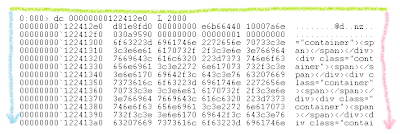
7. dc 00000000122412e0 L 2000
Address is taken as the first HEAP_ENTRY from previous screenshot - address of first block of that size. "dc" command display us raw memory in double word bytes and ASCII characters corresponding to them. L 2000 means that we will take 2000 of these double words.
We will get a large output, scroll over it and find interesting places, if you have them:
 |
| beginning of the "dc" output |
Cool. There is definitely some repeating string, like <div class="container"><span></span></div>... and this string is being repeated forever.
 |
| somewhere in the middle of the "dc" output |
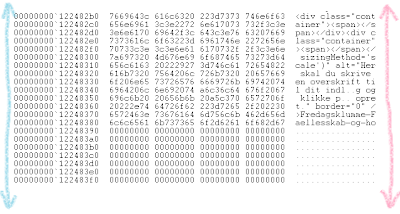
Another eye-catching place. Among all these repeating spans some piece of the content is jumping into: Fredagsklumme-Faellesskab-og-ho... and some styling before this content.
 |
| end of dots-range in "dc"-output |
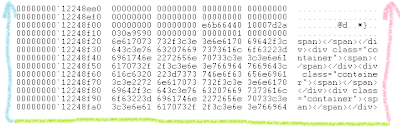
Then our content piece is followed by a lot of dots and ends up with all this div-span thing again.
Actually, it was the brilliant moment - find some meaningful strings in all this garbage-looking native heap.
My next step was just to ask customer about nature of this string, and he has successfully found something similar in their XSLT files and found related content in one of the Sitecore fields. Most of all, this memory leak was caused by incorrect parsing some content markup by this xslt.
Epilogue.
...and the moral of this story:
Guys, please keep posting! Especially about the things that are not that obvious and that you spent a lot of time on.

Investigating issues with Unmanaged Memory. First steps. (转载)的更多相关文章
- Investigating Your RAM Usage
转载自:http://developer.android.com/intl/zh-cn/tools/debugging/debugging-memory.html Because Android is ...
- [转]Passing Managed Structures With Strings To Unmanaged Code Part 1
1. Introduction. 1.1 Managed structures that contain strings are a common sight. The trouble is that ...
- SAP NOTE 1999997 - FAQ: SAP HANA Memory
Symptom You have questions related to the SAP HANA memory. You experience a high memory utilization ...
- NET Memory Profiler 跟踪.net 应用内存
NET Memory Profiler 跟踪.net 应用内存 用 .NET Memory Profiler 跟踪.net 应用内存使用情况--基本应用篇 作者:肖波 .net 框架号称永远 ...
- 还是说Memory Model,gcc的__sync_synchronize真是太坑爹了
还是说Memory Model,gcc的__sync_synchronize真是太坑爹了! 时间 2012-01-29 03:18:35 IT牛人博客聚合网站 原文 http://www.udpw ...
- 用 .NET Memory Profiler 跟踪.net 应用内存使用情况--基本应用篇(转)
.net 框架号称永远不会发生内存泄漏,原因是其引入了内存回收的机制.但实际应用中,往往我们分配了对象但没有释放指向该对象的引用,导致对象永远无法释放.最 常见的情况就是给对象添加了事件处理函数,但当 ...
- The Dangers of the Large Object Heap(转载,LOH内存碎片情景重现)
原文地址:https://www.simple-talk.com/dotnet/.net-framework/the-dangers-of-the-large-object-heap/ You'd h ...
- [转]Passing Managed Structures With Strings To Unmanaged Code Part 3
1. Introduction. 1.1 In part 1 of this series of blogs we studied how to pass a managed structure (w ...
- [转]Passing Managed Structures With Strings To Unmanaged Code Part 2
1. Introduction. 1.1 In part 1 of this series of blogs we studied how to pass a managed structure (w ...
随机推荐
- Unity---动画系统学习(6)---Avatar Mask动画融合、Layers动画分层、IK反向动力学
1. 介绍 Avatar Mask(动画融合) 前面我们一直介绍的都是动画混合,一般用于解决边跑边转弯的问题.而动画融合一般用于解决例如边跑边挥手的问题. 简单说就是让跑步去控制腿的骨骼,挥手控制手的 ...
- 《Andrew Ng深度学习》笔记4
浅层神经网络 1.激活函数 在神经网络中,激活函数有很多种,常用的有sigmoid()函数,tanh()函数,ReLu函数(修正单元函数),泄露ReLu(泄露修正单元函数).它们的图形如下: sigm ...
- PHP 中 快捷的三元运算...
a!=null ? a: 123 当 a 不为空时,返回 123, 可简写为 a ?: 123(a 不为null 不为 '','0',0 时,返回它本身,否则返回123...)
- php 常用字符集
ASCII 字符集 单字节编码,7位(bits)表示一个字符,共128字符 包含内容 控制字符:回车键.退格.换行键等. 可显示字符:英文大小写字符.阿拉伯数字和西文符号 ANSI 码 ANSI编码 ...
- python之控制流习题+代码
# !/usr/bin/python3 # -*- coding: utf-8 -*- # @Time :2018/11/26 15:32 # @Author :yosef # @Email :wur ...
- C++ 构造函数与默认构造函数
构造函数:C++用于构建类的新对象时需要调用的函数,该函数无返回类型!(注意:是“无”! 不是空!(void)). 默认构造函数:未提供显式初始值时,用来穿件对象的构造函数. 以上是二者的定义,但是单 ...
- 字典序的第K小数字
今天zyb参加一场面试,面试官听说zyb是ACMer之后立马抛出了一道算法题给zyb:有一个序列,是1到n的一种排列,排列的顺序是字典序小的在前,那么第k个数字是什么?例如n=15,k=7, 排列顺序 ...
- setlocal enabledelayedexpansion 解释
看字面的意思是:设置本地为延迟扩展.其实也就是:延迟变量,全称"延迟环境变量扩展", 在cmd执行命令前会对脚本进行预处理,其中有一个过程是变量识别过程,在这个过程中,如果有两个% ...
- python--交互器,编译器
1在写python的时候调交互器的作用 唯一作用:调试代码 2.编译器
- C++ GUI Qt4编程(10)-3.4spreadsheet
1. C++ GUI Qt4编程第三章,增加spreadsheet. 2. spreadsheet.h /**/ #ifndef SPREADSHEET_H #define SPREADSHEET_H ...