
Linux挂载Win共享文件夹 一
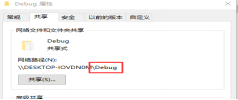
1, Win下选中文件夹,属性设置为共享,红圈中的为共享路径,挂载时//ip/共享路径
2,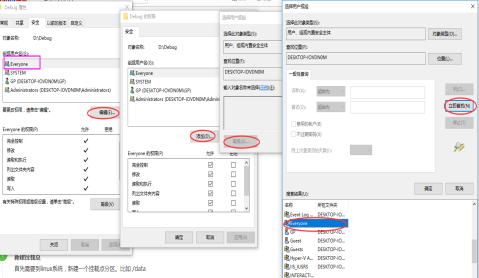
3,Linux需要安装这两个软件
rpm -qa | grep samba-client
rpm -qa | grep cifs=utils
else
yum install samba-client
yum install cifs-utils
4,
可能提示


创建成功
如果需要每次系统启动都挂载这个目录,那就需要在/etc/fstab 文件里把需要挂载项添加进去
添加行:
//192.168.1.100/workspace /mnt/share cifs auto,username=‘echo’,password=‘123456’ 0 0
通过linux 的mount命令挂载windows下的共享目录,挂载后目录权限为755,普通用户没有权限写入。
chmod给目录加权限出现错误,和普通的目录不同。
通过linux的 man mount.cifs 简单的了解下。
NAME
mount.cifs - mount using the Common Internet File System (CIFS)
cifs的意思是通用网络文件系统。
DESCRIPTION
This tool is part of the cifs-utils suite.
mount.cifs mounts a Linux CIFS filesystem. It is usually invoked indirectly by the mount(8) command when using the "-t cifs" option. This command only works in Linux, and the kernel must support the cifs filesystem. The CIFS protocol is the successor to the SMB protocol and is supported by most Windows servers and many other commercial servers and Network Attached Storage appliances as well as by the popular Open Source server Samba.
mount.cifs用于挂载linux的CIFS文件系统,当用-t cifs命令的时候间接的涉及了mount(8)命令。这个命令只能在linux上执行,以及内核必须支持cifs文件系统。cifs协议的前身是smb协议,被大部分的windows、商业服务器、存储应用支持。(mount.cifs跟mount -t cifs唯一的区别就是mount.cifs在samba软件包里,而mount在util-linux软件包里。)
The mount.cifs utility attaches the UNC name (exported network resource) specified as service (using //server/share syntax, where "server" is the server name or IP address and "share" is the name of the share) to the local directory mount-point.
mount -t cifs 192.168.50.34:temp /root/aa 通过类似的形式使用。192.168.50.34是windows的ip地址,temp目录是windows的共享目录。
Options to mount.cifs are specified as a comma-separated list of key=value pairs. It is possible to send options other than those listed here, assuming that the cifs filesystem kernel module (cifs.ko) supports them. Unrecognized cifs mount options passed to the cifs vfs kernel code will be logged to the kernel log.
mount.cifs causes the cifs vfs to launch a thread named cifsd. After mounting it keeps running until the mounted resource is unmounted (usually via the umount utility).
mount.cifs 挂载后会有一个cifsd进程出现。
继续查看下mount.cifs的语法。
file_mode=arg
If the server does not support the CIFS Unix extensions this overrides the default file mode.
dir_mode=arg
If the server does not support the CIFS Unix extensions this overrides the default mode for directories.
可以通过file_mode 和dir_mode 来设置权限,覆盖默认的755权限。
mount -t cifs //192.168.50.34/temp /root/aa -o username=allenli,password=lcc201314,rw,dir_mode=0777,file_mode=0777
Linux挂载Win共享文件夹 一的更多相关文章
- Linux挂载Win共享文件夹_VmwareTools
- Linux 挂载windows共享文件夹
Linux 挂载windows共享文件夹 准备工具: 1.windows 共享出来文件夹. 2.Linux 安装cifs文件挂载属性 3.其他 windows ip: 192.168.27.99 Li ...
- Linux 挂载Windows共享文件夹和NAS存储
summary: [Linux 挂载共享存储] 概述 将Windows共享文件夹和NAS存储挂载至Linux. Linux系统环境:CentOS 挂载共享存储 查看外部主机共享了哪些目录 smbcli ...
- linux挂载windows共享文件夹
1.建立共享文件夹 2.在linux中挂载共享目录 #mount -t cifs -o username=administrator,password=你的系统账号密码 //192.168.0.22/ ...
- linux挂载windows共享文件夹出错,提示mount error(13): Permission denied
完整的可以工作的命令行: mount -v -t cifs -o username=clouder,password=123456,iocharset=utf8,sec=ntlm //172.28.1 ...
- Linux挂载NAS共享文件夹
[root@ftp:/mnt] > mount -o username=user01,password=1234567890 //192.168.31.20/share /mnt/nas [ro ...
- VMware下Linux虚拟机访问本地Win共享文件夹
VMware下Linux虚拟机访问本地Win共享文件夹 : 访问共享文件夹的步骤如下: 1.先在本地Win创建一个需要共享到虚拟机中的共享目录,如 F:\share. 2.打开你的VMware,选择 ...
- linux上挂载windows共享文件夹
linux上挂载windows共享文件夹 1.共享windows目录 挂载之前得创建一个有password的用户(当前用户也能够),并将你要挂载的目录进行共享,并赋予读写权限 如图. watermar ...
- VMware,win7与linux centos6.4文件互传,linux下挂载windows共享文件夹,vmware tools安装方法
本方法是以win7,VMware9.0.1 ,centos6.4为基础实验的. 对于linux的初级使用阶段,都会Windows中使用linux虚拟机VMWare或者其它的.在Windows与linu ...
随机推荐
- java各种业务解决方案总结
最近有点时间,突然感慨良多,感觉辛苦工作这么久什么都没有,总结了以前的工作,将接触的主要工具列出来,希望给大家解决问题做参考.相关工具都是实践检验过的 1.数据库 (1).内存数据库 redis (2 ...
- N个数求和
题目: 本题的要求很简单,就是求N个数字的和.麻烦的是,这些数字是以有理数分子/分母的形式给出的,你输出的和也必须是有理数的形式. 输入格式: 输入第一行给出一个正整数N(≤100).随后一行按格式a ...
- 【shell脚本学习-3】
part-1 #!/bin/bash:<<FTP#test [ 1 -eq 2] #条件测试x="abc" #不允许有空格y="abc" [ &qu ...
- MySQL数据操作(DML)
表结构准备: mysql> CREATE TABLE student( -> sid INT PRIMARY KEY AUTO_INCREMENT, ), -> age INT, ) ...
- 自定义控件,继承自 ListView
public class MyListView extends ListView { /** * 如果在xml中创建并设置了style,就会调用三个参数的. * * @param context * ...
- 11个简单实用技巧--Java性能调优
多数开发人员认为性能优化是个比较复杂的问题,需要大量的经验和知识.是的,这并不没有错.诚然,优化应用程序以获得最好的性能并不是一件容易的事情,但这并不意味着你在没有获得这些经验和知识之前就不能做任何事 ...
- Redis缓存数据库的安装与配置(1)
1.安装 tarxf redis-3.2.5.tar.gz cd redis-3.2.5 make mkdir -p /usr/local/redis/bin src目录下这些文件作用如下 redis ...
- 相亲数--Python
想亲数:在遥远的古代,人们发现某些自然数之间有特殊的关系:如果两个数a和b,a的所有除本身以外的因数之和等于b,b的所有除本身以外的因数之和等于a,则称a,b是一对相亲数 code: def sumF ...
- Scala Tuple
Python中的Tuple 元组将多样的对象集合到一起,元素不能修改,通过索引进行查找, 使用括号"()" 允许重复 Scala中的Tuple 概念跟Python是完全相同的 定义 ...
- Git使用之一:创建仓储和提交文件
一.前期工作: 1.准备自己的文件夹用于同步文件 2.准备自己的Git账号,并设置好项目(推荐使用国产的码云) 3.安装Git软件 (下载地址: 32-bit Git for Window ...