
Android的DDMS中的Threads的各个字段的含义
在使用DDMS调试代码时,Threads窗口中各个字段的含义从网上搜了下,如下所示:
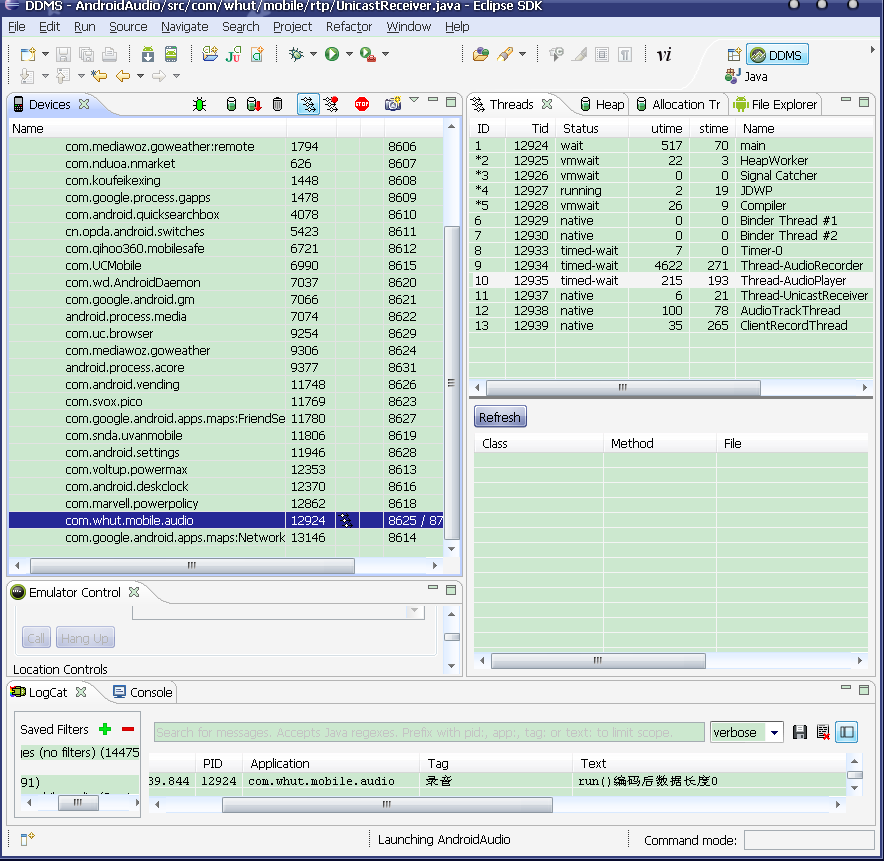
该标签页显示了如下信息:
ID
– a VM-assigned unique thread ID. In Dalvik, these are odd numbers starting from 3.
– 虚拟机分配的唯一线程ID. 在 Dalvik, 该数字是一个从3开始的奇数.
Tid
– the Linux thread ID. For the main thread in a process, this will match the process ID.
– Linux 线程 ID. 进程中主线程的ID, 会同进程的ID相匹配.
Status
– the VM thread status. Daemon threads are shown with a ‘*’. This will be one of the following:
– 虚拟机线程状态. 守护进程会附带一个’*’. 状态信息列表如下:
- running – executing application code – 正在执行应用程序
- sleeping – called Thread.sleep() – 执行了Thread.sleep() 方法
- monitor – waiting to acquire a monitor lock – 在正等待获取一个监听锁
- wait – in Object.wait() – 在Object.wait() 方法中
- native – executing native code – 执行了原生代码
- vmwait – waiting on a VM resource – 正在等待一个虚拟机资源
- zombie – thread is in the process of dying – 该线程已死
- init – thread is initializing (you shouldn’t see this) – 线程正在初始化 (你不会看到这个)
- starting – thread is about to start (you shouldn’t see this either) – 线程正在启动中 (这个你也不会看到)
utime
– cumulative time spent executing user code, in “jiffies” (usually 10ms). Only available under Linux.
– 执行用户代码的累计时间, 单位为”jiffies(表示系统启动以来的tick数)” (通常是 10ms). 仅在Linux系统中适用.
stime
– cumulative time spent executing system code, in “jiffies” (usually 10ms).
– 执行系统代码的累计时间, 单位为”jiffies(表示系统启动以来的tick数)”.
Name
– the name of the thread
– 线程的名字
“ID” and “Name” are set when the thread is started. The remaining fields are updated periodically (default is every 4 seconds).
“ID” 和 “Name” 在进程启动的时候就会显示. 其余的字段每个一段时间更新一次(默认是4秒钟)
Android的DDMS中的Threads的各个字段的含义的更多相关文章
- Android studio关于真机调试DDMS中的data文件夹打不开的解决方法
由于做开发的时候想打开查看数据库存放的内容,在eclipse中数据库文件默认就在/data/data/应用包名/databases/数据库名,而用Android studio打开DDMS下面找时发现点 ...
- Android开发Eclipse中DDMS中Heap使用及GC_EXTERNAL_ALLOC含义
一.先说DDMS中的Heap的使用,通过可以观察VM中的Java内存,但是无法查看通过JNI分配的内存. 直接上图,废话少说... 图一:将要查看内存使用情况的项目Update heap 图二:操作项 ...
- android DDMS中的内存监测工具Heap
DDMS中自带的Heap工具可以显示出当前堆内存的情况,分配内存.剩余的内存等信息. 首先是进入DDMS,运行应用,在DDMS的左边区域选中应用的包名,然后点击上方的update heap图标. 点击 ...
- android调试工具DDMS
DDMS工作机制 DDMS全称Dalvik Debug Monitor Service.DDMS为IDE和emultor及真正的android设备架起来了一座桥梁,Android DDMS将捕捉 ...
- 第06讲- DDMS中logcat的使用
1.DDMS使用 )Device选项卡 Device中罗列了Emulator中所有的进程,选项卡右上角那一排按钮分别为:调试进程.更新进程.更新进程堆栈信息.停止某个进程. )Threads选项卡 ...
- .Net 转战 Android 4.4 日常笔记(6)--Android Studio DDMS用法
Android Studio DDMS与Eclipse DDMS大同小异,下面了解DDMS的使用 DDMS(Dalvik Debug Monitor Service )Dalvik调试监控服务 DDM ...
- 关于eclipse中DDMS中Emulator Control选项卡为灰色不可用
首先先感谢版主:http://blog.csdn.net/noname666/article/details/51670905#reply 方法一的出处:http://stackoverflow.co ...
- Android配置----DDMS 连接真机(己ROOT),用file explore看不到data/data文件夹的解决办法
Android DDMS 连接真机(己ROOT),用file explore看不到data/data文件夹,问题在于data文件夹没有权限,用360手机助手或豌豆荚也是看不见的. 有以下两种解决方法: ...
- 关于真机调试DDMS中的data文件夹打不开的解决方法
关于真机调试DDMS中的data文件夹打不开的解决方法 今天在开发的时候需要导出程序中的数据库文件查看数据,数据库文件默认就在/data/data/应用包名/databases/数据库名 这个路径下, ...
随机推荐
- JSF教程(11)——生命周期之Invoke Application Phase
在这个阶段JSF实现将处理不论什么应用界别的事件,比如表单的提交或者链接点击后跳转到还有一个页面. 这时假设应用须要重定向不同 的web应用字眼或者产生一个资源其并不喊不论什么的JSF组件,那么就调用 ...
- VC和MATLAB混合开发经验总结
作者:朱金灿 来源:http://blog.csdn.net/clever101 前期准备: 1.请确认机器中已经安装Matlab主程序或(MCR)MATLAB Compiler Runtime(具体 ...
- if..... if..... 和if..... else if.....
曾经一度认为没有区别,,在有的时候是没有区别的,,但是有些时候则不可相互替换 这两个是有区别的 if..... if..... 是不相关的.只要各自判断两部分的条件即可,两个都会执行 if.... e ...
- POJ 2823 Sliding Window 线段树
http://poj.org/problem?id=2823 出太阳啦~^ ^被子拿去晒了~晚上还要数学建模,刚才躺在床上休息一下就睡着了,哼,还好我强大,没有感冒. 话说今年校运会怎么没下雨!!!说 ...
- 通过双重for循环来找到JSON中不反复的数据
//通过双重for循环来找到JSON中不反复的数据 var count = 0; for ( i=0; i<json.length; i++) { for ( j=0; j<i; j++) ...
- swift学习第十五天:闭包
闭包 闭包的介绍 闭包和OC中的block非常相似 OC中的block是匿名的函数 Swift中的闭包是一个特殊的函数 block和闭包都经常用于回调 注意:闭包和block一样,第一次使用时可能不习 ...
- 神经网络 vs 大脑
海马区域(负责记忆的关键区域) 0. 常见概念 神经递质:neurotransmitter 在突触传递中是担当"信使"的特定化学物质.简称递质. 重要的神经递质有:乙酰胆碱: 1. ...
- 魔兽争霸war3心得体会(三):UD内战
最近,经常匹配到UD内战.有输有赢,有的时候,自己双矿经济,人口优势巨大,却很遗憾地输掉比赛. 本文,简要分析下 对战过程. 前期狗流开局, 5只狗,一只出去骚扰,攻击商店,防止对方科技蜘蛛骚扰我.二 ...
- input常用输入框限制
input常用输入框限制 本篇 1.小写自动转换成大写: or 2.大写自动转换成小写 or 3.防止退后清空的TEXT文档 4.ENTER键可以让光标移到下一个输入框 5.只能为中文(有闪动) ...
- [Vue] Use basic event handling in Vue
Let's use a range of events and their modifiers to look at the cool ways we can deal with event hand ...