
Linux ssh密钥自动登录 专题
在开发中,经常需要从一台主机ssh登陆到另一台主机去,每次都需要输一次login/Password,很繁琐。
使用密钥登陆就可以不用输入用户名和密码了
实现从主机A免密码登陆到主机B(即把主机A的pub密钥--公钥,添加到主机B的~/.ssh/authorized_keys文件中即可),需要以下几个步骤:
1. 在主机A“~/.ssh/”目录下执行命令“ssh-keygen -t rsa”(生成过程中,一路回车),生成两个文件id_rsa和id_rsa_pub,这两个文件实际上是一个密钥对,id_rsa是私钥,id_rsa_pub是公钥;
2. 将文件id_rsa_pub从主机A拷贝(可以使用scp命令)到主机B“~/.ssh/”目录下;
scp local_file remote_username@remote_ip:remote_folder
3. 登陆到主机B上, 进入“~/.ssh/”目录,将从主机拷贝来的id_rsa_pub文件添加到文件“authorized_keys”尾部(cat id_rsa_pub>>authorized_keys),若文件“authorized_keys”不存在,则创建;确保“~/.ssh/authorized_keys”的权限至少为600;
4. 从主机A登陆主机B,第一次登陆时主机B要自动设置known_hosts文件,所以需要输入yes,以后就不需要了;
P.S.当然你登陆主机A和主机B用的是同一个用户名
配置用户的公钥登陆时,配置完authorized_keys居然一直不生效,于是google之,发现原来是因为.ssh目录和下面文件的权限问题导致的,因为目录的权限已经超过了sshd的要求权限。
如果希望ssh公钥生效需满足至少下面两个条件:
1) .ssh目录的权限必须是700
2) .ssh/authorized_keys文件权限必须是600
r=

w=

x=
可能出现的问题,主机A登陆主机B时,自动登陆会失效:“Agent admitted failure to sign using the key.”
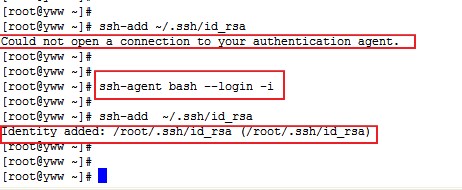
在主机A使用 ssh-add 指令将私钥 加进来 (根据个人的密匙命名不同更改 id_rsa)
ssh-add ~/.ssh/id_rsa
如果报“Could not open a connection to your authentication agent.”
则执行命令:
ssh-agent bash --login -i
锦上添花:
假设你的用户名为user,已经设置好了密钥登陆主机B。那么你可以在shell的配置文件(比如.bashrc)里定义一个alias
alias b='ssh user@B'
以后每次你启动shell终端后,输入b,回车,直接就ssh登陆到主机B上。
ssh连接失败,排错经验 http://www.cnblogs.com/softidea/p/4710513.html
记一次诡异的 ssh 互信免密码登录失败【剧透一下,是 .ssh目录和 .ssh/authorized_keys的权限没有设置好 造成的】
下面是排查过程:
0、背景
因为 hadoop 环境需要 master 能免密码 ssh localhost,所以我们需要建立与本机 localhost 的互信,方法很简单:
. ssh-keygen -t rsa

   #Press enter for each line

. cat ~/.ssh/id_rsa.pub >> ~/.ssh/authorized_keys

. chmod og-wx ~/.ssh/authorized_keys
这三步执行下来就能顺利 ssh localhost 免密码登录了,但是昨天刚建好的互信,今天下午突然不能用了,ssh localhost 需要密码,
第一反应是可能哪里设置和配置被改动了,看了下文件版本、配置修改时间都无变化,然而登录时的提示信息又过于简单,这个时候排查陷入僵局了。
work@test_zz_Master 192.168.187.213 :: ~ >

ssh localhost

work@localhost's password:

work@test_zz_Master 192.168.187.213 :: ~ >
1、怎么排查?
1.1 debug 日志
首先还是要拿到明细 debug 日志,看看卡在哪里了。
linux 下的不少命令都自带调试功能,比如 ssh 就自带 debug 功能:
ssh -vvv localhost

OpenSSH_5.3p1, OpenSSL 1.0.1e-fips  Feb

debug1: Reading configuration data /etc/ssh/ssh_config

debug1: Applying options for *

debug2: ssh_connect: needpriv

debug1: Connecting to localhost [127.0.0.1] port .

debug1: Connection established.

debug1: identity file /home/work/.ssh/identity type -

debug1: identity file /home/work/.ssh/identity-cert type -

...

debug3: remaining preferred: keyboard-interactive,password

// 启用公钥登录

debug3: authmethod_is_enabled publickey

debug1: Next authentication method: publickey

debug1: Trying private key: /home/work/.ssh/identity

debug3: no such identity: /home/work/.ssh/identity

debug1: Offering public key: /home/work/.ssh/id_rsa

debug3: send_pubkey_test

// 发送公钥包,等待服务器认证响应

debug2: we sent a publickey packet, wait for reply

debug3: Wrote  bytes for a total of

debug1: Authentications that can continue: publickey,gssapi-keyex,gssapi-with-mic,password

debug1: Trying private key: /home/work/.ssh/id_dsa

debug3: no such identity: /home/work/.ssh/id_dsa

debug1: Trying private key: /home/work/.ssh/id_ecdsa

debug3: no such identity: /home/work/.ssh/id_ecdsa

// 没通过认证,禁用该认证方法

debug2: we did not send a packet, disable method

debug3: authmethod_lookup password

debug3: remaining preferred: ,password

debug3: authmethod_is_enabled password

// 下一个认证方法:启用密码登录

debug1: Next authentication method: password

work@localhost's password:
可以看到,确实是认证失败了,但是仅凭一句 we did not send a packet, disable method,咱们还是无法看到失败的深层次原因,那咱们再对比下正常的认证流程应该是怎样的:
可以看到右边正常的会接受公钥,左边的则没有得到响应,继续走别的认证方式。
1.2 检查配置
打开服务器的 /etc/ssh/sshd_config
确认下面几行是这样的:
RSAAuthentication yes

PubkeyAuthentication yes

AuthorizedKeysFile      .ssh/authorized_keys

#GSSAPIAuthentication yes

#GSSAPICleanupCredentials yes
配置没问题,此路还是不通。
1.3 Debugging SSH public key
在B机器上,we sent a public key packet, wait for reply 之后则是紧跟着”debug1: Server accepts key: pkalg ssh-rsa blen 277″。由此可以看出,是A机器的sshd不认可publickey。
至于为什么不认可,在google上查了许多,毫无头绪,直到使用类似“ssh publickey ignore debug diagnose”这样的关键词,发现这个页面,其中的第二条和第六条给出了解答:
2. Debugging on the remote host by running sshd in debug mode: Run ‘/usr/sbin/sshd -d -p 2222′ on the remote host and connect to it.

 ’2222′ here is the port number of the sshd process you started on the remote host.

6. Check the permissions on your home directory, .ssh directory,

and the authorized_keys file: If your ssh server is running with ‘StrictModes on’, it will refuse to use your public keys in the ~/.ssh/authorized_keys file.

Your home directory should be writable only by you, ~/.ssh should be 700, and authorized_keys should be 600.
通过执行 /usr/sbin/sshd -d -p 2222 (在2222端口启动一个带debug输出的sshd) ,
然后 ssh -vv localhost -p 2222 ,可以看到 sshd 的输出:
[root(hostname)@bjdhj-- ~]# /usr/sbin/sshd -d -p

debug1: sshd version OpenSSH_5.3p1

debug1: read PEM private key done: type RSA

...

debug1: trying public key file /home/work/.ssh/authorized_keys

debug1: fd  clearing O_NONBLOCK

Authentication refused: bad ownership or modes for directory /home/work

debug1: restore_uid: /

debug1: temporarily_use_uid: / (e=/)

debug1: trying public key file /home/work/.ssh/authorized_keys

debug1: fd  clearing O_NONBLOCK

Authentication refused: bad ownership or modes for directory /home/work

debug1: restore_uid: /

Failed publickey for work from 127.0.0.1 port  ssh2
可以看到倒数第三行:Authentication refused: bad ownership or modes for directory /home/work,
正好与那第六条相对应,再检查一下 /home/work ,其权限是否是其他组可读写。
同时,咱们也能从 /var/log/secure 看到明细的 debug 日志:
[root(hostname)@bjdhj-- ~]# tail -f /var/log/secure

Sep   :: bjdhj-- sshd[]: Server listening on 0.0.0.0 port .

Sep   :: bjdhj-- sshd[]: Authentication refused: bad ownership or modes for directory /home/work

Sep   :: bjdhj-- sshd[]: Authentication refused: bad ownership or modes for directory /home/work

Sep   :: bjdhj-- sshd[]: Connection closed by 127.0.0.1
2、最终解决方案
ssh 为了保证通信安全,防止 key 被篡改或窃取,对目录和文件的权限要求相当严格,
咱们最终需要确保相关目录权限与下述一致:
chmod  ~               # 或 chmod g-w ~

chmod  ~/.ssh

chmod  ~/.ssh/authorized_keys

sudo service sshd restart
后记:
当然了,这篇文章所反映的问题虽然很小,最后的答案也很简单,但是其展现的排查思路和方法却很独特,值得借鉴,毕竟很多时候咱们不能像平时一样,直接 debug 源码。
Refer:
[1] 记一次sshd异常:无法通过建立信任关系登录 https://www.felix021.com/blog/read.php?2085
[2] ssh公钥登录无效 https://my.oschina.net/sukai/blog/686981
[3] Debugging SSH public key authentication problems https://blog.codefront.net/2007/02/28/debugging-ssh-public-key-authentication-problems/
http://www.importnew.com/27372.html
Linux ssh密钥自动登录 专题的更多相关文章
- Linux ssh密钥自动登录(转)
在开发中,经常需要从一台主机ssh登陆到另一台主机去,每次都需要输一次login/Password,很繁琐.使用密钥登陆就可以不用输入用户名和密码了 实现从主机A免密码登陆到主机B,需要以下几个步骤: ...
- [整理]配置SSH密钥自动登录远程服务器
原理: 公钥私钥匹配通过验证,允许访问服务器. 简单步骤: 1.在本地创建一对密钥 2.将公钥传到需要访问的服务器上 3.将公钥放入服务器的authorized_keys,确保访问时能通过验证 4.本 ...
- Linux expect实现自动登录
expect expect可以让我们实现自动登录远程机器,并且可以实现自动远程执行命令.当然若是使用不带密码的密钥验证同样可以实现自动登录和自动远程执行命令.但当不能使用密钥验证的时候,我们就没有办法 ...
- linux SSH免密码登录远程服务器
背景:无密码登录,所谓的无密码登录其实是指通过证书认证的方式登录,使用一种‘公私钥’认证的方式来进行ssh登录 在linux系统中,ssh是远程登录的默认工具,因为该工具的协议使用了RSA/DSA的加 ...
- ssh 配置自动登录
假定 机器A 连接至 机器B . 1. 在机器A上,生成RSA秘钥对 ssh-keygen -t rsa 期间passphrase不输入密码.默认生成文件至 ~/.ssh/ -rw------- we ...
- linux启动后自动登录并运行自定义图形界面程序
在<Ubuntu CTRL+ALT+F1~F6 进入命令模式后不支持中文显示的解决办法>一文中提到linux启动在以后运行一个独占显示器的图形程序的两种办法. 1.不启动xserver,使 ...
- Linux SSH免密登录
SSH无密码登录要使用公钥与私钥.Linux可以用ssh-keygen生成公钥/私钥对,下面以Ubuntu为例说明配置过程. 有两个节点:node01(172.17.0.14)和node02(172. ...
- SSH(安全协议外壳)介绍及Linux SSH免密登录
SSH(安全外壳协议) SSH 为 Secure Shell 的缩写,是一种网络安全协议,专为远程登录会话和其他网络服务提供安全性的协议.通过使用 SSH,可以把传输的数据进行加密,有效防止远程管理过 ...
- 使用SSH密钥方式登录ubuntu Linux,指令(ssh-keygen 和 ssh-copy-id)
实验目的 从myVM1(本地主机)上登录myVM2(远程主机).采用密钥方式,不输入密码. 测试环境 主机:window7 sp1 64位 专业版 虚拟机:VMware workstation 12 ...
随机推荐
- Android TextView,EditText要求固定行数自动调整TextSize
最近项目有个需求要求文本最多显示3行,继续输入则字体变小,删除已经输入的文字,那么字体变大,不管变大变小都不能超过3行.网上怎么找也找不到相关的解决方案,自己动手,丰衣足食了! 说一下算法思路,后面给 ...
- Qt5.4.2编译 qtpropertybrowser-2.51(从4修改到5的除错过程)
qtpropertybrowser是一个洛基亚时代的一个产物,其实它就是QtDesigner侧栏那种样子而已.网上大部分的都只适用于Qt4,今天头脑发热想用Qt5编译一下,发觉一大堆错误,因为Qt4有 ...
- unresolved external symbol __forceAtlDllManifest错误的解决
作者:朱金灿 来源:http://blog.csdn.net/clever101 晚上编译一个ATL程序,出现一些诡异的错误: 1>CGreet.obj : error LNK2001: unr ...
- 小强的HTML5移动开发之路(39)——jqMobi插件json格式ActionSheet
在上一篇中我们学会了ActionSheet的使用,细心的朋友可能会发现其中创建列表的格式是HTML的,代码如下: function showCustomHtmlSheet() { $("#a ...
- ANR触发原理
ANR(Application Not responding),是指应用程序未响应,Android系统对于一些事件需要在一定的时间范围内完成,如果超过预定时间能未能得到有效响应或者响应时间过长,都会造 ...
- 【序列操作V】平衡树(无旋treap)
题目描述 维护一个队列,初始为空.依次加入 n(1≤n≤105)个数 ai(-109≤ai≤109),第 i(1≤i≤n)个数加入到当前序列第 bi(0≤bi≤当前序列长度)个数后面.输出最终队列. ...
- 【b603】作业调度方案
Time Limit: 1 second Memory Limit: 50 MB [问题描述] 我们现在要利用m台机器加工n个工件,每个工件都有m道工序,每道工序都在不同的指定的机器上完成.每个工件的 ...
- 【BZOJ 1038】[ZJOI2008]瞭望塔
[题目链接]:http://www.lydsy.com/JudgeOnline/problem.php?id=1038 [题意] [题解] 可以看到所有村子的瞭望塔所在的位置只会是在相邻两个村子所代表 ...
- Fiddler快速入门(还有一个功能就是不经过网络,直接模拟一个响应返回给客户端)
Fiddler是一个免费.强大.跨平台的HTTP抓包工具.Wireshark也是一个强大的抓包工具,不过Wireshark是一个通用的抓包工具,主要精力放在各种协议上了,针对HTTP的特定功能较少.所 ...
- Ibatis之RowHandler
如果一个场景:账户表中有1千万账户,现在,我们需要这个1千万账户利息结算业务.需求是基于Ibatis框架来实现这个功能. 如果按照一般的编程模式,我们将编写一个sql,然后调用QueryForList ...