
WPF字体图标——FontAwesom
一、字体图标概述
FontAwesome是迄今为止最出色的图标字体(没有之一),优点是图标多、图标美观、兼容各种应用场景等。
二、获取FontAwesome字体图标库
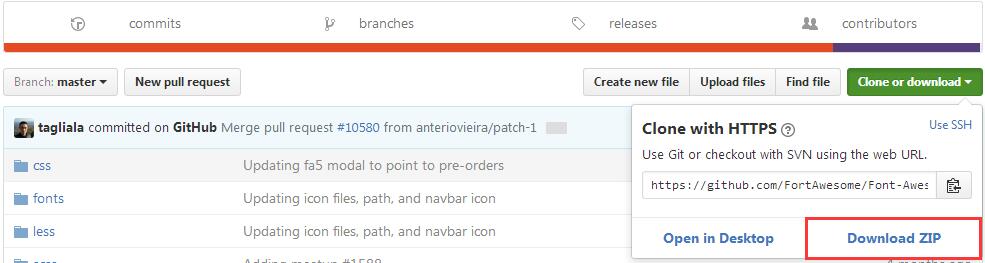
三、加压下载到的字体库压缩包,得到字体图标库文件
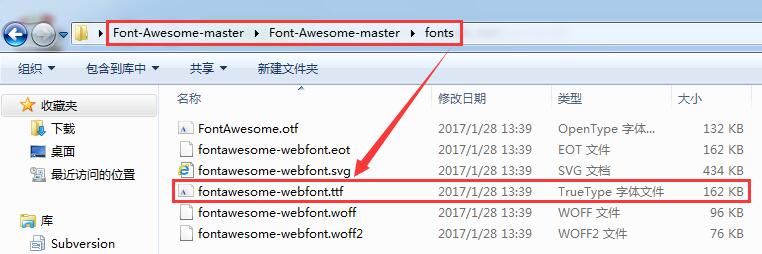
四、像WPF字体图标——IconFont提供的步骤调用即可,只需要将样式引用的字体名称改为:#FontAwesome,注意名称大小写,否则找不到对应的图标
①项目目录结构
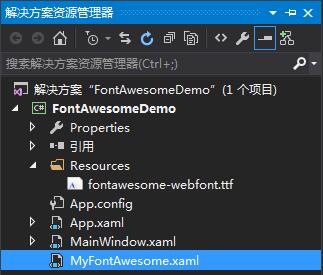
②MyFontAwesome.xaml
<ResourceDictionary xmlns="http://schemas.microsoft.com/winfx/2006/xaml/presentation"

                    xmlns:x="http://schemas.microsoft.com/winfx/2006/xaml"

                    xmlns:local="clr-namespace:FontAwesomeDemo">

    <Style x:Key="iFont" TargetType="TextBlock">

        <Setter Property="FontFamily" Value="/FontAwesomeDemo;component/Resources/#FontAwesome"/>

        <Setter Property="TextAlignment" Value="Center"/>

        <Setter Property="HorizontalAlignment" Value="Center"/>

        <Setter Property="VerticalAlignment" Value="Center"/>

        <Setter Property="FontSize" Value="20"/>

    </Style>

</ResourceDictionary>
③App.xaml
<Application x:Class="FontAwesomeDemo.App"

             xmlns="http://schemas.microsoft.com/winfx/2006/xaml/presentation"

             xmlns:x="http://schemas.microsoft.com/winfx/2006/xaml"

             xmlns:local="clr-namespace:FontAwesomeDemo"

             StartupUri="MainWindow.xaml">

    <Application.Resources>

        <ResourceDictionary>

            <ResourceDictionary.MergedDictionaries>

                <ResourceDictionary Source="MyFontAwesome.xaml"/>

            </ResourceDictionary.MergedDictionaries>

        </ResourceDictionary>

    </Application.Resources>

</Application>
④MainWindow.xaml
<Window x:Class="FontAwesomeDemo.MainWindow"
xmlns="http://schemas.microsoft.com/winfx/2006/xaml/presentation"
xmlns:x="http://schemas.microsoft.com/winfx/2006/xaml"
xmlns:d="http://schemas.microsoft.com/expression/blend/2008"
xmlns:mc="http://schemas.openxmlformats.org/markup-compatibility/2006"
xmlns:local="clr-namespace:FontAwesomeDemo"
mc:Ignorable="d"
Title="MainWindow" Height="350" Width="525" Background="Blue">
<StackPanel Orientation="Horizontal">
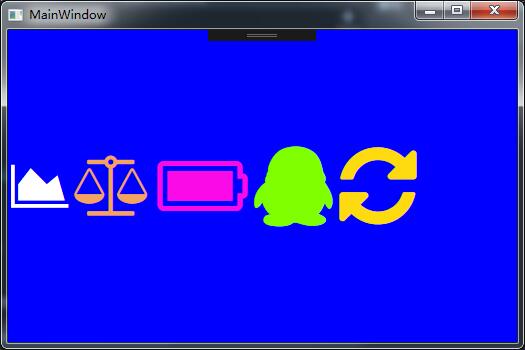
<TextBlock Text="" Style="{StaticResource iFont}" FontSize="50" Margin="3" Foreground="White"></TextBlock>
<TextBlock Text="" Style="{StaticResource iFont}" FontSize="60" Margin="3" Foreground="SandyBrown"></TextBlock>
<TextBlock Text="" Style="{StaticResource iFont}" FontSize="70" Margin="3" Foreground="#FB0AE8"></TextBlock>
<TextBlock x:Name="qq" Style="{StaticResource iFont}" FontSize="80" Margin="3" Foreground="Chartreuse"></TextBlock>
<TextBlock x:Name="refresh" Style="{StaticResource iFont}" FontSize="90" Margin="3" Foreground="#FEDB11"></TextBlock>
</StackPanel>
</Window>
很奇怪Text属性在网页上无法显示,三个属性分别为:Text="" Text="" Text=""
⑤MainWindow.xaml.cs
using System;

using System.Collections.Generic;

using System.Linq;

using System.Text;

using System.Threading.Tasks;

using System.Windows;

using System.Windows.Controls;

using System.Windows.Data;

using System.Windows.Documents;

using System.Windows.Input;

using System.Windows.Media;

using System.Windows.Media.Imaging;

using System.Windows.Navigation;

using System.Windows.Shapes;

namespace FontAwesomeDemo

{

    /// <summary>

    /// MainWindow.xaml 的交互逻辑

    /// </summary>

    public partial class MainWindow : Window

    {

        public MainWindow()

        {

            InitializeComponent();

            qq.Text = "\xf1d6";

            refresh.Text = "\xf021";

        }

    }

}
⑥效果演示
WPF字体图标——FontAwesom的更多相关文章
- WPF字体图标——IconFont
原文:WPF字体图标--IconFont 版权声明:本文为[CSDN博主:松一160]原创文章,未经允许不得转载. https://blog.csdn.net/songyi160/article/de ...
- WPF 字体图标样式
1.在网上下载Font ICO 字体字体压缩包 Font Awesome 矢量图标库 2.下载到的压缩包,解压后获得图标字体文件 3.然后把字体文件夹拷贝到项目中,目录为(/fon ...
- WPF自定义控件与样式(1)-矢量字体图标(iconfont)
一.图标字体 图标字体在网页开发上运用非常广泛,具体可以网络搜索了解,网页上的运用有很多例子,如Bootstrap.但在C/S程序中使用还不多,字体图标其实就是把矢量图形打包到字体文件里,就像使用一般 ...
- 在WPF中使用字体图标
一.源码描述 这是一款基于WPF窗体应用程序的字体图标示例源码, 该源码简单易懂使用于初学者和实战项目应用, 感兴趣的朋友们可以下载看看哦. 二.功能介绍 1.用ICO字体代替 ...
- Bootstrap WPF Style(二)--Glyphicons 字体图标
介绍 关于Glyphicons字体图标,首先给出友情链接 Glyphicons 这个项目是在Bootstrap WPF Style项目基础上做的,详见http://www.cnblogs.com/ts ...
- WPF中应用字体图标
一.什么是字体图标 我们在进行GDI(图形界面)编程的过程中图标是不可少的.近些年随着网络的繁荣和移动应用的繁荣,矢量图的应用越来越火. 矢量图是一种用数学方法描述的.由一系列点和线组成的图,因此相比 ...
- 在WPF中使用FontAwesome之类的字体图标
我之前在博客中介绍过几个矢量图库网站,在WPF程序中,一般接触到的矢量图标资源有XAML.SVG.字体这三种格式.XAML是标准格式就不说了,SVG并不是直接支持的,不过微软提供了Expression ...
- WPF使用矢量字体图标(阿里巴巴iconfont)
原文:WPF使用矢量字体图标(阿里巴巴iconfont) 版权声明:本文为博主原创文章,转载请注明出处. https://blog.csdn.net/lwwl12/article/details/78 ...
- WPF矢量字体图标(iconfont)
原文:WPF矢量字体图标(iconfont) 转载:点击打开链接 步骤: 一.下载添加iconfont文件 二.添加到资源文件夹,并设置不复制,且为资源文件 三.增加FIcon.xaml文件 < ...
随机推荐
- 二次封装CoreData
(1)创建一个Data Model文件.命名为MyModel.xcdatamodeld (2)创建Users表,加入如图的字段 (3)创建NSManagedObject subclass表实体文件 ( ...
- [转载]Ocelot简易教程(二)之快速开始2
为什么这篇的标题叫“Ocelot简易教程(二)之快速开始2”呢,因为很多朋友跟我说上一篇“ Ocelot简易教程(二)之快速开始1”内容太少了,只是简单介绍Ocelot的一些简单配置,让Ocelot能 ...
- Windows Phone 8.1 FilePicker API
在 Windows Phone 8.1 中,增加了 FilePicker 的方式与文件打交道,最大的亮点在于这种方式不仅可以浏览手机上的文件,还可以浏览符合协议的应用里的文件! 比如点击 OneDri ...
- [Now] Configure secrets and environment variables with Zeit’s Now
Often your project will require some secret keys or tokens - for instance, API keys or database auth ...
- Android selector背景以及透明色
selector可以设置图片或layout的点击效果: <?xml version="1.0" encoding="utf-8"?> <sel ...
- js中 慎用for(var o in arrays) 遍历数组,for(var i,i< objects.length;i++)与for(var i,n = objects.length;i<n;i++) 的性能区别
原文:js中 慎用for(var o in arrays) 遍历数组,for(var i,i< objects.length;i++)与for(var i,n = objects.length; ...
- WPF实现控件拖动
原文:WPF实现控件拖动 版权声明:本文为博主原创文章,未经博主允许不得转载. https://blog.csdn.net/lordwish/article/details/51823637 实现控件 ...
- QT类库与Delphi VCL类库的体系结构对比——两者十分类似!
今天在看QT对象内存管理的一篇文章时:http://blog.csdn.net/dbzhang800/article/details/6300025想到了一个问题:就是QT类库体系结构与Delphi类 ...
- ice框架应用记录-框架说明
ice框架是一个解决分布式问题的框架,包括应用与管理工具两部分, 应用部分主要包括: 1,注册服务,用来管理所有节点:为了可靠性,一般会开启两个注册服务,一个主注册服务一个从注册服务 2,节点,就是开 ...
- 用决策树模型求解回归问题(regression tree)
How do decision trees for regression work? 决策树模型既可以求解分类问题(对应的就是 classification tree),也即对应的目标值是类别型数据, ...