
Win10 UI入门 导航滑动条 求UWP工作
借鉴了 段博琼 大哥写的导航滑动,自己实现了一个类似安卓 IOS 导航滑动条
支持等比例 分割 tabView 支持动画滑动
效果如下图
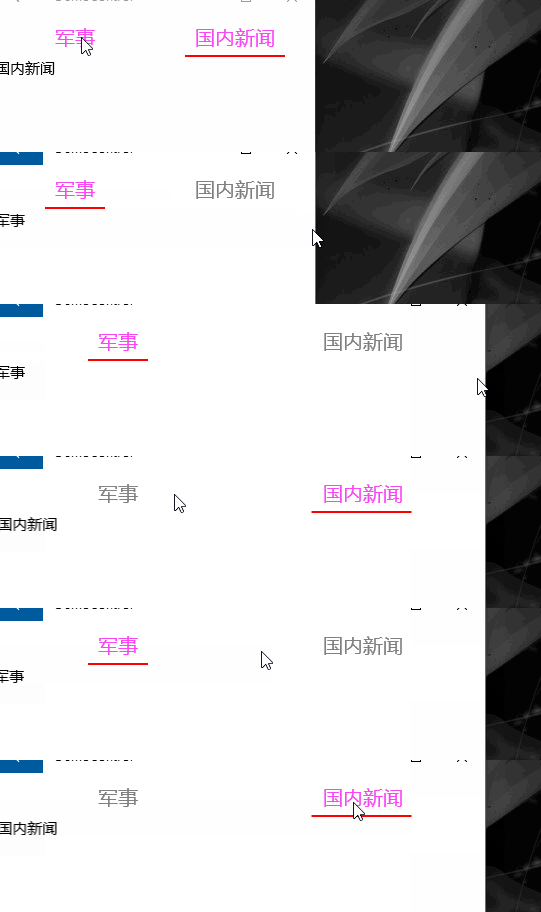
WYGrid 你可以想象一个GridView  itemsWrapGridPanel.Orientation = Orientation.Vertical; 垂直方向的控件

自定义一个项高 ItemHeight 并绑定到最高属性
                var itemsWrapGridPanel = ItemsPanelRoot as ItemsWrapGrid;

                var b = new Binding()

                {

                    Source = this,

                    Path = new PropertyPath("ItemHeight")

                };

                if (itemsWrapGridPanel != null)

                {

                    itemsWrapGridPanel.Orientation = Orientation.Vertical;

                }

                this.SetBinding(MaxHeightProperty, b);
容器样式来自于 GridViewItem styles and templates
xaml实现
<Grid>
<Grid.RowDefinitions>
<RowDefinition Height="Auto" />
<RowDefinition Height="*" />
</Grid.RowDefinitions>
<ctl:WYGrid x:Name="PART_ListViewStateName" Background="RoyalBlue" Padding="" Margin="" BorderThickness=""
ScrollViewer.HorizontalScrollBarVisibility="Hidden"
ScrollViewer.HorizontalScrollMode="Enabled"
ScrollViewer.VerticalScrollBarVisibility="Disabled"
ScrollViewer.VerticalScrollMode="Disabled" ItemHeight=""
ItemTemplate="{StaticResource DT_Pivot}"
ItemsSource="{Binding MyItemSources}">
<ctl:WYGrid.ItemContainerStyle>
<Style TargetType="GridViewItem">
<Setter Property="FontFamily" Value="{ThemeResource ContentControlThemeFontFamily}" />
<Setter Property="FontSize" Value="{ThemeResource ControlContentThemeFontSize}" />
<Setter Property="Background" Value="Transparent" />
<Setter Property="Foreground" Value="{ThemeResource SystemControlForegroundBaseHighBrush}" />
<Setter Property="TabNavigation" Value="Local" />
<Setter Property="IsHoldingEnabled" Value="True" />
<Setter Property="HorizontalContentAlignment" Value="Center" />
<Setter Property="VerticalContentAlignment" Value="Center" />
<Setter Property="Margin" Value="" />
<Setter Property="MinWidth" Value="{ThemeResource GridViewItemMinWidth}" />
<Setter Property="MinHeight" Value="{ThemeResource GridViewItemMinHeight}" />
<Setter Property="AllowDrop" Value="False" />
<Setter Property="UseSystemFocusVisuals" Value="True" />
<Setter Property="FocusVisualMargin" Value="-2" />
<Setter Property="FocusVisualPrimaryBrush" Value="{ThemeResource SystemControlFocusVisualPrimaryBrush}" />
<Setter Property="FocusVisualPrimaryThickness" Value="" />
<Setter Property="FocusVisualSecondaryBrush" Value="{ThemeResource SystemControlFocusVisualSecondaryBrush}" />
<Setter Property="FocusVisualSecondaryThickness" Value="" />
<Setter Property="Template">
<Setter.Value>
<ControlTemplate TargetType="GridViewItem">
<Grid x:Name="ContentBorder"
Control.IsTemplateFocusTarget="True"
BorderThickness=""
RenderTransformOrigin="0.5,0.5">
<Grid.RenderTransform>
<ScaleTransform x:Name="ContentBorderScale" />
</Grid.RenderTransform>
<VisualStateManager.VisualStateGroups>
<VisualStateGroup x:Name="FocusStates">
<VisualState x:Name="Focused"/>
<VisualState x:Name="Unfocused"/>
</VisualStateGroup>
<VisualStateGroup x:Name="CommonStates">
<VisualState x:Name="Normal"/>
<VisualState x:Name="PointerOver">
<Storyboard>
<ObjectAnimationUsingKeyFrames Storyboard.TargetName="ContentPresenter" Storyboard.TargetProperty="Foreground">
<DiscreteObjectKeyFrame KeyTime="" Value="{ThemeResource SystemControlForegroundBaseHighBrush}" />
</ObjectAnimationUsingKeyFrames>
<ObjectAnimationUsingKeyFrames Storyboard.TargetName="ContentBorder" Storyboard.TargetProperty="FocusVisualSecondaryBrush">
<DiscreteObjectKeyFrame KeyTime="" Value="{ThemeResource SystemControlHighlightListLowBrush}" />
</ObjectAnimationUsingKeyFrames>
<ObjectAnimationUsingKeyFrames Storyboard.TargetName="ContentBorder" Storyboard.TargetProperty="FocusVisualSecondaryThickness">
<DiscreteObjectKeyFrame KeyTime="" Value="" />
</ObjectAnimationUsingKeyFrames>
<PointerUpThemeAnimation Storyboard.TargetName="ContentPresenter" />
</Storyboard>
</VisualState>
<VisualState x:Name="Pressed">
<Storyboard>
<ObjectAnimationUsingKeyFrames Storyboard.TargetName="ContentPresenter" Storyboard.TargetProperty="Foreground">
<DiscreteObjectKeyFrame KeyTime="" Value="{ThemeResource SystemControlForegroundBaseHighBrush}" />
</ObjectAnimationUsingKeyFrames>
<ObjectAnimationUsingKeyFrames Storyboard.TargetName="ContentBorder" Storyboard.TargetProperty="FocusVisualSecondaryBrush">
<DiscreteObjectKeyFrame KeyTime="" Value="{ThemeResource SystemControlHighlightListMediumBrush}" />
</ObjectAnimationUsingKeyFrames>
<ObjectAnimationUsingKeyFrames Storyboard.TargetName="ContentBorder" Storyboard.TargetProperty="FocusVisualSecondaryThickness">
<DiscreteObjectKeyFrame KeyTime="" Value="" />
</ObjectAnimationUsingKeyFrames>
<PointerDownThemeAnimation TargetName="ContentPresenter" />
</Storyboard>
</VisualState>
<VisualState x:Name="Selected">
<Storyboard>
<ObjectAnimationUsingKeyFrames Storyboard.TargetName="ContentPresenter" Storyboard.TargetProperty="Foreground">
<DiscreteObjectKeyFrame KeyTime="" Value="{ThemeResource SystemControlForegroundBaseHighBrush}" />
</ObjectAnimationUsingKeyFrames>
<ObjectAnimationUsingKeyFrames Storyboard.TargetName="ContentBorder" Storyboard.TargetProperty="FocusVisualSecondaryBrush">
<DiscreteObjectKeyFrame KeyTime="" Value="{ThemeResource SystemControlHighlightAccentBrush}" />
</ObjectAnimationUsingKeyFrames>
<ObjectAnimationUsingKeyFrames Storyboard.TargetName="ContentBorder" Storyboard.TargetProperty="FocusVisualSecondaryThickness">
<DiscreteObjectKeyFrame KeyTime="" Value="" />
</ObjectAnimationUsingKeyFrames> <PointerUpThemeAnimation Storyboard.TargetName="ContentPresenter" />
</Storyboard>
</VisualState>
<VisualState x:Name="PointerOverSelected">
<Storyboard>
<ObjectAnimationUsingKeyFrames Storyboard.TargetName="ContentPresenter" Storyboard.TargetProperty="Foreground">
<DiscreteObjectKeyFrame KeyTime="" Value="{ThemeResource SystemControlForegroundBaseHighBrush}" />
</ObjectAnimationUsingKeyFrames>
<ObjectAnimationUsingKeyFrames Storyboard.TargetName="ContentBorder" Storyboard.TargetProperty="FocusVisualSecondaryBrush">
<DiscreteObjectKeyFrame KeyTime="" Value="{ThemeResource SystemControlHighlightListAccentMediumBrush}" />
</ObjectAnimationUsingKeyFrames>
<ObjectAnimationUsingKeyFrames Storyboard.TargetName="ContentBorder" Storyboard.TargetProperty="FocusVisualSecondaryThickness">
<DiscreteObjectKeyFrame KeyTime="" Value="" />
</ObjectAnimationUsingKeyFrames> <PointerUpThemeAnimation Storyboard.TargetName="ContentPresenter" />
</Storyboard>
</VisualState>
<VisualState x:Name="PressedSelected">
<Storyboard>
<ObjectAnimationUsingKeyFrames Storyboard.TargetName="ContentPresenter" Storyboard.TargetProperty="Foreground">
<DiscreteObjectKeyFrame KeyTime="" Value="{ThemeResource SystemControlForegroundBaseHighBrush}" />
</ObjectAnimationUsingKeyFrames>
<ObjectAnimationUsingKeyFrames Storyboard.TargetName="ContentBorder" Storyboard.TargetProperty="FocusVisualSecondaryBrush">
<DiscreteObjectKeyFrame KeyTime="" Value="{ThemeResource SystemControlHighlightListAccentHighBrush}" />
</ObjectAnimationUsingKeyFrames>
<ObjectAnimationUsingKeyFrames Storyboard.TargetName="ContentBorder" Storyboard.TargetProperty="FocusVisualSecondaryThickness">
<DiscreteObjectKeyFrame KeyTime="" Value="" />
</ObjectAnimationUsingKeyFrames> <PointerDownThemeAnimation TargetName="ContentPresenter" />
</Storyboard>
</VisualState>
</VisualStateGroup>
<VisualStateGroup x:Name="DisabledStates">
<VisualState x:Name="Enabled" />
<VisualState x:Name="Disabled">
<Storyboard>
<DoubleAnimation Storyboard.TargetName="ContentBorder"
Storyboard.TargetProperty="Opacity"
Duration=""
To="{ThemeResource ListViewItemDisabledThemeOpacity}" />
</Storyboard>
</VisualState>
</VisualStateGroup>
</VisualStateManager.VisualStateGroups>
<ContentPresenter x:Name="ContentPresenter" VerticalAlignment="Center" HorizontalAlignment="Stretch" HorizontalContentAlignment="Center"
Background="SkyBlue" FontSize="" Margin="0,10,0,10"/>
<Rectangle x:Name="PlaceholderRect" Visibility="Visible" Fill="Red" Height="" Width="" VerticalAlignment="Bottom"/>
</Grid>
</ControlTemplate>
</Setter.Value>
</Setter>
</Style>
</ctl:WYGrid.ItemContainerStyle>
</ctl:WYGrid>
<Rectangle x:Name="PART_RectStateName" Fill="Red" Height="" Width="" Grid.Row="" Opacity="" Margin="0,-2,0,0" HorizontalAlignment="Left" >
<Rectangle.RenderTransform>
<TranslateTransform/>
</Rectangle.RenderTransform>
</Rectangle>
</Grid>
基本实现思路是
初始化的时候 PivotItemLoading 来初始化导航条的位置
PART_RectStateName 显示动画 透明为1, gridview 里面的 PlaceholderRect 透明 为0

当点击的时候 SelectionChanged 被call 查找ContentPresenter 和 Rectangle 来确定位置和宽度,启动动画,之后让
PART_RectStateName 显示动画 透明为0, gridview 里面的 PlaceholderRect 透明 为1

下面是动画的代码,思路清楚了接下来很快就做好了。
        private Storyboard StoryBordTemp(double formW, double toW, Point newPoint, Point oldPoint)

        {

            var storyBoard = new Storyboard();

            var extendAnimation = new DoubleAnimation { Duration = new Duration(TimeSpan.FromSeconds(0.5)), From = formW, To = toW, EnableDependentAnimation = true };

            QuarticEase easing = new QuarticEase();

            easing.EasingMode = EasingMode.EaseOut;

            easing.Ease(0.3);

            extendAnimation.EasingFunction = easing;

            Storyboard.SetTarget(extendAnimation, _rectangle);

            Storyboard.SetTargetProperty(extendAnimation, "Width");

            var xAnimation = new DoubleAnimation { Duration = new Duration(TimeSpan.FromSeconds(0.5)), From = newPoint.X, To = oldPoint.X, EnableDependentAnimation = true };

            QuarticEase xEasing = new QuarticEase();

            xEasing.EasingMode = EasingMode.EaseOut;

            xEasing.Ease(0.3);

            xAnimation.EasingFunction = xEasing;

            Storyboard.SetTarget(xAnimation, _rectangle);

            Storyboard.SetTargetProperty(xAnimation, "(UIElement.RenderTransform).(TranslateTransform.X)");

            storyBoard.Children.Add(extendAnimation);

            storyBoard.Children.Add(xAnimation);

            storyBoard.Begin();

            return storyBoard;

        }
详情请查看 https://github.com/androllen/CCUWPToolkit
Win10 UI入门 导航滑动条 求UWP工作的更多相关文章
- Win10 UI入门 SliderRectangle
看了@段博琼大哥导航滑动的思路,自己又做了一个类似与黄油相机里面的一个功能 <Grid x:Name="> <Grid.ColumnDefinitions> < ...
- Win10 UI入门窗口由默认500px to 320px
https://code.msdn.microsoft.com/Layout-for-windows-that-ba648e1c/ https://msdn.microsoft.com/library ...
- Win10 UI入门 pivot multiable DataTemplate
this is a dynamic pivot with sliderable navigation and multiableDatatemplate Control 看了 alexis 大哥的pi ...
- Win10 UI入门 圆形控件
动态模版绑定 http://blog.csdn.net/XXChen2/article/details/4552554
- Win10 UI入门RelativePanel(2)
自适应 1) Gif: 添加动画 2)
- Win10 UI入门 RenderTransform属性分析之Translate 平移变形
对齐方式是中心底部对齐: HorizontalAlignment="Center" VerticalAlignment="Bottom" 以底部边为起始线,向上 ...
- Win10 UI入门RelativePanel
<RelativePanel Background="Black" > <Rectangle x:Name=" RelativePanel.AlignH ...
- UWP Control Toolkit Collections 求UWP工作
1. it is like wechat wait-sliderdeleteitem in iOS 看起来比较像微信删掉项 now support listview and gridview in C ...
- IOS开发-UI学习-UISlider(滑动条)的使用
滑动条即UISlider,是我们常见的软件中设置音量,亮度等的滑条,初始化及基本设置如下: // 新建滑动条 UISlider *slider = [[UISlider alloc]initWithF ...
随机推荐
- (转)shiro权限框架详解03-shiro介绍
http://blog.csdn.net/facekbook/article/details/54893740 shiro介绍 本文正式进入主题.本文将介绍如下内容: 什么是shiro 为什么需要学习 ...
- 自动化构建之bower
官网地址:https://bower.io/ 网站由很多东西组成 - 框架,库,一个大型网站有很多人一块创建,那么因为版本或者其他的原因导致文件重复,或者不是最新的.例如:jq的版本不一样但是都是jq ...
- 转载:移动端自适应:flexible.js可伸缩布局使用
阿里团队开源的一个库.flexible.js,主要是实现在各种不同的移动端界面实现一稿搞定所有的设备兼容自适应问题. 实现方法: 通过JS来调整html的字体大小,而在页面中的制作稿则统一使用rem这 ...
- JS 马托货物
大马驮2石粮食,中马驮1石粮食,两头小马驮一石粮食,要用100匹马,驮100石粮食,该如何调配? <!DOCTYPE html> <html> <head> < ...
- python数据分析------文本挖掘(jieba)
1.import jieba jieba的cut函数有三个模式:全模式.精准模式.搜索引擎模式 1 精确模式,试图将句子最精确地切开,适合文本分析: 2 全模式,把句子中所有的可以成词的词语都扫描出来 ...
- buddyinfo 内存碎片数据采集
不说了,上工具 #cat buddyinfo.sh #!/bin/sh #*************************************************************** ...
- BZOJ 3774 最优选择 (最小割+二分图)
题面传送门 题目大意:给你一个网格图,每个格子都有$a_{ij}$的代价和$b_{ij}$的回报,对于格子$ij$,想获得$b_{ij}$的回报,要么付出$a_{ij}$的代价,要么$ij$周围四联通 ...
- [bzoj2662 BeiJing wc2012] 冻结 (分层图+最短路)
传送门 Description "我要成为魔法少女!" "那么,以灵魂为代价,你希望得到什么?" "我要将有关魔法和奇迹的一切,封印于卡片之中„„&q ...
- Java 学习(9):java Stream & File & IO
Java 流(Stream).文件(File)和IO Java.io 包几乎包含了所有操作输入.输出需要的类.所有这些流类代表了输入源和输出目标. Java.io 包中的流支持很多种格式,比如:基本类 ...
- 双向链表的实现与操作(C语言实现)
双向链表也叫双链表,是链表的一种,它的每一个数据结点中都有两个指针,分别指向直接后继和直接前驱.所以,从双向链表中的随意一个结点開始,都能够非常方便地訪问它的前驱结点和后继结点. 单链表的局限 1.单 ...