
web全栈开发之网站开发二(弹出式登录注册框前端实现-类腾讯)
这次给大家分享的是目前很多网站中流行的弹出式登录框,如下面的腾讯网登录界面,采用弹出式登录的好处是大大提升了网站的用户体验和交互性,用户不用重新跳转到指定的页面就能登录,非常方便
先来个演示地址

要实现这个功能的大致思路是:
1.首先要在页面上设置一个登录按钮,可以是<button><a><img>都行,我们点击这个元素的时候会弹出登录框
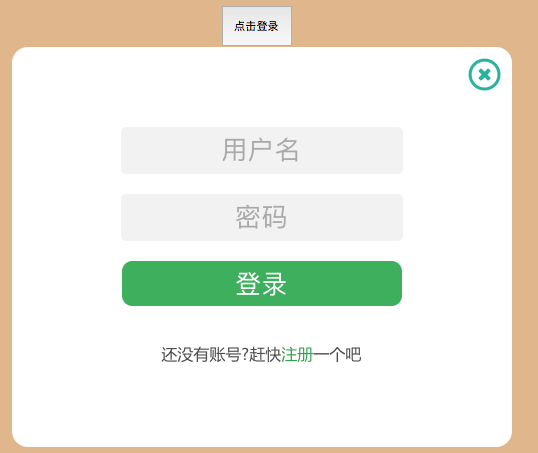
2.其次在页面合适位置制作两个<div>,一个登录功能的div,另一个注册功能的div,注意位置的设置,当网站首次加载进入的时候登录框不可见,那就要把样式设置为display:"none"
3.当用户点击登录按钮的时候,通过JS设置登录div的display="",如何用户点击了登录界面上的注册按钮时,通过jQuery切换div透明和大小就可以完美实现登录注册的切换
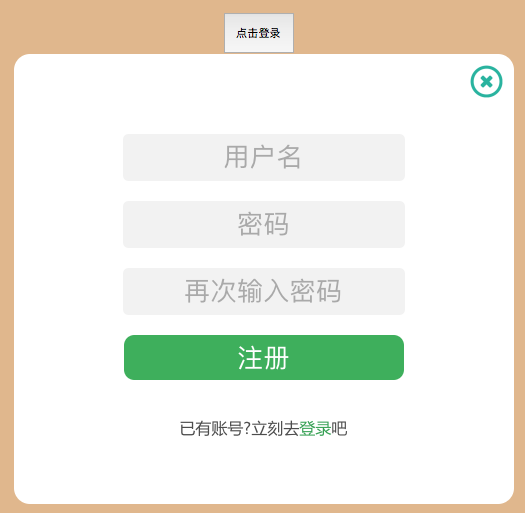
4.关闭登录框的话也是同样的道理,把两个div的display设置为none就行
上代码:
sign.html
 <!DOCTYPE html>

 <html lang="en">

 <head>

     <meta charset="UTF-8">

     <title>sign</title>

     <style>

         body {

             text-align: center;

             background-color: burlywood;

         }

         .signform {

             font-family: 微软雅黑;

             position: fixed;

             background-color: white;

             top: 20%;

             left: 30%;

             width: 500px;

             height: 400px;

             border-radius: 1em;

             text-align: center;

             z-index: 999;

         }

         #registerform {

             height: 450px;

         }

         .signclose {

             cursor: pointer;

             float: right;

             overflow: hidden;

             text-align: center;

             position: relative;

             height: 35px;

             width: 35px;

             margin-top: 10px;

             margin-right: 10px;

         }

         #registerloading{

             position: absolute;

             width: 25px;

             height: 25px;

             left: 410px;

             top: 90px;

         }

         .signinput {

             text-align: center;

             border-radius: 0.2em;

             width: 280px;

             height: 45px;

             border: none;

             background-color:#f2f2f2;

             font-size: 28px;

         }

         .signinput::-webkit-input-placeholder {

             font-size: 26px;

         }

         .userdiv {

             position: relative;

             margin-top: 80px;

         }

         .pwddiv {

             position: relative;

             margin-top: 20px;

         }

         .postdiv {

             position: relative;

             margin-top: 20px;

         }

         .postdiv button {

             cursor: pointer;

             color: white;

             font-size: 26px;

             border: none;

             border-radius: 0.4em;

             width: 280px;

             height: 45px;

             background-color:#4CAF50;

         }

     </style>

     <link rel="stylesheet" href="css/sign.css">

 </head>

 <body>

 <div>

     <button id="displaysign" onclick="start()">点击登录</button>

 </div>

 <div class="signform" id="signform" style="display: none">

     <div class="signclose">

         <img src="data:image/signclose.ico" width="35px" height="35px" onclick="signclose()">

     </div>

     <div class="userdiv">

     <input id="user" class="signinput" type="text" placeholder="用户名" name="user" >

     </div>

     <div class="pwddiv">

     <input id="pwd" class="signinput" type="password" placeholder="密码" name="pwd">

     </div>

     <div class="postdiv">

     <button>登录</button>

     </div>

     <br>

     <div class="change" style="color: #4d4d4d">

         <p>还没有账号?赶快<a href="#" style="text-decoration: none;color: #43A047">注册</a>一个吧</p>

     </div>

 </div>

 <div class="signform" id="registerform" style="display: none">

         <div class="signclose">

             <img src="data:image/signclose.ico" width="35px" height="35px" onclick="signclose()">

         </div>

         <div class="userdiv">

             <input  id="registeruser" class="signinput" onblur="loading()" type="text" placeholder="用户名" name="user">

         </div>

     <img src="data:image/signloading.gif" style="display: none" id="registerloading">

         <div class="pwddiv">

             <input  id="registerpwd" class="signinput" type="password" placeholder="密码" name="pwd">

         </div>

         <div class="pwddiv">

             <input  id="registerrepwd" class="signinput" type="password" placeholder="再次输入密码" name="pwd">

         </div>

         <div class="postdiv">

             <button>注册</button>

         </div>

         <br>

         <div class="change" style="color: #4d4d4d">

             <p>已有账号?立刻去<a href="#" style="text-decoration: none;color: #43A047">登录</a>吧</p>

         </div>

 </div>

 </body>

 <script src="js/jquery-3.1.1.min.js"></script>

 <script src="js/signformchange.js"></script>

 </html>
sign.css
body {

    text-align: center;

    background-color: burlywood;

}

#displaysign{

    position: relative;

    top: 80px;

    width: 70px;

    height: 40px;

}

.signform {

    font-family: 微软雅黑;

    position: fixed;

    background-color: white;

    top: 20%;

    left: 30%;

    width: 500px;

    height: 400px;

    border-radius: 1em;

    text-align: center;

    z-index:;

}

#registerform {

    height: 450px;

}

.signclose {

    cursor: pointer;

    float: right;

    overflow: hidden;

    text-align: center;

    position: relative;

    height: 35px;

    width: 35px;

    margin-top: 10px;

    margin-right: 10px;

}

#registerloading{

    position: absolute;

    width: 25px;

    height: 25px;

    left: 410px;

    top: 90px;

}

.signinput {

    text-align: center;

    border-radius: 0.2em;

    width: 280px;

    height: 45px;

    border: none;

    background-color:#f2f2f2;

    font-size: 28px;

}

.signinput::-webkit-input-placeholder {

    font-size: 26px;

}

.userdiv {

    position: relative;

    margin-top: 80px;

}

.pwddiv {

    position: relative;

    margin-top: 20px;

}

.postdiv {

    position: relative;

    margin-top: 20px;

}

.postdiv button {

    cursor: pointer;

    color: white;

    font-size: 26px;

    border: none;

    border-radius: 0.4em;

    width: 280px;

    height: 45px;

    background-color:#4CAF50;

}
signformchange.js
$(function ()

{

        $('.change a').click(function ()

        {

            $('.signform').animate({height: 'toggle', opacity: 'toggle'}, 'slow');

        });

})

function start() {

document.getElementById('signform').style.display=""

}

function signclose() {

    document.getElementById('signform').style.display="none"

    document.getElementById('registerform').style.display="none"

}

function loading() {

    document.getElementById('registerloading').style.display=""

}
web全栈开发之网站开发二(弹出式登录注册框前端实现-类腾讯)的更多相关文章
- web全栈后台权限管理系统(VUE+ElementUi+nodeJs+koa2)
web全栈后台权限管理系统(VUE+ElementUi+nodeJs+koa2) 主要技术 前端 vue 全家桶 ElementUI 后端 Node.js Koa2 Mongoess 数据库 mong ...
- 处女作《Web全栈开发进阶之路》出版了!
书中源码下载地址:https://github.com/qinggee/WebAdvanced 01. 当初决定写博客的原因非常的纯洁:只要每个月写上 4 篇以上博客,月底的绩效奖金就多 500 块. ...
- Web 全栈开发 MySQL 面试题
Web 全栈开发 MySQL 面试题 MySQL MySQL 读写分离 读写分离原理 MySQL的主从复制和MySQL的读写分离两者有着紧密联系,首先部署主从复制,只有主从复制完了,才能在此基础上进行 ...
- Web 全栈开发 Redis 面试题
Web 全栈开发 Redis 面试题 Redis 大 key 问题 https://www.cnblogs.com/xgqfrms/p/13601959.html Redis 数据结构 Redis 初 ...
- 从 rails 窥探 web 全栈开发(零)
从 rails 窥探 web 全栈开发(零) 本文将讲述在学习之前几个必须要知道的概念,这些词汇在 rails 中都会出现. 本文前置条件:安装好 Ruby. 从 rails 窥探 web 全栈开发( ...
- 使用IntelliJ IDEA开发SpringMVC网站(二)框架配置
原文:使用IntelliJ IDEA开发SpringMVC网站(二)框架配置 摘要 讲解如何配置SpringMVC框架xml,以及如何在Tomcat中运行 目录[-] 文章已针对IDEA 15做了一定 ...
- Web 全栈大会:万维网之父的数据主权革命
大家好,今天我和大家分享一下由万维网之父发起的一场数据主权革命.什么叫数据主权?很容易理解,现在我们的数据是把持在巨头手里的,你的微信通讯录和聊天记录都无法导出,不管是从人权角度还是从法理角度,这些数 ...
- 基于LeanCloud云引擎的Web全栈方案
LeanEngine-Full-Stack The FULL STACK DEVELOPER 复杂的项目, 协作分工, 自动化流程,代码组织结构,框架选择,国际化方案等 Generator 或者See ...
- 《web全栈工程师的自我修养》阅读笔记
在买之前以为这本书是教你怎么去做一个web全栈工程师,以及介绍需要掌握的哪些技术的书,然而看的过程中才发现,是一本方法论的书.读起来的感觉有点像红衣教主的<我的互联网方法论>,以一些自己的 ...
随机推荐
- webp图片实践之路
最近,我们在项目中实践了webp图片,并且抽离出了工具模块,整合到了项目的基础模板中.传闻IOS10也将要支持webp,那么使用webp带来的性能提升将更加明显.估计在不久的将来,webp会成为标配. ...
- “.Net 社区虚拟大会”(dotnetConf) 2016 Day 1 Keynote: Scott Hunter
“.Net 社区虚拟大会”(dotnetConf) 2016 今天凌晨在Channel9 上召开,在Scott Hunter的30分钟的 Keynote上没有特别的亮点,所讲内容都是 微软“.Net社 ...
- UWP开发之Mvvmlight实践九:基于MVVM的项目架构分享
在前几章介绍了不少MVVM以及Mvvmlight实例,那实际企业开发中将以那种架构开发比较好?怎样分层开发才能节省成本? 本文特别分享实际企业项目开发中使用过的项目架构,欢迎参照使用!有不好的地方欢迎 ...
- 6_Win7下Chrome主页被流氓网站hao123.com劫持后的解决方法。
今天安装了一个PDF阅读器,免费的,你懂的,结果自己安装的时候没有将默认的选项取消,就被hao123流氓网站劫持啦. 说实话某免费PDF阅读器还算好的,有一个可以供你选择的项.不想某些软件直接就默认选 ...
- 使用四元数解决万向节锁(Gimbal Lock)问题
问题 使用四元数可以解决万向节锁的问题,但是我在实际使用中出现问题:我设计了一个程序,显示一个三维物体,用户可以输入绕zyx三个轴进行旋转的指令,物体进行相应的转动. 由于用户输入的是绕三个轴旋转的角 ...
- SSD框架训练自己的数据集
SSD demo中详细介绍了如何在VOC数据集上使用SSD进行物体检测的训练和验证.本文介绍如何使用SSD实现对自己数据集的训练和验证过程,内容包括: 1 数据集的标注2 数据集的转换3 使用SSD如 ...
- mono-3.4.0 源码安装时出现的问题 [do-install] Error 2 [install-pcl-targets] Error 1 解决方法
Mono 3.4修复了很多bug,继续加强稳定性和性能(其实Mono 3.2.8 已经很稳定,性能也很好了),但是从http://download.mono-project.com/sources/m ...
- 在CentOS上构建.net自动化编译环境
我们知道在Windows上我们很容易构建于MSBuild的自动化编译环境,那么在CentOS也是可以的,主要是需要Mono. 在这儿我们选择Jenkins+Gitlab+Mono在C ...
- Mono产品生命周期
软件生命周期 同任何事物一样,一个软件产品或软件系统也要经历孕育.诞生.成长.成熟.衰亡等阶段,一般称为软件生命周期(软件生存周期) .软件生命周期模型是指人们为开发更好的软件而归纳总结的软件生命周期 ...
- Sublime Text3使用总结
写在前面的话:平时做项目中在用eclipse和vs,但是对于一些小项目,感觉没有必要搞那么大的一个工具使用,比如写个小微商城,搞个小脚本了什么,所以就一直在用Sublime Text,界面清新简洁,没 ...