
web全栈开发之网站开发二(弹出式登录注册框前端实现-类腾讯)
这次给大家分享的是目前很多网站中流行的弹出式登录框,如下面的腾讯网登录界面,采用弹出式登录的好处是大大提升了网站的用户体验和交互性,用户不用重新跳转到指定的页面就能登录,非常方便
先来个演示地址

要实现这个功能的大致思路是:
1.首先要在页面上设置一个登录按钮,可以是<button><a><img>都行,我们点击这个元素的时候会弹出登录框
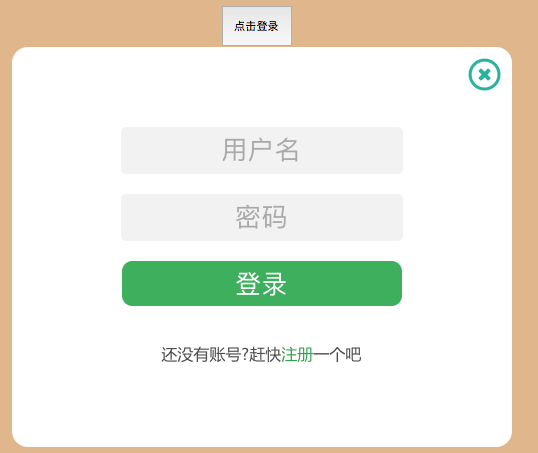
2.其次在页面合适位置制作两个<div>,一个登录功能的div,另一个注册功能的div,注意位置的设置,当网站首次加载进入的时候登录框不可见,那就要把样式设置为display:"none"
3.当用户点击登录按钮的时候,通过JS设置登录div的display="",如何用户点击了登录界面上的注册按钮时,通过jQuery切换div透明和大小就可以完美实现登录注册的切换
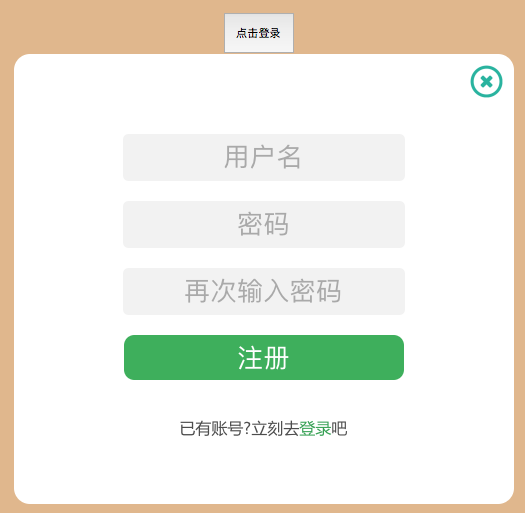
4.关闭登录框的话也是同样的道理,把两个div的display设置为none就行
上代码:
sign.html
 <!DOCTYPE html>

 <html lang="en">

 <head>

     <meta charset="UTF-8">

     <title>sign</title>

     <style>

         body {

             text-align: center;

             background-color: burlywood;

         }

         .signform {

             font-family: 微软雅黑;

             position: fixed;

             background-color: white;

             top: 20%;

             left: 30%;

             width: 500px;

             height: 400px;

             border-radius: 1em;

             text-align: center;

             z-index: 999;

         }

         #registerform {

             height: 450px;

         }

         .signclose {

             cursor: pointer;

             float: right;

             overflow: hidden;

             text-align: center;

             position: relative;

             height: 35px;

             width: 35px;

             margin-top: 10px;

             margin-right: 10px;

         }

         #registerloading{

             position: absolute;

             width: 25px;

             height: 25px;

             left: 410px;

             top: 90px;

         }

         .signinput {

             text-align: center;

             border-radius: 0.2em;

             width: 280px;

             height: 45px;

             border: none;

             background-color:#f2f2f2;

             font-size: 28px;

         }

         .signinput::-webkit-input-placeholder {

             font-size: 26px;

         }

         .userdiv {

             position: relative;

             margin-top: 80px;

         }

         .pwddiv {

             position: relative;

             margin-top: 20px;

         }

         .postdiv {

             position: relative;

             margin-top: 20px;

         }

         .postdiv button {

             cursor: pointer;

             color: white;

             font-size: 26px;

             border: none;

             border-radius: 0.4em;

             width: 280px;

             height: 45px;

             background-color:#4CAF50;

         }

     </style>

     <link rel="stylesheet" href="css/sign.css">

 </head>

 <body>

 <div>

     <button id="displaysign" onclick="start()">点击登录</button>

 </div>

 <div class="signform" id="signform" style="display: none">

     <div class="signclose">

         <img src="data:image/signclose.ico" width="35px" height="35px" onclick="signclose()">

     </div>

     <div class="userdiv">

     <input id="user" class="signinput" type="text" placeholder="用户名" name="user" >

     </div>

     <div class="pwddiv">

     <input id="pwd" class="signinput" type="password" placeholder="密码" name="pwd">

     </div>

     <div class="postdiv">

     <button>登录</button>

     </div>

     <br>

     <div class="change" style="color: #4d4d4d">

         <p>还没有账号?赶快<a href="#" style="text-decoration: none;color: #43A047">注册</a>一个吧</p>

     </div>

 </div>

 <div class="signform" id="registerform" style="display: none">

         <div class="signclose">

             <img src="data:image/signclose.ico" width="35px" height="35px" onclick="signclose()">

         </div>

         <div class="userdiv">

             <input  id="registeruser" class="signinput" onblur="loading()" type="text" placeholder="用户名" name="user">

         </div>

     <img src="data:image/signloading.gif" style="display: none" id="registerloading">

         <div class="pwddiv">

             <input  id="registerpwd" class="signinput" type="password" placeholder="密码" name="pwd">

         </div>

         <div class="pwddiv">

             <input  id="registerrepwd" class="signinput" type="password" placeholder="再次输入密码" name="pwd">

         </div>

         <div class="postdiv">

             <button>注册</button>

         </div>

         <br>

         <div class="change" style="color: #4d4d4d">

             <p>已有账号?立刻去<a href="#" style="text-decoration: none;color: #43A047">登录</a>吧</p>

         </div>

 </div>

 </body>

 <script src="js/jquery-3.1.1.min.js"></script>

 <script src="js/signformchange.js"></script>

 </html>
sign.css
body {

    text-align: center;

    background-color: burlywood;

}

#displaysign{

    position: relative;

    top: 80px;

    width: 70px;

    height: 40px;

}

.signform {

    font-family: 微软雅黑;

    position: fixed;

    background-color: white;

    top: 20%;

    left: 30%;

    width: 500px;

    height: 400px;

    border-radius: 1em;

    text-align: center;

    z-index:;

}

#registerform {

    height: 450px;

}

.signclose {

    cursor: pointer;

    float: right;

    overflow: hidden;

    text-align: center;

    position: relative;

    height: 35px;

    width: 35px;

    margin-top: 10px;

    margin-right: 10px;

}

#registerloading{

    position: absolute;

    width: 25px;

    height: 25px;

    left: 410px;

    top: 90px;

}

.signinput {

    text-align: center;

    border-radius: 0.2em;

    width: 280px;

    height: 45px;

    border: none;

    background-color:#f2f2f2;

    font-size: 28px;

}

.signinput::-webkit-input-placeholder {

    font-size: 26px;

}

.userdiv {

    position: relative;

    margin-top: 80px;

}

.pwddiv {

    position: relative;

    margin-top: 20px;

}

.postdiv {

    position: relative;

    margin-top: 20px;

}

.postdiv button {

    cursor: pointer;

    color: white;

    font-size: 26px;

    border: none;

    border-radius: 0.4em;

    width: 280px;

    height: 45px;

    background-color:#4CAF50;

}
signformchange.js
$(function ()

{

        $('.change a').click(function ()

        {

            $('.signform').animate({height: 'toggle', opacity: 'toggle'}, 'slow');

        });

})

function start() {

document.getElementById('signform').style.display=""

}

function signclose() {

    document.getElementById('signform').style.display="none"

    document.getElementById('registerform').style.display="none"

}

function loading() {

    document.getElementById('registerloading').style.display=""

}
web全栈开发之网站开发二(弹出式登录注册框前端实现-类腾讯)的更多相关文章
- web全栈后台权限管理系统(VUE+ElementUi+nodeJs+koa2)
web全栈后台权限管理系统(VUE+ElementUi+nodeJs+koa2) 主要技术 前端 vue 全家桶 ElementUI 后端 Node.js Koa2 Mongoess 数据库 mong ...
- 处女作《Web全栈开发进阶之路》出版了!
书中源码下载地址:https://github.com/qinggee/WebAdvanced 01. 当初决定写博客的原因非常的纯洁:只要每个月写上 4 篇以上博客,月底的绩效奖金就多 500 块. ...
- Web 全栈开发 MySQL 面试题
Web 全栈开发 MySQL 面试题 MySQL MySQL 读写分离 读写分离原理 MySQL的主从复制和MySQL的读写分离两者有着紧密联系,首先部署主从复制,只有主从复制完了,才能在此基础上进行 ...
- Web 全栈开发 Redis 面试题
Web 全栈开发 Redis 面试题 Redis 大 key 问题 https://www.cnblogs.com/xgqfrms/p/13601959.html Redis 数据结构 Redis 初 ...
- 从 rails 窥探 web 全栈开发(零)
从 rails 窥探 web 全栈开发(零) 本文将讲述在学习之前几个必须要知道的概念,这些词汇在 rails 中都会出现. 本文前置条件:安装好 Ruby. 从 rails 窥探 web 全栈开发( ...
- 使用IntelliJ IDEA开发SpringMVC网站(二)框架配置
原文:使用IntelliJ IDEA开发SpringMVC网站(二)框架配置 摘要 讲解如何配置SpringMVC框架xml,以及如何在Tomcat中运行 目录[-] 文章已针对IDEA 15做了一定 ...
- Web 全栈大会:万维网之父的数据主权革命
大家好,今天我和大家分享一下由万维网之父发起的一场数据主权革命.什么叫数据主权?很容易理解,现在我们的数据是把持在巨头手里的,你的微信通讯录和聊天记录都无法导出,不管是从人权角度还是从法理角度,这些数 ...
- 基于LeanCloud云引擎的Web全栈方案
LeanEngine-Full-Stack The FULL STACK DEVELOPER 复杂的项目, 协作分工, 自动化流程,代码组织结构,框架选择,国际化方案等 Generator 或者See ...
- 《web全栈工程师的自我修养》阅读笔记
在买之前以为这本书是教你怎么去做一个web全栈工程师,以及介绍需要掌握的哪些技术的书,然而看的过程中才发现,是一本方法论的书.读起来的感觉有点像红衣教主的<我的互联网方法论>,以一些自己的 ...
随机推荐
- android自定义控件一站式入门
自定义控件 Android系统提供了一系列UI相关的类来帮助我们构造app的界面,以及完成交互的处理. 一般的,所有可以在窗口中被展示的UI对象类型,最终都是继承自View的类,这包括展示最终内容的非 ...
- 一步一步使用ABP框架搭建正式项目系列教程
研究ABP框架好多天了,第一次看到这个框架的名称到现在已经很久了,但由于当时内功有限,看不太懂,所以就只是大概记住了ABP这个名字.最近几天,看到了园友@阳光铭睿的系列ABP教程,又点燃了我内心要研究 ...
- setAttribute()
●节点分为不同的类型:元素节点.属性节点和文本节点等. ●getElementById()方法将返回一个对象,该对象对应着文档里的一个特定的元素节点. ●getElementsByTagNam ...
- LeetCode: 3Sum
Given an array S of n integers, are there elements a, b, c in S such that a + b + c = 0? Find all un ...
- CENTOS 6.5 平台离线安装 Apache2.4
一.下载Apache 2.4 http://httpd.apache.org/download.cgi http://mirrors.cnnic.cn/apache//httpd/httpd-2.4. ...
- 客户端的验证插件validator
简单,智能,令人愉悦的表单验证~~~ 官方文档:http://www.niceue.com/validator/ <!DOCTYPE html> <html> <head ...
- Java中Comparable与Comparator的区别
相同 Comparable和Comparator都是用来实现对象的比较.排序 要想对象比较.排序,都需要实现Comparable或Comparator接口 Comparable和Comparator都 ...
- [C#] 简单的 Helper 封装 -- SQLiteHelper
using System; using System.Data; using System.Data.SQLite; namespace SqliteConsoleApp { /// <summ ...
- SQL Server2016升级前几点自检
SQL Server2016已经出来一段时间了,而且最新的SP1包也于2016年11月18日正式发布,各种新的特性推出让我们跃跃欲试.那么对于我们真实的业务环境,特别是生产环境要不要"跟风& ...
- Velocity笔记--使用Velocity获取动态Web项目名的问题
以前使用jsp开发的时候,可以通过request很轻松的获取到根项目名,现在换到使用velocity渲染视图,因为已经不依赖servlet,request等一些类的环境,而Web项目的根项目名又不是写 ...