
IOS 使用SDWebImage实现仿新浪微博照片浏览器
使用第三方库SDWebImage实现仿新浪微博照片浏览器,可以下载图片缓存,点击之后滚动查看相片,具体效果如下:
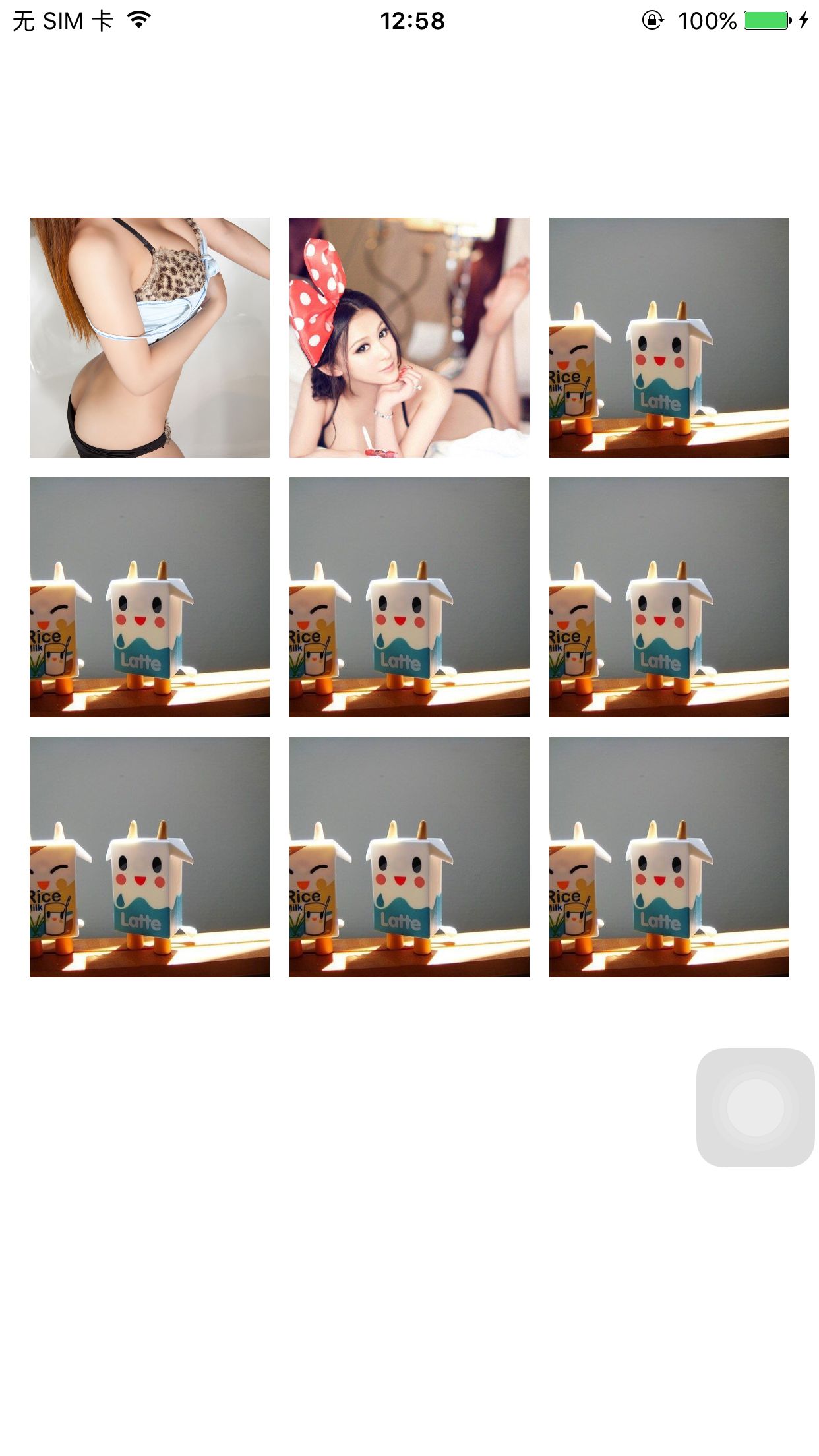

代码如下:
WeiboImageView.h:
#import <UIKit/UIKit.h>

@interface WeiboImageView : UIImageView

@property (nonatomic, assign) CGRect originRect;

- (instancetype)initWithFrame:(CGRect)frame;

@end
WeiboImageView.m
#import "WeiboImageView.h"

@implementation WeiboImageView

@synthesize originRect;

- (instancetype)initWithFrame:(CGRect)frame

{

    self = [super initWithFrame:frame];

    if (self) {

        originRect = frame;

        self.clipsToBounds = YES;

        self.userInteractionEnabled  = YES;

        self.contentMode = UIViewContentModeScaleAspectFill;

    }

    return self;

}

- (void)dealloc

{

}

@end
WeiboImageBrowser.h
#import <UIKit/UIKit.h>

@interface WeiboImageBrowser : UIView<UIScrollViewDelegate>

//@property (nonatomic, copy) NSArray *imageViewArray;

@property (nonatomic, assign) int currentSelectedIamge;

@property (nonatomic, strong) UIScrollView *backgroundScrollView;

@property (nonatomic, strong) UILabel *pageIndexLabel;

@property (nonatomic,strong) NSMutableArray *originRects;

@property (nonatomic, copy) NSArray *bigImageArray;

- (instancetype)initWithFrame : (CGRect)rect;

- (void)showWeiboImages;

@end
WeiboImageBrowser.m
#import "WeiboImageBrowser.h"

#import "WeiboDefine.h"

#import "WeiboImageView.h"

#import "SDImageCache.h"      //缓存相关

#import "SDWebImageCompat.h"  //组件相关

#import "SDWebImageDecoder.h" //解码相关

//图片下载以及下载管理器

#import "SDWebImageDownloader.h"

#import "SDWebImageManager.h"

#import "SDWebImageDownloaderOperation.h"

@implementation WeiboImageBrowser

//@synthesize imageViewArray;

@synthesize currentSelectedIamge;

@synthesize bigImageArray;

- (instancetype)initWithFrame : (CGRect)rect

{

    self = [super initWithFrame:rect];

    if (self) {

        [self addSubview:self.pageIndexLabel];

        self.backgroundColor = [UIColor blackColor];

        [self initBackgroundScrollView];

    }

    return self;

}

- (UIScrollView *)backgroundScrollView

{

    if (!_backgroundScrollView) {

        _backgroundScrollView = [[UIScrollView alloc]initWithFrame:CGRectMake(, , UISCREEN_WIDTH, UISCREEN_HEIGHT)];

        _backgroundScrollView.pagingEnabled = YES;

    }

    return _backgroundScrollView;

}

- (NSMutableArray *)originRects

{

    if (!_originRects) {

        _originRects = [NSMutableArray array];

    }

    return _originRects;

}

- (UILabel *)pageIndexLabel

{

    if (!_pageIndexLabel) {

        _pageIndexLabel = [[UILabel alloc]initWithFrame:CGRectMake((UISCREEN_WIDTH - ) / , UISCREEN_HEIGHT - , , )];

        _pageIndexLabel.textAlignment = NSTextAlignmentCenter;

        _pageIndexLabel.textColor = [UIColor whiteColor];

        _pageIndexLabel.font = [UIFont fontWithName:@"Arial" size:];

    }

    return _pageIndexLabel;

}

- (void)initBackgroundScrollView

{

    self.backgroundScrollView.contentSize = CGSizeMake([self.bigImageArray count] * UISCREEN_WIDTH, UISCREEN_HEIGHT);

    self.backgroundScrollView.delegate = self;

    self.backgroundScrollView.showsHorizontalScrollIndicator = NO;

    [self addSubview:self.backgroundScrollView];

}

- (void)initImageScrollViews

{

    self.backgroundScrollView.contentSize = CGSizeMake([self.bigImageArray count] * UISCREEN_WIDTH, );

    self.backgroundScrollView.contentOffset = CGPointMake(currentSelectedIamge * UISCREEN_WIDTH, );

    for (int i = ; i < [self.bigImageArray count]; i++) {

        [[SDWebImageManager sharedManager] downloadImageWithURL:[NSURL URLWithString:[self.bigImageArray objectAtIndex:i] ] options:

                                                       progress:^(NSInteger receivedSize, NSInteger expectedSize)

         {

             NSLog(@"progress!!!");

         }

                                                      completed:^(UIImage *image, NSError *error, SDImageCacheType cacheType, BOOL finished, NSURL *imageURL)

         {

             UIScrollView *iamgeScrollView = [[UIScrollView alloc]initWithFrame:CGRectMake(UISCREEN_WIDTH * i, , UISCREEN_WIDTH, UISCREEN_HEIGHT)];

             WeiboImageView *weibImageView = [[WeiboImageView alloc]init];

             weibImageView.image = image;

             CGFloat ratio = (double)weibImageView.image.size.height / (double)weibImageView.image.size.width;

             weibImageView.bounds = CGRectMake(, , UISCREEN_WIDTH, UISCREEN_WIDTH * ratio);

             weibImageView.center = CGPointMake(UISCREEN_WIDTH / , UISCREEN_HEIGHT / );

             UITapGestureRecognizer *tap = [[UITapGestureRecognizer alloc] initWithTarget:self action:@selector(imageTap:)];

             [weibImageView addGestureRecognizer:tap];

             [iamgeScrollView addSubview:weibImageView];

             [self.backgroundScrollView addSubview:iamgeScrollView];

         }];

    }

}

- (void)showWeiboImages

{

    [self initImageScrollViews];

    [[UIApplication sharedApplication].keyWindow addSubview:self];

}

-(void)imageTap:(UITapGestureRecognizer *)tap

{

    [self removeFromSuperview];

}

- (void)scrollViewDidEndDecelerating:(UIScrollView *)scrollView

{

    int nCurrentPage = scrollView.contentOffset.x / UISCREEN_WIDTH;

    currentSelectedIamge = nCurrentPage;

    NSString *stringPage = [NSString stringWithFormat:@"%d/%d",nCurrentPage + , [self.bigImageArray count]];

    self.pageIndexLabel.text = stringPage;

    [self bringSubviewToFront:self.pageIndexLabel];

}

@end
使用方法:
ViewController.h
#import <UIKit/UIKit.h>

@interface ViewController : UIViewController

@property (nonatomic, strong)NSArray *imageArray;

@end
ViewController.m
#import "ViewController.h"

#import "SDImageCache.h"      //缓存相关

#import "SDWebImageCompat.h"  //组件相关

#import "SDWebImageDecoder.h" //解码相关

//图片下载以及下载管理器

#import "SDWebImageDownloader.h"

#import "SDWebImageManager.h"

#import "SDWebImageDownloaderOperation.h"

#import "WeiboDefine.h"

#import "WeiboImageView.h"

#import "WeiboImageBrowser.h"

@interface ViewController ()

@end

@implementation ViewController

- (void)viewDidLoad {

    [super viewDidLoad];

    float imageWidth = (UISCREEN_WIDTH - ) / 3.0;

    _imageArray = [NSArray arrayWithObjects:

                           @"http://g.hiphotos.baidu.com/image/pic/item/c2cec3fdfc03924578c6cfe18394a4c27c1e25e8.jpg",

                           @"http://image.tianjimedia.com/uploadImages/2015/072/23/4X4L0E9BNEZ6.jpg",

                           @"http://img15.3lian.com/2015/c1/83/d/31.jpg",

                           @"http://img15.3lian.com/2015/c1/83/d/31.jpg",

                           @"http://img15.3lian.com/2015/c1/83/d/31.jpg",

                           @"http://img15.3lian.com/2015/c1/83/d/31.jpg",

                           @"http://img15.3lian.com/2015/c1/83/d/31.jpg",

                           @"http://img15.3lian.com/2015/c1/83/d/31.jpg",

                           @"http://img15.3lian.com/2015/c1/83/d/31.jpg",nil  ] ;

    int n = _imageArray.count;

    for (int i = ; i < n; i++) {

        [[SDWebImageManager sharedManager] downloadImageWithURL:[NSURL URLWithString:[_imageArray objectAtIndex:i]

                                                                                      ] options:

                                                       progress:^(NSInteger receivedSize, NSInteger expectedSize)

         {

             NSLog(@"progress!!!");

         }

                                                      completed:^(UIImage *image, NSError *error, SDImageCacheType cacheType, BOOL finished, NSURL *imageURL)

         {

             CGRect rect = CGRectMake( + (i % ) * (imageWidth + ) ,  +  + (i / ) * (imageWidth + ), imageWidth, imageWidth);

             UIImageView *imageView = [[UIImageView alloc]initWithFrame:rect];

             imageView.image = image;

             imageView.frame = rect;

             imageView.clipsToBounds = YES;

             imageView.contentMode = UIViewContentModeScaleAspectFill;

             imageView.tag = i;

             imageView.userInteractionEnabled = YES;

             UITapGestureRecognizer *tap = [[UITapGestureRecognizer alloc] initWithTarget:self action:@selector(imageTap:)];

             [imageView addGestureRecognizer:tap];

             [self.view addSubview:imageView];

         }];

    }

    // Do any additional setup after loading the view, typically from a nib.

}

- (void)didReceiveMemoryWarning {

    [super didReceiveMemoryWarning];

    // Dispose of any resources that can be recreated.

}

-(void)imageTap:(UITapGestureRecognizer *)tap

{

    WeiboImageBrowser *imageBrowser = [[WeiboImageBrowser alloc] initWithFrame:CGRectMake(, , UISCREEN_WIDTH, UISCREEN_HEIGHT)];

    imageBrowser.currentSelectedIamge = tap.view.tag;

    imageBrowser.bigImageArray = /*weiboInformation.pic_urls*/_imageArray;

    [imageBrowser showWeiboImages];

}

@end
源代码下载链接:http://download.csdn.net/detail/lzm2625347497/9615067
IOS 使用SDWebImage实现仿新浪微博照片浏览器的更多相关文章
- iOS开源照片浏览器框架SGPhotoBrowser的设计与实现
简介 近日在制作一个开源加密相册时附带着设计了一个照片浏览器,在进一步优化后发布到了GitHub供大家使用,该框架虽然没有MWPhotoBrowser那么强大,但是使用起来更为方便,操作更符合常规相册 ...
- ios 仿新浪微博 UINavigationController 向左滑动时显示上一个控制器的View.
仿新浪微博 UINavigationController 向左滑动时显示上一个控制器的View. 实现原理,UINavigationController 的 self.view显示时把当前显示的vie ...
- ASP.NET仿新浪微博下拉加载更多数据瀑布流效果
闲来无事,琢磨着写点东西.貌似页面下拉加载数据,瀑布流的效果很火,各个网站都能见到各式各样的展示效果,原理大同小异.于是乎,决定自己写一写这个效果,希望能给比我还菜的菜鸟们一点参考价值. 在开始之前, ...
- javascript仿新浪微博图片放大缩小及旋转效果
javascript仿新浪微博图片放大缩小及旋转效果 经常看到新浪微博里有图片放大缩小旋转效果,感觉效果还不错,所以就想试着做一个类似的demo出来,至于旋转对于IE可以用滤镜来解决,标准的浏览器可以 ...
- android的照片浏览器(一)至返回所有图片文件
今天开始写android的照片浏览器 首先要解决的问题是要得到sdcard下面所有是图片的文件的目录 于是我先写了一个普通的java类 来得到后缀是.jpg,.bmp.png.jpeg的文件 pack ...
- 监听文本框输入开发仿新浪微博限制输入字数的textarea插件
监听文本框输入 Firefox.Chrome.IE9,IE10 均支持 oninput 事件,此外所有版本的 IE 均支持 onpropertychange 事件. oninput 事件在用户输入.退 ...
- 照片浏览器软件-WTL开发的照片浏览器
前段时间,为了准备情人节礼物,本人想了做一个照片浏览器送给女友,专门播放我俩的所有照片的一个程序软件,于是,就写了这么一个照片浏览器软件.本程序是基于WTL8.0开发的一个图片/照片浏览器,涉及到XM ...
- 《转》iOS 平台 Cocos2d-x 项目接入新浪微博 SDK 的坑
最近在做一个 iOS 的 cocos2d-x 项目接入新浪微博 SDK 的时候被“坑”了,最后终于顺利的解决了.发现网上也有不少人遇到一样的问题,但是能找到的数量有限的解决办法写得都不详细,很难让人理 ...
- jQuery练手:仿新浪微博图片文字列表淡进淡出上下滚动效果
1.效果及功能说明 仿新浪微博图片文字列表上下淡进淡出间歇上下滚动 2.实现原理 首先要设定div内只能显示4个图片那么多出来的图片会自动隐藏然后在给图片添加一个动画的事件让他们可以滚动的播放出来上下 ...
随机推荐
- Shell 判断
1 shell 的$! ,$?, $$,$@ $n $1 the first parameter,$2 the second... $# The number of co ...
- SVN中Branch的创建与合并
在使用源代码版本控制工具时,最佳实践是一直保持一个主干版本.但是为了应付实际开发中的各种情况,适时的开辟一些分支也是很有必要的.比如在持续开发新功能的同时,需要发布一个新版本,那么就需要从开发主干中建 ...
- 开启Github之旅
在那个远古时代,我以为可以用GoogleCode干点事,结果啥也没干好.如今,Github已经成为了业界标杆,就连Google.微软.Facebook的开源项目都往Github搬.Github作为全球 ...
- WebLogic 12c SpringMVC Jackson 冲突 java.lang.NoSuchMethodError: TypeFactory.constructParametrizedType(Ljava/lang/Class;Ljava/lang/Class;[Ljava/lang/Class;)
<?xml version="1.0" encoding="UTF-8"?> <wls:weblogic-web-app xmlns:wls= ...
- MySQL 存储过程 定时任务
drop procedure if exists move_track_data; delimiter // create procedure move_track_data() begin ; st ...
- django with mysql (part-4)
step01: write the ( views.py ) again .. vim views.py step02: configure your (urls.py) step03: check ...
- paip.数据挖掘--导出词库 清理太长的iptcode
paip.数据挖掘--导出词库 清理太长的iptcode 原来eng2atian的时候儿,有些cnchar无对眼的atian,走临时使用nonex代替... 而个,要不个那清理给挂了.. #keywo ...
- android: 使用 AsyncTask
9.2.4 使用 AsyncTask 不过为了更加方便我们在子线程中对 UI 进行操作,Android 还提供了另外一些好用的工 具,AsyncTask 就是其中之一.借助 AsyncTask, ...
- [轉載]史上最强php生成pdf文件,html转pdf文件方法
之前有个客户需要把一些html页面生成pdf文件,然后我就找一些用php把html页面围成pdf文件的类.方法是可谓是找了很多很多,什么html2pdf,pdflib,FPDF这些都试过了,但是都没有 ...
- GTD时间管理(3)---项目
一:什么是项目? 一个项目是由多步骤,多阶段组成的,不可能一步到位的. 项目分为可大可小. 魔兽世界这个程序是一个项目,是一个用10年开发的大型项目 搭建一个博客也可以成为一个项目,可以用一天时间去搭 ...