
IOS 使用SDWebImage实现仿新浪微博照片浏览器
使用第三方库SDWebImage实现仿新浪微博照片浏览器,可以下载图片缓存,点击之后滚动查看相片,具体效果如下:
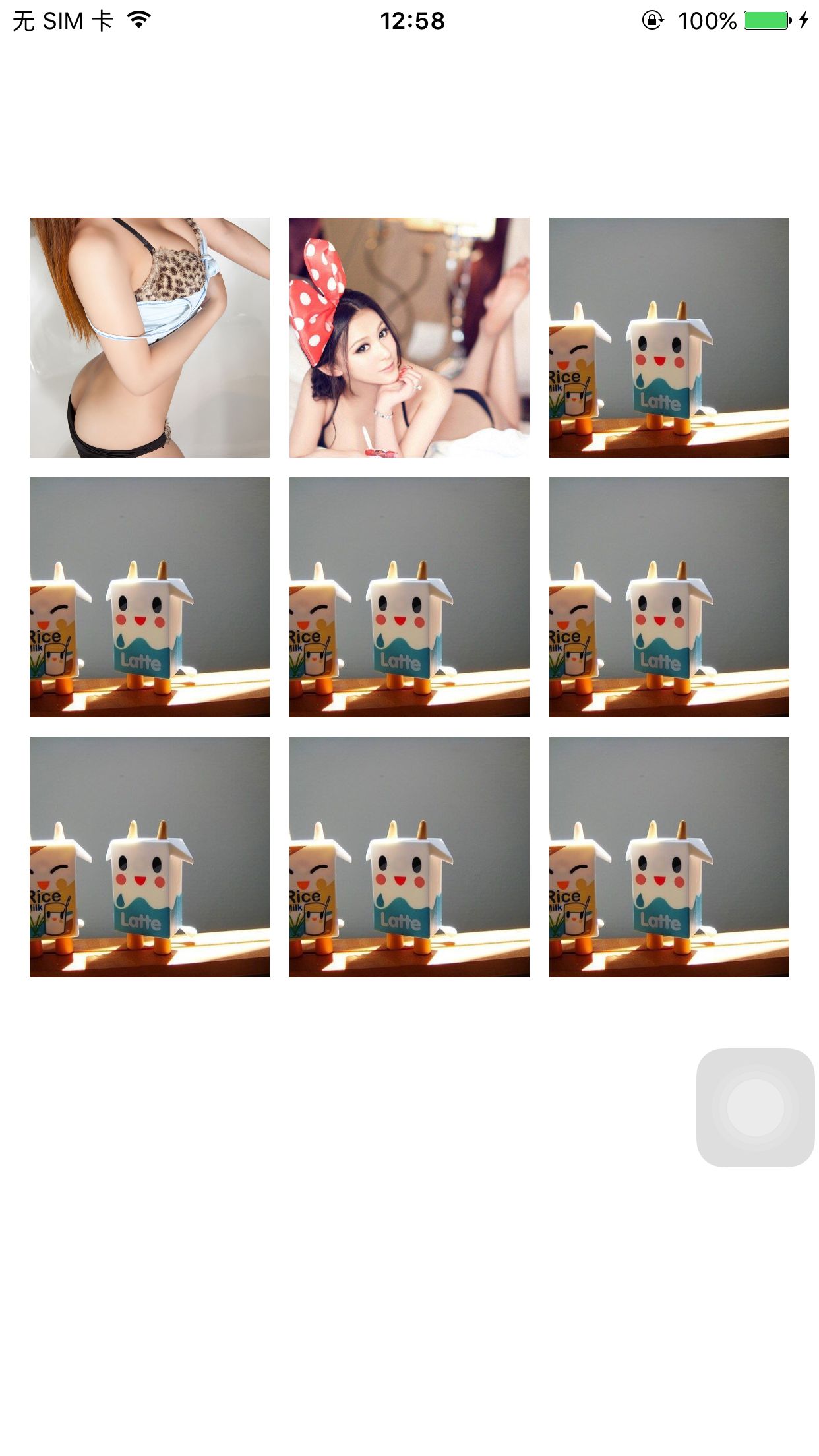

代码如下:
WeiboImageView.h:
#import <UIKit/UIKit.h>

@interface WeiboImageView : UIImageView

@property (nonatomic, assign) CGRect originRect;

- (instancetype)initWithFrame:(CGRect)frame;

@end
WeiboImageView.m
#import "WeiboImageView.h"

@implementation WeiboImageView

@synthesize originRect;

- (instancetype)initWithFrame:(CGRect)frame

{

    self = [super initWithFrame:frame];

    if (self) {

        originRect = frame;

        self.clipsToBounds = YES;

        self.userInteractionEnabled  = YES;

        self.contentMode = UIViewContentModeScaleAspectFill;

    }

    return self;

}

- (void)dealloc

{

}

@end
WeiboImageBrowser.h
#import <UIKit/UIKit.h>

@interface WeiboImageBrowser : UIView<UIScrollViewDelegate>

//@property (nonatomic, copy) NSArray *imageViewArray;

@property (nonatomic, assign) int currentSelectedIamge;

@property (nonatomic, strong) UIScrollView *backgroundScrollView;

@property (nonatomic, strong) UILabel *pageIndexLabel;

@property (nonatomic,strong) NSMutableArray *originRects;

@property (nonatomic, copy) NSArray *bigImageArray;

- (instancetype)initWithFrame : (CGRect)rect;

- (void)showWeiboImages;

@end
WeiboImageBrowser.m
#import "WeiboImageBrowser.h"

#import "WeiboDefine.h"

#import "WeiboImageView.h"

#import "SDImageCache.h"      //缓存相关

#import "SDWebImageCompat.h"  //组件相关

#import "SDWebImageDecoder.h" //解码相关

//图片下载以及下载管理器

#import "SDWebImageDownloader.h"

#import "SDWebImageManager.h"

#import "SDWebImageDownloaderOperation.h"

@implementation WeiboImageBrowser

//@synthesize imageViewArray;

@synthesize currentSelectedIamge;

@synthesize bigImageArray;

- (instancetype)initWithFrame : (CGRect)rect

{

    self = [super initWithFrame:rect];

    if (self) {

        [self addSubview:self.pageIndexLabel];

        self.backgroundColor = [UIColor blackColor];

        [self initBackgroundScrollView];

    }

    return self;

}

- (UIScrollView *)backgroundScrollView

{

    if (!_backgroundScrollView) {

        _backgroundScrollView = [[UIScrollView alloc]initWithFrame:CGRectMake(, , UISCREEN_WIDTH, UISCREEN_HEIGHT)];

        _backgroundScrollView.pagingEnabled = YES;

    }

    return _backgroundScrollView;

}

- (NSMutableArray *)originRects

{

    if (!_originRects) {

        _originRects = [NSMutableArray array];

    }

    return _originRects;

}

- (UILabel *)pageIndexLabel

{

    if (!_pageIndexLabel) {

        _pageIndexLabel = [[UILabel alloc]initWithFrame:CGRectMake((UISCREEN_WIDTH - ) / , UISCREEN_HEIGHT - , , )];

        _pageIndexLabel.textAlignment = NSTextAlignmentCenter;

        _pageIndexLabel.textColor = [UIColor whiteColor];

        _pageIndexLabel.font = [UIFont fontWithName:@"Arial" size:];

    }

    return _pageIndexLabel;

}

- (void)initBackgroundScrollView

{

    self.backgroundScrollView.contentSize = CGSizeMake([self.bigImageArray count] * UISCREEN_WIDTH, UISCREEN_HEIGHT);

    self.backgroundScrollView.delegate = self;

    self.backgroundScrollView.showsHorizontalScrollIndicator = NO;

    [self addSubview:self.backgroundScrollView];

}

- (void)initImageScrollViews

{

    self.backgroundScrollView.contentSize = CGSizeMake([self.bigImageArray count] * UISCREEN_WIDTH, );

    self.backgroundScrollView.contentOffset = CGPointMake(currentSelectedIamge * UISCREEN_WIDTH, );

    for (int i = ; i < [self.bigImageArray count]; i++) {

        [[SDWebImageManager sharedManager] downloadImageWithURL:[NSURL URLWithString:[self.bigImageArray objectAtIndex:i] ] options:

                                                       progress:^(NSInteger receivedSize, NSInteger expectedSize)

         {

             NSLog(@"progress!!!");

         }

                                                      completed:^(UIImage *image, NSError *error, SDImageCacheType cacheType, BOOL finished, NSURL *imageURL)

         {

             UIScrollView *iamgeScrollView = [[UIScrollView alloc]initWithFrame:CGRectMake(UISCREEN_WIDTH * i, , UISCREEN_WIDTH, UISCREEN_HEIGHT)];

             WeiboImageView *weibImageView = [[WeiboImageView alloc]init];

             weibImageView.image = image;

             CGFloat ratio = (double)weibImageView.image.size.height / (double)weibImageView.image.size.width;

             weibImageView.bounds = CGRectMake(, , UISCREEN_WIDTH, UISCREEN_WIDTH * ratio);

             weibImageView.center = CGPointMake(UISCREEN_WIDTH / , UISCREEN_HEIGHT / );

             UITapGestureRecognizer *tap = [[UITapGestureRecognizer alloc] initWithTarget:self action:@selector(imageTap:)];

             [weibImageView addGestureRecognizer:tap];

             [iamgeScrollView addSubview:weibImageView];

             [self.backgroundScrollView addSubview:iamgeScrollView];

         }];

    }

}

- (void)showWeiboImages

{

    [self initImageScrollViews];

    [[UIApplication sharedApplication].keyWindow addSubview:self];

}

-(void)imageTap:(UITapGestureRecognizer *)tap

{

    [self removeFromSuperview];

}

- (void)scrollViewDidEndDecelerating:(UIScrollView *)scrollView

{

    int nCurrentPage = scrollView.contentOffset.x / UISCREEN_WIDTH;

    currentSelectedIamge = nCurrentPage;

    NSString *stringPage = [NSString stringWithFormat:@"%d/%d",nCurrentPage + , [self.bigImageArray count]];

    self.pageIndexLabel.text = stringPage;

    [self bringSubviewToFront:self.pageIndexLabel];

}

@end
使用方法:
ViewController.h
#import <UIKit/UIKit.h>

@interface ViewController : UIViewController

@property (nonatomic, strong)NSArray *imageArray;

@end
ViewController.m
#import "ViewController.h"

#import "SDImageCache.h"      //缓存相关

#import "SDWebImageCompat.h"  //组件相关

#import "SDWebImageDecoder.h" //解码相关

//图片下载以及下载管理器

#import "SDWebImageDownloader.h"

#import "SDWebImageManager.h"

#import "SDWebImageDownloaderOperation.h"

#import "WeiboDefine.h"

#import "WeiboImageView.h"

#import "WeiboImageBrowser.h"

@interface ViewController ()

@end

@implementation ViewController

- (void)viewDidLoad {

    [super viewDidLoad];

    float imageWidth = (UISCREEN_WIDTH - ) / 3.0;

    _imageArray = [NSArray arrayWithObjects:

                           @"http://g.hiphotos.baidu.com/image/pic/item/c2cec3fdfc03924578c6cfe18394a4c27c1e25e8.jpg",

                           @"http://image.tianjimedia.com/uploadImages/2015/072/23/4X4L0E9BNEZ6.jpg",

                           @"http://img15.3lian.com/2015/c1/83/d/31.jpg",

                           @"http://img15.3lian.com/2015/c1/83/d/31.jpg",

                           @"http://img15.3lian.com/2015/c1/83/d/31.jpg",

                           @"http://img15.3lian.com/2015/c1/83/d/31.jpg",

                           @"http://img15.3lian.com/2015/c1/83/d/31.jpg",

                           @"http://img15.3lian.com/2015/c1/83/d/31.jpg",

                           @"http://img15.3lian.com/2015/c1/83/d/31.jpg",nil  ] ;

    int n = _imageArray.count;

    for (int i = ; i < n; i++) {

        [[SDWebImageManager sharedManager] downloadImageWithURL:[NSURL URLWithString:[_imageArray objectAtIndex:i]

                                                                                      ] options:

                                                       progress:^(NSInteger receivedSize, NSInteger expectedSize)

         {

             NSLog(@"progress!!!");

         }

                                                      completed:^(UIImage *image, NSError *error, SDImageCacheType cacheType, BOOL finished, NSURL *imageURL)

         {

             CGRect rect = CGRectMake( + (i % ) * (imageWidth + ) ,  +  + (i / ) * (imageWidth + ), imageWidth, imageWidth);

             UIImageView *imageView = [[UIImageView alloc]initWithFrame:rect];

             imageView.image = image;

             imageView.frame = rect;

             imageView.clipsToBounds = YES;

             imageView.contentMode = UIViewContentModeScaleAspectFill;

             imageView.tag = i;

             imageView.userInteractionEnabled = YES;

             UITapGestureRecognizer *tap = [[UITapGestureRecognizer alloc] initWithTarget:self action:@selector(imageTap:)];

             [imageView addGestureRecognizer:tap];

             [self.view addSubview:imageView];

         }];

    }

    // Do any additional setup after loading the view, typically from a nib.

}

- (void)didReceiveMemoryWarning {

    [super didReceiveMemoryWarning];

    // Dispose of any resources that can be recreated.

}

-(void)imageTap:(UITapGestureRecognizer *)tap

{

    WeiboImageBrowser *imageBrowser = [[WeiboImageBrowser alloc] initWithFrame:CGRectMake(, , UISCREEN_WIDTH, UISCREEN_HEIGHT)];

    imageBrowser.currentSelectedIamge = tap.view.tag;

    imageBrowser.bigImageArray = /*weiboInformation.pic_urls*/_imageArray;

    [imageBrowser showWeiboImages];

}

@end
源代码下载链接:http://download.csdn.net/detail/lzm2625347497/9615067
IOS 使用SDWebImage实现仿新浪微博照片浏览器的更多相关文章
- iOS开源照片浏览器框架SGPhotoBrowser的设计与实现
简介 近日在制作一个开源加密相册时附带着设计了一个照片浏览器,在进一步优化后发布到了GitHub供大家使用,该框架虽然没有MWPhotoBrowser那么强大,但是使用起来更为方便,操作更符合常规相册 ...
- ios 仿新浪微博 UINavigationController 向左滑动时显示上一个控制器的View.
仿新浪微博 UINavigationController 向左滑动时显示上一个控制器的View. 实现原理,UINavigationController 的 self.view显示时把当前显示的vie ...
- ASP.NET仿新浪微博下拉加载更多数据瀑布流效果
闲来无事,琢磨着写点东西.貌似页面下拉加载数据,瀑布流的效果很火,各个网站都能见到各式各样的展示效果,原理大同小异.于是乎,决定自己写一写这个效果,希望能给比我还菜的菜鸟们一点参考价值. 在开始之前, ...
- javascript仿新浪微博图片放大缩小及旋转效果
javascript仿新浪微博图片放大缩小及旋转效果 经常看到新浪微博里有图片放大缩小旋转效果,感觉效果还不错,所以就想试着做一个类似的demo出来,至于旋转对于IE可以用滤镜来解决,标准的浏览器可以 ...
- android的照片浏览器(一)至返回所有图片文件
今天开始写android的照片浏览器 首先要解决的问题是要得到sdcard下面所有是图片的文件的目录 于是我先写了一个普通的java类 来得到后缀是.jpg,.bmp.png.jpeg的文件 pack ...
- 监听文本框输入开发仿新浪微博限制输入字数的textarea插件
监听文本框输入 Firefox.Chrome.IE9,IE10 均支持 oninput 事件,此外所有版本的 IE 均支持 onpropertychange 事件. oninput 事件在用户输入.退 ...
- 照片浏览器软件-WTL开发的照片浏览器
前段时间,为了准备情人节礼物,本人想了做一个照片浏览器送给女友,专门播放我俩的所有照片的一个程序软件,于是,就写了这么一个照片浏览器软件.本程序是基于WTL8.0开发的一个图片/照片浏览器,涉及到XM ...
- 《转》iOS 平台 Cocos2d-x 项目接入新浪微博 SDK 的坑
最近在做一个 iOS 的 cocos2d-x 项目接入新浪微博 SDK 的时候被“坑”了,最后终于顺利的解决了.发现网上也有不少人遇到一样的问题,但是能找到的数量有限的解决办法写得都不详细,很难让人理 ...
- jQuery练手:仿新浪微博图片文字列表淡进淡出上下滚动效果
1.效果及功能说明 仿新浪微博图片文字列表上下淡进淡出间歇上下滚动 2.实现原理 首先要设定div内只能显示4个图片那么多出来的图片会自动隐藏然后在给图片添加一个动画的事件让他们可以滚动的播放出来上下 ...
随机推荐
- js 弹出窗口 防止拦截,突破阻止,保存后打开
<script language="javascript"> function orderprint() { var formUrl = "savedata_ ...
- python __del__
python __del__ 转自:http://blog.csdn.net/bbdxf/article/details/25774763 最近学习<Python参考手册>学到Class部 ...
- jQuery Mobile + HTML5
最近项目需要,需要构建一个适合手持设备访问的站点,作者从网上查阅了一些资料,本文就是基于此而来. 首先下载jQuery Mobile http://jquerymobile.com/,选择稳定版即可. ...
- 使用SignalR为FineUI/Webform打造消息总线
第一次写博客,语言组织能力不好,请大家多多包涵! 效果图如下: 图片的右下角即为SignalR消息总线的消息框. 一.建立SignalR服务端 第一步:打开一个空的FineUI 4.5空项目文件,在空 ...
- linux下ssh远程登录服务器入门操作
使用用户名密码登录 在命令行中输入命令: ssh username@ip_address -p port 之后系统会提示输入密码,输入后即可登录 如果不添加-p选项,则默认是22端口 还可以使用-l选 ...
- paip.python连接mysql最佳实践o4
paip.python连接mysql最佳实践o4 python连接mysql 还使用了不少时间...,相比php困难多了..麻烦的.. 而php,就容易的多兰.. python标准库没mysql库,只 ...
- java继承与多态-3个小题
1.(1)编写一个接口ShapePara,要求: 接口中的方法: int getArea():获得图形的面积.int getCircumference():获得图形的周长 (2)编写一个圆类Circl ...
- MyEclipse使用总结——MyEclipse去除网上复制下来的来代码带有的行号
一.正则表达式去除代码行号 作为开发人员,我们经常从网上复制一些代码,有些时候复制的代码前面是带有行号,如: MyEclipse本身自带有查找替换功能,并且支持正则表达式替换,使用正则替换就可以很容易 ...
- AngularJS(一)
什么是AngularJS[双向数据绑定:从界面的操作能实时反映到数据,数据的变更能实时展现到界面.]?1.AngularJS 使得开发现代的单一页面应用程序(SPAs:Single Page Appl ...
- 详解Bootstrap媒体对象
在web页面中,图片居左,内容居右排列,是非常常见的效果,它也就是媒体对象,它是一种抽象的样式,可以用来构建不同类型的组件,在bootstrap框架中其对应的版本文件如下: LESS: media.l ...