
MyEclipse下如何安装svn插件
方法一:在线安装
1.打开HELP->MyEclipse Configuration 不过多数情况下再myeclipse实现不了
Center。切换到SoftWare标签页。
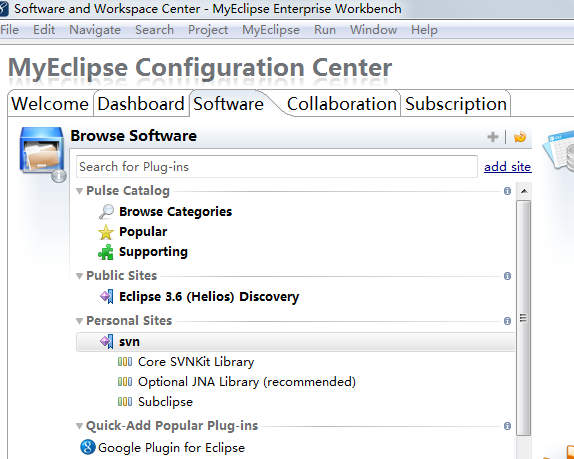
2.点击Add Site 打开对话框,在对话框Name输入Svn,URL中输入:http://subclipse.tigris.org/update_1.6.x
3.在左边栏中找到Personal Site中找到SVN展开。将Core SVNKit Library和Optional JNA
Library添加(右键Add to Profile),Subclipse下面的Subclipse Integration for Mylyn
3.0可以不添加(特别注意,此处不要添加)。
4.在右下角窗格(Pending Changes )中点击Apply。安装重启后MyEclipse即可。
方法二:link安装
安装subclipse, MyEclipse9.0 SVN插件
1、从官网下载site-1.6.10.zip文件,网址是:subclipse.tigris.org,
2、从中解压出features与 plugins文件夹,复制到E:\MyEclipse\myPlugin\svn里面,其它的*.xml文件不要。
3、在 E:\MyEclipse\MyEclipse9.0\dropins下新建文件svn.link,内容是:path=E:\\MyEclipse \\myPlugin\\svn保存。
4、(唛呆儿:这一步不确定,先不要删除)删除E:\MyEclipse\MyEclipse8.5\configuration \org.eclipse.update文件夹
5、重启myeclipse就一切正常了。[/size]
以上两种方法都尝试成功
方法三:直接解压 (myeclipse10 亲测可用)
下载SVN插件:site-1.6.10.zip 下载地址 http://pan.baidu.com/s/1bntOgxT
解压后将其全部文件拷贝至:D:\Program Files\Genuitec\MyEclipse 8.5\dropins(MyEclipse的安装目录)
重启MyEclipse即可出现SVN!
方法四:肯定可行的方法
1、下载最新的SVN包:
http://subclipse.tigris.org/servlets/ProjectDocumentList?folderID=2240
2、在你的磁盘上任意位置创建文件夹:“myplugins/svn”。名字可以任取,为了方便插件管理,建议名称为“myplugins”。
3、将解压的svn里的两个文件夹拷贝到“myplugins/svn”下。
4、复制下列java代码,修改路径并执行:
package app;

import java.io.File;

import java.util.ArrayList;

import java.util.List;

/**

 * MyEclipse9 插件配置代码生成器

 *

 *

 */

public class PluginConfigCreator

{

    public PluginConfigCreator()

    {

    }

    public void print(String path)

    {

        List<String> list = getFileList(path);

        if (list == null)

        {

            return;

        }

        int length = list.size();

        for (int i = 0; i < length; i++)

        {

            String result = "";

            String thePath = getFormatPath(getString(list.get(i)));

            File file = new File(thePath);

            if (file.isDirectory())

            {

                String fileName = file.getName();

                if (fileName.indexOf("_") < 0)

                {

                    print(thePath);

                    continue;

                }

                String[] filenames = fileName.split("_");

                String filename1 = filenames[0];

                String filename2 = filenames[1];

                result = filename1 + "," + filename2 + ",file:/" + path + "/"

                        + fileName + "//,4,false";

                System.out.println(result);

            } else if (file.isFile())

            {

                String fileName = file.getName();

                if (fileName.indexOf("_") < 0)

                {

                    continue;

                }

                int last = fileName.lastIndexOf("_");// 最后一个下划线的位置

                String filename1 = fileName.substring(0, last);

                String filename2 = fileName.substring(last + 1, fileName

                        .length() - 4);

                result = filename1 + "," + filename2 + ",file:/" + path + "/"

                        + fileName + ",4,false";

                System.out.println(result);

            }

        }

    }

    public List<String> getFileList(String path)

    {

        path = getFormatPath(path);

        path = path + "/";

        File filePath = new File(path);

        if (!filePath.isDirectory())

        {

            return null;

        }

        String[] filelist = filePath.list();

        List<String> filelistFilter = new ArrayList<String>();

        for (int i = 0; i < filelist.length; i++)

        {

            String tempfilename = getFormatPath(path + filelist[i]);

            filelistFilter.add(tempfilename);

        }

        return filelistFilter;

    }

    public String getString(Object object)

    {

        if (object == null)

        {

            return "";

        }

        return String.valueOf(object);

    }

    public String getFormatPath(String path)

    {

        path = path.replaceAll("////", "/");

        path = path.replaceAll("//", "/");

        return path;

    }

    public static void main(String[] args)

    {

        /*你的插件的安装目录*/

            String plugin = "改成安装目录//Genuitec//svn";

        new PluginConfigCreator().print(plugin);

    }

}
这里需要注意的是修改成为刚才svn所在路径,建议改为绝对路径。比如d:/myplugins/svn/。。。
5、 找到“$myeclipse_home/configuration /org.eclipse.equinox.simpleconfigurator/”,打开其中的“bundles.inf”文件,为了防止分不清是不是我们自己后加的东西,在最后面多回几次车,然后粘贴第4步运行后的代码,保存
6、重启myeclipse
转自:http://hi.baidu.com/294286540/blog/item/f89af3014404630d738b656d.html
MyEclipse下如何安装svn插件的更多相关文章
- mac下eclipse安装svn插件-subclipse
目前Eclipse最常用的svn插件莫非subclipse,在windows系统下的安装svn client和subclipse比较简单.本文介绍如何在mac安装svn插件和subclipse. 一. ...
- myeclipse 8.6 安装svn插件
第一种:在线安装 1.打开HELP->MyEclipse Configuration Center,切换到SoftWare标签页. 2.点击Add Site 打开对话框,在对话框Name输入Sv ...
- myeclipse 8.6安装SVN插件
方法二: 安装subclipse, SVN 插件 1.从官网下载site-1.6.9.zip文件,网址是:subclipse.tigris.org, 2.从中解压出features与plug ...
- Mac下eclipse安装SVN插件
eclipse中最常使用的SVN插件是subclipse,先到subclipse官网:http://subclipse.tigris.org下载该插件. 如上图,点击“Download and I ...
- Ubuntu下eclipse安装svn插件
好记性不如烂笔头,碰见一个不大不小的问题,记录下. 系统:Ubuntu 12.04 Eclipse:eclipse-jee-kepler-R-linux-gtk.tar.gz subclipse:1. ...
- [IDE工具配置]myeclipse 2014 专业版 安装 svn插件
本文地址:http://blog.csdn.net/sushengmiyan/article/details/38342411 本文作者:sushengmiyan 团队合作的项目肯定少不了版本控制,那 ...
- myeclipse 2014 专业版 安装 svn插件
团队合作的项目肯定少不了版本控制,那么现在就看看myeclispe中是如何使用的吧. 开发环境:myeclipse 2014 java 8 tomcate 8 试了网上说的几种方法,都没有成功,最 ...
- myeclipse学习总结二(myeclipse安装svn插件)
1.在myeclipse中要安装svn插件,首先是下载svn插件. 下载地址:http://subclipse.tigris.org/servlets/ProjectDocumentList?fold ...
- MyEclipse使用总结——MyEclipse10安装SVN插件
一.下载SVN插件subclipse 下载地址:http://subclipse.tigris.org/servlets/ProjectDocumentList?folderID=2240 在打开的网 ...
随机推荐
- 利用堆排序找出数组中前n大的元素
#include <stdio.h> #include <stdint.h> #include <stdlib.h> #include <time.h> ...
- CSS控制"标题前增加小图标或编号"
---题目前加图片--- p:before { content:url(xxx/xx.png); }//所有p的最前都有一个图标 p.a:after { content:url(xxx/xx.png) ...
- Asp.net mvc + .net ef database first 或 model first 时如何添加验证特性
今天有个同事问到,在使用Entity Framework 的Database frist或model first时,怎么在model上添加验证的特性? 因为此时的Model是是VS 工具怎么生成的,直 ...
- link标签和script标签跑到body下面,网页顶部有空白
用UltraEdit的16进制编辑模式查看代码,都是EF BB BF开头的,说明都是带BOM的.我手动的将所有文件转成UTF-8 without BOM.页面终于正常了.link,script标签乖乖 ...
- 错误提示: An App ID with identifier "*****" is not avaliable. Please enter a different string.
百度了很多,但大多的解决办法就是 更改BundleID,的确管用,,但是有的情况下,你需要跟同事合作,公用同一个BundleID, 我是这样处理的:工具栏中打开Window—project删除所有工程 ...
- Installing OpenCV 2.4.10 in Ubuntu 12.04 LTS
转自 http://www.samontab.com/web/2012/06/installing-opencv-2-4-1-ubuntu-12-04-lts/ EDIT: I published a ...
- JAVA并发编程的艺术目录
第7章:JAVA中的13个原子操作类 第8章:JAVA中的并发工具类 第9章:JAVA中的线程池
- jquery选择器效率优化问题
jquery选择器效率优化问题 jquery选择器固然强大,但是使用不当回导致效率问题: 1.要养成将jQuery对象缓存进变量的习惯 //不好的写法 $('#btn').bind("c ...
- Apple Demo
https://developer.apple.com/library/ios/navigation/ http://developer.apple.com/library/ios/samplecod ...
- 优化系统资源ulimit《高性能Linux服务器构建实战:运维监控、性能调优与集群应用》
优化系统资源ulimit<高性能Linux服务器构建实战:运维监控.性能调优与集群应用> 假设有这样一种情况,一台Linux 主机上同时登录了10个用户,在没有限制系统资源的情况下,这10 ...