
Android 实现卫星菜单
步骤:一:自定义ViewGroup
1、自定义属性
a、attr.xml
b、在布局文件中使用activity_main.xml
c、在自定义控件中进行读取
2、onMeasure
3、onLayout
4、设置主按钮的旋转动画
为menuItem添加平移动画和旋转动画
实现menuItem的点击事件
MainActivity.java
public class MainActivity extends AppCompatActivity {

    private ListView listView;

    private List<String> mData;

    private ArrayAdapter mAdapter;

    private ArcMenuActivity mArc;

    @Override

    protected void onCreate(Bundle savedInstanceState) {

        super.onCreate(savedInstanceState);

        setContentView(R.layout.activity_main);

        listView = (ListView) findViewById(R.id.listview);

        mArc = (ArcMenuActivity) findViewById(R.id.view_arc);

        addData();

        mAdapter = new ArrayAdapter<String>(MainActivity.this, android.R.layout.simple_list_item_1, mData);

        listView.setAdapter(mAdapter);

        listView.setOnScrollListener(new AbsListView.OnScrollListener() {

            @Override

            public void onScrollStateChanged(AbsListView view, int scrollState) {

            }

            @Override

            public void onScroll(AbsListView view, int firstVisibleItem, int visibleItemCount, int totalItemCount) {

                if (mArc.isOpen()) {

                    mArc.toggleMenu(200);

                }

            }

        });

        mArc.setOnMenuItemClickListener(new ArcMenuActivity.onMenuItemClickListener() {

            @Override

            public void onItemClick(View view, int position) {

                Toast.makeText(MainActivity.this,position+" : "+view.getTag(),Toast.LENGTH_SHORT).show();

            }

        });

    }

    private void addData() {

        mData = new ArrayList<String>();

        for (int i = 'A'; i <= 'z'; i++) {

            mData.add((char) i + "");

        }

    }

}
ArcMenuActivity.java
/**

 * 自定义的ViewGroup,在activity_main.xml里面调用

 */

public class ArcMenuActivity extends ViewGroup {

    private static final int POS_LEFT_TOP = 0;

    private static final int POS_RIGHT_TOP = 1;

    private static final int POS_LEFT_BOTTOM = 2;

    private static final int POS_RIGHT_BOTTOM = 3;

    private Position mPosition = Position.RIGHT_BOTTOM;

    private Status mCurrentStatus = Status.CLOSE;

    private onMenuItemClickListener onMenuItemClick;

    private View mCButton;       //主菜单按钮

    private int mRadius;         //卫星半径

    //卫星菜单位置枚举类

    public enum Position {

        LEFT_TOP, RIGHT_TOP, LEFT_BOTTOM, RIGHT_BOTTOM

    }

    //主菜单的状态

    public enum Status {

        OPEN, CLOSE

    }

    //定义一个点击点击子菜单项的回调接口

    public interface onMenuItemClickListener {

        void onItemClick(View view, int position);

    }

    //自定义的点击方法

    public void setOnMenuItemClickListener(onMenuItemClickListener onMenuItemClick) {

        this.onMenuItemClick = onMenuItemClick;

    }

    public ArcMenuActivity(Context context) {

//        super(context);

        this(context, null);

    }

    public ArcMenuActivity(Context context, AttributeSet attrs) {

//        super(context, attrs);

        this(context, attrs, 0);

    }

    public ArcMenuActivity(Context context, AttributeSet attrs, int defStyleAttr) {

        super(context, attrs, defStyleAttr);

        //获取自定义属性的值

        TypedArray ta = context.getTheme().obtainStyledAttributes(

                attrs, R.styleable.ArcMenu, defStyleAttr, 0);

        //getInt()方法

        //参数1:所需要赋予给pos的值

        // 参数2:如果参数1无值,则取该值,就是custom:position="right_bottom"没有定义时

        int pos = ta.getInt(R.styleable.ArcMenu_position, POS_RIGHT_BOTTOM);

        switch (pos) {

            case POS_LEFT_TOP:

                mPosition = Position.LEFT_TOP;

                break;

            case POS_LEFT_BOTTOM:

                mPosition = Position.LEFT_BOTTOM;

                break;

            case POS_RIGHT_TOP:

                mPosition = Position.RIGHT_TOP;

                break;

            case POS_RIGHT_BOTTOM:

                mPosition = Position.RIGHT_BOTTOM;

                break;

        }

        //半径的默认值

        mRadius = (int) TypedValue.applyDimension(

                TypedValue.COMPLEX_UNIT_DIP, 100, getResources().getDisplayMetrics());

        //getDimension()方法

        //参数1:所需要赋予给radius的值

        // 参数2:如果参数1无值,则取该值,就是custom:radius="100"没有定义时

        mRadius = (int) ta.getDimension(R.styleable.ArcMenu_radius, TypedValue.applyDimension(

                TypedValue.COMPLEX_UNIT_DIP, 100, getResources().getDisplayMetrics()));

        //radius输出的值为px

        Log.v("TGA", "position = " + mPosition + ",radius = " + mRadius);

        ta.recycle();

    }

    @Override

    protected void onMeasure(int widthMeasureSpec, int heightMeasureSpec) {

        //获取activity_main.xml里面的View控件的个数

        // <my.com.example.x550v.view.ArcMenuActivity/>里面的

        int count = getChildCount();

        //测量child

        for (int i = 0; i < count; i++) {

            //xml文件里面控件的位置,宽,高

            measureChild(getChildAt(i), widthMeasureSpec, heightMeasureSpec);

        }

        super.onMeasure(widthMeasureSpec, heightMeasureSpec);

    }

    @Override

    protected void onLayout(boolean changed, int l, int t, int r, int b) {

        if (changed) {

            //主菜单按钮

            layoutCButton();

            //子菜单按钮

            subItemButton();

        }

    }

    //定义主菜单按钮

    private void layoutCButton() {

        //或者使用findViewById()的方法

        mCButton = getChildAt(0); //获取第一个xml文件里面的第一个View控件

        mCButton.setOnClickListener(new OnClickListener() {

            @Override

            public void onClick(View v) {

                //主菜单动画

                //这里得使用getContext()来获取context

                Animation animation = AnimationUtils.loadAnimation(getContext(), R.anim.anim);

                //如果使用setAnimation()只会转一次

                mCButton.startAnimation(animation);

                //子菜单动画

                toggleMenu(200);

            }

        });

        //l为主菜单距离父布局的左边距离,t为主菜单距离父布局的顶边距离

        int l = 0, t = 0;

        //获取主按钮的宽和高

        int width = mCButton.getMeasuredWidth();

        int height = mCButton.getMeasuredHeight();

        switch (mPosition) {

            case LEFT_TOP:

                //0,0表示坐上角的位置

                l = 0;

                t = 0;

                break;

            case RIGHT_TOP:

                l = getMeasuredWidth() - width;   //getMeasuredWidth()取得容器的宽度

                t = 0;

                break;

            case LEFT_BOTTOM:

                l = 0;

                t = getMeasuredHeight() - height; //getMeasuredHeight()取得容器的高度

                break;

            case RIGHT_BOTTOM:

                l = getMeasuredWidth() - width;

                t = getMeasuredHeight() - height;

                break;

        }

        mCButton.layout(l, t, l + width, t + height);

    }

    //定义子菜单按钮

    public void subItemButton() {

        //获取activity_main.xml里面的View控件的个数

        // <my.com.example.x550v.view.ArcMenuActivity/>里面的

        int count = getChildCount();

        for (int i = 0; i < count - 1; i++) { //去掉主菜单按钮的一个

            View child = getChildAt(i + 1);   //从第一个子菜单开始获取,而不是主菜单

            //开始时设置子菜单为隐藏

            child.setVisibility(GONE);

            //当子菜单为左上角时,cl为子菜单距离父布局的左边距离,ct为子菜单距离父布局的顶边距离

            //当子菜单为右上角时,cl为子菜单距离父布局的右边距离,ct为子菜单距离父布局的顶边距离

            //当子菜单为左下角时,cl为子菜单距离父布局的左边距离,ct为子菜单距离父布局的底边距离

            //当子菜单为右下角时,cl为子菜单距离父布局的右边距离,ct为子菜单距离父布局的底边距离

            //Math.PI的值为圆周率pai,角度为180度

            //Math.PI / 2 / (count - 2)是取出平均角,

            //*i是看子菜单拥有几个平均角

            int cl = (int) (mRadius * Math.sin(Math.PI / 2 / (count - 2) * i));

//            Log.v("TAG","cl = "+cl);

            int ct = (int) (mRadius * Math.cos(Math.PI / 2 / (count - 2) * i));

            //获取子菜单View的宽和高

            int cWidth = child.getMeasuredWidth();

            int cHeight = child.getMeasuredHeight();

            //如果子菜单在左下,右下

            if (mPosition == Position.LEFT_BOTTOM || mPosition == Position.RIGHT_BOTTOM) {

                ct = getMeasuredHeight() - cHeight - ct;

                Log.v("TAG","getMeasuredHeight()"+getMeasuredHeight());

            }

            //如果子菜单在右上,右下

            if (mPosition == Position.RIGHT_TOP || mPosition == Position.RIGHT_BOTTOM) {

                cl = getMeasuredWidth() - cWidth - cl;

            }

            child.layout(cl, ct, cl + cWidth, ct + cHeight);

        }

    }

    //定义点击主菜单后子菜单出现动画

    public void toggleMenu(int duration) {

        int count = getChildCount();

        for (int i = 0; i < count - 1; i++) {

            final View childView = getChildAt(i + 1);

            childView.setVisibility(View.VISIBLE);

            //end 0,0

            //start

            int cl = (int) (mRadius * Math.sin(Math.PI / 2 / (count - 2) * i));

            int ct = (int) (mRadius * Math.cos(Math.PI / 2 / (count - 2) * i));

            int xFlag = 1;

            int yFlag = 1;

            if (mPosition == Position.LEFT_TOP || mPosition == Position.LEFT_BOTTOM) {

                xFlag = -1;

            }

            if (mPosition == Position.LEFT_TOP || mPosition == Position.RIGHT_TOP) {

                yFlag = -1;

            }

            final AnimationSet animationSet = new AnimationSet(true);

            //位移动画

            Animation tranAnim = null;

            //如果为关闭状态,点击后会散开

            if (mCurrentStatus == Status.CLOSE) {

                //子菜单一开始就是扇形排布,其坐标为(0,0)

                tranAnim = new TranslateAnimation(xFlag * cl, 0, yFlag * ct, 0);

                childView.setClickable(true);

                childView.setFocusable(true);

            }

            //否则为打开状态,点击后会收缩

            else {

                tranAnim = new TranslateAnimation(0, xFlag * cl, 0, yFlag * ct);

                childView.setClickable(false);

                childView.setFocusable(false);

            }

            tranAnim.setFillAfter(true);

            tranAnim.setDuration(duration);

            tranAnim.setStartOffset((i * 100) / count); //越是后面的子菜单,延迟越多

            tranAnim.setAnimationListener(new Animation.AnimationListener() {

                @Override

                public void onAnimationStart(Animation animation) {

                }

                @Override

                public void onAnimationEnd(Animation animation) {

                    if (mCurrentStatus == Status.CLOSE) {

                        childView.setVisibility(GONE);

                    }

                }

                @Override

                public void onAnimationRepeat(Animation animation) {

                }

            });

            //旋转动画

            RotateAnimation rotateAnim = new RotateAnimation(

                    0, 360, Animation.RELATIVE_TO_SELF, 0.5f, Animation.RELATIVE_TO_SELF, 0.5f);

            rotateAnim.setFillAfter(true);

            rotateAnim.setDuration(duration);

            //先旋转,再位移

            //先位移,再旋转更炫

//            animationSet.addAnimation(tranAnim);

            animationSet.addAnimation(rotateAnim);

            animationSet.addAnimation(tranAnim);

            childView.startAnimation(animationSet);

            final int pos = i + 1;

            //子菜单的点击监听

            childView.setOnClickListener(new OnClickListener() {

                @Override

                public void onClick(View v) {

                    if (onMenuItemClick != null) {

                        onMenuItemClick.onItemClick(childView, pos);

                    }

                    menuItemAnim(pos - 1);  //子菜单点击动画

                    changeStatus();

                }

            });

        }

        //切换菜单状态,在for()循环之外

        changeStatus();

    }

    //切换菜单状态

    private void changeStatus() {

        mCurrentStatus = (mCurrentStatus == Status.CLOSE ? Status.OPEN : Status.CLOSE);

    }

    //添加子菜单点击动画

    private void menuItemAnim(int pos) {

        for (int i = 0; i < getChildCount() - 1; i++) {

            View childView = getChildAt(i + 1);

            if (i == pos) {

                childView.startAnimation(scaleBigAnimation(300));

            } else {

                childView.startAnimation(scaleSmallAnimation(300));

            }

            childView.setClickable(false);

            childView.setFocusable(false);

        }

    }

    //子菜单变大,变小动画

    private Animation scaleBigAnimation(int duration) {

        AnimationSet set = new AnimationSet(true);

        Animation scaleAnim = new ScaleAnimation(1, 2, 1, 2, Animation.RELATIVE_TO_SELF, 0.5f, Animation.RELATIVE_TO_SELF, 0.5f);

        Animation alphaAnim = new AlphaAnimation(1, 0);

        set.setDuration(duration);

        set.addAnimation(scaleAnim);

        set.addAnimation(alphaAnim);

        set.setFillAfter(true);

        return set;

    }

    private Animation scaleSmallAnimation(int duration) {

        AnimationSet set = new AnimationSet(true);

        Animation scaleAnim = new ScaleAnimation(1, 0, 1, 0, Animation.RELATIVE_TO_SELF, 0.5f, Animation.RELATIVE_TO_SELF, 0.5f);

        Animation alphaAnim = new AlphaAnimation(1, 0);

        set.setDuration(duration);

        set.addAnimation(scaleAnim);

        set.addAnimation(alphaAnim);

        set.setFillAfter(true);

        return set;

    }

    public boolean isOpen(){

        return mCurrentStatus == Status.OPEN;

    }

}
activity_main.xml
<RelativeLayout xmlns:android="http://schemas.android.com/apk/res/android"

    xmlns:custom="http://schemas.android.com/apk/res-auto"

    xmlns:tools="http://schemas.android.com/tools"

    android:layout_width="match_parent"

    android:layout_height="match_parent"

    tools:context=".MainActivity">

    <ListView

        android:id="@+id/listview"

        android:layout_width="match_parent"

        android:layout_height="match_parent"/>

    <my.com.example.x550v.view.ArcMenuActivity

        android:id="@+id/view.arc"

        android:layout_width="match_parent"

        android:layout_height="match_parent"

        custom:position="right_bottom"

        custom:radius="200dp">

        <RelativeLayout

            android:layout_width="wrap_content"

            android:layout_height="wrap_content"

            android:background="@drawable/composer_button">

            <ImageView

                android:id="@+id/iv_button"

                android:layout_width="wrap_content"

                android:layout_height="wrap_content"

                android:layout_centerInParent="true"

                android:src="@drawable/composer_icn_plus" />

        </RelativeLayout>

        <ImageView

            android:layout_width="wrap_content"

            android:layout_height="wrap_content"

            android:src="@drawable/composer_camera"

            android:tag="Camera" />

        <ImageView

            android:layout_width="wrap_content"

            android:layout_height="wrap_content"

            android:src="@drawable/composer_music"

            android:tag="Music" />

        <ImageView

            android:layout_width="wrap_content"

            android:layout_height="wrap_content"

            android:src="@drawable/composer_place"

            android:tag="Place" />

        <ImageView

            android:layout_width="wrap_content"

            android:layout_height="wrap_content"

            android:src="@drawable/composer_sleep"

            android:tag="Sleep" />

        <ImageView

            android:layout_width="wrap_content"

            android:layout_height="wrap_content"

            android:src="@drawable/composer_thought"

            android:tag="Thought" />

        <ImageView

            android:layout_width="wrap_content"

            android:layout_height="wrap_content"

            android:src="@drawable/composer_with"

            android:tag="With" />

    </my.com.example.x550v.view.ArcMenuActivity>

</RelativeLayout>
attr.xml
<resources>

    <attr name="position">

        <enum name="left_top" value="0" />

        <enum name="right_top" value="1" />

        <enum name="left_bottom" value="2" />

        <enum name="right_bottom" value="3" />

    </attr>

    <attr name="radius" format="dimension" />

    <declare-styleable name="ArcMenu">

        <attr name="position" />

        <attr name="radius" />

    </declare-styleable>

</resources>
anim.xml
<set

    xmlns:android="http://schemas.android.com/apk/res/android">

    <rotate

        android:duration="500"

        android:fromDegrees="0"

        android:toDegrees="360"

        android:pivotX="50%"

        android:pivotY="50%"

        android:fillAfter="true"/>

</set>
运行效果: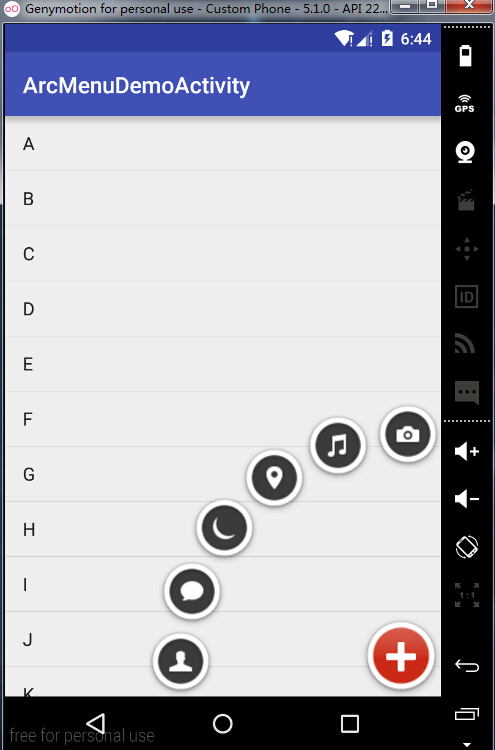
Android 实现卫星菜单的更多相关文章
- Android之卫星菜单的实现
卫星菜单是现在一个非常受欢迎的“控件”,很多Android程序员都趋之若鹜,预览如下图.传统的卫星菜单是用Animation实现的,需要大量的代码,而且算法极多,一不小心就要通宵Debug.本帖贴出用 ...
- Android 实现卫星菜单(精简版)
MainActivity.java public class MainActivity extends AppCompatActivity { private ArcDemo mArc; privat ...
- android 实现自定义卫星菜单
看了hyman老师的视频,听起来有点迷糊,所以就想把实现卫星菜单的实现总结一下.长话短说,下面总结一下: 一.自定义ViewGroup1).自定义属性文件 属性的定义: <attr name=& ...
- Android双向滑动菜单完全解析,教你如何一分钟实现双向滑动特效
转载请注明出处:http://blog.csdn.net/guolin_blog/article/details/9671609 记得在很早之前,我写了一篇关于Android滑动菜单的文章,其中有一个 ...
- Android 的上下文菜单: Context Menu,registerForContextMenu(getListView())
概述: Android 的上下文菜单类似于 PC 上的右键菜单.当为一个视图注册了上下文菜单之后,长按(2 秒左右)这个视图对象就会弹出一个浮动菜单,即上下文菜单.任何视图都可以注册上下文菜单,不过, ...
- android中常用菜单(menu)的基本知识
(一)选项菜单 1.简单的创建菜单: @Override public boolean onCreateOptionsMenu(Menu menu) { super.onCreateOptionsMe ...
- Android SlidingMenu侧滑菜单使用
把下载的侧滑菜单压缩包打开,会有一个library文件夹,在eclipse中import existing android code into workspace,导入library文件夹,并且选择作 ...
- 【转】Android双向滑动菜单完全解析,教你如何一分钟实现双向滑动特效
转载请注明出处:http://blog.csdn.net/guolin_blog/article/details/9671609 记得在很早之前,我写了一篇关于Android滑动菜单的文章,其中有一个 ...
- Android:有关菜单的学习(供自己参考)
Android:有关==菜单==的学习 上下文菜单 上下文菜单就是手机中对某一项进行==点击一定时间==后弹出的针对该项处理的菜单. context_menu.xml: <?xml versio ...
随机推荐
- RDLC系列之七 条码打印
参考: C# 条码标签打印程序,RDLC报表动态显示多条码标签的方法 http://www.cnblogs.com/vice/p/4105898.html 我做的思路是:不使用数据库存储image的b ...
- Android View.onMeasure方法的理解
View在屏幕上显示出来要先经过measure(计算)和layout(布局).1.什么时候调用onMeasure方法? 当控件的父元素正要放置该控件时调用.父元素会问子控件一个问题,“你想要用多大地方 ...
- immutability-javascript
https://www.sitepoint.com/immutability-javascript/
- 佳博80250打印机怎么看打印机IP
插上电源关机状态开机前按住走纸键(FEED)先别放手长按大概5-10秒手放开,打印机就会自动打印出一张测试纸的,纸上有个IP的,此IP就是打印机IP了!
- vim自动添加注释
我想了下,要做好一件事, 1,首先喜欢它最才有动机去了解它 2,道听途说about那东西的,会去了解并去玩转 3,兴趣需要培养 一 添加vim头部信息. 系统:C67 追加以下代码到 /etc/vim ...
- Linux 网络编程六(socket通信UDP版)
//udp接收消息 #include <stdio.h> #include <stdlib.h> #include <string.h> #include < ...
- Qt——鼠标拖动调整窗口大小
要求:鼠标移到界面边角时,鼠标样式相应地发生改变. 实现方法一: 重写mouseMoveEvent,如果鼠标没有按下,则根据鼠标在界面上的位置设置鼠标样式,如果鼠标按下,则根据位置判断该怎样调整界面大 ...
- JS调用Silverlight方法拾遗
在最近做的物联网项目中,需要利用封装过的Silverlight刻度控件显示温度,湿度,二氧化碳浓度等值.由于最新的数据是通过js ajax获取的,所以需要把这些数据传递给silverlight显示,这 ...
- 做leetcode的几点体会分享(转)
1 大部分题目你都是可以自己做出来的.所以,第一遍尽量不要网上找答案: 2 写了的不管通过的,不通过的答案要保存下来.不通过的,也要记录下来哪儿没有通过.很有可能你这次错了,不知道怎么搞过了,下次还是 ...
- 学习笔记——Maven实战(四)基于Maven的持续集成实践
Martin的<持续集成> 相信很多读者和我一样,最早接触到持续集成的概念是来自Martin的著名文章<持续集成>,该文最早发布于2000年9月,之后在2006年进行了一次修订 ...