
Android 启动过程简析
首先我们先来看android构架图:

android系统是构建在linux系统上面的。
所以android设备启动经历3个过程。
Boot Loader,Linux Kernel & Android 系统服务。
1.基本启动过程
系统引导bootloader 加载boot.img
由bootloader 加载内核kernel
文件系统挂载,init
完成引导进程(文件解析、属性设置、启动服务、执行动作)
重要的服务进程zygote 建立Java Runtime,建立虚拟机 启动Android System Server
系统服务System Server 通过System Manager管理android的服务
桌面launcher 各个服务已经就绪,桌面程序Home在ActivityManagerService的服务过程中建立
2.init
android 启动流程图:
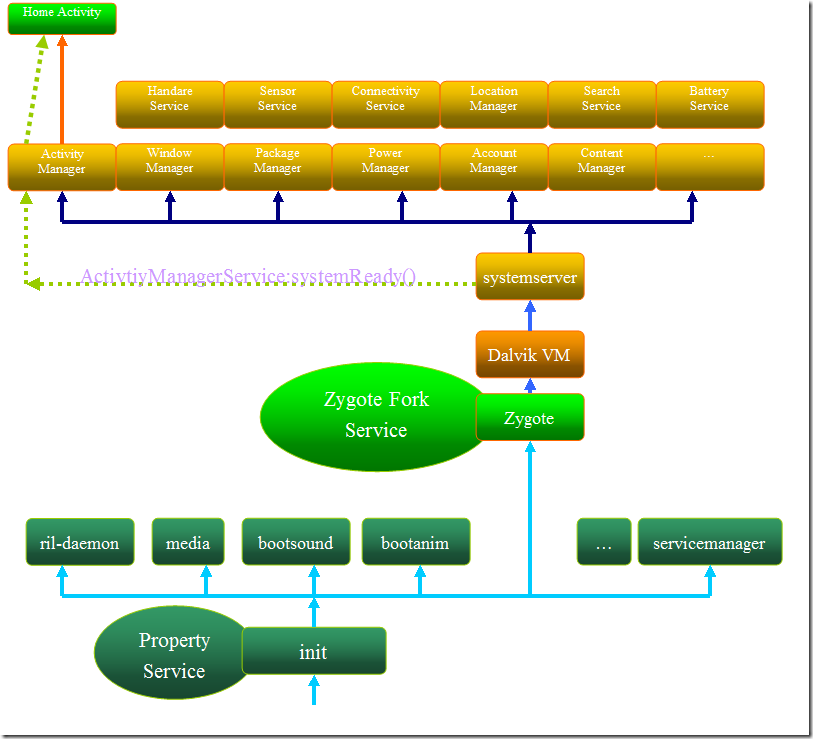
是有kernel启动的第一个进程。
用来完成其他服务的引导进程。
init启动的过程记录在init.rc文件中。
2.1 init.rc的语法
rc文件只有在System/Core/Init/readme.txt中有描述
一共分为4种设计。
Action
Commands
Services
Options
Action & Services 暗示着一个新的语句的开始,这两个关键字后面跟着的 commands 或者 options 都属于这个新语句。
Action就是响应某事件的过程
而services就是可执行程序。
2.2 init.rc实例分析
android5.0下面的init.rc
位置如下:system\core\rootdir
# Copyright (C) 2012 The Android Open Source Project

#

# IMPORTANT: Do not create world writable files or directories.

# This is a common source of Android security bugs.

#

import /init.environ.rc

import /init.usb.rc

import /init.${ro.hardware}.rc

import /init.${ro.zygote}.rc

import /init.trace.rc

on early-init

    # Set init and its forked children's oom_adj.

    write /proc/1/oom_score_adj -1000

    # Apply strict SELinux checking of PROT_EXEC on mmap/mprotect calls.

    write /sys/fs/selinux/checkreqprot 0

    # Set the security context for the init process.

    # This should occur before anything else (e.g. ueventd) is started.

    setcon u:r:init:s0

    # Set the security context of /adb_keys if present.

    restorecon /adb_keys

    start ueventd

    # create mountpoints

    mkdir /mnt 0775 root system

on init

    sysclktz 0

    loglevel 3

    # Backward compatibility

    symlink /system/etc /etc

    symlink /sys/kernel/debug /d

    # Right now vendor lives on the same filesystem as system,

    # but someday that may change.

    symlink /system/vendor /vendor

    # Create cgroup mount point for cpu accounting

    mkdir /acct

    mount cgroup none /acct cpuacct

    mkdir /acct/uid

    # Create cgroup mount point for memory

    mount tmpfs none /sys/fs/cgroup mode=0750,uid=0,gid=1000

    mkdir /sys/fs/cgroup/memory 0750 root system

    mount cgroup none /sys/fs/cgroup/memory memory

    write /sys/fs/cgroup/memory/memory.move_charge_at_immigrate 1

    chown root system /sys/fs/cgroup/memory/tasks

    chmod 0660 /sys/fs/cgroup/memory/tasks

    mkdir /sys/fs/cgroup/memory/sw 0750 root system

    write /sys/fs/cgroup/memory/sw/memory.swappiness 100

    write /sys/fs/cgroup/memory/sw/memory.move_charge_at_immigrate 1

    chown root system /sys/fs/cgroup/memory/sw/tasks

    chmod 0660 /sys/fs/cgroup/memory/sw/tasks

    mkdir /system

    mkdir /data 0771 system system

    mkdir /cache 0770 system cache

    mkdir /config 0500 root root

    # See storage config details at http://source.android.com/tech/storage/

    mkdir /mnt/shell 0700 shell shell

    mkdir /mnt/media_rw 0700 media_rw media_rw

    mkdir /storage 0751 root sdcard_r

    # Directory for putting things only root should see.

    mkdir /mnt/secure 0700 root root

    # Directory for staging bindmounts

    mkdir /mnt/secure/staging 0700 root root

    # Directory-target for where the secure container

    # imagefile directory will be bind-mounted

    mkdir /mnt/secure/asec  0700 root root

    # Secure container public mount points.

    mkdir /mnt/asec  0700 root system

    mount tmpfs tmpfs /mnt/asec mode=0755,gid=1000

    # Filesystem image public mount points.

    mkdir /mnt/obb 0700 root system

    mount tmpfs tmpfs /mnt/obb mode=0755,gid=1000

    # memory control cgroup

    mkdir /dev/memcg 0700 root system

    mount cgroup none /dev/memcg memory

    write /proc/sys/kernel/panic_on_oops 1

    write /proc/sys/kernel/hung_task_timeout_secs 0

    write /proc/cpu/alignment 4

    write /proc/sys/kernel/sched_latency_ns 10000000

    write /proc/sys/kernel/sched_wakeup_granularity_ns 2000000

    write /proc/sys/kernel/sched_compat_yield 1

    write /proc/sys/kernel/sched_child_runs_first 0

    write /proc/sys/kernel/randomize_va_space 2

    write /proc/sys/kernel/kptr_restrict 2

    write /proc/sys/vm/mmap_min_addr 32768

    write /proc/sys/net/ipv4/ping_group_range "0 2147483647"

    write /proc/sys/net/unix/max_dgram_qlen 300

    write /proc/sys/kernel/sched_rt_runtime_us 950000

    write /proc/sys/kernel/sched_rt_period_us 1000000

    # reflect fwmark from incoming packets onto generated replies

    write /proc/sys/net/ipv4/fwmark_reflect 1

    write /proc/sys/net/ipv6/fwmark_reflect 1

    # set fwmark on accepted sockets

    write /proc/sys/net/ipv4/tcp_fwmark_accept 1

    # Create cgroup mount points for process groups

    mkdir /dev/cpuctl

    mount cgroup none /dev/cpuctl cpu

    chown system system /dev/cpuctl

    chown system system /dev/cpuctl/tasks

    chmod 0660 /dev/cpuctl/tasks

    write /dev/cpuctl/cpu.shares 1024

    write /dev/cpuctl/cpu.rt_runtime_us 950000

    write /dev/cpuctl/cpu.rt_period_us 1000000

    mkdir /dev/cpuctl/apps

    chown system system /dev/cpuctl/apps/tasks

    chmod 0666 /dev/cpuctl/apps/tasks

    write /dev/cpuctl/apps/cpu.shares 1024

    write /dev/cpuctl/apps/cpu.rt_runtime_us 800000

    write /dev/cpuctl/apps/cpu.rt_period_us 1000000

    mkdir /dev/cpuctl/apps/bg_non_interactive

    chown system system /dev/cpuctl/apps/bg_non_interactive/tasks

    chmod 0666 /dev/cpuctl/apps/bg_non_interactive/tasks

    # 5.0 %

    write /dev/cpuctl/apps/bg_non_interactive/cpu.shares 52

    write /dev/cpuctl/apps/bg_non_interactive/cpu.rt_runtime_us 700000

    write /dev/cpuctl/apps/bg_non_interactive/cpu.rt_period_us 1000000

    # qtaguid will limit access to specific data based on group memberships.

    #   net_bw_acct grants impersonation of socket owners.

    #   net_bw_stats grants access to other apps' detailed tagged-socket stats.

    chown root net_bw_acct /proc/net/xt_qtaguid/ctrl

    chown root net_bw_stats /proc/net/xt_qtaguid/stats

    # Allow everybody to read the xt_qtaguid resource tracking misc dev.

    # This is needed by any process that uses socket tagging.

    chmod 0644 /dev/xt_qtaguid

    # Create location for fs_mgr to store abbreviated output from filesystem

    # checker programs.

    mkdir /dev/fscklogs 0770 root system

    # pstore/ramoops previous console log

    mount pstore pstore /sys/fs/pstore

    chown system log /sys/fs/pstore/console-ramoops

    chmod 0440 /sys/fs/pstore/console-ramoops

# Healthd can trigger a full boot from charger mode by signaling this

# property when the power button is held.

on property:sys.boot_from_charger_mode=1

    class_stop charger

    trigger late-init

# Load properties from /system/ + /factory after fs mount.

on load_all_props_action

    load_all_props

# Indicate to fw loaders that the relevant mounts are up.

on firmware_mounts_complete

    rm /dev/.booting

# Mount filesystems and start core system services.

on late-init

    trigger early-fs

    trigger fs

    trigger post-fs

    trigger post-fs-data

    # Load properties from /system/ + /factory after fs mount. Place

    # this in another action so that the load will be scheduled after the prior

    # issued fs triggers have completed.

    trigger load_all_props_action

    # Remove a file to wake up anything waiting for firmware.

    trigger firmware_mounts_complete

    trigger early-boot

    trigger boot

on post-fs

    # once everything is setup, no need to modify /

    mount rootfs rootfs / ro remount

    # mount shared so changes propagate into child namespaces

    mount rootfs rootfs / shared rec

    # We chown/chmod /cache again so because mount is run as root + defaults

    chown system cache /cache

    chmod 0770 /cache

    # We restorecon /cache in case the cache partition has been reset.

    restorecon_recursive /cache

    # This may have been created by the recovery system with odd permissions

    chown system cache /cache/recovery

    chmod 0770 /cache/recovery

    #change permissions on vmallocinfo so we can grab it from bugreports

    chown root log /proc/vmallocinfo

    chmod 0440 /proc/vmallocinfo

    chown root log /proc/slabinfo

    chmod 0440 /proc/slabinfo

    #change permissions on kmsg & sysrq-trigger so bugreports can grab kthread stacks

    chown root system /proc/kmsg

    chmod 0440 /proc/kmsg

    chown root system /proc/sysrq-trigger

    chmod 0220 /proc/sysrq-trigger

    chown system log /proc/last_kmsg

    chmod 0440 /proc/last_kmsg

    # make the selinux kernel policy world-readable

    chmod 0444 /sys/fs/selinux/policy

    # create the lost+found directories, so as to enforce our permissions

    mkdir /cache/lost+found 0770 root root

on post-fs-data

    # We chown/chmod /data again so because mount is run as root + defaults

    chown system system /data

    chmod 0771 /data

    # We restorecon /data in case the userdata partition has been reset.

    restorecon /data

    # Avoid predictable entropy pool. Carry over entropy from previous boot.

    copy /data/system/entropy.dat /dev/urandom

    # Create dump dir and collect dumps.

    # Do this before we mount cache so eventually we can use cache for

    # storing dumps on platforms which do not have a dedicated dump partition.

    mkdir /data/dontpanic 0750 root log

    # Collect apanic data, free resources and re-arm trigger

    copy /proc/apanic_console /data/dontpanic/apanic_console

    chown root log /data/dontpanic/apanic_console

    chmod 0640 /data/dontpanic/apanic_console

    copy /proc/apanic_threads /data/dontpanic/apanic_threads

    chown root log /data/dontpanic/apanic_threads

    chmod 0640 /data/dontpanic/apanic_threads

    write /proc/apanic_console 1

    # create basic filesystem structure

    mkdir /data/misc 01771 system misc

    mkdir /data/misc/adb 02750 system shell

    mkdir /data/misc/bluedroid 0770 bluetooth net_bt_stack

    mkdir /data/misc/bluetooth 0770 system system

    mkdir /data/misc/keystore 0700 keystore keystore

    mkdir /data/misc/keychain 0771 system system

    mkdir /data/misc/net 0750 root shell

    mkdir /data/misc/radio 0770 system radio

    mkdir /data/misc/sms 0770 system radio

    mkdir /data/misc/zoneinfo 0775 system system

    mkdir /data/misc/vpn 0770 system vpn

    mkdir /data/misc/shared_relro 0771 shared_relro shared_relro

    mkdir /data/misc/systemkeys 0700 system system

    mkdir /data/misc/wifi 0770 wifi wifi

    mkdir /data/misc/wifi/sockets 0770 wifi wifi

    mkdir /data/misc/wifi/wpa_supplicant 0770 wifi wifi

    mkdir /data/misc/ethernet 0770 system system

    mkdir /data/misc/dhcp 0770 dhcp dhcp

    mkdir /data/misc/user 0771 root root

    # give system access to wpa_supplicant.conf for backup and restore

    chmod 0660 /data/misc/wifi/wpa_supplicant.conf

    mkdir /data/local 0751 root root

    mkdir /data/misc/media 0700 media media

    # For security reasons, /data/local/tmp should always be empty.

    # Do not place files or directories in /data/local/tmp

    mkdir /data/local/tmp 0771 shell shell

    mkdir /data/data 0771 system system

    mkdir /data/app-private 0771 system system

    mkdir /data/app-asec 0700 root root

    mkdir /data/app-lib 0771 system system

    mkdir /data/app 0771 system system

    mkdir /data/property 0700 root root

    # create dalvik-cache, so as to enforce our permissions

    mkdir /data/dalvik-cache 0771 root root

    mkdir /data/dalvik-cache/profiles 0711 system system

    # create resource-cache and double-check the perms

    mkdir /data/resource-cache 0771 system system

    chown system system /data/resource-cache

    chmod 0771 /data/resource-cache

    # create the lost+found directories, so as to enforce our permissions

    mkdir /data/lost+found 0770 root root

    # create directory for DRM plug-ins - give drm the read/write access to

    # the following directory.

    mkdir /data/drm 0770 drm drm

    # create directory for MediaDrm plug-ins - give drm the read/write access to

    # the following directory.

    mkdir /data/mediadrm 0770 mediadrm mediadrm

    # symlink to bugreport storage location

    symlink /data/data/com.android.shell/files/bugreports /data/bugreports

    # Separate location for storing security policy files on data

    mkdir /data/security 0711 system system

    # Reload policy from /data/security if present.

    setprop selinux.reload_policy 1

    # Set SELinux security contexts on upgrade or policy update.

    restorecon_recursive /data

    # If there is no fs-post-data action in the init.<device>.rc file, you

    # must uncomment this line, otherwise encrypted filesystems

    # won't work.

    # Set indication (checked by vold) that we have finished this action

    #setprop vold.post_fs_data_done 1

on boot

    # basic network init

    ifup lo

    hostname localhost

    domainname localdomain

    # set RLIMIT_NICE to allow priorities from 19 to -20

    setrlimit 13 40 40

    # Memory management.  Basic kernel parameters, and allow the high

    # level system server to be able to adjust the kernel OOM driver

    # parameters to match how it is managing things.

    write /proc/sys/vm/overcommit_memory 1

    write /proc/sys/vm/min_free_order_shift 4

    chown root system /sys/module/lowmemorykiller/parameters/adj

    chmod 0220 /sys/module/lowmemorykiller/parameters/adj

    chown root system /sys/module/lowmemorykiller/parameters/minfree

    chmod 0220 /sys/module/lowmemorykiller/parameters/minfree

    # Tweak background writeout

    write /proc/sys/vm/dirty_expire_centisecs 200

    write /proc/sys/vm/dirty_background_ratio  5

    # Permissions for System Server and daemons.

    chown radio system /sys/android_power/state

    chown radio system /sys/android_power/request_state

    chown radio system /sys/android_power/acquire_full_wake_lock

    chown radio system /sys/android_power/acquire_partial_wake_lock

    chown radio system /sys/android_power/release_wake_lock

    chown system system /sys/power/autosleep

    chown system system /sys/power/state

    chown system system /sys/power/wakeup_count

    chown radio system /sys/power/wake_lock

    chown radio system /sys/power/wake_unlock

    chmod 0660 /sys/power/state

    chmod 0660 /sys/power/wake_lock

    chmod 0660 /sys/power/wake_unlock

    chown system system /sys/devices/system/cpu/cpufreq/interactive/timer_rate

    chmod 0660 /sys/devices/system/cpu/cpufreq/interactive/timer_rate

    chown system system /sys/devices/system/cpu/cpufreq/interactive/timer_slack

    chmod 0660 /sys/devices/system/cpu/cpufreq/interactive/timer_slack

    chown system system /sys/devices/system/cpu/cpufreq/interactive/min_sample_time

    chmod 0660 /sys/devices/system/cpu/cpufreq/interactive/min_sample_time

    chown system system /sys/devices/system/cpu/cpufreq/interactive/hispeed_freq

    chmod 0660 /sys/devices/system/cpu/cpufreq/interactive/hispeed_freq

    chown system system /sys/devices/system/cpu/cpufreq/interactive/target_loads

    chmod 0660 /sys/devices/system/cpu/cpufreq/interactive/target_loads

    chown system system /sys/devices/system/cpu/cpufreq/interactive/go_hispeed_load

    chmod 0660 /sys/devices/system/cpu/cpufreq/interactive/go_hispeed_load

    chown system system /sys/devices/system/cpu/cpufreq/interactive/above_hispeed_delay

    chmod 0660 /sys/devices/system/cpu/cpufreq/interactive/above_hispeed_delay

    chown system system /sys/devices/system/cpu/cpufreq/interactive/boost

    chmod 0660 /sys/devices/system/cpu/cpufreq/interactive/boost

    chown system system /sys/devices/system/cpu/cpufreq/interactive/boostpulse

    chown system system /sys/devices/system/cpu/cpufreq/interactive/input_boost

    chmod 0660 /sys/devices/system/cpu/cpufreq/interactive/input_boost

    chown system system /sys/devices/system/cpu/cpufreq/interactive/boostpulse_duration

    chmod 0660 /sys/devices/system/cpu/cpufreq/interactive/boostpulse_duration

    chown system system /sys/devices/system/cpu/cpufreq/interactive/io_is_busy

    chmod 0660 /sys/devices/system/cpu/cpufreq/interactive/io_is_busy

    # Assume SMP uses shared cpufreq policy for all CPUs

    chown system system /sys/devices/system/cpu/cpu0/cpufreq/scaling_max_freq

    chmod 0660 /sys/devices/system/cpu/cpu0/cpufreq/scaling_max_freq

    chown system system /sys/class/timed_output/vibrator/enable

    chown system system /sys/class/leds/keyboard-backlight/brightness

    chown system system /sys/class/leds/lcd-backlight/brightness

    chown system system /sys/class/leds/button-backlight/brightness

    chown system system /sys/class/leds/jogball-backlight/brightness

    chown system system /sys/class/leds/red/brightness

    chown system system /sys/class/leds/green/brightness

    chown system system /sys/class/leds/blue/brightness

    chown system system /sys/class/leds/red/device/grpfreq

    chown system system /sys/class/leds/red/device/grppwm

    chown system system /sys/class/leds/red/device/blink

    chown system system /sys/class/timed_output/vibrator/enable

    chown system system /sys/module/sco/parameters/disable_esco

    chown system system /sys/kernel/ipv4/tcp_wmem_min

    chown system system /sys/kernel/ipv4/tcp_wmem_def

    chown system system /sys/kernel/ipv4/tcp_wmem_max

    chown system system /sys/kernel/ipv4/tcp_rmem_min

    chown system system /sys/kernel/ipv4/tcp_rmem_def

    chown system system /sys/kernel/ipv4/tcp_rmem_max

    chown root radio /proc/cmdline

    # Define default initial receive window size in segments.

    setprop net.tcp.default_init_rwnd 60

    class_start core

on nonencrypted

    class_start main

    class_start late_start

on property:vold.decrypt=trigger_default_encryption

    start defaultcrypto

on property:vold.decrypt=trigger_encryption

    start surfaceflinger

    start encrypt

on property:sys.init_log_level=*

    loglevel ${sys.init_log_level}

on charger

    class_start charger

on property:vold.decrypt=trigger_reset_main

    class_reset main

on property:vold.decrypt=trigger_load_persist_props

    load_persist_props

on property:vold.decrypt=trigger_post_fs_data

    trigger post-fs-data

on property:vold.decrypt=trigger_restart_min_framework

    class_start main

on property:vold.decrypt=trigger_restart_framework

    class_start main

    class_start late_start

on property:vold.decrypt=trigger_shutdown_framework

    class_reset late_start

    class_reset main

on property:sys.powerctl=*

    powerctl ${sys.powerctl}

# system server cannot write to /proc/sys files,

# and chown/chmod does not work for /proc/sys/ entries.

# So proxy writes through init.

on property:sys.sysctl.extra_free_kbytes=*

    write /proc/sys/vm/extra_free_kbytes ${sys.sysctl.extra_free_kbytes}

# "tcp_default_init_rwnd" Is too long!

on property:sys.sysctl.tcp_def_init_rwnd=*

    write /proc/sys/net/ipv4/tcp_default_init_rwnd ${sys.sysctl.tcp_def_init_rwnd}

## Daemon processes to be run by init.

##

service ueventd /sbin/ueventd

    class core

    critical

    seclabel u:r:ueventd:s0

service logd /system/bin/logd

    class core

    socket logd stream 0666 logd logd

    socket logdr seqpacket 0666 logd logd

    socket logdw dgram 0222 logd logd

    seclabel u:r:logd:s0

service healthd /sbin/healthd

    class core

    critical

    seclabel u:r:healthd:s0

service console /system/bin/sh

    class core

    console

    disabled

    user shell

    group shell log

    seclabel u:r:shell:s0

on property:ro.debuggable=1

    start console

# adbd is controlled via property triggers in init.<platform>.usb.rc

service adbd /sbin/adbd --root_seclabel=u:r:su:s0

    class core

    socket adbd stream 660 system system

    disabled

    seclabel u:r:adbd:s0

# adbd on at boot in emulator

on property:ro.kernel.qemu=1

    start adbd

service lmkd /system/bin/lmkd

    class core

    critical

    socket lmkd seqpacket 0660 system system

service servicemanager /system/bin/servicemanager

    class core

    user system

    group system

    critical

    onrestart restart healthd

    onrestart restart zygote

    onrestart restart media

    onrestart restart surfaceflinger

    onrestart restart drm

service vold /system/bin/vold

    class core

    socket vold stream 0660 root mount

    ioprio be 2

service netd /system/bin/netd

    class main

    socket netd stream 0660 root system

    socket dnsproxyd stream 0660 root inet

    socket mdns stream 0660 root system

    socket fwmarkd stream 0660 root inet

service debuggerd /system/bin/debuggerd

    class main

service debuggerd64 /system/bin/debuggerd64

    class main

service ril-daemon /system/bin/rild

    class main

    socket rild stream 660 root radio

    socket rild-debug stream 660 radio system

    user root

    group radio cache inet misc audio log

service surfaceflinger /system/bin/surfaceflinger

    class core

    user system

    group graphics drmrpc

    onrestart restart zygote

service drm /system/bin/drmserver

    class main

    user drm

    group drm system inet drmrpc

service media /system/bin/mediaserver

    class main

    user media

    group audio camera inet net_bt net_bt_admin net_bw_acct drmrpc mediadrm

    ioprio rt 4

# One shot invocation to deal with encrypted volume.

service defaultcrypto /system/bin/vdc --wait cryptfs mountdefaultencrypted

    disabled

    oneshot

    # vold will set vold.decrypt to trigger_restart_framework (default

    # encryption) or trigger_restart_min_framework (other encryption)

# One shot invocation to encrypt unencrypted volumes

service encrypt /system/bin/vdc --wait cryptfs enablecrypto inplace default

    disabled

    oneshot

    # vold will set vold.decrypt to trigger_restart_framework (default

    # encryption)

service bootanim /system/bin/bootanimation

    class core

    user graphics

    group graphics audio

    disabled

    oneshot

service installd /system/bin/installd

    class main

    socket installd stream 600 system system

service flash_recovery /system/bin/install-recovery.sh

    class main

    seclabel u:r:install_recovery:s0

    oneshot

service racoon /system/bin/racoon

    class main

    socket racoon stream 600 system system

    # IKE uses UDP port 500. Racoon will setuid to vpn after binding the port.

    group vpn net_admin inet

    disabled

    oneshot

service mtpd /system/bin/mtpd

    class main

    socket mtpd stream 600 system system

    user vpn

    group vpn net_admin inet net_raw

    disabled

    oneshot

service keystore /system/bin/keystore /data/misc/keystore

    class main

    user keystore

    group keystore drmrpc

service dumpstate /system/bin/dumpstate -s

    class main

    socket dumpstate stream 0660 shell log

    disabled

    oneshot

service mdnsd /system/bin/mdnsd

    class main

    user mdnsr

    group inet net_raw

    socket mdnsd stream 0660 mdnsr inet

    disabled

    oneshot

service pre-recovery /system/bin/uncrypt

    class main

    disabled

    oneshot
inti.rc
节选部分关键代码:
on init

    sysclktz 0    //设置基准时间,默认是0

    loglevel 3

    # Backward compatibility

    symlink /system/etc /etc            //设置链接文件

    symlink /sys/kernel/debug /d     //设置链接文件

    # Right now vendor lives on the same filesystem as system,

    # but someday that may change.

    symlink /system/vendor /vendor

    # Create cgroup mount point for cpu accounting

    mkdir /acct                            //创建acct文件夹

    mount cgroup none /acct cpuacct

    mkdir /acct/uid

    # Create cgroup mount point for memory

    mount tmpfs none /sys/fs/cgroup mode=0750,uid=0,gid=1000

    mkdir /sys/fs/cgroup/memory 0750 root system

    mount cgroup none /sys/fs/cgroup/memory memory

    write /sys/fs/cgroup/memory/memory.move_charge_at_immigrate 1

    chown root system /sys/fs/cgroup/memory/tasks

    chmod 0660 /sys/fs/cgroup/memory/tasks

    mkdir /sys/fs/cgroup/memory/sw 0750 root system

    write /sys/fs/cgroup/memory/sw/memory.swappiness 100

    write /sys/fs/cgroup/memory/sw/memory.move_charge_at_immigrate 1

    chown root system /sys/fs/cgroup/memory/sw/tasks

    chmod 0660 /sys/fs/cgroup/memory/sw/tasks

    mkdir /system

    mkdir /data 0771 system system

    mkdir /cache 0770 system cache

    mkdir /config 0500 root root
如上所示,主要是创建文件夹,链接文件,挂载等等的操作。
on boot

    # basic network init

    ifup lo

    hostname localhost

    domainname localdomain

    # set RLIMIT_NICE to allow priorities from 19 to -20

    setrlimit 13 40 40

    # Memory management.  Basic kernel parameters, and allow the high

    # level system server to be able to adjust the kernel OOM driver

    # parameters to match how it is managing things.

    write /proc/sys/vm/overcommit_memory 1

    write /proc/sys/vm/min_free_order_shift 4

    chown root system /sys/module/lowmemorykiller/parameters/adj

    chmod 0220 /sys/module/lowmemorykiller/parameters/adj

    chown root system /sys/module/lowmemorykiller/parameters/minfree

    chmod 0220 /sys/module/lowmemorykiller/parameters/minfree

    # Tweak background writeout

    write /proc/sys/vm/dirty_expire_centisecs 200

    write /proc/sys/vm/dirty_background_ratio  5

    # Permissions for System Server and daemons.

    chown radio system /sys/android_power/state

    chown radio system /sys/android_power/request_state

    chown radio system /sys/android_power/acquire_full_wake_lock

    chown radio system /sys/android_power/acquire_partial_wake_lock

    chown radio system /sys/android_power/release_wake_lock

    chown system system /sys/power/autosleep

    chown system system /sys/power/state

    chown system system /sys/power/wakeup_count

    chown radio system /sys/power/wake_lock

    chown radio system /sys/power/wake_unlock

    chmod 0660 /sys/power/state

    chmod 0660 /sys/power/wake_lock

    chmod 0660 /sys/power/wake_unlock
都是设置权限的操作。
service servicemanager /system/bin/servicemanager

    class core

    user system

    group system

    critical

    onrestart restart healthd

    onrestart restart zygote

    onrestart restart media

    onrestart restart surfaceflinger

    onrestart restart drm
启动servicemanager这个大管家。
其他还有很多,具体看init.rc文件。
3.系统关键服务启动简析
3.1 servicemanager---大管家
如上,servicemanager的启动,会同时restart其他一些关键的进程。
core的特性表示其他同类型的class。会同时启动或者关闭。
service ueventd /sbin/ueventd

    class core

    critical

    seclabel u:r:ueventd:s0

service logd /system/bin/logd

    class core

    socket logd stream 0666 logd logd

    socket logdr seqpacket 0666 logd logd

    socket logdw dgram 0222 logd logd

    seclabel u:r:logd:s0

service healthd /sbin/healthd

    class core

    critical

    seclabel u:r:healthd:s0

service console /system/bin/sh

    class core

    console

    disabled

    user shell

    group shell log

    seclabel u:r:shell:s0
critical意味着,这个是关键进程,一旦进程在4分钟内退出了4次,手机将会进入还原模式。
3.2 Zygote
android中绝大部分进程都是从zygote中来的。
zygote的启动在android5.0的时候,可以进行配置。
service zygote /system/bin/app_process64 -Xzygote /system/bin --zygote --start-system-server

    class main

    socket zygote stream 660 root system

    onrestart write /sys/android_power/request_state wake

    onrestart write /sys/power/state on

    onrestart restart media

    onrestart restart netd
我们选择一个看看:
从上面可以看出:
ServiceName:zygote
path:/system/bin/app_process64
启动的位置在app_process64 并且之后启动systemserver。
先看看app_process64是什么鬼?
源码在:frameworks\base\cmds\app_process\app_main.cpp
int main(int argc, char* const argv[])

{

    if (prctl(PR_SET_NO_NEW_PRIVS, 1, 0, 0, 0) < 0) {

        // Older kernels don't understand PR_SET_NO_NEW_PRIVS and return

        // EINVAL. Don't die on such kernels.

        if (errno != EINVAL) {

            LOG_ALWAYS_FATAL("PR_SET_NO_NEW_PRIVS failed: %s", strerror(errno));

            return 12;

        }

    }

    AppRuntime runtime(argv[0], computeArgBlockSize(argc, argv));

    // Process command line arguments

    // ignore argv[0]

    argc--;

    argv++;

    // Everything up to '--' or first non '-' arg goes to the vm.

    //

    // The first argument after the VM args is the "parent dir", which

    // is currently unused.

    //

    // After the parent dir, we expect one or more the following internal

    // arguments :

    //

    // --zygote : Start in zygote mode

    // --start-system-server : Start the system server.

    // --application : Start in application (stand alone, non zygote) mode.

    // --nice-name : The nice name for this process.

    //

    // For non zygote starts, these arguments will be followed by

    // the main class name. All remaining arguments are passed to

    // the main method of this class.

    //

    // For zygote starts, all remaining arguments are passed to the zygote.

    // main function.

    //

    // Note that we must copy argument string values since we will rewrite the

    // entire argument block when we apply the nice name to argv0.

    int i;

    for (i = 0; i < argc; i++) {

        if (argv[i][0] != '-') {

            break;

        }

        if (argv[i][1] == '-' && argv[i][2] == 0) {

            ++i; // Skip --.

            break;

        }

        runtime.addOption(strdup(argv[i]));

    }

    // Parse runtime arguments.  Stop at first unrecognized option.

    bool zygote = false;

    bool startSystemServer = false;

    bool application = false;

    String8 niceName;

    String8 className;

    ++i;  // Skip unused "parent dir" argument.

    while (i < argc) {

        const char* arg = argv[i++];

        if (strcmp(arg, "--zygote") == 0) {

            zygote = true;

            niceName = ZYGOTE_NICE_NAME;

        } else if (strcmp(arg, "--start-system-server") == 0) {

            startSystemServer = true;

        } else if (strcmp(arg, "--application") == 0) {

            application = true;

        } else if (strncmp(arg, "--nice-name=", 12) == 0) {

            niceName.setTo(arg + 12);

        } else if (strncmp(arg, "--", 2) != 0) {

            className.setTo(arg);

            break;

        } else {

            --i;

            break;

        }

    }

    Vector<String8> args;

    if (!className.isEmpty()) {

        // We're not in zygote mode, the only argument we need to pass

        // to RuntimeInit is the application argument.

        //

        // The Remainder of args get passed to startup class main(). Make

        // copies of them before we overwrite them with the process name.

        args.add(application ? String8("application") : String8("tool"));

        runtime.setClassNameAndArgs(className, argc - i, argv + i);

    } else {

        // We're in zygote mode.

        maybeCreateDalvikCache();

        if (startSystemServer) {

            args.add(String8("start-system-server"));

        }

        char prop[PROP_VALUE_MAX];

        if (property_get(ABI_LIST_PROPERTY, prop, NULL) == 0) {

            LOG_ALWAYS_FATAL("app_process: Unable to determine ABI list from property %s.",

                ABI_LIST_PROPERTY);

            return 11;

        }

        String8 abiFlag("--abi-list=");

        abiFlag.append(prop);

        args.add(abiFlag);

        // In zygote mode, pass all remaining arguments to the zygote

        // main() method.

        for (; i < argc; ++i) {

            args.add(String8(argv[i]));

        }

    }

    if (!niceName.isEmpty()) {

        runtime.setArgv0(niceName.string());

        set_process_name(niceName.string());

    }

    if (zygote) {

        runtime.start("com.android.internal.os.ZygoteInit", args);

    } else if (className) {

        runtime.start("com.android.internal.os.RuntimeInit", args);

    } else {

        fprintf(stderr, "Error: no class name or --zygote supplied.\n");

        app_usage();

        LOG_ALWAYS_FATAL("app_process: no class name or --zygote supplied.");

        return 10;

    }

}
main
关键代码是
if (strcmp(arg, "--zygote") == 0) {

            zygote = true;

            niceName = ZYGOTE_NICE_NAME;
如果是zygote,就启动它:
runtime.start("com.android.internal.os.ZygoteInit", args);
3.3 systemserver
systemservice中的main,然后启动run:
        // Start services.

        try {

            startBootstrapServices();

            startCoreServices();

            startOtherServices();

        } catch (Throwable ex) {

            Slog.e("System", "******************************************");

            Slog.e("System", "************ Failure starting system services", ex);

            throw ex;

        }
在startBootstrapServices中启动,
AMS,PMS等服务
startOtherServices中启动
启动了WMS,
是的,android最重要的2个系统服务,启动了。
Android 启动过程简析的更多相关文章
- Linux进程启动过程简析
朱宇轲 + 原创作品转载请注明出处 + <Linux内核分析>MOOC课程http://mooc.study.163.com/course/USTC-1000029000 今天,我们将通过 ...
- Android 核心分析 之八Android 启动过程详解
Android 启动过程详解 Android从Linux系统启动有4个步骤: (1) init进程启动 (2) Native服务启动 (3) System Server,Android服务启动 (4) ...
- Android启动过程以及各个镜像的关系
Android启动过程 Android在启动的时候,会由UBOOT传入一个init参数,这个init参数指定了开机的时候第一个运行的程序,默认就是init程序,这个程序在ramdisk.img中.可以 ...
- Android(java)学习笔记162:Android启动过程(转载)
转载路径为: http://blog.jobbole.com/67931/ 1. 关于Android启动过程的问题: 当按下Android设备电源键时究竟发生了什么? Android的启动过程是怎么样 ...
- Android启动过程深入解析
本文由 伯乐在线 - 云海之巅 翻译.未经许可,禁止转载!英文出处:kpbird.欢迎加入翻译小组. 当按下Android设备电源键时究竟发生了什么? Android的启动过程是怎么样的? 什么是Li ...
- Android启动过程深入解析【转】
转自:http://www.open-open.com/lib/view/open1403250347934.html 当按下Android设备电源键时究竟发生了什么? Android的启动过程是怎么 ...
- Android(java)学习笔记105:Android启动过程(转载)
转载路径为: http://blog.jobbole.com/67931/ 1. 关于Android启动过程的问题: 当按下Android设备电源键时究竟发生了什么? Android的启动过程是怎么样 ...
- Nutch学习笔记二——抓取过程简析
在上篇学习笔记中http://www.cnblogs.com/huligong1234/p/3464371.html 主要记录Nutch安装及简单运行的过程. 笔记中 通过配置抓取地址http://b ...
- Android 启动过程总结
SystemServer的启动 frameworks/base/services/java/com/android/server/SystemServer.java: run() 其中调用Activi ...
随机推荐
- Laravel在不同的环境调用不同的配置文件
Laravel在不同的环境调用不同的配置文件 Laravel如何在不同的环境调用不同的配置文件?社区这个问题问的蛮多,如何优雅的方法实现呢,应该有好多方法吧,我一般习惯用两种方法,设置环境变量,或 ...
- [Node.js] BDD和Mocha框架
原文地址:http://www.moye.me/2014/11/22/bdd_mocha/ 引子 今天造了个轮子:写了个深拷贝任意JavaScript对象的模块(事实上npm上已经有类似的模块,纯造轮 ...
- Node.js Web 开发框架大全《静态文件服务器篇》
这篇文章与大家分享优秀的 Node.js 静态服务器模块.Node 是一个服务器端 JavaScript 解释器,它将改变服务器应该如何工作的概念.它的目标是帮助程序员构建高度可伸缩的应用程序,编写能 ...
- Mysql 修改密码及重置密码方法
修改密码: //选择数据库 use mysql; //修改密码 update user set password=password('新密码') where user='root'; //立即生效 f ...
- Android 学习笔记 BroadcastReceiver广播...
PS:不断提升自己,是件好事... 学习内容: 1.BroadcastReceiver的使用.. 2.通过BroadcastReceiver去启动Service... 1.BroadcastRecei ...
- Redis设计与实现-附加功能
发布与订阅 redis订阅分为精准的频道订阅与模糊匹配的模式订阅: redis将所有频道的订阅关系都保存在服务器状态pubsub_channels字典里,键是频道名,值是一个记录所有订阅此频道的客户端 ...
- 整理的有用的一些EF的CommonDAL小封装
CommonDAL封装: using System; using System.Collections.Generic; using System.Data.Entity; using System. ...
- 重新想象 Windows 8 Store Apps (70) - 其它: 文件压缩和解压缩, 与 Windows 商店相关的操作, app 与 web, 几个 Core 的应用, 页面的生命周期和程序的生命周期
[源码下载] 重新想象 Windows 8 Store Apps (70) - 其它: 文件压缩和解压缩, 与 Windows 商店相关的操作, app 与 web, 几个 Core 的应用, 页面的 ...
- DP入门---Robberies
HDU 2955 Description The aspiring Roy the Robber has seen a lot of American movies, and knows that ...
- 线段树区间求最大值(点更新)---I Hate It
HDU 1754 Description 很多学校流行一种比较的习惯.老师们很喜欢询问,从某某到某某当中,分数最高的是多少. 这让很多学生很反感. 不管你喜不喜欢,现在需要你做的是,就是按照老师的 ...