
[ROS]3 Linux编程练习
一起做RGB-SLAM(2)实验
第二讲 从图像到点云
http://www.cnblogs.com/gaoxiang12/p/4652478.html
 exbot@ubuntu:~$ cd CodeLearn

 exbot@ubuntu:~/CodeLearn$ cd Depth2PointCloud

 exbot@ubuntu:~/CodeLearn/Depth2PointCloud$ mkdir bin include lib src build

 exbot@ubuntu:~/CodeLearn/Depth2PointCloud$ touch CMakeLists.txt

 exbot@ubuntu:~/CodeLearn/Depth2PointCloud$ touch src/generatePointCloud.cpp

 exbot@ubuntu:~/CodeLearn/Depth2PointCloud$ touch src/CMakeLists.txt

 exbot@ubuntu:~/CodeLearn/Depth2PointCloud$ cd build

 exbot@ubuntu:~/CodeLearn/Depth2PointCloud/build$ cmake ..

 -- The C compiler identification is GNU

 -- The CXX compiler identification is GNU

 -- Check for working C compiler: /usr/bin/gcc

 -- Check for working C compiler: /usr/bin/gcc -- works

 -- Detecting C compiler ABI info

 -- Detecting C compiler ABI info - done

 -- Check for working CXX compiler: /usr/bin/c++

 -- Check for working CXX compiler: /usr/bin/c++ -- works

 -- Detecting CXX compiler ABI info

 -- Detecting CXX compiler ABI info - done

 -- checking for module 'eigen3'

 --   found eigen3, version 3.2.

 -- Found eigen: /usr/include/eigen3

 -- Boost version: 1.46.

 -- Found the following Boost libraries:

 --   system

 --   filesystem

 --   thread

 --   date_time

 --   iostreams

 --   serialization

 -- checking for module 'openni-dev'

 --   package 'openni-dev' not found

 -- Found openni: /usr/lib/libOpenNI.so

 -- Found libusb-1.0: /usr/include

 -- looking for PCL_COMMON

 -- Found PCL_COMMON: /usr/lib/libpcl_common.so

 -- looking for PCL_OCTREE

 -- Found PCL_OCTREE: /usr/lib/libpcl_octree.so

 -- looking for PCL_IO

 -- Found PCL_IO: /usr/lib/libpcl_io.so

 -- Found PCL: /usr/lib/libboost_system-mt.so;/usr/lib/libboost_filesystem-mt.so;/usr/lib/libboost_thread-mt.so;pthread;/usr/lib/libboost_date_time-mt.so;/usr/lib/libboost_iostreams-mt.so;/usr/lib/libboost_serialization-mt.so;optimized;/usr/lib/libpcl_common.so;debug;/usr/lib/libpcl_common.so;optimized;/usr/lib/libpcl_octree.so;debug;/usr/lib/libpcl_octree.so;/usr/lib/libOpenNI.so;vtkCommon;vtkRendering;vtkHybrid;vtkCharts;optimized;/usr/lib/libpcl_io.so;debug;/usr/lib/libpcl_io.so;/usr/lib/libboost_system-mt.so;/usr/lib/libboost_filesystem-mt.so;/usr/lib/libboost_thread-mt.so;pthread;/usr/lib/libboost_date_time-mt.so;/usr/lib/libboost_iostreams-mt.so;/usr/lib/libboost_serialization-mt.so;/usr/lib/libOpenNI.so;vtkCommon;vtkRendering;vtkHybrid;vtkCharts

 -- Configuring done

 WARNING: Target "generate_pointcloud" requests linking to directory "/usr/lib".  Targets may link only to libraries.  CMake is dropping the item.

 -- Generating done

 -- Build files have been written to: /home/exbot/CodeLearn/Depth2PointCloud/build

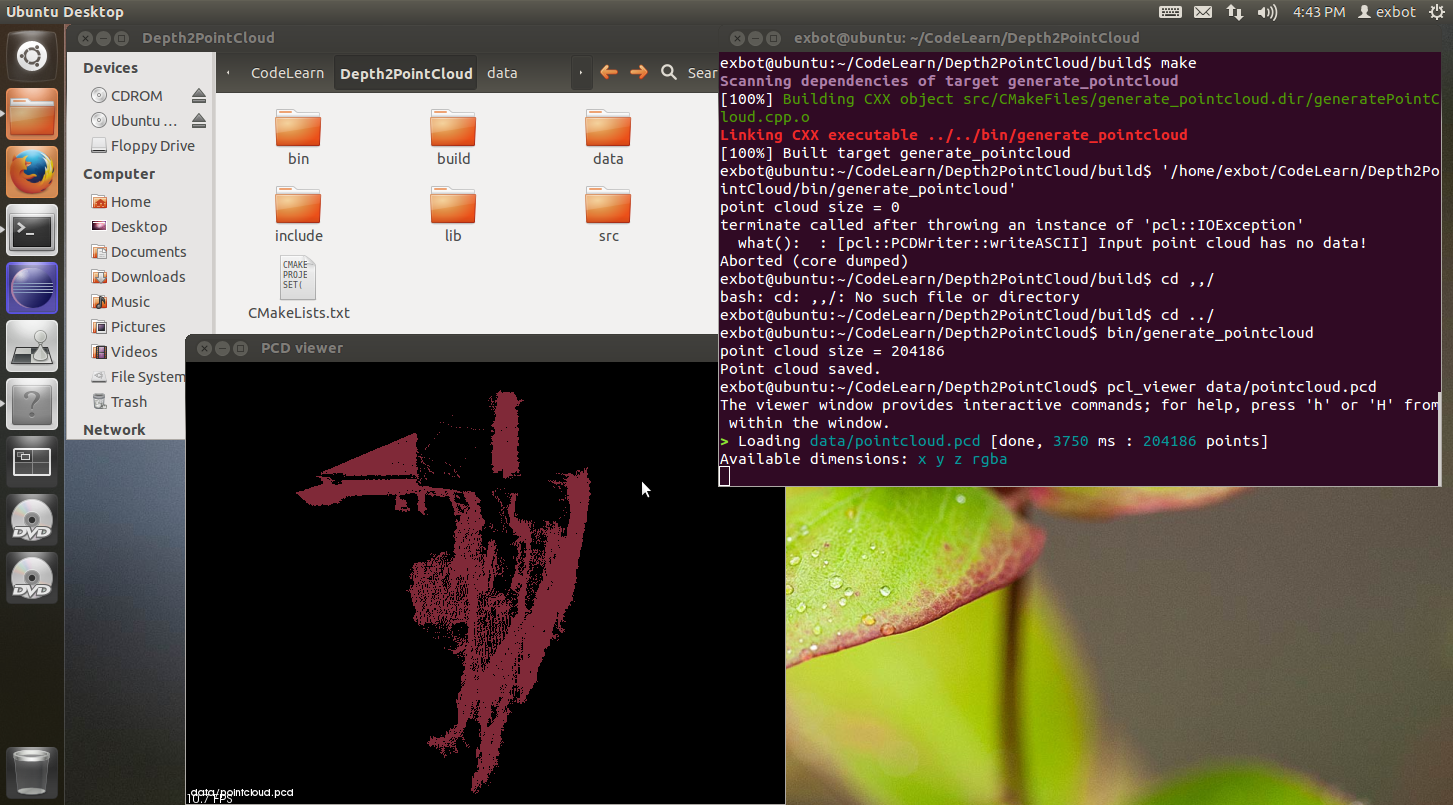
 exbot@ubuntu:~/CodeLearn/Depth2PointCloud/build$ make

 Scanning dependencies of target generate_pointcloud

 [%] Building CXX object src/CMakeFiles/generate_pointcloud.dir/generatePointCloud.cpp.o

 Linking CXX executable ../../bin/generate_pointcloud

 [%] Built target generate_pointcloud

 exbot@ubuntu:~/CodeLearn/Depth2PointCloud/build$ '/home/exbot/CodeLearn/Depth2PointCloud/bin/generate_pointcloud'

 point cloud size =

 terminate called after throwing an instance of 'pcl::IOException'

   what():  : [pcl::PCDWriter::writeASCII] Input point cloud has no data!

 Aborted (core dumped)

 exbot@ubuntu:~/CodeLearn/Depth2PointCloud/build$ cd ,,/

 bash: cd: ,,/: No such file or directory

 exbot@ubuntu:~/CodeLearn/Depth2PointCloud/build$ cd ../

 exbot@ubuntu:~/CodeLearn/Depth2PointCloud$ bin/generate_pointcloud

 point cloud size =

 Point cloud saved.

 exbot@ubuntu:~/CodeLearn/Depth2PointCloud$ pcl_viewer data/pointcloud.pcd

 The viewer window provides interactive commands; for help, press 'h' or 'H' from within the window.

 > Loading data/pointcloud.pcd [done,  ms :  points]

 Available dimensions: x y z rgba
[ROS]3 Linux编程练习的更多相关文章
- 牛人整理分享的面试知识:操作系统、计算机网络、设计模式、Linux编程,数据结构总结 转载
基础篇:操作系统.计算机网络.设计模式 一:操作系统 1. 进程的有哪几种状态,状态转换图,及导致转换的事件. 2. 进程与线程的区别. 3. 进程通信的几种方式. 4. 线程同步几种方式.(一定要会 ...
- 【转】牛人整理分享的面试知识:操作系统、计算机网络、设计模式、Linux编程,数据结构总结
基础篇:操作系统.计算机网络.设计模式 一:操作系统 1. 进程的有哪几种状态,状态转换图,及导致转换的事件. 2. 进程与线程的区别. 3. 进程通信的几种方式. 4. 线程同步几种方式.(一定要会 ...
- Linux 编程中的API函数和系统调用的关系【转】
转自:http://blog.chinaunix.net/uid-25968088-id-3426027.html 原文地址:Linux 编程中的API函数和系统调用的关系 作者:up哥小号 API: ...
- linux编程获取本机网络相关参数
getifaddrs()和struct ifaddrs的使用,获取本机IP 博客分类: Linux C编程 ifaddrs结构体定义如下: struct ifaddrs { struct ifad ...
- 面试知识:操作系统、计算机网络、设计模式、Linux编程,数据结构总结
基础篇:操作系统.计算机网络.设计模式 一:操作系统 1. 进程的有哪几种状态,状态转换图,及导致转换的事件. 2. 进程与线程的区别. 3. 进程通信的几种方式. 4. 线程同步几种方式.(一定要会 ...
- Linux编程简介
Linux编程可以分为Shell(如BASH.TCSH.GAWK.Perl.Tcl和Tk等)编程和高级语言(C语言,C++语言,java语言等)编程,Linux程序需要首先转化为低级机器语言即所谓的二 ...
- Linux编程return与exit区别
Linux编程return与exit区别 exit 是用来结束一个程序的执行的,而return只是用来从一个函数中返回. return return 表示从被调函数返回到主调函数继续执行,返回时可附 ...
- linux 编程技术
linux 编程技术No.1前期准备工作 GCC的编译过程分为预处理.生成汇编代码.生成目标代码和链接成可执行文件等4个步骤. 使用vim编写C 文件 : [lining@localhost prog ...
- Linux编程之给你的程序开后门
这里说的"后门"并不是教你做坏事,而是让你做好事,搭建自己的调试工具更好地进行调试开发.我们都知道,当程序发生异常错误时,我们需要定位到错误,有时我们还想,我们在不修改程序的前提下 ...
随机推荐
- spring redis整合
1,利用spring-data-redis整合 项目使用的pom.xml: <project xmlns="http://maven.apache.org/POM/4.0.0" ...
- HRBUST 1326 循环找父节点神术
题意 给出一个图 给出a点到每个点的路径 最后经过的除这个点本身以外的点 现在把a点改为b点 让求出按上面那种方式 把除b之外的点对应的点列出 ...算了我描述题意得能力好差...这个锅还是给出题的吧 ...
- Maven 创建多模块工程
1. 创建父项目 new -->project-->maven-->maven Project,然后下一步, 进入new maven Project的Select project n ...
- [ZZ] HD7970GE vs GTX770
AMD/NV烽烟再起!HD7970GE大战GTX770 泡泡网显卡频道7月8日 高端市场肩负展示厂商实力,树立品牌形象的任务,历来是兵家必争之地.从GTX680 VS HD7970,HD7970GE ...
- nginx 配置文件分析以及配置负载均衡器
修改Nginx核心配置文件nginx.conf # cat /usr/local/nginx/conf/nginx.conf user www www; worker_processes ; # 工作 ...
- CentOS上安装Node.js
CentOS上安装Node.js [日期:2014-07-21] 来源:Linux社区 作者:maskdfe [字体:大 中 小] CentOS上安装Node.js(想在Linux上学习No ...
- 类型强转(type cast)
类型转换有 c 风格的,当然还有 c++风格的.c 风格的转换的格式很简单(TYPEEXPRESSION),但是 c 风格的类型转换有不少的缺点,有的时候用 c 风格的转换是不合适的, 因为它可以在任 ...
- wordpress页面前端添加编辑按钮
<?php edit_post_link(__('Edit This')); ?> 在single.php或者page.php模板页面加入以上代码片段.当管理员登录后,可以直接点击编辑文章 ...
- phone number is not known @w@ have no phone, and thus no phone number
http://dev.mysql.com/doc/refman/5.7/en/problems-with-null.html B.5.4.3 Problems with NULL Values The ...
- Map的数据结构
一:Map<String,Map<String,Map<String,List<A>>>>