
【Andrioid】在Gradle编译时生成一个不同的版本号,动态设置应用程序标题,应用程序图标,更换常数
写项目的时候常常会遇到下面的情况:
1.须要生成測试版本号和正式版本号的apk
2.測试版本号和正式版本号的URL是不一样的
3.測试版本号和正式版本号的包名须要不一致,这样才干安装到同一部手机上面。
4.不同apk须要应用名不同,图标不同,某些常量不同....
假设你有以上的需求。看这篇文章就对了
When developing an app, you usually have many slightly different versions of this app. The most common example is probably the backend you want to use: production or staging.
当我们做开发的时候。常常会须要生成多个版本号的app。
最常见的就是測试版和正式版。
You usually define the base URLs with the other constants of the app. Switching from one environment to the other is done by (un)commenting the right lines:
我们经常须要在应用中定义一些常量,当应用正式公布的时候,经常是凝视掉測试用的部分,放开正式的部分,就像以下一样:
public static String BASE_URL = "http://staging.tamere.be"

//public static String BASE_URL = "http://production.tamere.be"
The process is manual, boring and error prone but hey, changing one line is not that bad, is it?
Then you add more and more features that depends on the environment. You maybe want a different icon and then different input validation rules and then ...
That's where your build tool can help. Let's see how we can automate the process of generating different APKs for different environment with Gradle.
上面的步骤是烦躁。无味的,改动一个地方还好。代码写多了以后正过来整过去就egg_pain了,这个时候我们Gragle就闪亮登场了
Build variants
Gradle has the concepts of Build Types and Build Flavors. When combining the two, you get a Build Variant.
There two default build types: release and debug. We won't change them in our example but we will create two new flavors: production and staging.
Gradle默认有release和debug两个版本号。
我们这里添加了production 和staging.两两组合就是以下4个版本号了。
As a result, we'll have four different variants:
- ProductionDebug
- ProductionRelease
- StagingDebug
- StagingRelease
Sample project 演示样例项目
The project is pretty simple but shows how you can define for each build variant:
- an app name
- an icon
- constants (in our case a
BASE_URLvariable)
You can download the project on Github.
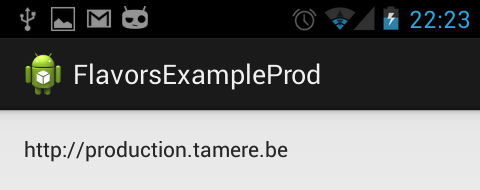
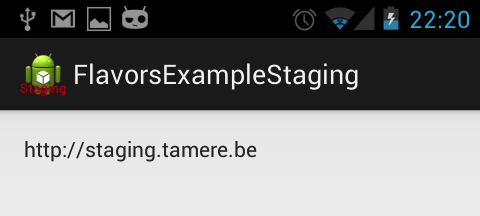
Here are two screenshots of the generated apps. Nothing really fancy:
演示样例项目非常easy。在不同的版本号中我们须要改动项目名称。项目图标,一些常量:url...,项目能够从Github 下载,效果图例如以下:
build.gradle file
buildscript {

    repositories {

        mavenCentral()

    }

    dependencies {

        classpath 'com.android.tools.build:gradle:0.5.+'

    }

}

apply plugin: 'android'

repositories {

    mavenCentral()

}

android {

    compileSdkVersion 18

    buildToolsVersion "18.0.1"

    defaultConfig {

        minSdkVersion 15

        targetSdkVersion 18

    }

    productFlavors {

        production {

            packageName "be.tamere.gradlebuildtypesexample"

        }

        staging {

            packageName "be.tamere.gradlebuildtypesexample.staging"

        }

    }

}

dependencies {

    compile 'com.android.support:appcompat-v7:18.0.0'

}
The definition of the flavors is super simple, all the magic will happen in their folders.
改动非常easy:核心配置是productFlavors,同一时候须要注意production和staging。它们须要与后面的文件夹结构名字一致
File structure 改动后的文件结构
In the src folder, we've created two directories whose names must match the flavors. We will define all the flavor-specific values. Only
specific values are necessary.
改动也比較简单,在src以下(main同级的文件夹)新建和上面productFlavors中配置production和staging同样的文件夹,分别放入相应的Constants.java。这两个文件夹的属性和功能与系统默认创建的main是一样的。
总结一下就是:
1.production和staging两个文件夹,相应着各存放一份Constants.java
2.对于应用图标和应用名字信息配置在res文件夹以下的。这个地方针对staging又一次配置了一份ic_launcher.png和string.xml。production没配置的话就是用默认main以下的res。
这个比較easy理解哈。
The staging version defines new icons while both flavors defines a Constants.java. The app name is defined in the string.xml files.
├── main

│   ├── AndroidManifest.xml

│   ├── ic_launcher-web.png

│   ├── java

│   │   └── be

│   │       └── tamere

│   │           └── gradlebuildtypesexample

│   │               └── MainActivity.java

│   └── res

│       ├── drawable-hdpi

│       │   └── ic_launcher.png

│       ├── drawable-mdpi

│       │   └── ic_launcher.png

│       ├── drawable-xhdpi

│       │   └── ic_launcher.png

│       ├── drawable-xxhdpi

│       │   └── ic_launcher.png

│       ├── layout

│       │   └── activity_main.xml

│       ├── menu

│       │   └── main.xml

│       ├── values

│       │   ├── dimens.xml

│       │   ├── strings.xml

│       │   └── styles.xml

│       ├── values-v11

│       │   └── styles.xml

│       └── values-v14

│           └── styles.xml

├── production

│   └── java

│       └── be

│           └── tamere

│               └── gradlebuildtypesexample

│                   └── Constants.java

└── staging

    ├── java

    │   └── be

    │       └── tamere

    │           └── gradlebuildtypesexample

    │               └── Constants.java

    └── res

        ├── drawable-hdpi

        │   └── ic_launcher.png

        ├── drawable-mdpi

        │   └── ic_launcher.png

        ├── drawable-xhdpi

        │   └── ic_launcher.png

        ├── drawable-xxhdpi

        │   └── ic_launcher.png

        └── values

            └── string.xml
Android Studio
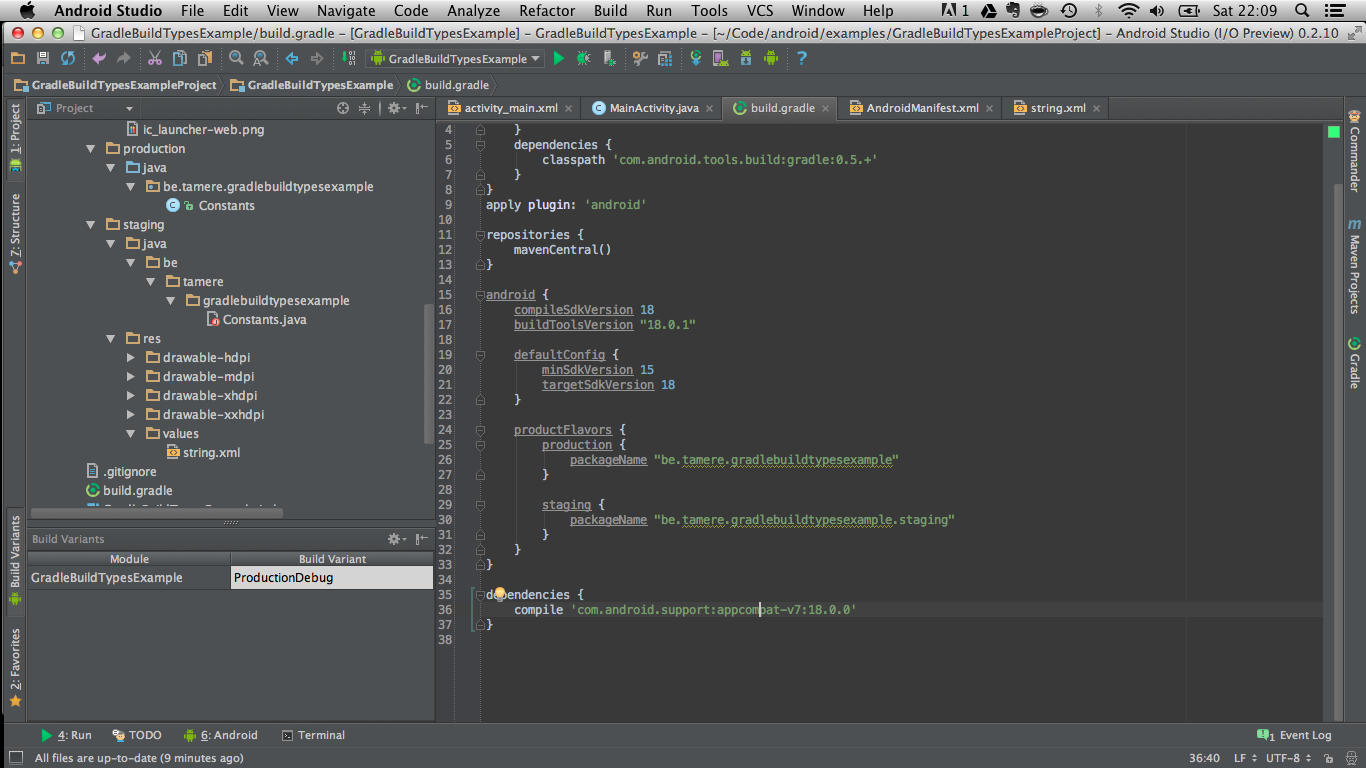
You can switch between the two flavors in the Build variants tab of the IDE. Android Studio has some trouble identifying the resources for
a non-active flavors.
We are using the production flavor, Studio does not understand that the staging folder
contains source code. Don't worry, it's normal, it will catch up when you switch to the staging variant.
Launch the app with the different flavors to see the result.
The app drawer shows the two icons:

References
- http://tools.android.com/tech-docs/new-build-system/user-guide#TOC-Product-flavors
- Xav's answer on this Stack
overflow topic is particularly helpful.
【Andrioid】在Gradle编译时生成一个不同的版本号,动态设置应用程序标题,应用程序图标,更换常数的更多相关文章
- apt 根据注解,编译时生成代码
apt: @Retention后面的值,设置的为CLASS,说明就是编译时动态处理的.一般这类注解会在编译的时候,根据注解标识,动态生成一些类或者生成一些xml都可以,在运行时期,这类注解是没有的~~ ...
- .net postsharp编译时生成的代码?
使用PostSharp进行AOP框架设计:一个简单的原型 AOP已经不是一个什么新名词了,在博客园使用关键字搜索可以查出n多条关于AOP的介绍,这里就不再赘述了. 在Bruce Zhang's B ...
- maven常见问题处理(3-3)Gradle编译时下载依赖失败解决方法
Gradle编译时在本地仓库中如果没有发现依赖,就会从远程仓库中下载, 默认的远程仓库为 mavenCentral(),即 http://repo1.maven.org/maven2/往往访问速度特别 ...
- Android Studio Gradle编译时『No resource found that matches the given name』解决方法(windows系统的坑)
* 最近帮团队同事配置gradle时,发现一个非常奇怪的问题:> * 同样的gradle配置的项目,只是修改了一个项目的名称,竟然会出现以下奇怪问题: ## 现象1. 一个编译完全OK,另外一个 ...
- qmake.exe是在Qt安装编译时生成的,里面内嵌了Qt相关的一些路径(最简单的方法是保持一样的安装路径,最方便的办法是设置qt.conf文件)
在网上直接下载别人编译好的Qt库,为自己使用省了不少事.但往往也会遇到些问题,其中Qt version is not properly installed,please run make instal ...
- 解决Gradle编译时出现: 编码GBK的不可映射字符
解决Gradle编译时出现: 编码GBK的不可映射字符 在build.gradle文件中加入如下内容: [compileJava, compileTestJava]*.options*.encodin ...
- Gradle 编译时选择不同的 google-services.json
在做的安卓应用需要在 debug 和 release build中使用不同的谷歌服务账号,要用到不同的google-serivces.json ,手动替换的话太费时费力,好在万能的gradle可以完成 ...
- Gradle编译时下载依赖失败解决方法
如果Gradle在编译的时候没有在本地仓库中发现依赖,就会从远程仓库中下载,默认的远程仓库为mavenCentral(),也就是http://repo1.maven.org/maven2/,但是往往访 ...
- Android 打造编译时注解解析框架 这只是一个开始
转载请标明出处:http://blog.csdn.net/lmj623565791/article/details/43452969 ,本文出自:[张鸿洋的博客] 1.概述 记得很久以前,写过几篇博客 ...
随机推荐
- 读 Working with forms 一些心得
Working with forms About this document This document provides an introduction to Django’s form handl ...
- C#多线程问题整合
一.跨进程访问组件 错误:线程间操作无效: 从不是创建控件“XXX”的线程访问它 解决方法: 1:把CheckForIllegalCrossThreadCalls设置为false 这个方法只是不去捕获 ...
- 关于静态与动态编译arm平台程序的比較
因为近期弄个console程序,调用了readline,ncurses库,这两个动态库加起来有四百多k.而程序事实上非常小,其它地方也没使用到这两个库 所以想静态编译看看console程序有多大. # ...
- java读写文件
对于任何文件,不管有没有扩展名,都可以读写.切记,最后要.close();,否则效果出不来. 读操作: package com.wjy.read; import java.io.BufferedRea ...
- ios7开发者必知
如果你想为iOS 设备开发app,你需要知道如何与软件交互,如何设计,你还要知道苹果独特的开发理念和开发工具.真正的能力还需要成功地从其他行业领域借鉴核心概念.最后把所有这些东西糅合进你的信息库中, ...
- hunnu-11546--Sum of f(x)
Sum of f(x) Time Limit: 1000ms, Special Time Limit:2500ms, Memory Limit:32768KB Total submit users: ...
- Android Ant打包笔记
本文文档的下载地址(Word版):http://download.csdn.net/detail/yangwei19680827/7250711 Android Ant 打包 网上找了ant打包的资料 ...
- Oracle基本流程语句
====1.IF语句==========
- win7提示“ipconfig不是内部或外部命令”
进入windows环境变量设置->系统变量,找到path,添加C:\Windows\SysWOW64,或者c:\windows\system32
- scu - 3254 - Rain and Fgj(最小点权割)
题意:N个点.M条边(2 <= N <= 1000 , 0 <= M <= 10^5),每一个点有个权值W(0 <= W <= 10^5),现要去除一些点(不能去掉 ...