
angularJS 系列(二)——理解指令 understanding directives
参考:https://github.com/angular/angular.js/wiki/Understanding-Directives
Injecting, Compiling, and Linking functions
When you create a directive, there are essentially up to 3 function layers for you to define[1]:
myApp.directive('uiJq', function InjectingFunction(){

  // === InjectingFunction === //

  // Logic is executed 0 or 1 times per app (depending on if directive is used).

  // Useful for bootstrap and global configuration

  return {

    compile: function CompilingFunction($templateElement, $templateAttributes) {

      // === CompilingFunction === //

      // Logic is executed once (1) for every instance of ui-jq in your original UNRENDERED template.

      // Scope is UNAVAILABLE as the templates are only being cached.

      // You CAN examine the DOM and cache information about what variables

      //   or expressions will be used, but you cannot yet figure out their values.

      // Angular is caching the templates, now is a good time to inject new angular templates

      //   as children or future siblings to automatically run..

      return function LinkingFunction($scope, $linkElement, $linkAttributes) {

        // === LinkingFunction === //

        // Logic is executed once (1) for every RENDERED instance.

        // Once for each row in an ng-repeat when the row is created.

        // Note that ng-if or ng-switch may also affect if this is executed.

        // Scope IS available because controller logic has finished executing.

        // All variables and expression values can finally be determined.

        // Angular is rendering cached templates. It's too late to add templates for angular

        //  to automatically run. If you MUST inject new templates, you must $compile them manually.

      };

    }

  };

})
You can only access data in $scope inside the LinkingFunction. Since the template logic may remove or duplicate elements, you can only rely on the final DOM configuration in theLinkingFunction. You still cannot rely upon children or following-siblings since they have not been linked yet.
例子如下:http://plnkr.co/edit/qrDMJBlnwdNlfBqEEXL2?p=preview
index.html
<!doctype html>

<html ng-app="compilation">

<head>

  <meta charset="utf-8">

  <title>Compilation Demo</title>

  <link rel="stylesheet" href="style.css">

  <script src="http://code.angularjs.org/1.1.1/angular.js"></script>

  <script src="app.js"></script>

</head>

<body>

<div log-compile="parent">

  <div log-compile="..child 1">

    <div log-compile="....child 1 a"></div>

    <div log-compile="....child 1 b"></div>

  </div>

  <div log-compile="..child 2">

    <div log-compile="....child 2 a" ysr-fly="ysrflyhah"></div>

    <div log-compile="....child 2 b"></div>

  </div>

</div>

<!-- LOG -->

<pre>{{log}}</pre>

</body>

</html>
app.js
angular.module('compilation', [])

.directive('logCompile', function($rootScope) {

  $rootScope.log = "";

  return {

    controller: function($scope, $attrs) {

      $rootScope.log = $rootScope.log + ($attrs.logCompile + ' (controller)\n');

    },

    compile: function compile(element, attributes) {

      $rootScope.log = $rootScope.log + attributes.ysrFly+ (attributes.logCompile + ' (compile)\n');

      return {

        pre: function preLink(scope, element, attributes) {

          $rootScope.log = $rootScope.log + (attributes.logCompile + ' (pre-link)\n');

        },

        post: function postLink(scope, element, attributes) {

          element.prepend(attributes.logCompile);

          $rootScope.log = $rootScope.log + (attributes.logCompile + ' (post-link)\n');

        }

      };

    }

  };

})

.directive('terminate', function() {

  return {

    terminal: true

  };

});
style.css
div {

  padding: 5px;

  margin: 5px;

  background-color: #EEE;

  border: 1px solid #BBB;

}

div > div {

  background-color: #DDD;

}

div > div > div {

  background-color: #CCC;

}

ol {

  list-style: decimal;

  margin-left: 30px;

}
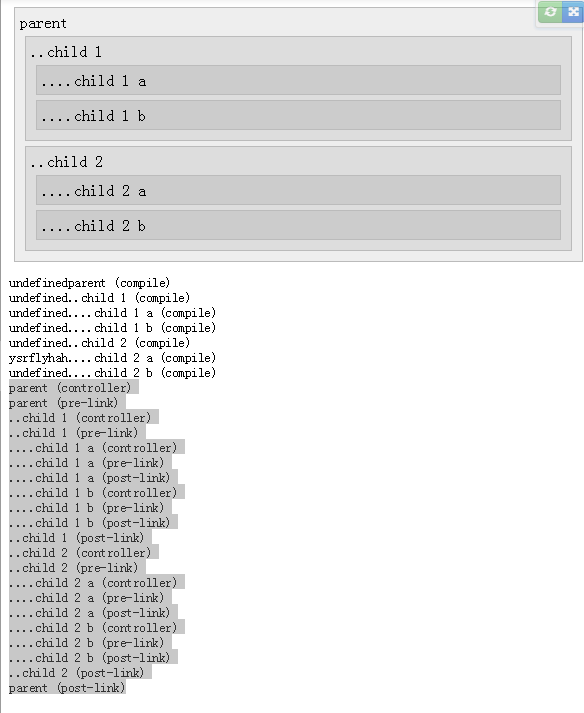
效果如图:
angularJS 系列(二)——理解指令 understanding directives的更多相关文章
- AngularJS 指令(Directives)实践指南
指令(Directives)是所有AngularJS应用最重要的部分.尽管AngularJS已经提供了非常丰富的指令,但还是经常需要创建应用特定的指令.这篇教程会为你讲述如何自定义指令,以及介绍如何在 ...
- angularJS 系列(七)---指令
----------------------------------------------------------------------------------- 原文:https://www.s ...
- AngularJS 系列 01 - HelloWorld和数据绑定
目录导读: AngularJS 系列 学习笔记 目录篇 前言: 好记性不如烂键盘,随笔就是随手笔记,希望以后有用. 本篇目录: 1. Hello World 2. AngularJS中的数据绑定 3. ...
- 带你走近AngularJS - 创建自己定义指令
带你走近AngularJS系列: 带你走近AngularJS - 基本功能介绍 带你走近AngularJS - 体验指令实例 带你走近AngularJS - 创建自己定义指令 ------------ ...
- struts2官方 中文教程 系列二:Hello World项目
先贴个本帖的地址,免得其它网站被爬去了struts2入门系列二之Hello World 即 http://www.cnblogs.com/linghaoxinpian/p/6898779.html ...
- [知识库分享系列] 二、.NET(ASP.NET)
最近时间又有了新的想法,当我用新的眼光在整理一些很老的知识库时,发现很多东西都已经过时,或者是很基础很零碎的知识点.如果分享出去大家不看倒好,更担心的是会误人子弟,但为了保证此系列的完整,还是选择分享 ...
- WPF入门教程系列(二) 深入剖析WPF Binding的使用方法
WPF入门教程系列(二) 深入剖析WPF Binding的使用方法 同一个对象(特指System.Windows.DependencyObject的子类)的同一种属性(特指DependencyProp ...
- Wireshark入门与进阶系列(二)
摘自http://blog.csdn.net/howeverpf/article/details/40743705 Wireshark入门与进阶系列(二) “君子生非异也,善假于物也”---荀子 本文 ...
- VSTO之旅系列(二):创建Excel解决方案
原文:VSTO之旅系列(二):创建Excel解决方案 本专题概要 引言 创建VSTO项目 Excel对象模型 创建Excel外接程序 创建Excel文档级自定义项 小结 一.引言 也许很多朋友都没有听 ...
随机推荐
- 漫谈QML
漫谈 QML/Qt Quick QML是从Qt 4.7开始引入的,QML是一种声明语言,使得可以像设计师思考的一样编码,并且Qt Quick元素就是应用程序的编译单元,每一帧的故事板被声明为元素树中的 ...
- 关于安卓HTTP请求用HttpUrlConnection还是HttpClient好
安卓和JAVA应用开发少不了要提交HTTP请求,而基本上目前有两个实现方式:HttpUrlConnection(即URL.openConnection)和HttpClient. 网上不少人都认为Htt ...
- jmx additional port
http://stackoverflow.com/questions/20884353/why-java-opens-3-ports-when-jmx-is-configured http://blo ...
- Kickstart 自动化安装配置
自动化安装案例: 一 ,系统环境 # cat /etc/redhat-release CentOS release 6.6 (Final) #Hostname [root@boot ~]# hostn ...
- c语言的编译过程和GCC 编译参数
原文: http://www.cnblogs.com/zhangShanGui/p/4912135.html C语言的编译过程和GCC编译参数 C语言的编译一般有三个步骤: 预编译: gcc -E - ...
- 标签—box-shadow
box-shadow:2px 3px 4px #CCC; 一个带外阴影的元素,阴影位置x轴偏移2px,y轴偏移3px,模糊范围4px,阴影颜色#CCC box-shadow:inset 0 -4px ...
- 单元测试、自动化测试、接口测试过程中的Excel数据驱动(java实现)
import java.io.FileInputStream;import java.io.InputStream;import java.util.HashMap;import java.util. ...
- android 5.0新特性学习--视图阴影
android 5.0的视图阴影主要是体验出层次性,就是在一个物体上面叠加上一层的设计,而这种设计就是除了传统的,x,y的纸面层,还有就是透过纸面的z轴的层次设计. elevation: 高度,静态属 ...
- android 5.0新特性学习--CardView
CardView继承自FrameLayout类,可以在一个卡片布局中一致性的显示内容,卡片可以包含圆角和阴影.CardView是一个Layout,可以布局其他View. 官网地址:https://de ...
- 如何修改apache的默认web端口
在apache的安装文件夹里搜索 httpd.conf 文件,用记事本打开,搜索 Listen 80 ,把80(默认端口)改为你想用的端口,保存,重新启动apache服务即可!