
实战django(一)--(你也能看懂的)注册与登录(带前端模板)
先是具体目录:(主要是注意templates和static的位置),其中person文件夹是上一期实战的,不用理会,login是本节实战app
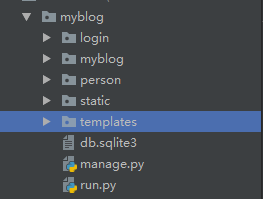
项目urls.py
from django.contrib import admin

from django.urls import path,include

urlpatterns = [

    path('admin/', admin.site.urls),

    path('',include('person.urls',namespace='person')),

    path('login/',include('login.urls',namespace='login'))

]
app中urls.py
from django.urls import path

from . import views

app_name='login'

urlpatterns=[

    path('',views.login,name='login'),

    path('register/',views.register,name='register'),

    path('register/savereg/',views.save_register,name='savereg'),

    path('tologin/',views.to_login,name='tologin'),

 ]
models.py
from django.db import models

# Create your models here.

class Users(models.Model):

    id=models.AutoField(primary_key=True)

    phone=models.CharField(max_length=20)

    username=models.CharField(max_length=20)

    password=models.CharField(max_length=50)

    repassword=models.CharField(max_length=50)

    birthday=models.DateField()

    regday=models.DateField()
views.py
from django.shortcuts import render

from .models import Users

import datetime

# Create your views here.

def login(request):

    return render(request,'login/login.html')

def register(request):

    return render(request,'login/register.html')

def save_register(request):

    if request.method == 'POST':

        phone=request.POST.get('phone')

        username=request.POST.get('username')

        password=request.POST.get('password')

        repassword=request.POST.get('repassword')

        birthday=request.POST.get('birthday')

        errormsg=''

        if phone =='':

            errormsg='手机号不能为空'

        elif password =='':

            errormsg='密码不能为空'

        else:

            if password!=repassword:

                errormsg='确认密码与密码不一致'

        if errormsg == '':

            Users.objects.create(phone=phone,username=username,password=password,birthday=birthday,

                                 regday=datetime.datetime.now().strftime('%Y-%m-%d'))

            return render(request,'login/pagejump.html')

        else:

            return render(request,'login/register.html',context={'errormsg':errormsg})

def to_login(request):

    if request.method == 'POST':

        phone=request.POST.get('phone')

        if phone == '':

            return render(request, 'login/login.html', {'errormsg': '用户名不能为空'})

        try:

            user_obj = Users.objects.get(phone=phone)

        except Users.DoesNotExist:

            return render(request,'login/login.html',{'errormsg':'账号不存在,请重新输入'})

        pwd=user_obj.password

        password = request.POST.get('password')

        if password != '':

            repwd=password

            if pwd == repwd:

                username=user_obj.username

                return render(request, 'login/index.html',{'username':username})

            else:

                return render(request, 'login/login.html',{'errormsg':'密码错误'})

        else:

            return render(request, 'login/login.html', {'errormsg': '密码不能为空'})
login.html
<!doctype html>

<html lang="en">

<head>

    <meta charset="UTF-8">

    <title>盒老师</title>

    <meta name="keywords" content="盒老师">

    <meta name="content" content="盒老师">

    <meta http-equiv="X-UA-Compatible" content="IE=edge, chrome=1">

    <link type="text/css" rel="stylesheet" href="/static/login/css/login.css">

    <script type="text/javascript" src="/static/login/js/jquery.min.js"></script>

</head>

<body class="login_bj" >

<div class="zhuce_body" style="position:absolute;left:130px;top:300px;">

    <div class="zhuce_kong login_kuang" >

        <div class="zc">

            <div class="bj_bai" style="height:330px;">

            <h3>登录</h3>

                   <form action="{% url 'login:tologin'%}" method="post">

                <p style="color: red;margin-top: 0px;">{{errormsg}}</p>

                <input name="phone" type="text" class="kuang_txt" placeholder="手机号">

                <input name="password" type="text" class="kuang_txt" placeholder="密码">

                <div>

                       <input name="" type="checkbox" value="" checked><span>记住我</span><a href="#" style="float:rigth;">忘记密码</a>

                </div>

                <div>

                       <p>没有账号?<a href="{% url 'login:register'%}">立即注册</a></p>

                </div>

                <input style="margin-top:2px;" name="登录" type="submit" class="btn_zhuce" value="登录">

                </form>

            </div>

        </div>

    </div>

</div>

</body>

</html>
register.html
<!doctype html>

<html lang="en">

<head>

    <meta charset="UTF-8">

    <title>盒老师</title>

    <meta name="keywords" content="盒老师">

    <meta name="content" content="盒老师">

    <meta http-equiv="X-UA-Compatible" content="IE=edge, chrome=1">

    <link type="text/css" rel="stylesheet" href="/static/login/css/login.css">

    <script type="text/javascript" src="/static/login/js/jquery.min.js"></script>

</head>

<body class="login_bj" >

<div class="zhuce_body" style="position:absolute;left:150px;top:300px;">

    <div class="zhuce_kong">

        <div class="zc">

            <div class="bj_bai">

            <h3>欢迎注册</h3>

                   <form action="{% url 'login:savereg'%}" method="post">

                <p style="color: red">{{errormsg}}</p>

                <input style="margin-top: 3px;" name="phone" type="text" class="kuang_txt" placeholder="手机号">

                <input name="username" type="text" class="kuang_txt " placeholder="用户名">

                <input name="password" type="text" class="kuang_txt " placeholder="密码">

                <input name="repassword" type="text" class="kuang_txt " placeholder="确认密码"><br>

                <input name="birthday" type="text" class="kuang_txt " placeholder="生日">

                <div stytle="margin-top:2px;">

                    <input name="注册" type="submit" class="btn_zhuce" value="注册"></span>

                </div>

                </form>

            </div>

        </div>

    </div>

</div>

</body>

</html>
pagejump.html
<body>

<div align="center" style="border: 1px solid blueviolet;

        position:absolute;left:500px;top: 200px;width: 400px;height: 50px;">

    <p style="text-align: center;font-size: 20px;">注册成功!还有<span id="sp">4</span>秒跳转到登录界面...</p>

</div>

<script>

    //onload事件会在页面加载完后立即发生

    onload=function () {

        //etInterval() 方法可按照指定的周期(以毫秒计)来调用函数或计算表达式。

        setInterval(go,1000)

    };

    var x=3;

    function go() {

        if (x>=0){

            document.getElementById("sp").innerText=x;

        }else {

            location.href="{% url 'login:login'%}";

        }

        x--;

    }

</script>

</body>
index.html
<!doctype html>

<html lang="en">

<head>

    <meta charset="UTF-8">

    <meta name="viewport"

          content="width=device-width, user-scalable=no, initial-scale=1.0, maximum-scale=1.0, minimum-scale=1.0">

    <meta http-equiv="X-UA-Compatible" content="ie=edge">

    <title>Document</title>

</head>

<body>

    <h3><p>hello {{username}}</p></h3>

</body>

</html>
启动服务器:http://127.0.0.1:8000/login/,来到初始页面:
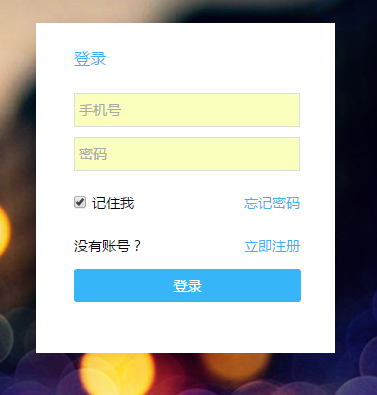
点击立即注册,跳转到http://127.0.0.1:8000/login/register/

我们输入相应信息(后端会有一些简单的验证,如何有错误就会在前端显示,假设我们什么都不输入):
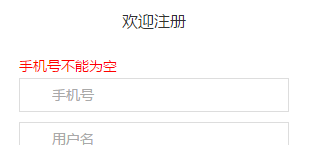
其他的更复杂的验证就没怎么写了。我们输入以下数据:
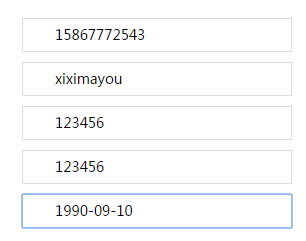
点击注册:若注册成功,则会跳转到pagejump页:否则返回错误信息给注册页
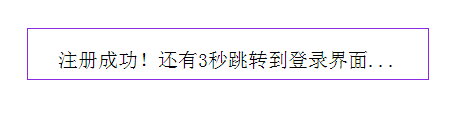
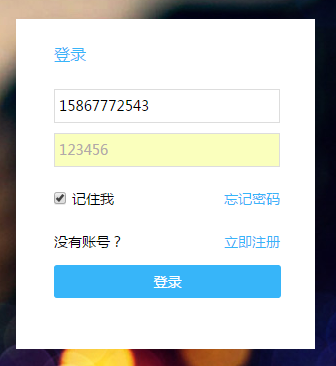
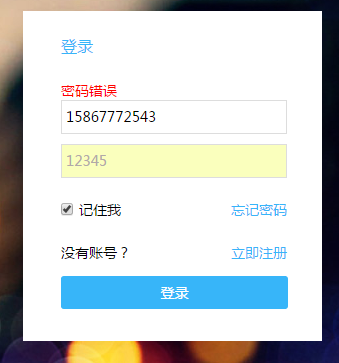
三秒后会跳转到登录页,同样的,我们在登录页也有简单的验证,先是登录账号(手机号)不能为空,然后如果在数据库中找不到该手机号,则返回错误信息‘账号不存在,请重新输入’,否则找到该条记录,找到对应密码,将数据库中的密码与输入的进行比较,如果相同,则可以登录,跳转到index界面,否则就返回错误信息,‘密码错误’。
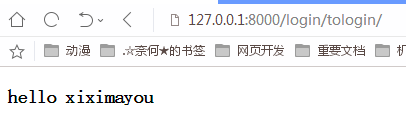
登录成功后获取用户名,并进行显示。
总结:也不知道该总结啥。。。。
补充:
(1)忘记密码:这个就不实现了,就是绑定手机号或邮箱之类的,发送短信验证进行修改。
(2)注册和登录时输入密码显示为*,也就是不可见。
(3)记住我,将用户放在cookie或session中,下次直接跳转至index页面,而不用进行登录(下一步要实现的)。
实战django(一)--(你也能看懂的)注册与登录(带前端模板)的更多相关文章
- 【 全干货 】5 分钟带你看懂 Docker !
欢迎大家前往腾讯云社区,获取更多腾讯海量技术实践干货哦~ 作者丨唐文广:腾讯工程师,负责无线研发部地图测试. 导语:Docker,近两年才流行起来的超轻量级虚拟机,它可以让你轻松完成持续集成.自动交付 ...
- 新手也能看懂的 SpringBoot 异步编程指南
本文已经收录自 springboot-guide : https://github.com/Snailclimb/springboot-guide (Spring Boot 核心知识点整理. 基于 S ...
- 亲子之间,在于看懂,无关耐心zz
每当有人告诉我:『你对孩子真有耐心!』时,我总会想起我的金项链,当越来越多人说的时候,我就越想找出来,我翻箱倒柜的找,越心急却越找不到,那 一条金项链从我十八岁那一年一直戴在我的脖子上一直到女儿两岁, ...
- 一篇文章一张思维导图看懂Android学习最佳路线
一篇文章一张思维导图看懂Android学习最佳路线 先上一张android开发知识点学习路线图思维导图 Android学习路线从4个阶段来对Android的学习过程做一个全面的分析:Android初级 ...
- 实战Django:简易博客Part1
舍得学习新技能的时候,通常不喜欢傻读书--捧着一本阐述该项技能的书籍,然后傻看,一路看下来,脑子里塞满了新的概念.知识点,头是越来越大,但技能却几乎没掌握半分. 多年来,舍得养成了用做实例来学习新技能 ...
- 《架构探险——从零开始写Java Web框架》这书不错,能看懂的入门书
这书适合我. 哈哈,结合 以前的知识点,勉强能看懂. 讲得细,还可以参照着弄出来. 希望能坚持 完成啦... 原来,JSTL就类似于DJANGO中的模板. 而servlet类中的res,req,玩了D ...
- 从零开始一起学习SLAM | 理解图优化,一步步带你看懂g2o代码
首发于公众号:计算机视觉life 旗下知识星球「从零开始学习SLAM」 这可能是最清晰讲解g2o代码框架的文章 理解图优化,一步步带你看懂g2o框架 小白:师兄师兄,最近我在看SLAM的优化算法,有种 ...
- 代码走查25条疑问 C# 跳转新的标签页 C#线程处理 .Net 特性 attribute 学习 ----自定义特性 看懂 ,学会 .NET 事件的正确姿势-简单版
代码走查25条疑问 代码走查(Code Review) 是一个开发人员与架构师集中讨论代码的过程.通过代码走查可以提高代码的 质量,同时减少Bug出现的几率.但是在小公司中并没有代码走查的过程在这 ...
- 小学生都能看懂的数位dp
前言 数位dp其实很久前就知道了,也做过几道和其他算法混在一起的题目,其实通过手玩是能做的 但毕竟是种算法,还是系统学下比较好(节省手玩时间) 模板题 P2602 [ZJOI2010]数字计数 化简题 ...
随机推荐
- [IDA] Oops! internal error 40343 occured.
问题描述: 解决方案: 安装 IDA 时,其路径下不要出现中文.
- C# winform 获取鼠标点击位置
说明:该篇随笔的代码内容并非出自本人,是在其他网站搜寻的,出处已经不记得了,本次随笔只为记录,目的帮助自己,帮助他人. 实现的原理也不做多的赘述,直接上代码. 第一个类是需要用到的Windows AP ...
- netCore3.0+webapi到前端vue(前端)
前篇已经完成后端配置并获取到api连接 https://www.cnblogs.com/ouyangkai/p/11504279.html 前端项目用的是VS code编译器完成 vue 第一步 引入 ...
- 腾讯WeTest&TesterHome深圳线下沙龙
腾讯官方的一站式品质开放平台「腾讯WeTest」携手知名测试社区「TesterHome」以及3家金融相关企业为我们带来的金融专场. 本次活动内容主要以金融公司的测试落地和测试技术为主,我们希望你是一个 ...
- Linux中用postfix搭建邮件服务器实战详解
Linux中用postfix搭建邮件服务器实战详解 postfix是Wietse Venema在IBM的GPL协议之下开发的MTA(邮件传输代理)软件.Postfix试图更快.更容易管理.更安全,同时 ...
- elasticsearch ik分词
elasticsearch 默认并不支持中文分词,默认将每个中文字切分为一个词,这明显不符合我们的业务要求.这里就需要用到ik分词插件. 本文主要囊括了以下几部分,ik插件安装.ik用法介绍.自定义词 ...
- Valgrind调试
Valgrind的最初作者是Julian Seward,他于2006年由于在开发Valgrind上的工作获得了第二届Google-O'Reilly开源代码奖 摘自 Valgrind.org: Valg ...
- Vue-组件模板抽离的写法
VUE的模板分离写法. 1.第一种(不常用) <script type="text/x-template" id="myCpm"> <div& ...
- Native层和so接口和Java层
一.Java层加载so文件 Android在Java层加载so的接口是System.loadLibrary()逐级调用的过程: System.loadLibrary()系统源码: 987 pub ...
- numpy,matplotlib,pandas
目录 numpy模块 numpy简介 numpy使用 matplotlib模块 条形图 直方图 折线图 散点图+直线图 pandas模块 numpy模块 numpy简介 numpy官方文档:https ...