
WPF USB设备采集开源工具介绍
最近项目需要需要试试采集电脑USB 设备信息 找到了 开源 示例 代码非常好 公共库也很友好 可能知名度太低 才4star
https://github.com/vurdalakov/usbdevices.git
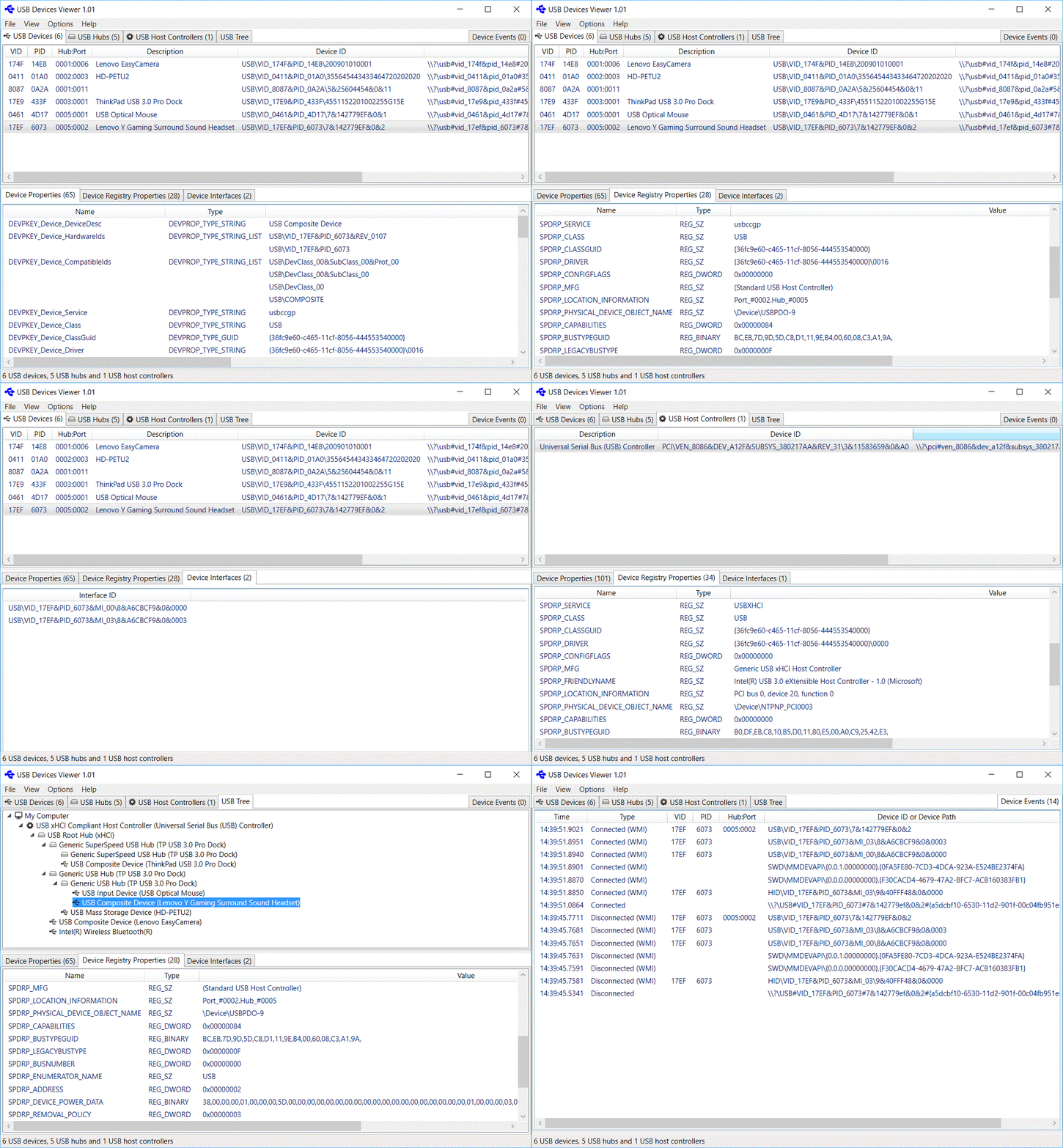
示例图
代码结构
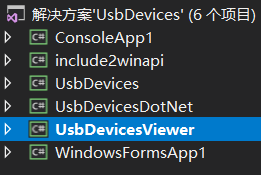
UsbDevicesDotNet是公共库
UsbDevicesViewer是WPF界面
别的是控制台测试
获取电脑所有USB设备信息
List<UsbDevice> UsbDevices = UsbDevice.GetDevices(new Guid(UsbDeviceWinApi.GUID_DEVINTERFACE_USB_DEVICE)).ToList()
设备事件
        private Win32UsbControllerDevices win32UsbControllerDevices = new Win32UsbControllerDevices();

        private DeviceManagementNotifications deviceManagementNotifications = new DeviceManagementNotifications();

        private void EnableDeviceWatcher(Boolean enable)

        {

            if (enable)

            {

                this.win32UsbControllerDevices.DeviceConnected += OnWin32UsbControllerDevicesDeviceConnected;

                this.win32UsbControllerDevices.DeviceDisconnected += OnWin32UsbControllerDevicesDeviceDisconnected;

                //this.win32UsbControllerDevices.DeviceModified += OnWin32UsbControllerDevicesDeviceModified;

                this.win32UsbControllerDevices.StartWatcher();

                this.deviceManagementNotifications.DeviceConnected += OnDeviceManagementNotificationsDeviceConnected;

                this.deviceManagementNotifications.DeviceDisconnected += OnDeviceManagementNotificationsDeviceDisconnected;

                this.deviceManagementNotifications.Start(new Guid(UsbDeviceWinApi.GUID_DEVINTERFACE_USB_DEVICE));

            }

            else

            {

                this.deviceManagementNotifications.Stop();

                //this.deviceManagementNotifications.DeviceConnected -= OnDeviceManagementNotificationsDeviceConnected;

                //this.deviceManagementNotifications.DeviceDisconnected -= OnDeviceManagementNotificationsDeviceDisconnected;

                this.win32UsbControllerDevices.StopWatcher();

                this.win32UsbControllerDevices.DeviceConnected -= OnWin32UsbControllerDevicesDeviceConnected;

                this.win32UsbControllerDevices.DeviceDisconnected -= OnWin32UsbControllerDevicesDeviceDisconnected;

                //this.win32UsbControllerDevices.DeviceModified -= OnWin32UsbControllerDevicesDeviceModified;

            }

        }

/// <summary>

        /// 设备插入事件

        /// </summary>

        /// <param name="sender"></param>

        /// <param name="e"></param>

        private void OnWin32UsbControllerDevicesDeviceConnected(object sender, Win32UsbControllerDeviceEventArgs e)

        {

            var _thisDevice = e.Device;

        }

        /// <summary>

        /// 设备拔出事件

        /// </summary>

        /// <param name="sender"></param>

        /// <param name="e"></param>

        private void OnWin32UsbControllerDevicesDeviceDisconnected(Object sender, Win32UsbControllerDeviceEventArgs e)

        {

            var _thisDevice = e.Device;

        }

        /// <summary>

        /// 设备管理器广播插入

        /// </summary>

        /// <param name="sender"></param>

        /// <param name="e"></param>

        private void OnDeviceManagementNotificationsDeviceConnected(Object sender, DeviceManagementNotificationsEventArgs e)

        {

            var _DeviceClass = e.DeviceClass;

            var _DevicePath = e.DevicePath;

        }

        /// <summary>

        /// 设备管理器广播拔出

        /// </summary>

        /// <param name="sender"></param>

        /// <param name="e"></param>

        private void OnDeviceManagementNotificationsDeviceDisconnected(Object sender, DeviceManagementNotificationsEventArgs e)

        {

            var _DeviceClass = e.DeviceClass;

            var _DevicePath = e.DevicePath;

        }
控制台示例
static void Main(string[] args)

        {

            UsbDevice[] usbDevices = UsbDevice.GetDevices();

            Console.WriteLine("{0} USB devices:\n", usbDevices.Length);

            foreach (UsbDevice usbDevice in usbDevices)

            {

                Console.WriteLine("VID_{0}&PID_{1}", usbDevice.Vid, usbDevice.Pid);

                Console.WriteLine("Hub:Port = {0}:{1}", usbDevice.Hub, usbDevice.Port);

                Console.WriteLine("Device ID     = {0}", usbDevice.DeviceId);

                foreach (var deviceInterface in usbDevice.Interfaces)

                {

                    Console.WriteLine("Interface ID  = {0}", deviceInterface.InterfaceId);

                }

                Console.WriteLine("LocationInformation = {0}", usbDevice.GetRegistryPropertyValue(UsbDeviceWinApi.DeviceRegistryPropertyKeys.SPDRP_LOCATION_INFORMATION));

                foreach (String locationPath in usbDevice.GetRegistryPropertyValue(UsbDeviceWinApi.DeviceRegistryPropertyKeys.SPDRP_LOCATION_PATHS) as String[])

                {

                    Console.WriteLine("LocationPaths = {0}", locationPath);

                }

                if (!String.IsNullOrEmpty(usbDevice.BusReportedDeviceDescription))

                {

                    Console.WriteLine("DeviceDescription = {0}", usbDevice.BusReportedDeviceDescription);

                }

                Console.WriteLine();

            }

            Console.ReadLine();

        }

没有找到该示例的文档 全靠看demo 如果谁有文档还望 也给我一份
WPF USB设备采集开源工具介绍的更多相关文章
- 【转帖】四种BI 开源工具介绍-SpagoBI,openI,JasperSoft,Pentaho
四种BI 开源工具介绍-SpagoBI,openI,JasperSoft,Pentaho 1 BI系统的简述 从技术角度来说 BI 包含了 ETL.DW.OLAP.DM等多环节.简单的说就是把交易系统 ...
- USB 设备的PID-Product ID,VID-Vendor ID
根据USB规范的规定,所有的USB设备都有供应商ID(VID)和产品识别码(PID),主机通过不同的VID和PID来区别不同的设备,VID 和PID都是两个字节长,其中,供应商ID(VID)由供应商向 ...
- USB系列之一:列出你的USB设备
USB现在已经成为PC机必不可少的接口之一,几乎所有的设备都可以接在USB设备上,USB键盘.鼠标.打印机.摄像头,还有常用的U盘等等,从本篇文章开始,将集中篇幅介绍一下在DOS中使用USB设备的方法 ...
- 利用谷歌开源工具cAdvisor 结合influxdb存储+Grafana前端展示进行Docker容器的监控
一.Docker 监控方式 1.利用docker 的 docker stats API 命令: docker stats [容器ID/容器名称] [root@docker ~]# docker sta ...
- 《连载 | 物联网框架ServerSuperIO教程》- 14.配制工具介绍,以及设备驱动、视图驱动、服务实例的挂载
注:ServerSuperIO二次开发套件授权码申请---截止到:2016-12-09 1.C#跨平台物联网通讯框架ServerSuperIO(SSIO)介绍 <连载 | 物联网框架Server ...
- Linux单设备多路USB串口的实现方法介绍
某设备需要提供多路USB串口的功能给主机端使用,比如一路用作业务1通信功能,一路用作业务2通信功能,一路用作debug抓log用途,诸如此类.如下图所示. 要实现上述设备功能,可以参考如下步骤. 1) ...
- 13个优秀的开源UML工具介绍
本文将为您介绍12个优秀的UML工具: 1. StarUML StarUML(简称SU),是一种创建UML类图,是一种生成类图和其他类型的统一建模语言(UML)图表的工具.StarUML是一个开源项目 ...
- vmware 桌面虚拟化 horizon view 介绍(使用微软的RDP协议或vmware 专有的PCoIP协议,连接到虚拟桌面,并且可以使用本地的USB设备、本地存储)
虚拟化(一):虚拟化及vmware产品介绍 虚拟化(二):虚拟化及vmware workstation产品使用 虚拟化(三):vsphere套件的安装注意及使用 虚拟化(四):vsphere高可用功能 ...
- Monkey 命令收集相关 --追加Monkey自动化测试开源工具
.1.环境配置 MONKEY测试使用的是ADB命令,因此只需要配置ADB环境即可. 2.测试准备与执行 在Monkey测试前,必须进行以下准备 Ø 手机屏幕超时设置为30分钟或者永不超时,防止手机进 ...
随机推荐
- MySQL数据物理备份之lvm快照
使用lvm快照实现物理备份 优点: 几乎是热备(创建快照前把表上锁,创建完后立即释放) 支持所有存储引擎 备份速度快 无需使用昂贵的商业软件(它是操作系统级别的) 缺点: 可能需要跨部门协调(使用操作 ...
- php静态化介绍
1.动态URL地址设置成静态形式http://state.com/index.php?c=play&a=index&id=16267 ------>http://state.co ...
- django 权限设置 左侧菜单点击显示,面包屑
1.左侧菜单点击显示 就是在点击的时候保留点击的功能 方法. 1.加入新的字段,pid来判断 class Permission(models.Model): """ 权限 ...
- Python 文件读写操作实例详解
Python提供了必要的函数和方法进行默认情况下的文件基本操作.你可以用file对象做大部分的文件操作 一.python中对文件.文件夹操作时经常用到的os模块和shutil模块常用方法.1.得到当前 ...
- 第05组 Beta冲刺(4/4)
第05组 Beta冲刺(4/4) 队名:天码行空 组长博客连接 作业博客连接 团队燃尽图(共享): GitHub当日代码/文档签入记录展示(共享): 组员情况: 组员1:卢欢(组长) 过去两天完成了哪 ...
- 【Matplotlib】使用速记
[持续更新] pyplot matplotlib.pyplot is a state-based interface to matplotlib. It provides a MATLAB-like ...
- 关于时间排序在ios中失效的处理方法
上个月公司做项目的时候在列表排序的时候产品加了一个需求,通过点击量,发布时间,评论量进行筛选的一个需求. 一开始在电脑上测试基本没问题,然后我也就放下了这个按耐不住的小心脏,然后在完成所有模块后 sh ...
- [RN] React Native Image 实现placeholder占位图
React Native Image 实现placeholder占位图 react-native Image没有placeholder这样的props,但是业务有需要这种场景, 解决方法为: 使用Im ...
- sass、less异同
相同点: 1.混入(Mixins):class中的class 2.参数混入:可以传递参数的class,就像函数一样 3.嵌套规则:class中嵌套class,从而减少重复的代码 4.运算:css中用上 ...
- 回溯法 | 旅行商问题(TSP问题)
学习链接: 回溯法解旅行商问题(TSP).贪心算法:旅行商问题(TSP) 今天早上做了无数个梦,然后被紧紧地吸附在床上.挣扎一番后爬起来,已经是9点了.然后我开始研究旅行商问题. 在一个无向图中找到一 ...