
WPF USB设备采集开源工具介绍
最近项目需要需要试试采集电脑USB 设备信息 找到了 开源 示例 代码非常好 公共库也很友好 可能知名度太低 才4star
https://github.com/vurdalakov/usbdevices.git
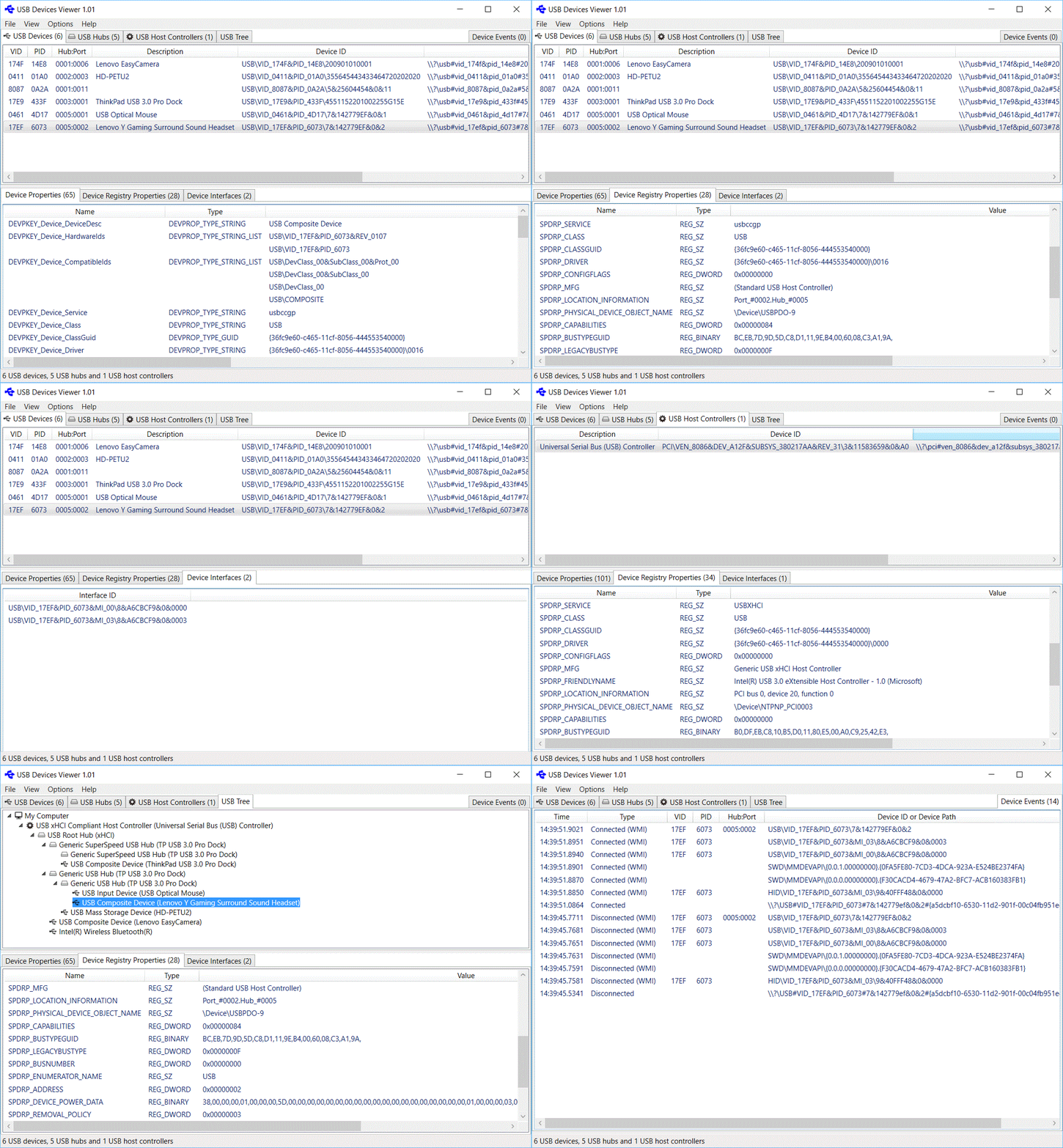
示例图
代码结构
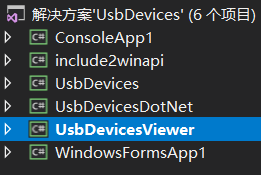
UsbDevicesDotNet是公共库
UsbDevicesViewer是WPF界面
别的是控制台测试
获取电脑所有USB设备信息
List<UsbDevice> UsbDevices = UsbDevice.GetDevices(new Guid(UsbDeviceWinApi.GUID_DEVINTERFACE_USB_DEVICE)).ToList()
设备事件
        private Win32UsbControllerDevices win32UsbControllerDevices = new Win32UsbControllerDevices();

        private DeviceManagementNotifications deviceManagementNotifications = new DeviceManagementNotifications();

        private void EnableDeviceWatcher(Boolean enable)

        {

            if (enable)

            {

                this.win32UsbControllerDevices.DeviceConnected += OnWin32UsbControllerDevicesDeviceConnected;

                this.win32UsbControllerDevices.DeviceDisconnected += OnWin32UsbControllerDevicesDeviceDisconnected;

                //this.win32UsbControllerDevices.DeviceModified += OnWin32UsbControllerDevicesDeviceModified;

                this.win32UsbControllerDevices.StartWatcher();

                this.deviceManagementNotifications.DeviceConnected += OnDeviceManagementNotificationsDeviceConnected;

                this.deviceManagementNotifications.DeviceDisconnected += OnDeviceManagementNotificationsDeviceDisconnected;

                this.deviceManagementNotifications.Start(new Guid(UsbDeviceWinApi.GUID_DEVINTERFACE_USB_DEVICE));

            }

            else

            {

                this.deviceManagementNotifications.Stop();

                //this.deviceManagementNotifications.DeviceConnected -= OnDeviceManagementNotificationsDeviceConnected;

                //this.deviceManagementNotifications.DeviceDisconnected -= OnDeviceManagementNotificationsDeviceDisconnected;

                this.win32UsbControllerDevices.StopWatcher();

                this.win32UsbControllerDevices.DeviceConnected -= OnWin32UsbControllerDevicesDeviceConnected;

                this.win32UsbControllerDevices.DeviceDisconnected -= OnWin32UsbControllerDevicesDeviceDisconnected;

                //this.win32UsbControllerDevices.DeviceModified -= OnWin32UsbControllerDevicesDeviceModified;

            }

        }

/// <summary>

        /// 设备插入事件

        /// </summary>

        /// <param name="sender"></param>

        /// <param name="e"></param>

        private void OnWin32UsbControllerDevicesDeviceConnected(object sender, Win32UsbControllerDeviceEventArgs e)

        {

            var _thisDevice = e.Device;

        }

        /// <summary>

        /// 设备拔出事件

        /// </summary>

        /// <param name="sender"></param>

        /// <param name="e"></param>

        private void OnWin32UsbControllerDevicesDeviceDisconnected(Object sender, Win32UsbControllerDeviceEventArgs e)

        {

            var _thisDevice = e.Device;

        }

        /// <summary>

        /// 设备管理器广播插入

        /// </summary>

        /// <param name="sender"></param>

        /// <param name="e"></param>

        private void OnDeviceManagementNotificationsDeviceConnected(Object sender, DeviceManagementNotificationsEventArgs e)

        {

            var _DeviceClass = e.DeviceClass;

            var _DevicePath = e.DevicePath;

        }

        /// <summary>

        /// 设备管理器广播拔出

        /// </summary>

        /// <param name="sender"></param>

        /// <param name="e"></param>

        private void OnDeviceManagementNotificationsDeviceDisconnected(Object sender, DeviceManagementNotificationsEventArgs e)

        {

            var _DeviceClass = e.DeviceClass;

            var _DevicePath = e.DevicePath;

        }
控制台示例
static void Main(string[] args)

        {

            UsbDevice[] usbDevices = UsbDevice.GetDevices();

            Console.WriteLine("{0} USB devices:\n", usbDevices.Length);

            foreach (UsbDevice usbDevice in usbDevices)

            {

                Console.WriteLine("VID_{0}&PID_{1}", usbDevice.Vid, usbDevice.Pid);

                Console.WriteLine("Hub:Port = {0}:{1}", usbDevice.Hub, usbDevice.Port);

                Console.WriteLine("Device ID     = {0}", usbDevice.DeviceId);

                foreach (var deviceInterface in usbDevice.Interfaces)

                {

                    Console.WriteLine("Interface ID  = {0}", deviceInterface.InterfaceId);

                }

                Console.WriteLine("LocationInformation = {0}", usbDevice.GetRegistryPropertyValue(UsbDeviceWinApi.DeviceRegistryPropertyKeys.SPDRP_LOCATION_INFORMATION));

                foreach (String locationPath in usbDevice.GetRegistryPropertyValue(UsbDeviceWinApi.DeviceRegistryPropertyKeys.SPDRP_LOCATION_PATHS) as String[])

                {

                    Console.WriteLine("LocationPaths = {0}", locationPath);

                }

                if (!String.IsNullOrEmpty(usbDevice.BusReportedDeviceDescription))

                {

                    Console.WriteLine("DeviceDescription = {0}", usbDevice.BusReportedDeviceDescription);

                }

                Console.WriteLine();

            }

            Console.ReadLine();

        }

没有找到该示例的文档 全靠看demo 如果谁有文档还望 也给我一份
WPF USB设备采集开源工具介绍的更多相关文章
- 【转帖】四种BI 开源工具介绍-SpagoBI,openI,JasperSoft,Pentaho
四种BI 开源工具介绍-SpagoBI,openI,JasperSoft,Pentaho 1 BI系统的简述 从技术角度来说 BI 包含了 ETL.DW.OLAP.DM等多环节.简单的说就是把交易系统 ...
- USB 设备的PID-Product ID,VID-Vendor ID
根据USB规范的规定,所有的USB设备都有供应商ID(VID)和产品识别码(PID),主机通过不同的VID和PID来区别不同的设备,VID 和PID都是两个字节长,其中,供应商ID(VID)由供应商向 ...
- USB系列之一:列出你的USB设备
USB现在已经成为PC机必不可少的接口之一,几乎所有的设备都可以接在USB设备上,USB键盘.鼠标.打印机.摄像头,还有常用的U盘等等,从本篇文章开始,将集中篇幅介绍一下在DOS中使用USB设备的方法 ...
- 利用谷歌开源工具cAdvisor 结合influxdb存储+Grafana前端展示进行Docker容器的监控
一.Docker 监控方式 1.利用docker 的 docker stats API 命令: docker stats [容器ID/容器名称] [root@docker ~]# docker sta ...
- 《连载 | 物联网框架ServerSuperIO教程》- 14.配制工具介绍,以及设备驱动、视图驱动、服务实例的挂载
注:ServerSuperIO二次开发套件授权码申请---截止到:2016-12-09 1.C#跨平台物联网通讯框架ServerSuperIO(SSIO)介绍 <连载 | 物联网框架Server ...
- Linux单设备多路USB串口的实现方法介绍
某设备需要提供多路USB串口的功能给主机端使用,比如一路用作业务1通信功能,一路用作业务2通信功能,一路用作debug抓log用途,诸如此类.如下图所示. 要实现上述设备功能,可以参考如下步骤. 1) ...
- 13个优秀的开源UML工具介绍
本文将为您介绍12个优秀的UML工具: 1. StarUML StarUML(简称SU),是一种创建UML类图,是一种生成类图和其他类型的统一建模语言(UML)图表的工具.StarUML是一个开源项目 ...
- vmware 桌面虚拟化 horizon view 介绍(使用微软的RDP协议或vmware 专有的PCoIP协议,连接到虚拟桌面,并且可以使用本地的USB设备、本地存储)
虚拟化(一):虚拟化及vmware产品介绍 虚拟化(二):虚拟化及vmware workstation产品使用 虚拟化(三):vsphere套件的安装注意及使用 虚拟化(四):vsphere高可用功能 ...
- Monkey 命令收集相关 --追加Monkey自动化测试开源工具
.1.环境配置 MONKEY测试使用的是ADB命令,因此只需要配置ADB环境即可. 2.测试准备与执行 在Monkey测试前,必须进行以下准备 Ø 手机屏幕超时设置为30分钟或者永不超时,防止手机进 ...
随机推荐
- DDL(数据库定义语言)(五)
一.数据定义语言(Data Definition Language)的基本操作 定义数据库.表等,包括CREATE语句.ALTER语句.DROP语句.CREATE语句用于创建数据库.数据表等,ALTE ...
- C++ 梳理:跑通简单程序
C++ 结合了三个编程流派: 过程式编程:C 特性,结构化语言,强调过程 面向对象编程:C++ 对于 C 语言的补充,一切皆对象,强调数据 泛型编程(generic programming):由 C+ ...
- jq node.js bootstrap
1.node.js 网址:https://nodejs.org/en/ 用来通过下载node.js 来引用里面的npm 来实现对外部项目的下载 1.安装nodejs 自带了npm npm instal ...
- 201871010104-陈园园 《面向对象程序设计(java)》第二周学习总结
201871010104-陈园园 <面向对象程序设计(java)>第二周学习总结 项目 内容 这个作业属于哪个课程 ttps://www.cnblogs.com/nwnu-daizh/ 这 ...
- CAJViewer 去除右上角闪动的图标
打开CMD,粘贴如下代码: %homedrive% cd "%userprofile%\Documents\My eBooks\" del ad0.xml md ad0.xml m ...
- Sublime Text2中的快捷方式及html各种标签(待完善)
快捷方式 1.xhtml+tab 2.自动补全标签 Alt + . 补全标签 标签 1.<p>段落标签 ,前后换行 <h1.2.3.4.5>标题标签 h1最大,一级标题 2. ...
- 【java】int与bigdecimal的相互转换
int转bigdecimal BigDecimal number = new BigDecimal(0); int value=score; number=BigDecimal.valueOf((in ...
- RabbitMQ消息幂等性问题
文章目录 1. 什么是幂等性?1.1 消息队列的幂等性1.2 模拟重试机制1.2.1 生产者代码1.2.2 消费者代码1.2.3 消费者 application.yml 配置2. 如何保证消息幂等性, ...
- java 的守护进程脚本
#!/bin/sh ] do Tag=`ps -ef|grep 'jar包名称'|grep -v grep|wc -l|awk '{printf $1"\n"}'` ] then ...
- 修改了celery任务老是执行失败,跟shell中调试的结果不同
因为没有重启celery,没有删除celerybeat-schedule,导致使用的task任务一直是原来缓存的,所以代码一直无法生效,也是日了狗了