
centos7安装后,一些小优化
1.设置静态ip
vim /etc/sysconfig/network-scripts/ifcfg-ens33
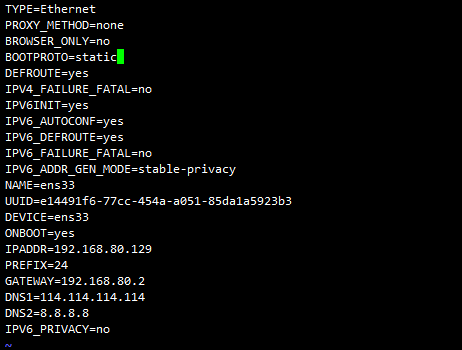
  将BOOTPROTO=dhcp修改为BOOTPROTO=static

  ONBOOT=no修改为ONBOOT=yes

新增

  IPADDR=192.168.80.129

  PREFIX=24    #NETMASK=255.255.255.0

  GATEWAY=192.168.80.2

  DNS1=114.114.114.114

  DNS2=8.8.8.8
之后重启网络服务
systemctl restart network
2.关闭NetworkManager
systemctl status NetworkManager

systemctl stop NetworkManager

systemctl disable NetworkManager
3.关闭selinux
vim /etc/selinux/config

将SELINUX=enforcing注释掉,并添加SELINUX=disabled,之后重启电脑生效
4.修改主机名
hostnamectl set-hostname centos2
5.修改yum源为阿里云
cd /etc/yum.repos.d

wget http://mirrors.aliyun.com/repo/Centos-7.repo

mv CentOS-Base.repo CentOS-Base.repo.bak

mv Centos-7.repo CentOS-Base.repo

yum clean all

yum makecache

yum update
6.设置环境变量
cd /etc/profile.d/

 vim custom.sh

    export PS1="\[\e[35;1m\][\u@\h \w]\\$\[\e[m\] "

    alias sudo='sudo '

    alias egrep='egrep --color=auto'

    alias fgrep='fgrep --color=auto'

    alias grep='grep --color=auto'

    alias ls='ls --color=auto'

    alias l.='ls -d .* --color=auto'

    alias ll='ls -l --color=auto'

    alias l='ls -laF'

    alias cp='cp -i'

    alias mv='mv -i'

    alias rm='rm -i'

    alias now='date +%Y%m%d%H%M%S'

 source custom.sh
7.ssh无密码登录
生成公钥私钥
ssh-keygen -t rsa
新建文件并添加主机公钥
touch authorized_keys

#vim authorized_keys
8.修改最大文件打开数
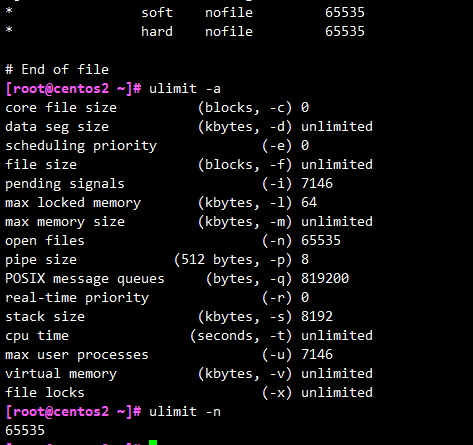
先查看默认最大文件打开数
ulimit -n

ulimit -a
修改配置文件
vim /etc/security/limits.conf
在最后添加
* soft nofile 65535

* hard nofile 65535
之后重启电脑生效
centos7安装后,一些小优化的更多相关文章
- VMware下CentOS7安装后,还原虚拟网络后,敲ifconfig不显示局域网ip解决方法
VMware下CentOS7安装后,还原虚拟网络后,敲ifconfig不显示局域网ip,没有出现eth0网卡,不能上网,SSH不能连接,输入ifconfig后如下图: 解决方法: 1.编辑网卡的配置文 ...
- centos7 最小化安装后的配置优化
echo #CENTOS7echo #1.最小化安装之后需要做的事echo 2.配置echo 2.1 安装网络yum install net-tools -y echo 2.2 更新机器名echo h ...
- CentOS7安装后配置MariaDB
安装后,优先推荐先对安全设置进行配置,键入命令 sudo mysql_secure_installation 键入当前密码,当前没有,直接回车,之后跟随提示会问几个问题:设置 root 密码? / 移 ...
- Centos7安装完成后一些小优化
1.修改ip地址.网关.主机名.DNS等 [root@localhost ~]# vi /etc/sysconfig/network-scripts/ifcfg-eth0 DEVICE=eth0 #网 ...
- MySQL安装后的初始优化
mysql数据库在安装之后,有一些内置的库(test库).用户(如root@localhost.localdomain)是不需要的,而且在Linux系统上,yum安装的mysql是默认无root密码的 ...
- centos7 安装后静态ip的配置
centos7 想到于centos6.5来说界面上看起来更加炫一点,但是在配置静态ip上来说是差不多的 首先看一下centos7的安装界面,相对来说简洁好看一些 先打开终端 可以看到centos7默认 ...
- CentOS7安装后连不上网络无法使用yum
更新日期:2018年5月31日 笔者今天在本地VMware中安装了CentOS7后,使用yum安装wget的时候发现不能下载,并有下图所示的提示: 于是,笔者就去问度娘,然后就找到了如下各种回复: 1 ...
- centos7系统安装后的基础优化
1.更改网卡信息 1.编辑网卡 # cd /etc/sysconfig/network-scripts/ # mv ifcfg-ens33 ifcfg-eth0 # mv ifcfg-ens37 if ...
- centos7 安装后,意外出现Please make your choice from above ['q' to quit | 'c' to continue | 'r' to refresh]
安装完成centos7后出现如下提示: Initial setup of CentOS Linux 7 (core) 1) [x] Creat user 2) [!] License informat ...
随机推荐
- html页面自适应宽度
html页面实现响应式的方式有很多,本篇介绍懒人必备一招见效的方法. 在head标签中加入 <meta name="viewport" content="width ...
- 泡泡一分钟:Using Geometric Features to Represent Near-Contact Behavior in Robotic Grasping
张宁 Using Geometric Features to Represent Near-Contact Behavior in Robotic Grasping链接:https://pan.ba ...
- [译]为什么在__new __()后总是调用__init __()?
原文来源: https://stackoverflow.com/questions/674304/why-is-init-always-called-after-new 需要控制新实例的创建时,请使用 ...
- precommit那些事儿
一.使用背景 我们有将 lint 命令添加进 npm scripts 中,但是很多人在提交代码时都会忘记或者没有习惯去执行检查,结果就是导致不符合规范的代码被上传到远端代码仓库. 二.问题分析 我们可 ...
- 取消Windows server 2008关机提示备注的方法
打开“开始”-“运行”,在“打开”一栏中输入“gpedit.msc”命令打开组策略编辑器,依次展开“计算机配置”→“管理模板”→“系统”,双击右侧窗口出现的“显示‘关闭事件跟踪程序’”,将“未配置”改 ...
- springcloud feign 调用
client端调用feigh, 要在启动类上添加@EnableFeignClients注解,并添加扫描: 不然会调用失败,找不到调用方法
- Git 工作流之 GitFlow
GitFlow学习: 先学习这篇:点击打开链接 Gitflow工作流是经典模型,体现了工作流的经验和精髓.随着项目过程复杂化,会感受到这个工作流中深思熟虑和威力. ////////////////// ...
- Git的各种工作流
Git工作流可以理解为团队成员遵守的一种代码管理方案,在Git中有以下几种常见工作流: 集中式工作流 功能开发工作流 Gitflow工作流 Forking工作流 1)集中式工作流 这种工作方式跟svn ...
- LeetCode 1051. 高度检查器(Height Checker) 28
1051. 高度检查器 1051. Height Checker 题目描述 学校在拍年度纪念照时,一般要求学生按照 非递减 的高度顺序排列. 请你返回至少有多少个学生没有站在正确位置数量.该人数指的是 ...
- java byte与int互相转换
一.Int2Byte byte[] bytes = new byte[4]; for (int i = 0; i < 4; i++) { bytes[i] = (byte)(integer &g ...