
OSPF 虚链路

通过配置OSPF虚链路连接到骨干区域。
实验拓扑
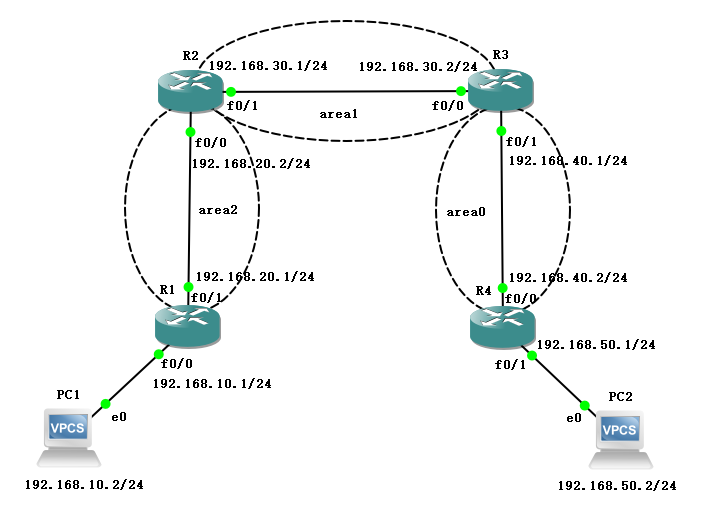
如图所示连接,地址规划如下:
| 名称 | 接口 | IP地址 |
|---|---|---|
| R1 | f0/0 | 192.168.10.1/24 |
| R1 | f0/1 | 192.168.20.1/24 |
| R2 | f0/0 | 192.168.20.2/24 |
| R2 | f0/1 | 192.168.30.1/24 |
| R3 | f0/0 | 192.168.30.2/24 |
| R3 | f0/1 | 192.168.40.1/24 |
| R4 | f0/0 | 192.168.40.2/24 |
| R4 | f0/1 | 192.168.50.1/24 |
| PC1 | e0 | 192.168.10.2/24 |
| PC2 | e0 | 192.168.50.2/24 |
配置方法
R2(config)#router ospf 1

R2(config-router)#area 1 virtual-link 3.3.3.3

R2(config-router)#ex
配置过程
R1
R1#conf t

Enter configuration commands, one per line.  End with CNTL/Z.

R1(config)#int f0/0

R1(config-if)#ip add 192.168.10.1 255.255.255.0

R1(config-if)#no sh

R1(config-if)#ex

R1(config)#int f0/1

R1(config-if)#ip add 192.168.20.1 255.255.255.0

R1(config-if)#no sh

R1(config-if)#ex

R1(config)#int loopback 0

R1(config-if)#ip add 1.1.1.1 255.255.255.255

R1(config-if)#no sh

R1(config-if)#ex

R1(config)#router ospf 1

R1(config-router)#router-id 1.1.1.1

R1(config-router)#network 192.168.10.0 0.0.0.255 area 2

R1(config-router)#network 192.168.20.0 0.0.0.255 area 2

R1(config-router)#ex
R2
R2#conf t

Enter configuration commands, one per line.  End with CNTL/Z.

R2(config)#int f0/0

R2(config-if)#ip add 192.168.20.2 255.255.255.0

R2(config-if)#no sh

R2(config-if)#ex

R2(config)#int f0/1

R2(config-if)#ip add 192.168.30.1 255.255.255.0

R2(config-if)#no sh

R2(config-if)#ex

R2(config)#int loopback 0

R2(config-if)#ip add 2.2.2.2 255.255.255.255

R2(config-if)#no sh

R2(config-if)#ex

R2(config)#router ospf 1

R2(config-router)#router-id 2.2.2.2

R2(config-router)#network 192.168.20.0 0.0.0.255 area 2

R2(config-router)#network 192.168.30.0 0.0.0.255 area 1

R2(config-router)#ex
R3
R3#conf t

Enter configuration commands, one per line.  End with CNTL/Z.

R3(config)#int f0/0

R3(config-if)#ip add 192.168.30.2 255.255.255.0

R3(config-if)#no sh

R3(config-if)#ex

R3(config)#int f0/1

R3(config-if)#ip add 192.168.40.1 255.255.255.0

R3(config-if)#no sh

R3(config-if)#ex

R3(config)#int loopback 0

R3(config-if)#ip add 3.3.3.3 255.255.255.255

R3(config-if)#no sh

R3(config-if)#ex

R3(config)#router ospf 1

R3(config-router)#router-id 3.3.3.3

R3(config-router)#network 192.168.30.0 0.0.0.255 area 1

R3(config-router)#network 192.168.40.0 0.0.0.255 area 0

R3(config-router)#ex
R4
R4#conf t

Enter configuration commands, one per line.  End with CNTL/Z.

R4(config)#int f0/0

R4(config-if)#ip add 192.168.40.2 255.255.255.0

R4(config-if)#no sh

R4(config-if)#ex

R4(config)#int f0/1

R4(config-if)#ip add 192.168.50.1 255.255.255.0

R4(config-if)#no sh

R4(config-if)#ex

R4(config)#int loopback 0

R4(config-if)#ip add 4.4.4.4 255.255.255.255

R4(config-if)#no sh

R4(config-if)#ex

R4(config)#router ospf 1

R4(config-router)#router-id 4.4.4.4

R4(config-router)#network 192.168.40.0 0.0.0.255 area 0

R4(config-router)#network 192.168.50.0 0.0.0.255 area 0

R4(config-router)#ex
第一次查看路由表
- R1
R1(config)#do show ip route

Codes: C - connected, S - static, R - RIP, M - mobile, B - BGP

       D - EIGRP, EX - EIGRP external, O - OSPF, IA - OSPF inter area

       N1 - OSPF NSSA external type 1, N2 - OSPF NSSA external type 2

       E1 - OSPF external type 1, E2 - OSPF external type 2

       i - IS-IS, su - IS-IS summary, L1 - IS-IS level-1, L2 - IS-IS level-2

       ia - IS-IS inter area, * - candidate default, U - per-user static route

       o - ODR, P - periodic downloaded static route

Gateway of last resort is not set

     1.0.0.0/32 is subnetted, 1 subnets

C       1.1.1.1 is directly connected, Loopback0

C    192.168.10.0/24 is directly connected, FastEthernet0/0

C    192.168.20.0/24 is directly connected, FastEthernet0/1
- R2
R2(config)#do show ip route

Codes: C - connected, S - static, R - RIP, M - mobile, B - BGP

       D - EIGRP, EX - EIGRP external, O - OSPF, IA - OSPF inter area

       N1 - OSPF NSSA external type 1, N2 - OSPF NSSA external type 2

       E1 - OSPF external type 1, E2 - OSPF external type 2

       i - IS-IS, su - IS-IS summary, L1 - IS-IS level-1, L2 - IS-IS level-2

       ia - IS-IS inter area, * - candidate default, U - per-user static route

       o - ODR, P - periodic downloaded static route

Gateway of last resort is not set

     2.0.0.0/32 is subnetted, 1 subnets

C       2.2.2.2 is directly connected, Loopback0

C    192.168.30.0/24 is directly connected, FastEthernet0/1

O    192.168.10.0/24 [110/20] via 192.168.20.1, 00:09:52, FastEthernet0/0

O IA 192.168.40.0/24 [110/20] via 192.168.30.2, 00:05:59, FastEthernet0/1

C    192.168.20.0/24 is directly connected, FastEthernet0/0

O IA 192.168.50.0/24 [110/30] via 192.168.30.2, 00:01:42, FastEthernet0/1
- R3
R3(config)#do show ip route

Codes: C - connected, S - static, R - RIP, M - mobile, B - BGP

       D - EIGRP, EX - EIGRP external, O - OSPF, IA - OSPF inter area

       N1 - OSPF NSSA external type 1, N2 - OSPF NSSA external type 2

       E1 - OSPF external type 1, E2 - OSPF external type 2

       i - IS-IS, su - IS-IS summary, L1 - IS-IS level-1, L2 - IS-IS level-2

       ia - IS-IS inter area, * - candidate default, U - per-user static route

       o - ODR, P - periodic downloaded static route

Gateway of last resort is not set

     3.0.0.0/32 is subnetted, 1 subnets

C       3.3.3.3 is directly connected, Loopback0

C    192.168.30.0/24 is directly connected, FastEthernet0/0

C    192.168.40.0/24 is directly connected, FastEthernet0/1

O    192.168.50.0/24 [110/20] via 192.168.40.2, 00:02:01, FastEthernet0/1
- R4
R4(config)#do show ip route

Codes: C - connected, S - static, R - RIP, M - mobile, B - BGP

       D - EIGRP, EX - EIGRP external, O - OSPF, IA - OSPF inter area

       N1 - OSPF NSSA external type 1, N2 - OSPF NSSA external type 2

       E1 - OSPF external type 1, E2 - OSPF external type 2

       i - IS-IS, su - IS-IS summary, L1 - IS-IS level-1, L2 - IS-IS level-2

       ia - IS-IS inter area, * - candidate default, U - per-user static route

       o - ODR, P - periodic downloaded static route

Gateway of last resort is not set

O IA 192.168.30.0/24 [110/20] via 192.168.40.1, 00:02:27, FastEthernet0/0

     4.0.0.0/32 is subnetted, 1 subnets

C       4.4.4.4 is directly connected, Loopback0

C    192.168.40.0/24 is directly connected, FastEthernet0/0

C    192.168.50.0/24 is directly connected, FastEthernet0/1
配置虚链路
R2(config)#router ospf 1

R2(config-router)#area 1 virtual-link 3.3.3.3

R2(config-router)#ex
R3(config)#router ospf 1

R3(config-router)#area 1 virtual-link 2.2.2.2

R3(config-router)#ex
第二次查看路由表
R1(config)#do show ip route

Codes: C - connected, S - static, R - RIP, M - mobile, B - BGP

       D - EIGRP, EX - EIGRP external, O - OSPF, IA - OSPF inter area

       N1 - OSPF NSSA external type 1, N2 - OSPF NSSA external type 2

       E1 - OSPF external type 1, E2 - OSPF external type 2

       i - IS-IS, su - IS-IS summary, L1 - IS-IS level-1, L2 - IS-IS level-2

       ia - IS-IS inter area, * - candidate default, U - per-user static route

       o - ODR, P - periodic downloaded static route

Gateway of last resort is not set

     1.0.0.0/32 is subnetted, 1 subnets

C       1.1.1.1 is directly connected, Loopback0

O IA 192.168.30.0/24 [110/20] via 192.168.20.2, 00:02:08, FastEthernet0/1

C    192.168.10.0/24 is directly connected, FastEthernet0/0

O IA 192.168.40.0/24 [110/30] via 192.168.20.2, 00:01:27, FastEthernet0/1

C    192.168.20.0/24 is directly connected, FastEthernet0/1

O IA 192.168.50.0/24 [110/40] via 192.168.20.2, 00:01:27, FastEthernet0/1
R2(config)#do show ip route

Codes: C - connected, S - static, R - RIP, M - mobile, B - BGP

       D - EIGRP, EX - EIGRP external, O - OSPF, IA - OSPF inter area

       N1 - OSPF NSSA external type 1, N2 - OSPF NSSA external type 2

       E1 - OSPF external type 1, E2 - OSPF external type 2

       i - IS-IS, su - IS-IS summary, L1 - IS-IS level-1, L2 - IS-IS level-2

       ia - IS-IS inter area, * - candidate default, U - per-user static route

       o - ODR, P - periodic downloaded static route

Gateway of last resort is not set

     2.0.0.0/32 is subnetted, 1 subnets

C       2.2.2.2 is directly connected, Loopback0

C    192.168.30.0/24 is directly connected, FastEthernet0/1

O    192.168.10.0/24 [110/20] via 192.168.20.1, 00:02:19, FastEthernet0/0

O    192.168.40.0/24 [110/20] via 192.168.30.2, 00:01:33, FastEthernet0/1

C    192.168.20.0/24 is directly connected, FastEthernet0/0

O    192.168.50.0/24 [110/30] via 192.168.30.2, 00:01:33, FastEthernet0/1
R3(config)#do show ip route

Codes: C - connected, S - static, R - RIP, M - mobile, B - BGP

       D - EIGRP, EX - EIGRP external, O - OSPF, IA - OSPF inter area

       N1 - OSPF NSSA external type 1, N2 - OSPF NSSA external type 2

       E1 - OSPF external type 1, E2 - OSPF external type 2

       i - IS-IS, su - IS-IS summary, L1 - IS-IS level-1, L2 - IS-IS level-2

       ia - IS-IS inter area, * - candidate default, U - per-user static route

       o - ODR, P - periodic downloaded static route

Gateway of last resort is not set

     3.0.0.0/32 is subnetted, 1 subnets

C       3.3.3.3 is directly connected, Loopback0

C    192.168.30.0/24 is directly connected, FastEthernet0/0

O IA 192.168.10.0/24 [110/30] via 192.168.30.1, 00:01:39, FastEthernet0/0

C    192.168.40.0/24 is directly connected, FastEthernet0/1

O IA 192.168.20.0/24 [110/20] via 192.168.30.1, 00:01:39, FastEthernet0/0

O    192.168.50.0/24 [110/20] via 192.168.40.2, 00:08:17, FastEthernet0/1
R4(config)#do show ip route

Codes: C - connected, S - static, R - RIP, M - mobile, B - BGP

       D - EIGRP, EX - EIGRP external, O - OSPF, IA - OSPF inter area

       N1 - OSPF NSSA external type 1, N2 - OSPF NSSA external type 2

       E1 - OSPF external type 1, E2 - OSPF external type 2

       i - IS-IS, su - IS-IS summary, L1 - IS-IS level-1, L2 - IS-IS level-2

       ia - IS-IS inter area, * - candidate default, U - per-user static route

       o - ODR, P - periodic downloaded static route

Gateway of last resort is not set

O IA 192.168.30.0/24 [110/20] via 192.168.40.1, 00:08:32, FastEthernet0/0

     4.0.0.0/32 is subnetted, 1 subnets

C       4.4.4.4 is directly connected, Loopback0

O IA 192.168.10.0/24 [110/40] via 192.168.40.1, 00:01:34, FastEthernet0/0

C    192.168.40.0/24 is directly connected, FastEthernet0/0

O IA 192.168.20.0/24 [110/30] via 192.168.40.1, 00:01:34, FastEthernet0/0

C    192.168.50.0/24 is directly connected, FastEthernet0/1
验证结果
配置 IP 地址
PC1> ip 192.168.10.2 192.168.10.1

Checking for duplicate address...

PC1 : 192.168.10.2 255.255.255.0 gateway 192.168.10.1
PC2> ip 192.168.50.2 192.168.50.1

Checking for duplicate address...

PC1 : 192.168.50.2 255.255.255.0 gateway 192.168.50.1
ping 测试
PC1> ping 192.168.50.2

192.168.50.2 icmp_seq=1 timeout

84 bytes from 192.168.50.2 icmp_seq=2 ttl=60 time=85.890 ms

84 bytes from 192.168.50.2 icmp_seq=3 ttl=60 time=80.743 ms

84 bytes from 192.168.50.2 icmp_seq=4 ttl=60 time=83.772 ms

84 bytes from 192.168.50.2 icmp_seq=5 ttl=60 time=85.761 ms
PC2> ping 192.168.10.2

84 bytes from 192.168.10.2 icmp_seq=1 ttl=60 time=76.961 ms

84 bytes from 192.168.10.2 icmp_seq=2 ttl=60 time=84.788 ms

84 bytes from 192.168.10.2 icmp_seq=3 ttl=60 time=79.753 ms

84 bytes from 192.168.10.2 icmp_seq=4 ttl=60 time=77.792 ms

84 bytes from 192.168.10.2 icmp_seq=5 ttl=60 time=83.964 ms
OSPF 虚链路的更多相关文章
- OSPF虚链路配置.示例2
先看一个拓扑图 黄色区域是area0,即骨干区域,如果如图示RT1与RT6之间的链路断了,那么会出现骨干区域被“分裂”的情况,很明显骨干区域是不能被分割开的,出现这种状况的时候可能会影响到整个自制系统 ...
- OSPF虚链路配置.示例1
在OSPF 网络中,区域0为骨干区域,其它的为非骨干区域,非骨干区域必须与骨干区域直接相连. 根据拓扑图可看到区域1与骨干区域0直接相连而区域2与骨干区域没有直接相连,这种情况下我们可以创建一条虚 ...
- rip是典型的距离矢量动态路由协议。Ospf是链路状态型的协议
网络工程师十个常见面试问题-看准网 https://m.kanzhun.com/k-mianshiwenti/1465113.html 两者都属于IGP协议,rip是典型的距离矢量动态路由协议.Osp ...
- H3C 显示OSPF的链路状态数据库
- OSPF 高级实验
一.环境准备 1. 软件:GNS3 2. 路由:c7200 二.实验操作 实验要求: 1.理解 OSPF 虚链路原理及何时需要使用虚链路. 2.掌握 OSPF 虚链路配置方法. 3.掌握 OSPF 的 ...
- OSPF详解
OSPF 详解 (1) [此博文包含图片] (2013-02-04 18:02:33) 转载 ▼ 标签: 端的 第二 以太 第一个 正在 目录 序言 初学乍练 循序渐进学习OSPF 朱皓 入门之前 了 ...
- 1.4-动态路由协议OSPF③
OSPF的路由汇总 ~~~~~~~~~~~~~~~~~~~~~~~~~~~~~~~~~~~~~~~~~~~~~~~ 用默认的网络地址 因为 无论在何种路 ...
- OSPF及实验
OSPF:Open Shortest Path First,最短路径优先1)基本概念:标准的LS型协议--共享拓扑组播更新:224.0.0.5/6触发更新,存在周期更新 30minOSPF是跨层封装 ...
- OSPF路由协议详解
OSPF:开放式最短路径优先协议无类别链路状态路由协议,组播更新224.0.0.5/6:跨层封装到三层,协议号89:基于拓扑工作,故更新量大-----需要结构化部署–区域划分.地址规划触发更新.每30 ...
随机推荐
- <虚树+树型DP> HNOI2014世界树
<虚树+树型DP> HNOI2014世界树 #include <iostream> #include <cstdio> #include <cstring&g ...
- [PHP] 一个免费、开源的基于tp5+layui2.1.5开发的快速开发框架
推荐 一个免费.开源的基于tp5+layui2.1.5开发的快速开发框架,既可以用来学习,也可以用来实际项目的快速开发: 码云下载:https://gitee.com/eduaskcms/eduask ...
- 【JZOJ5740】【20190706】幻想世界
题目 小 $\omega $ 想要进行烟火表演,她一开始有\(n\)颗彗星和\(n\)颗陨石 如果小 \(\omega\) 有\(i\)颗彗星而没有陨石,那么她会消耗\(i\)颗彗星并得到\(a_i\ ...
- 安卓设备连接Mac的简单方法
mac设备是苹果出品的桌面系统,以高冷而闻名,不同于我们平常使用的windows系统,mac系统对软件硬件的兼容性很差,将iOS 设备(iPhone.iPad和iPod)连接至Mac是一件很简单的事, ...
- IDEA Gradle配置与使用
1.安装Gradle,并添加环境变量. https://www.cnblogs.com/NyanKoSenSei/p/11458953.html 2.在IDEA中设置Gradle: 3.选中项目中的. ...
- button 在chrome浏览器下被点击时会出现一个橙色的边框
问题描述: button在chrome浏览器下被点击时会出现一个橙色的边框 在button上添加 :focus{outline:none;}也无法解决. 解决办法: 在button上添加 :focus ...
- Python【每日一问】22
问: [基础题]:输出 9*9 口诀表 [提高题]:古典问题:有一对兔子,从出生后第 3 个月起每个月都生一对兔子,小兔子长到第三个月后每个月又生一对兔子,假如兔子都不死,问每个月的兔子总数为多少? ...
- javascript的立即执行函数
在javascript中有引入立即执行函数的概念,那么什么是立即执行函数呢?立即执行函数又是怎么写的呢?立即执行函数与普通函数有什么区别呢? 先来看看一般的函数: function a(){ var ...
- [WeChat-Bot-Go] 记录帖
本来是想写一个微信机器人出来,用go语言. Github 目标是想做一个自动发送消息和抢红包的bot. 一开始跟着 这篇 文章写.写着写着发现文章久远,而且用的是第一版网页微信api,所以就自己去 ...
- 关于C语言指针的讨论
C语言指针的讨论 1.指整的概念辨析 2.指针与一维数组 3.指针与二维数组 4.指针与动态数组 5.指针数组 6. 指整与函数,形参,返回值 先熟悉一下概念,使劲把他们记下了 变量定义 类型表示 含 ...