
shell编程系列7--shell中常用的工具find、locate、which、whereis
shell编程系列7--shell中常用的工具find、locate、which、whereis .文件查找之find命令 语法格式:find [路径] [选项] [操作] 选项
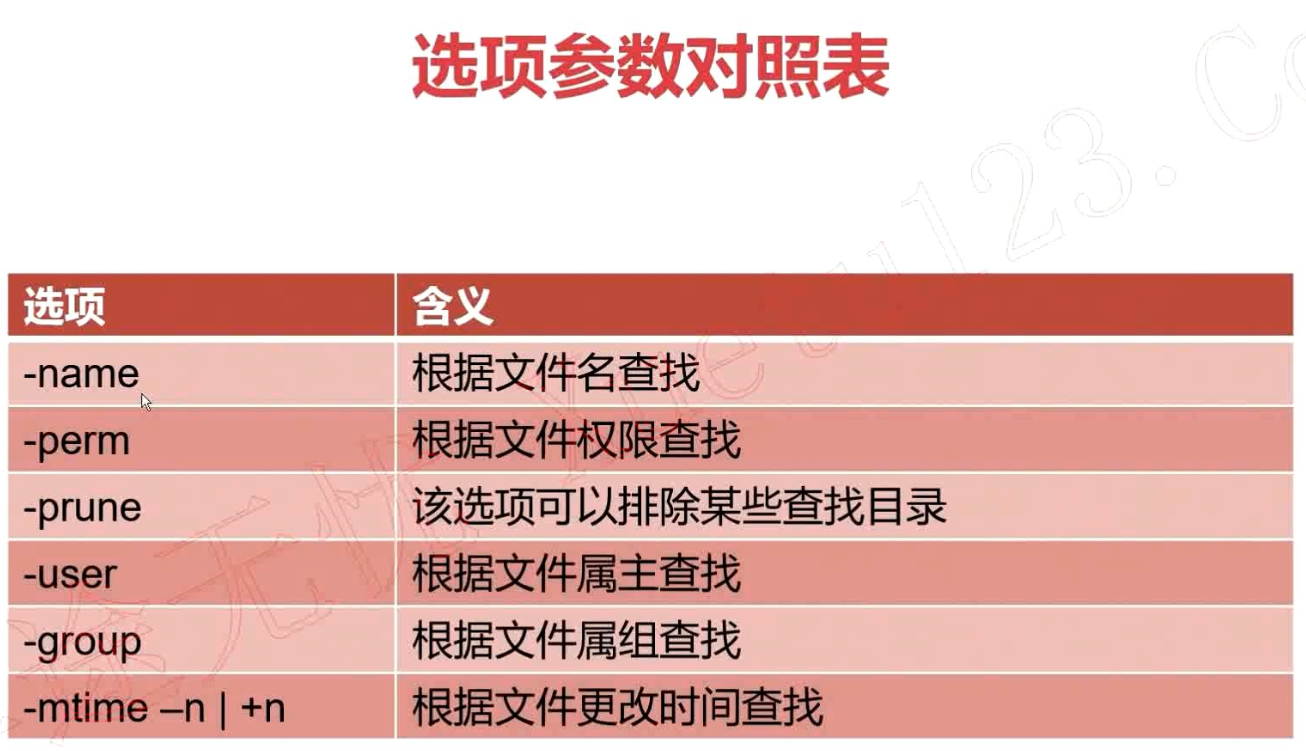
-name 根据文件名查找
-perm 根据文件权限查找
-prune 该选项可以排除某些查找目录
-user 根据文件属主查找
-group 根据文件属组查找
-mtime -n | +n 根据文件更改时间查找
-nogroup 查找无有效属组的文件
-nouser 查找无有效属主的文件
-newer file1 ! file2
-type 按文件类型查找
-size -n +n 按文件大小查找
-mindepth n 从n级子目录开始搜索
-maxdepth n 最多搜索到n级目录
find命令总结:
常用选项:
-name 查找/etc目录下以conf结尾的文件 find /etc -name "*.conf"
-iname 查找当前目录下文件名为aa的文件,不区分大小写 find . -iname aa
-user 查找文件属主为hdfs的所有文件 find . -user hdfs
-group 查找文件属主为yarn的所有文件 find . -group yarn
-type 查找文件属组为yarn的所有文件 find . -group yarn f 文件 find . -type f
d 目录 find . -type d
c 字符设备文件 find . -type c
b 块设备文件 find . -type b
l 链接文件 find . -type l
p 管道文件 find . -type p -size
-n 大小小于n的文件
+n 大小大于n的文件
n 大小等于n的文件(用的少) 例子1:查找/etc/目录下小于10000字节的文件
find /etc -size -10000c 例子2:查找/etc目录下大于1M的文件
find /etc/ -size +1M -mtime
-n n天以内修改的文件
+n n天以外修改的文件
n 正好等于n天修改的文件 例子1:查找/etc目录下5天以内修改且以conf结尾的文件 find /etc -mtime - -name '*.conf'
例子2:查找/etc目录下10天之前修改且属主为root的文件 find /etc -mtime + -user root -mmin
-n n分钟以内修改的文件
+n n分钟以外修改的文件 例子1:查找/etc目录下30分钟之前修改的文件 find /etc -mmin +
例子2:查找/etc目录下30分钟以内修改的目录 find /etc -mmin - -type d -mindepth n 表示从n级子目录开始搜索
例子:在/etc下的3级子目录开始搜索 find /etc -mindepth -name '*.conf' -maxdepth n 表示最多搜索到n级子目录
例子1:在/etc下搜索符号条件的文件,但最多搜索到2级子目录
例子2:
find /etc -type f -name '*.conf' -size +10k -maxdepth 需要了解的选项:
-nouser 查找没有属主的文件
例子:find . -type f -nouser
-nogroup 查找没有属组的文件
例子:find . -type f -nogroup
-perm
例子:find . -perm
-prune
通常和-path一起使用,用于将特定目录排除在搜索条件之外
例子1:查找当前目录下所有普通文件,但排除test目录
find . -path /etc -prune -o -type f
例子2:查找当前目录下所有普通文件,但排除etc和opt目录
find . -path /etc -prune -o -path /opt -prune -o -type f
例子3:查找当前目录下所有普通文件,但排除etc和opt目录,但属主为hdfs
find . -path /etc -prune -o -path /opt -prune -o -type f -a -user hdfs
例子4:查找当前目录下所有普通文件,但排除etc和opt目录,但属主为hdfs,切文件大小必须大于500字节
find . -path ./etc -prune -o -path ./opt -prune -o -type f -a user hdfs -a -size +500c -newer file1
例子1:find /etc -newer a 操作:
-print 打印输出 -exec 对搜索到的文件执行特定的操作,格式为 -exec 'command' {} \;
例子1:搜索/etc下的文件(非目录),文件名以conf结尾,且大于10k,然后将其删除
find ./etc -type f -name "*.conf" -size +10k -exec rm -f {} \; 例子2:将/var/log目录下以log结尾的文件,且更改时间在7天以上的删除
find /var/log -name "*.log" -mtime + -exec rm -rf {} \; 例子3:搜索条件和例子1一样,只是不删除,而是将其拷贝到/root/conf目录下
find ./etc -size +10k -type f -name "*.conf" -exec cp {} /root/conf/ \; -ok 和exec功能一样,只是每次操作都会给用户提示 逻辑运算符:
-a 与
-o 或
-not|! 非 例子1:查找当前目录下,属主不是hdfs的所有文件
find . -not -user hdfs | find . ! -user hdfs
例子2:查找当前目录下,属主属于hdfs,且大小大于300字节的文件
find . -type f -a -user hdfs -a -size +300c
例子3:查找当前目录下的属主为hdfs或者以xml结尾的普通文件
find . -type f -a \( -user hdfs -o -name '*.xml' \) 示例:
查找以.conf结尾的文件 [root@es01 shell]# find /etc -name '*.conf'
/etc/resolv.conf
/etc/depmod.d/dist.conf
/etc/dracut.conf
/etc/prelink.conf.d/nss-softokn-prelink.conf
/etc/prelink.conf.d/fipscheck.conf
/etc/prelink.conf.d/grub2.conf
/etc/modprobe.d/tuned.conf
/etc/modprobe.d/firewalld-sysctls.conf
/etc/modprobe.d/dccp-blacklist.conf
... # -name 区分大小写,iname忽略大小写
[root@es01 dir]# ll
total
-rw-r--r-- root root May : aa
-rw-r--r-- root root May : aA
-rw-r--r-- root root May : Aa
-rw-r--r-- root root May : AA
-rw-r--r-- root root May : etc
-rw-r--r-- root root May : test
-rw-r--r-- root root May : user.list
[root@es01 dir]# find ./ -name 'aa'
./aa
[root@es01 dir]# find ./ -iname 'aa'
./aa
./aA
./AA
./Aa # 查找文件
[root@es01 dir]# find ./ -type f
./aa
./aA
./AA
./Aa
./etc
./test
./user.list # 查找/etc/目录下大于1M的文件
[root@es01 dir]# find /etc -size +1M
/etc/udev/hwdb.bin
/etc/selinux/targeted/active/policy.kern
/etc/selinux/targeted/contexts/files/file_contexts.bin
/etc/selinux/targeted/policy/policy. # 创建一个1m的文件,并查找大小为1m的文件
[root@es01 dir]# dd if=/dev/zero of= bs=512k count=
+ records in
+ records out
bytes (1.0 MB) copied, 0.000784129 s, 1.3 GB/s
[root@es01 dir]# ll -h
-rw-r--r-- root root 1.0M May :
[root@es01 dir]# find . -size 1M
.
./ # 3天内修改的文件
[root@es01 dir]# find /etc/ -mtime -
/etc/
/etc/resolv.conf
/etc/group
/etc/gshadow
/etc/passwd
/etc/shadow
/etc/ld.so.cache
/etc/logrotate.d
/etc/tuned/active_profile
/etc/tuned/profile_mode # 查找5天内的.conf文件
[root@es01 dir]# find /etc -mtime - -name "*.conf"
/etc/resolv.conf
/etc/fonts/conf.d/-unhint-small-dejavu-sans.conf
/etc/fonts/conf.d/-dejavu-sans.conf
/etc/fonts/conf.d/-hinting-slight.conf
/etc/fonts/conf.d/-scale-bitmap-fonts.conf
/etc/fonts/conf.d/-unhint-small-vera.conf
/etc/fonts/conf.d/-unhint-nonlatin.conf # 查找30分钟内被修改的文件
[root@es01 dir]# find /etc -mmin -
/etc
/etc/group
/etc/gshadow
/etc/cron.daily
/etc/my.cnf
/etc/aa.conf # 查找2级子目录查找文件
[root@es01 dir]# find . -mindepth -type f
./test1/nginx/fastcgi.conf
./test1/nginx/fastcgi.conf.default
./test1/nginx/fastcgi_params
./test1/nginx/fastcgi_params.default
./test1/nginx/koi-utf
./test1/nginx/koi-win
./test1/nginx/mime.types
./test1/nginx/mime.types.default
./test1/nginx/nginx.conf
./test1/nginx/nginx.conf.default
./test1/nginx/scgi_params
./test1/nginx/scgi_params.default
./test1/nginx/uwsgi_params
./test1/nginx/uwsgi_params.default
./test1/nginx/win-utf # 最深查找1级子目录的文件
[root@es01 dir]# find . -maxdepth -type f
./aa
./aA
./AA
./Aa
./etc
./test
./user.list
./ # 查找644权限的文件
[root@es01 dir]# find . -perm
./aa
./aA
./AA
./Aa
./etc
./test
./user.list
./ # 排除 test1/nginx 目录后的文件
[root@es01 dir]# find . -path ./test1/nginx -prune -o -type f
./aa
./aA
./AA
./Aa
./etc
./test
./user.list
./
./test1/nginx # 查找排除 test_1 和 test1 以后的文件
[root@es01 dir]# find . -path ./test_1 -prune -o -path ./test1 -prune -o -type f
./aa
./aA
./AA
./Aa
./etc
./test
./user.list
./
./test1
./test_1
./test_2/ccc
./test_2/ddd # 查找当前目录下比123 新的文件
[root@es01 dir]# find ./ -newer
./
./test1
./test1/dir_3
./test1/dir_3/dir_4
./test_1
./test_1/bbb
./test_1/aaa
./test_2
./test_2/ccc
./test_2/ddd # 将etc目录拷贝到当前目录,查找etc目录中的.conf文件并删除
[root@es01 dir]# cp -r /etc ./
[root@es01 dir]# ls
aa aA Aa AA etc fff test test1 test_1 test_2 user.list
[root@es01 dir]# find ./etc -name '*.conf' -exec rm -f {} \;
[root@es01 dir]# find ./etc -name '*.conf'
[root@es01 dir]# # 将etc目录下大于1m的文件拷贝到test_5目录下
[root@es01 dir]# find ./etc/ -size +1M
./etc/udev/hwdb.bin
./etc/selinux/targeted/active/policy.kern
./etc/selinux/targeted/contexts/files/file_contexts.bin
./etc/selinux/targeted/policy/policy.
[root@es01 dir]# mkdir test_5
[root@es01 dir]# find ./etc -size +1M -exec cp {} ./test_5/ \;
[root@es01 dir]# ls test_5
file_contexts.bin hwdb.bin policy. policy.kern # -ok 提示用户是否执行操作
[root@es01 dir]# find ./ -type f -ok rm -f {} \;
< rm ... ./aa > ? y
< rm ... ./aA > ? y
< rm ... ./AA > ? n
< rm ... ./Aa > ? find、locate、whereis和which总结及适用场景分析 locate命令介绍 文件查找命令,所属软件包mlocate
不同于find命令是在整块磁盘中搜索,locate命令在数据库文件中查找 find默认全部匹配,locate则是默认部分匹配 updatedb命令:用户更新/var/lib/mlocate/mlocate.db 文件 所使用配置文件/etc/updatedb.conf 该命令在后台cron计划任务中定期执行 # find是精确查找
[root@es01 dir]# find /etc -name 'my.cnf'
/etc/my.cnf # locate部分匹配
[root@es01 dir]# locate my.cnf
/etc/my.cnf
/etc/my.cnf.d
/etc/my.cnf.d/mysql-clients.cnf # 即时创建的文件用locate是查找不到的,因为系统有计划任务定时更新mlocate.db文件,如果不包含是查找不到文件的
[root@es01 ~]# touch abc.txt
[root@es01 ~]# touch def.txt
[root@es01 ~]# locate abc.txt
[root@es01 ~]# locate def.txt # 更新数据库就可以查找到文件了
[root@es01 ~]# ll -h /var/lib/mlocate/mlocate.db
-rw-r----- root slocate 3.0M May : /var/lib/mlocate/mlocate.db
[root@es01 ~]# updatedb
[root@es01 ~]# locate abc.txt
/root/abc.txt
[root@es01 ~]# locate def.txt
/root/def.txt
[root@es01 ~]# ll -h /var/lib/mlocate/mlocate.db
-rw-r----- root slocate 3.1M May : /var/lib/mlocate/mlocate.db whereis命令 选项
-b 只返回二进制文件
-m 只返回帮助文档文件
-s 只返回源代码文件[root@es01 ~]# whereis mysql
mysql: /usr/bin/mysql /usr/lib64/mysql /usr/share/mysql /usr/share/man/man1/mysql..gz # 只查找二进制文件
[root@es01 ~]# whereis -b mysql
mysql: /usr/bin/mysql /usr/lib64/mysql /usr/share/mysql # 只查找man文档
[root@es01 ~]# whereis -m mysql
mysql: /usr/share/man/man1/mysql..gz which命令 作用:仅查找二进制程序文件 选项
-b 只返回二进制文件 [root@es01 ~]# which mysql
/usr/bin/mysql 各命令使用场景推荐
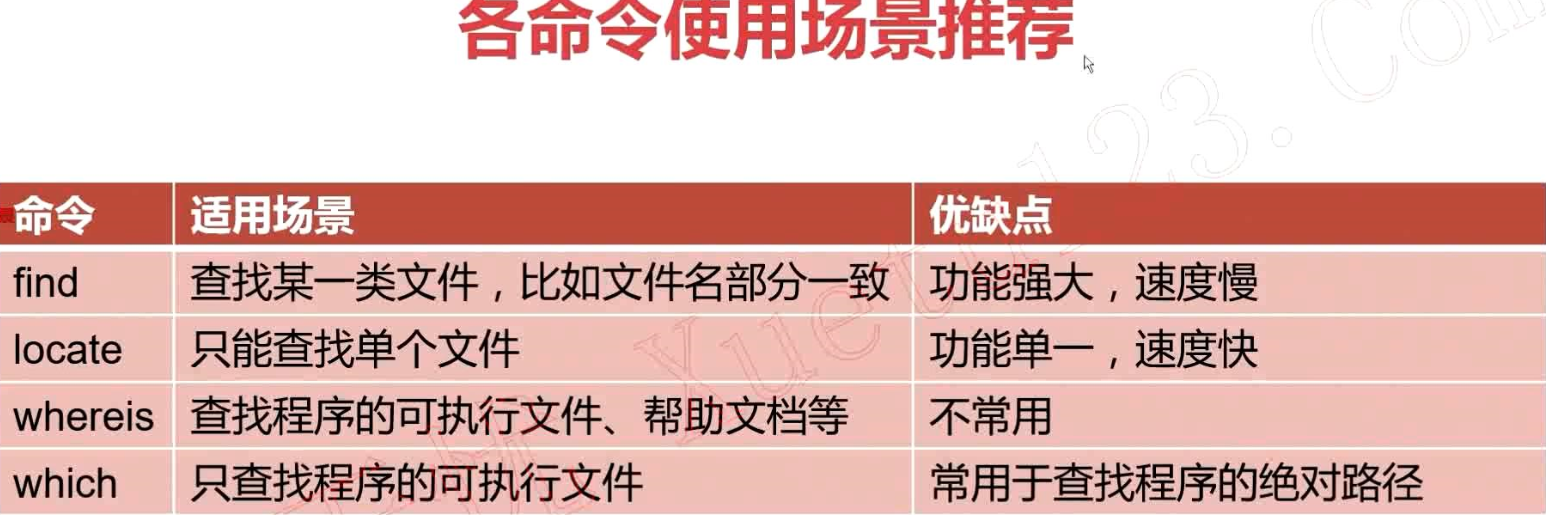
命令 适用场景 优缺点 find 查找某一类文件,比如文件名部分一致 功能强大,速度慢
locate 只能查找单个文件 功能单一,速度快
whereis 查找程序的可执行文件、帮助文档等 不常用
which 只查找程序的可执行文件 常用于查找程序的绝对路径

shell编程系列7--shell中常用的工具find、locate、which、whereis的更多相关文章
- shell编程系列1--shell脚本中的变量替换
shell编程系列1--shell脚本中的变量替换 变量替换总结: .${变量#匹配规则} # 从头开始匹配,最短删除 .${变量##匹配规则} # 从头开始匹配,最长删除(贪婪模式) .${变量%匹 ...
- shell编程系列21--文本处理三剑客之awk中数组的用法及模拟生产环境数据统计
shell编程系列21--文本处理三剑客之awk中数组的用法及模拟生产环境数据统计 shell中的数组的用法: shell数组中的下标是从0开始的 array=("Allen" & ...
- shell编程系列20--文本处理三剑客之awk常用选项
shell编程系列20--文本处理三剑客之awk常用选项 awk选项总结 选项 解释 -v 参数传递 -f 指定脚本文件 -F 指定分隔符 -V 查看awk的版本号 [root@localhost s ...
- shell编程系列24--shell操作数据库实战之利用shell脚本将文本数据导入到mysql中
shell编程系列24--shell操作数据库实战之利用shell脚本将文本数据导入到mysql中 利用shell脚本将文本数据导入到mysql中 需求1:处理文本中的数据,将文本中的数据插入到mys ...
- shell编程系列19--文本处理三剑客之awk中的字符串函数
shell编程系列19--文本处理三剑客之awk中的字符串函数 字符串函数对照表(上) 函数名 解释 函数返回值 length(str) 计算字符串长度 整数长度值 index(str1,str2) ...
- shell编程系列18--文本处理三剑客之awk动作中的条件及if/while/do while/for循环语句
shell编程系列18--文本处理三剑客之awk动作中的条件及if/while/do while/for循环语句条件语句 if(条件表达式) 动作1 else if(条件表达式) 动作2 else 动 ...
- shell编程系列17--文本处理三剑客之awk动作中的表达式用法
shell编程系列17--文本处理三剑客之awk动作中的表达式用法 awk动作表达式中的算数运算符 awk动作中的表达式用法总结: 运算符 含义 + 加 - 减 * 乘 / 除 % 模 ^或** 乘方 ...
- shell编程系列11--文本处理三剑客之sed利用sed删除文本中的内容
shell编程系列11--文本处理三剑客之sed利用sed删除文本中的内容 删除命令对照表 命令 含义 1d 删除第一行内容 ,10d 删除1行到10行的内容 ,+5d 删除10行到16行的内容 /p ...
- shell编程系列6--shell中的函数
shell编程系列6--shell中的函数 .函数介绍 linux shell中的函数和大多数编程语言中的函数一样 将相似的任务或者代码封装到函数中,供其他地方调用 语法格式 第一种格式 name() ...
随机推荐
- Codeforces D. Color the Fence(贪心)
题目描述: D. Color the Fence time limit per test 2 seconds memory limit per test 256 megabytes input sta ...
- deb: No command ‘deb’ found
deb: No command ‘deb’ found Posted on September 19, 2010 Let’s take a simple example of running the ...
- springboot 之 使用poi进行数据的导出(一)
使用的是idea+restful风格 第一:引入依赖为: <!--poi--> <dependency> <groupId>org.apache.xmlbeans& ...
- 关于C3P0-mySQL关于url的细节问题
1.为url设置?useUnicode=true&characterEncoding=UTF-8 为了统一编码,我们会为数据库封装的实体类加上上面的那句话,但是C3P0数据库连接池是xml配置 ...
- robot framework 笔记(二),web ui 元素定位
背景: 元素定位的方式很多,有通过 id.name.class等等,有感兴趣的同学可以参看相关文档,本文介绍 跟过文字定位的方法,在工作中一直使用这一种 no bb 方法如下: 1.根据"我 ...
- drf框架 - JWT认证插件
JWT认证 JWT认证方式与其他认证方式对比: 优点 1) 服务器不要存储token,token交给每一个客户端自己存储,服务器压力小 2)服务器存储的是 签发和校验token 两段算法,签发认证的效 ...
- dede5.7评论框不显示,文章页表情不显示,解决办法
dede5.7评论框不显示,文章页表情不显示,解决办法 进入dede后台,系统-系统基本参数-其它选项,找到模板引擎禁用标签,去掉里面的php,如图 进入dede模板目录,默认是/templets/d ...
- LightOJ - 1259 - Goldbach`s Conjecture(整数分解定理)
链接: https://vjudge.net/problem/LightOJ-1259 题意: Goldbach's conjecture is one of the oldest unsolved ...
- 执行DTS包将excel导入数据库
利用ssms生成dtsx文件,必须以32bit执行,到路径执行C:\Program Files (x86)\Microsoft SQL Server\110\DTS\Binn > dtexec ...
- 1-STM32+W5500+GPRS物联网开发基础篇-工控板简介
最近这些日子都在忙活STM+W5500+GPRS的板子,所以前面的那块板子的教程耽搁了些时间. 这次的板子和上一版相比更贴近了使用,是因为有朋友督促我要做一块直接可以在工厂使用的板子,所以设计了这一块 ...