
爬虫中BeautifulSoup4解析器
CSS 选择器:BeautifulSoup4
和 lxml 一样,Beautiful Soup 也是一个HTML/XML的解析器,主要的功能也是如何解析和提取 HTML/XML 数据。
lxml 只会局部遍历,而Beautiful Soup 是基于HTML DOM的,会载入整个文档,解析整个DOM树,因此时间和内存开销都会大很多,所以性能要低于lxml。
BeautifulSoup 用来解析 HTML 比较简单,API非常人性化,支持CSS选择器、Python标准库中的HTML解析器,也支持 lxml 的 XML解析器。
Beautiful Soup 3 目前已经停止开发,推荐现在的项目使用Beautiful Soup 4。使用 pip 安装即可:
pip install beautifulsoup4
| 抓取工具 | 速度 | 使用难度 | 安装难度 |
|---|---|---|---|
| 正则 | 最快 | 困难 | 无(内置) |
| BeautifulSoup | 慢 | 最简单 | 简单 |
| lxml | 快 | 简单 | 一般 |
示例:
首先必须要导入 bs4 库
# beautifulsoup4_test.py

from bs4 import BeautifulSoup

html = """

<html><head><title>The Dormouse's story</title></head>

<body>

<p class="title" name="dromouse"><b>The Dormouse's story</b></p>

<p class="story">Once upon a time there were three little sisters; and their names were

<a href="http://example.com/elsie" class="sister" id="link1"><!-- Elsie --></a>,

<a href="http://example.com/lacie" class="sister" id="link2">Lacie</a> and

<a href="http://example.com/tillie" class="sister" id="link3">Tillie</a>;

and they lived at the bottom of a well.</p>

<p class="story">...</p>

"""

#创建 Beautiful Soup 对象

soup = BeautifulSoup(html)

#打开本地 HTML 文件的方式来创建对象

#soup = BeautifulSoup(open('index.html'))

#格式化输出 soup 对象的内容

print soup.prettify()
运行结果:
<html>

 <head>

  <title>

   The Dormouse's story

  </title>

 </head>

 <body>

  <p class="title" name="dromouse">

   <b>

    The Dormouse's story

   </b>

  </p>

  <p class="story">

   Once upon a time there were three little sisters; and their names were

   <a class="sister" href="http://example.com/elsie" id="link1">

    <!-- Elsie -->

   </a>

   ,

   <a class="sister" href="http://example.com/lacie" id="link2">

    Lacie

   </a>

   and

   <a class="sister" href="http://example.com/tillie" id="link3">

    Tillie

   </a>

   ;

and they lived at the bottom of a well.

  </p>

  <p class="story">

   ...

  </p>

 </body>

</html>
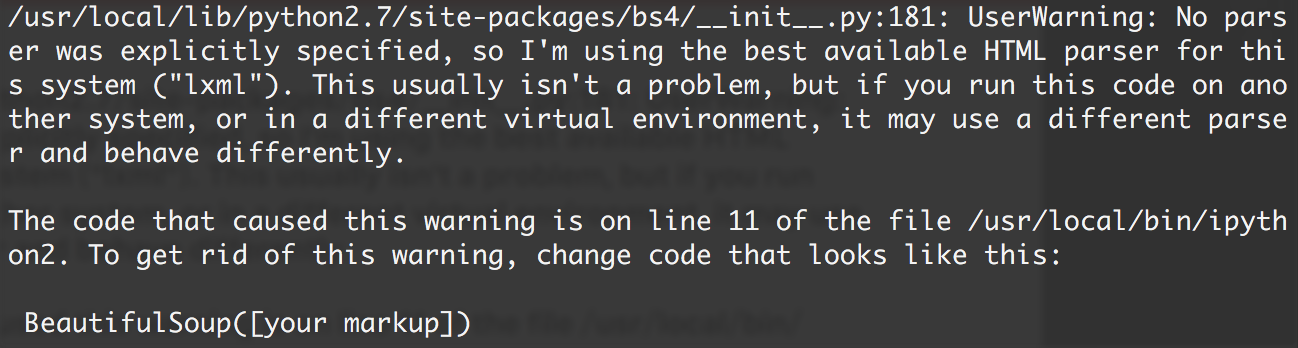
如果我们在 IPython2 下执行,会看到这样一段警告:
意思是,如果我们没有显式地指定解析器,所以默认使用这个系统的最佳可用HTML解析器(“lxml”)。如果你在另一个系统中运行这段代码,或者在不同的虚拟环境中,使用不同的解析器造成行为不同。
- 但是我们可以通过
soup = BeautifulSoup(html,“lxml”)方式指定lxml解析器。
四大对象种类
Beautiful Soup将复杂HTML文档转换成一个复杂的树形结构,每个节点都是Python对象,所有对象可以归纳为4种:
- Tag
- NavigableString
- BeautifulSoup
- Comment
1. Tag
Tag 通俗点讲就是 HTML 中的一个个标签,例如:
<head><title>The Dormouse's story</title></head>

<a class="sister" href="http://example.com/elsie" id="link1"><!-- Elsie --></a>

<p class="title" name="dromouse"><b>The Dormouse's story</b></p>
上面的 title head a p等等 HTML 标签加上里面包括的内容就是 Tag,那么试着使用 Beautiful Soup 来获取 Tags:
from bs4 import BeautifulSoup

html = """

<html><head><title>The Dormouse's story</title></head>

<body>

<p class="title" name="dromouse"><b>The Dormouse's story</b></p>

<p class="story">Once upon a time there were three little sisters; and their names were

<a href="http://example.com/elsie" class="sister" id="link1"><!-- Elsie --></a>,

<a href="http://example.com/lacie" class="sister" id="link2">Lacie</a> and

<a href="http://example.com/tillie" class="sister" id="link3">Tillie</a>;

and they lived at the bottom of a well.</p>

<p class="story">...</p>

"""

#创建 Beautiful Soup 对象

soup = BeautifulSoup(html)

print soup.title

# <title>The Dormouse's story</title>

print soup.head

# <head><title>The Dormouse's story</title></head>

print soup.a

# <a class="sister" href="http://example.com/elsie" id="link1"><!-- Elsie --></a>

print soup.p

# <p class="title" name="dromouse"><b>The Dormouse's story</b></p>

print type(soup.p)

# <class 'bs4.element.Tag'>
可以利用 soup 加标签名轻松地获取这些标签的内容,这些对象的类型是bs4.element.Tag。但是注意,它查找的是在所有内容中的第一个符合要求的标签。如果要查询所有的标签,后面会进行介绍。
对于 Tag,它有两个重要的属性,是 name 和 attrs
print soup.name

# [document] #soup 对象本身比较特殊,它的 name 即为 [document]

print soup.head.name

# head #对于其他内部标签,输出的值便为标签本身的名称

print soup.p.attrs

# {'class': ['title'], 'name': 'dromouse'}

# 在这里,我们把 p 标签的所有属性打印输出了出来,得到的类型是一个字典。

print soup.p['class'] # soup.p.get('class')

# ['title'] #还可以利用get方法,传入属性的名称,二者是等价的

soup.p['class'] = "newClass"

print soup.p # 可以对这些属性和内容等等进行修改

# <p class="newClass" name="dromouse"><b>The Dormouse's story</b></p>

del soup.p['class'] # 还可以对这个属性进行删除

print soup.p

# <p name="dromouse"><b>The Dormouse's story</b></p>
2. NavigableString
既然已经得到了标签的内容,那么问题来了,要想获取标签内部的文字怎么办呢?很简单,用 .string 即可,例如
print soup.p.string

# The Dormouse's story

print type(soup.p.string)

# In [13]: <class 'bs4.element.NavigableString'>
3. BeautifulSoup
BeautifulSoup 对象表示的是一个文档的内容。大部分时候,可以把它当作 Tag 对象,是一个特殊的 Tag,我们可以分别获取它的类型,名称,以及属性来感受一下
print type(soup.name)

# <type 'unicode'>

print soup.name

# [document]

print soup.attrs # 文档本身的属性为空

# {}
4. Comment
Comment 对象是一个特殊类型的 NavigableString 对象,其输出的内容不包括注释符号。
print soup.a

# <a class="sister" href="http://example.com/elsie" id="link1"><!-- Elsie --></a>

print soup.a.string

# Elsie

print type(soup.a.string)

# <class 'bs4.element.Comment'>
a 标签里的内容实际上是注释,但是如果我们利用 .string 来输出它的内容时,注释符号已经去掉了。
遍历文档树
1. 直接子节点 :.contents .children 属性
.content
tag 的 .content 属性可以将tag的子节点以列表的方式输出
print soup.head.contents

#[<title>The Dormouse's story</title>]
输出方式为列表,我们可以用列表索引来获取它的某一个元素
print soup.head.contents[0]

#<title>The Dormouse's story</title>
.children
它返回的不是一个 list,不过我们可以通过遍历获取所有子节点。
我们打印输出 .children 看一下,可以发现它是一个 list 生成器对象
print soup.head.children

#<listiterator object at 0x7f71457f5710>

for child in  soup.body.children:

    print child
结果:
<p class="title" name="dromouse"><b>The Dormouse's story</b></p>

<p class="story">Once upon a time there were three little sisters; and their names were

<a class="sister" href="http://example.com/elsie" id="link1"><!-- Elsie --></a>,

<a class="sister" href="http://example.com/lacie" id="link2">Lacie</a> and

<a class="sister" href="http://example.com/tillie" id="link3">Tillie</a>;

and they lived at the bottom of a well.</p>

<p class="story">...</p>
2. 所有子孙节点: .descendants 属性
.contents 和 .children 属性仅包含tag的直接子节点,.descendants 属性可以对所有tag的子孙节点进行递归循环,和 children类似,我们也需要遍历获取其中的内容。
for child in soup.descendants:

    print child
运行结果:
<html><head><title>The Dormouse's story</title></head>

<body>

<p class="title" name="dromouse"><b>The Dormouse's story</b></p>

<p class="story">Once upon a time there were three little sisters; and their names were

<a class="sister" href="http://example.com/elsie" id="link1"><!-- Elsie --></a>,

<a class="sister" href="http://example.com/lacie" id="link2">Lacie</a> and

<a class="sister" href="http://example.com/tillie" id="link3">Tillie</a>;

and they lived at the bottom of a well.</p>

<p class="story">...</p>

</body></html>

<head><title>The Dormouse's story</title></head>

<title>The Dormouse's story</title>

The Dormouse's story

<body>

<p class="title" name="dromouse"><b>The Dormouse's story</b></p>

<p class="story">Once upon a time there were three little sisters; and their names were

<a class="sister" href="http://example.com/elsie" id="link1"><!-- Elsie --></a>,

<a class="sister" href="http://example.com/lacie" id="link2">Lacie</a> and

<a class="sister" href="http://example.com/tillie" id="link3">Tillie</a>;

and they lived at the bottom of a well.</p>

<p class="story">...</p>

</body>

<p class="title" name="dromouse"><b>The Dormouse's story</b></p>

<b>The Dormouse's story</b>

The Dormouse's story

<p class="story">Once upon a time there were three little sisters; and their names were

<a class="sister" href="http://example.com/elsie" id="link1"><!-- Elsie --></a>,

<a class="sister" href="http://example.com/lacie" id="link2">Lacie</a> and

<a class="sister" href="http://example.com/tillie" id="link3">Tillie</a>;

and they lived at the bottom of a well.</p>

Once upon a time there were three little sisters; and their names were

<a class="sister" href="http://example.com/elsie" id="link1"><!-- Elsie --></a>

 Elsie

,

<a class="sister" href="http://example.com/lacie" id="link2">Lacie</a>

Lacie

 and

<a class="sister" href="http://example.com/tillie" id="link3">Tillie</a>

Tillie

;

and they lived at the bottom of a well.

<p class="story">...</p>

...
3. 节点内容: .string 属性
如果tag只有一个 NavigableString 类型子节点,那么这个tag可以使用 .string 得到子节点。如果一个tag仅有一个子节点,那么这个tag也可以使用 .string 方法,输出结果与当前唯一子节点的 .string 结果相同。
通俗点说就是:如果一个标签里面没有标签了,那么 .string 就会返回标签里面的内容。如果标签里面只有唯一的一个标签了,那么 .string 也会返回最里面的内容。例如:
print soup.head.string

#The Dormouse's story

print soup.title.string

#The Dormouse's story
搜索文档树
1.find_all(name, attrs, recursive, text, **kwargs)
1)name 参数
name 参数可以查找所有名字为 name 的tag,字符串对象会被自动忽略掉
A.传字符串
最简单的过滤器是字符串.在搜索方法中传入一个字符串参数,Beautiful Soup会查找与字符串完整匹配的内容,下面的例子用于查找文档中所有的<b>标签:
soup.find_all('b')

# [<b>The Dormouse's story</b>]

print soup.find_all('a')

#[<a class="sister" href="http://example.com/elsie" id="link1"><!-- Elsie --></a>, <a class="sister" href="http://example.com/lacie" id="link2">Lacie</a>, <a class="sister" href="http://example.com/tillie" id="link3">Tillie</a>]
B.传正则表达式
如果传入正则表达式作为参数,Beautiful Soup会通过正则表达式的 match() 来匹配内容.下面例子中找出所有以b开头的标签,这表示<body>和<b>标签都应该被找到
import re

for tag in soup.find_all(re.compile("^b")):

    print(tag.name)

# body

# b
C.传列表
如果传入列表参数,Beautiful Soup会将与列表中任一元素匹配的内容返回.下面代码找到文档中所有<a>标签和<b>标签:
soup.find_all(["a", "b"])

# [<b>The Dormouse's story</b>,

#  <a class="sister" href="http://example.com/elsie" id="link1">Elsie</a>,

#  <a class="sister" href="http://example.com/lacie" id="link2">Lacie</a>,

#  <a class="sister" href="http://example.com/tillie" id="link3">Tillie</a>]
2)keyword 参数
soup.find_all(id='link2')

# [<a class="sister" href="http://example.com/lacie" id="link2">Lacie</a>]
3)text 参数
通过 text 参数可以搜搜文档中的字符串内容,与 name 参数的可选值一样, text 参数接受 字符串 , 正则表达式 , 列表
soup.find_all(text="Elsie")

# [u'Elsie']

soup.find_all(text=["Tillie", "Elsie", "Lacie"])

# [u'Elsie', u'Lacie', u'Tillie']

soup.find_all(text=re.compile("Dormouse"))

[u"The Dormouse's story", u"The Dormouse's story"]
CSS选择器
这就是另一种与 find_all 方法有异曲同工之妙的查找方法.
写 CSS 时,标签名不加任何修饰,类名前加
.,id名前加#在这里我们也可以利用类似的方法来筛选元素,用到的方法是
soup.select(),返回类型是list
(1)通过标签名查找
print soup.select('title')

#[<title>The Dormouse's story</title>]

print soup.select('a')

#[<a class="sister" href="http://example.com/elsie" id="link1"><!-- Elsie --></a>, <a class="sister" href="http://example.com/lacie" id="link2">Lacie</a>, <a class="sister" href="http://example.com/tillie" id="link3">Tillie</a>]

print soup.select('b')

#[<b>The Dormouse's story</b>]
(2)通过类名查找
print soup.select('.sister')

#[<a class="sister" href="http://example.com/elsie" id="link1"><!-- Elsie --></a>, <a class="sister" href="http://example.com/lacie" id="link2">Lacie</a>, <a class="sister" href="http://example.com/tillie" id="link3">Tillie</a>]
(3)通过 id 名查找
print soup.select('#link1')

#[<a class="sister" href="http://example.com/elsie" id="link1"><!-- Elsie --></a>]
(4)组合查找
组合查找即和写 class 文件时,标签名与类名、id名进行的组合原理是一样的,例如查找 p 标签中,id 等于 link1的内容,二者需要用空格分开
print soup.select('p #link1')

#[<a class="sister" href="http://example.com/elsie" id="link1"><!-- Elsie --></a>]
直接子标签查找,则使用 > 分隔
print soup.select("head > title")

#[<title>The Dormouse's story</title>]
(5)属性查找
查找时还可以加入属性元素,属性需要用中括号括起来,注意属性和标签属于同一节点,所以中间不能加空格,否则会无法匹配到。
print soup.select('a[class="sister"]')

#[<a class="sister" href="http://example.com/elsie" id="link1"><!-- Elsie --></a>, <a class="sister" href="http://example.com/lacie" id="link2">Lacie</a>, <a class="sister" href="http://example.com/tillie" id="link3">Tillie</a>]

print soup.select('a[href="http://example.com/elsie"]')

#[<a class="sister" href="http://example.com/elsie" id="link1"><!-- Elsie --></a>]
同样,属性仍然可以与上述查找方式组合,不在同一节点的空格隔开,同一节点的不加空格
print soup.select('p a[href="http://example.com/elsie"]')

#[<a class="sister" href="http://example.com/elsie" id="link1"><!-- Elsie --></a>]
(6) 获取内容
以上的 select 方法返回的结果都是列表形式,可以遍历形式输出,然后用 get_text() 方法来获取它的内容。
soup = BeautifulSoup(html, 'lxml')

print type(soup.select('title'))

print soup.select('title')[0].get_text()

for title in soup.select('title'):

    print title.get_text()
爬虫中BeautifulSoup4解析器的更多相关文章
- 爬虫笔记(四)------关于BeautifulSoup4解析器与编码
前言:本机环境配置:ubuntu 14.10,python 2.7,BeautifulSoup4 一.解析器概述 如同前几章笔记,当我们输入: soup=BeautifulSoup(response. ...
- 爬虫——BeautifulSoup4解析器
BeautifulSoup用来解析HTML比较简单,API非常人性化,支持CSS选择器.Python标准库中的HTML解析器,也支持lxml的XML解析器. 其相较与正则而言,使用更加简单. 示例: ...
- Python爬虫开发【第1篇】【beautifulSoup4解析器】
CSS 选择器:BeautifulSoup4 Beautiful Soup 也是一个HTML/XML的解析器,主要的功能也是如何解析和提取 HTML/XML 数据. pip 安装:pip instal ...
- Python爬虫——使用 lxml 解析器爬取汽车之家二手车信息
本次爬虫的目标是汽车之家的二手车销售信息,范围是全国,不过很可惜,汽车之家只显示100页信息,每页48条,也就是说最多只能够爬取4800条信息. 由于这次爬虫的主要目的是使用lxml解析器,所以在信息 ...
- 爬虫系列 | 6、详解爬虫中BeautifulSoup4的用法
bs4,全称BeautifulSoup 4 , 它是Python独有的一种解析方式.也就是说只有Python语言才可以通过这种方式去解析数据. BeautifulSoup 3 只支持Python2,所 ...
- SpringMVC中视图解析器
视图解析器:固定写法直接coppy就行 1.dispatcherServlet-servlet.xml中添加 <!-- 视图解析器InternalResourceViewResolver --& ...
- 浏览器中“JavaScript解析器”工作原理
浏览器在读取HTML文件的时候,只有当遇到<script>标签的时候,才会唤醒所谓的“JavaScript解析器”开始工作. JavaScript解析器工作步骤: 1.“找一些东西”: v ...
- 关于BeautifulSoup4 解析器的说明
一.解析器概述 如同前几章笔记,当我们输入: soup=BeautifulSoup(response.body) 对网页进行析取时,并未规定解析器,此时使用的是python内部默认的解析器“html. ...
- 利用Microsoft.VisualBasic中TextFieldParser解析器把CSV格式倒入数据库
阅读目录 利用ODBC去操作 利用TextFieldParser操作 写了个Demo,利用Microsoft.VisualBasic这个程序集中的TextFieldParser解析器解析CSV格式的文 ...
随机推荐
- java中的偏序关系
从半个多月前接到阿里的面试电话,被多线程问题难住,到今天终于读完了<Java Concurrency In Practice>.想总结一下,又发现自己没有能力将一本书的内容都概括下来.还是 ...
- Kali下的内网劫持(三)
前面两种说的是在Kali下的ettercap工具通过配合driftnet和urlsnarf进行数据捕获,接下来我要说的是利用Kali下的另外一种抓包分析工具——wireshark来进行捕获数据: 首先 ...
- 基于springboot2.x集成缓存注解及设置过期时间
添加以下配置信息: /** * 基于注解添加缓存 */ @Configuration @EnableCaching public class CacheConfig extends CachingCo ...
- Java 出现cannot be resolved to a type
package com.sysutil.util; /* thishi duo zhu */ // dan zhshi import com.sysutil.util.*; class Example ...
- re正则match、search、findall、finditer函数方法使用
match 匹配string 开头,成功返回Match object, 失败返回None,只匹配一个. search 在string中进行搜索,成功返回Match object, 失败返回None, ...
- 代码编辑器与IDE(集成开发环境)
编辑器就是轻量级的只用于编辑代码: nodepad++, sublime, ...... IDE就是包含很多例如调试, 编译,UI界面的功能更为完善的软件: Pycharm(python用的多), V ...
- Oracle两表关联,只取B表的第一条记录
背景: A表.B表两表关联,关联出来的结果里B表有不止一条,需求是只要B表结果中的某一条(按某字段排序) 首先想到了直接写个带排序的子查询去匹配外围的值,从这个结果集中只要第一条,但是经过验证发现, ...
- Django REST framework 使用简记
最近在参与的项目中需要使用到dajngo REST framework工具包进行开发,之前参与的项目几乎都是清一色的使用原生的django(话说偶尔也会使用一下Flask,真心不怎么喜欢这个框架),之 ...
- Spring中的applicationContext文件详解
<?xml version="1.0" encoding="UTF-8"?> <beans xmlns="http://www.sp ...
- Hive 内置函数
原文见:https://cwiki.apache.org/confluence/display/Hive/LanguageManual+UDF 1.内置运算符1.1关系运算符 运算符 类型 说明 A ...