
Java基础 awt Button 鼠标放在按钮上背景颜色改变,鼠标离开背景颜色恢复
- JDK :OpenJDK-11
- OS :CentOS 7.6.1810
- IDE :Eclipse 2019‑03
- typesetting :Markdown
code
package per.jizuiku.gui;

import java.awt.Button;

import java.awt.Color;

import java.awt.FlowLayout;

import java.awt.Frame;

import java.awt.event.MouseAdapter;

import java.awt.event.MouseEvent;

/**

 * @author 给最苦

 * @date 2019/06/30

 * @blog www.cnblogs.com/jizuiku

 */

public class Demo {

    /**

     * @param args

     */

    public static void main(String[] args) {

        // TODO Auto-generated method stub

        Frame f = new Frame();

        // 三原色的数值

        int r = 4;

        int g = 5;

        int b = 70;

        Color bgColor = new Color(r, g, b);

        // 设置背景颜色

        f.setBackground(bgColor);

        // 设置窗体布局 - 流式布局

        f.setLayout(new FlowLayout());

        Button button = new Button("change bgcolor");

        button.setSize(30, 50);

        // 该按钮对鼠标的变化进行监听

        button.addMouseListener(new MouseAdapter() {

            // 使用 alt+ / , 查看 该适配器类下有哪些方法

            // 然后阅读英文,不会的时候 再去看API和查文献

            // 当鼠标进入时

            @Override

            public void mouseEntered(MouseEvent e) {

                // TODO Auto-generated method stub

                f.setBackground(Color.BLUE);

            }

            // 当鼠标离开时,一切又回到了原点

            @Override

            public void mouseExited(MouseEvent e) {

                // TODO Auto-generated method stub

                f.setBackground(bgColor);

            }

        });

        int width = 400;

        int height = 500;

        f.setSize(width, height);

        f.add(button);

        f.setVisible(true);

    }

}
result

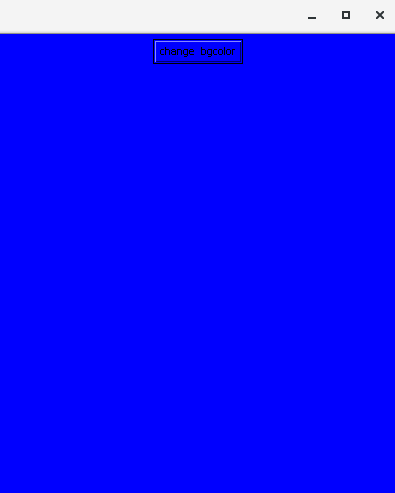
sourceCode
/*

 * Copyright (c) 1996, 2013, Oracle and/or its affiliates. All rights reserved.

 * DO NOT ALTER OR REMOVE COPYRIGHT NOTICES OR THIS FILE HEADER.

 *

 * This code is free software; you can redistribute it and/or modify it

 * under the terms of the GNU General Public License version 2 only, as

 * published by the Free Software Foundation.  Oracle designates this

 * particular file as subject to the "Classpath" exception as provided

 * by Oracle in the LICENSE file that accompanied this code.

 *

 * This code is distributed in the hope that it will be useful, but WITHOUT

 * ANY WARRANTY; without even the implied warranty of MERCHANTABILITY or

 * FITNESS FOR A PARTICULAR PURPOSE.  See the GNU General Public License

 * version 2 for more details (a copy is included in the LICENSE file that

 * accompanied this code).

 *

 * You should have received a copy of the GNU General Public License version

 * 2 along with this work; if not, write to the Free Software Foundation,

 * Inc., 51 Franklin St, Fifth Floor, Boston, MA 02110-1301 USA.

 *

 * Please contact Oracle, 500 Oracle Parkway, Redwood Shores, CA 94065 USA

 * or visit www.oracle.com if you need additional information or have any

 * questions.

 */

package java.awt.event;

/**

 * An abstract adapter class for receiving mouse events.

 * The methods in this class are empty. This class exists as

 * convenience for creating listener objects.

 * <P>

 * Mouse events let you track when a mouse is pressed, released, clicked,

 * moved, dragged, when it enters a component, when it exits and

 * when a mouse wheel is moved.

 * <P>

 * Extend this class to create a {@code MouseEvent}

 * (including drag and motion events) or/and {@code MouseWheelEvent}

 * listener and override the methods for the events of interest. (If you implement the

 * {@code MouseListener},

 * {@code MouseMotionListener}

 * interface, you have to define all of

 * the methods in it. This abstract class defines null methods for them

 * all, so you can only have to define methods for events you care about.)

 * <P>

 * Create a listener object using the extended class and then register it with

 * a component using the component's {@code addMouseListener}

 * {@code addMouseMotionListener}, {@code addMouseWheelListener}

 * methods.

 * The relevant method in the listener object is invoked  and the {@code MouseEvent}

 * or {@code MouseWheelEvent}  is passed to it in following cases:

 * <ul>

 * <li>when a mouse button is pressed, released, or clicked (pressed and  released)

 * <li>when the mouse cursor enters or exits the component

 * <li>when the mouse wheel rotated, or mouse moved or dragged

 * </ul>

 *

 * @author Carl Quinn

 * @author Andrei Dmitriev

 *

 * @see MouseEvent

 * @see MouseWheelEvent

 * @see MouseListener

 * @see MouseMotionListener

 * @see MouseWheelListener

 * @see <a href="http://docs.oracle.com/javase/tutorial/uiswing/events/mouselistener.html">Tutorial: Writing a Mouse Listener</a>

 *

 * @since 1.1

 */

public abstract class MouseAdapter implements MouseListener, MouseWheelListener, MouseMotionListener {

    /**

     * {@inheritDoc}

     */

    public void mouseClicked(MouseEvent e) {}

    /**

     * {@inheritDoc}

     */

    public void mousePressed(MouseEvent e) {}

    /**

     * {@inheritDoc}

     */

    public void mouseReleased(MouseEvent e) {}

    /**

     * {@inheritDoc}

     */

    public void mouseEntered(MouseEvent e) {}

    /**

     * {@inheritDoc}

     */

    public void mouseExited(MouseEvent e) {}

    /**

     * {@inheritDoc}

     * @since 1.6

     */

    public void mouseWheelMoved(MouseWheelEvent e){}

    /**

     * {@inheritDoc}

     * @since 1.6

     */

    public void mouseDragged(MouseEvent e){}

    /**

     * {@inheritDoc}

     * @since 1.6

     */

    public void mouseMoved(MouseEvent e){}

}
resource
- [ JDK ] openjdk.java.net
- [ doc - 参考 ] docs.oracle.com/en/java/javase/11
- [ 规范 - 推荐 ] yq.aliyun.com/articles/69327
- [ 规范 - 推荐 ] google.github.io/styleguide
- [ 源码 ] hg.openjdk.java.net
- [ OS ] www.centos.org
- [ IDE ] www.eclipse.org/downloads/packages
- [ 平台 ] www.cnblogs.com
感谢帮助过 给最苦 的人们。
Java、Groovy和Scala等基于JVM的语言,优秀,值得学习。
规范的命名和代码格式等,有助于沟通和理解。
JVM的配置、监控与优化,比较实用,值得学习。
Java基础 awt Button 鼠标放在按钮上背景颜色改变,鼠标离开背景颜色恢复的更多相关文章
- Java基础 awt Button 点击按钮后在控制台输出文字
JDK :OpenJDK-11 OS :CentOS 7.6.1810 IDE :Eclipse 2019‑03 typesetting :Markdown code ...
- [转]jquery 鼠标放在图片上显示图片的放大镜效果jqzoom_ev-2.3
本文转自:http://blog.csdn.net/weizengxun/article/details/6768183 鼠标放在图片上显示图片的放大镜效果使用jqzoom实现,本例版本2.3 效果图 ...
- 第3节:Java基础 - 必知必会(上)
第3节:Java基础 - 必知必会(上) 本篇是基础篇的第一小节,我们从最基础的java知识点开始学习.本节涉及的知识点包括面向对象的三大特征:封装,继承和多态,并且对常见且容易混淆的重要概念覆盖和重 ...
- Python3 tkinter基础 Button text,fg 按钮上显示的文字 文字的颜色
Python : 3.7.0 OS : Ubuntu 18.04.1 LTS IDE : PyCharm 2018.2.4 Conda ...
- Java基础---AWT
流式布局FlowLayout package net.zyz; import java.awt.Button; import java.awt.FlowLayout; import java.awt. ...
- JavaSE入门学习6:Java基础语法之运算符和语句(上)
继续接着上篇:JavaSE入门学习5:Java基础语法(一)来看Java的基础语法. 五运算符 运算符是一种"功能"符号,用以通知Java进行相关的运算.比方.我们须要将变量age ...
- Java 基础常见知识点&面试题总结(上),2022 最新版!| JavaGuide
你好,我是 Guide.秋招即将到来,我对 JavaGuide 的内容进行了重构完善,公众号同步一下最新更新,希望能够帮助你. 基础概念与常识 Java 语言有哪些特点? 简单易学: 面向对象(封装, ...
- Java基础(二)面向对象(上)
面向对象基础知识 面向对象是相对面向过程而言的 面向对象和面向过程都是一种思想 面向过程强调的是功能行为 面向对象将功能封装进对象,强调具备了功能的对象 面向对象是基于面向过程的 面向对象的特征: 封 ...
- Qt 鼠标悬浮按钮上出现浮窗效果
操作: 鼠标hover于Btn(or other widget),在指定位置显示想要的widget(或其他控件窗口) 方法:重载以下几个api void paintEvent(QPaintEvent ...
随机推荐
- Odoo中的Widget
转载请注明原文地址:https://www.cnblogs.com/ygj0930/p/10826144.html 一:Widget是什么 Odoo中定义了字段的显示形式,不同字段类型的字段都有其不同 ...
- zabbix--显示插件Graphtree
zabbix配置显示插件Graphtree 网盘下载地址:https://pan.baidu.com/s/1HGALOq2z7XiVRxyb6ASAeQ 提取码:13vn Graphtree 安装 ...
- 最长上生子序列LIS
学习动态规划问题(DP问题)中,其中有一个知识点叫最长上升子序列(longest increasing subsequence),也可以叫最长非降序子序列,简称LIS.简单说一下自己的心得. 我们都 ...
- BFS (1)算法模板 看是否需要分层 (2)拓扑排序——检测编译时的循环依赖 制定有依赖关系的任务的执行顺序 djkstra无非是将bfs模板中的deque修改为heapq
BFS模板,记住这5个: (1)针对树的BFS 1.1 无需分层遍历 from collections import deque def levelOrderTree(root): if not ro ...
- 关于__int 128 的读入与输出
inline __int128 read() { ,w=; ; while(!isdigit(ch)) {w|=ch=='-';ch=getchar();} )+(X<<)+(ch^),c ...
- Caused by: javax.persistence.TransactionRequiredException: Executing an update/delete query
org.springframework.dao.InvalidDataAccessApiUsageException: Executing an update/delete query; nested ...
- python老师博客
前端基础之HTML http://www.cnblogs.com/yuanchenqi/articles/6835654.html 前端基础之CSS http://www.cnblogs.com/yu ...
- Activity间通过Intent交互及系统服务调用
I. 实验目的通过本实验理解Android开发框架中最核心程序部件Activity间通过Intent交互的原理,掌握通过Intent传递参数和系统服务调用的方法,并通过实验中的3个具体的实验内容加深理 ...
- Oracle执行过程中出现的问题
ORA-02292: 违反完整约束条件 (用户名.约束名) - 已找到子记录 造成原因:删除该表时,有依赖该表的子表数据,需要删除该条记录或者禁用约束. 查看约束所在的表:select * from ...
- Educational Codeforces F. Remainder Problem
[传送门] 题意就是单点加以及查询下标为等差数列位置上的值之和.刚开始看到这道题.我以为一个数的倍数是log级别的.就直接写了发暴力.就T了.还在想为啥,优化了几发才发现不太对劲.然后才想到是$\df ...