
Java基础 awt Button 鼠标放在按钮上背景颜色改变,鼠标离开背景颜色恢复
- JDK :OpenJDK-11
- OS :CentOS 7.6.1810
- IDE :Eclipse 2019‑03
- typesetting :Markdown
code
package per.jizuiku.gui;

import java.awt.Button;

import java.awt.Color;

import java.awt.FlowLayout;

import java.awt.Frame;

import java.awt.event.MouseAdapter;

import java.awt.event.MouseEvent;

/**

 * @author 给最苦

 * @date 2019/06/30

 * @blog www.cnblogs.com/jizuiku

 */

public class Demo {

    /**

     * @param args

     */

    public static void main(String[] args) {

        // TODO Auto-generated method stub

        Frame f = new Frame();

        // 三原色的数值

        int r = 4;

        int g = 5;

        int b = 70;

        Color bgColor = new Color(r, g, b);

        // 设置背景颜色

        f.setBackground(bgColor);

        // 设置窗体布局 - 流式布局

        f.setLayout(new FlowLayout());

        Button button = new Button("change bgcolor");

        button.setSize(30, 50);

        // 该按钮对鼠标的变化进行监听

        button.addMouseListener(new MouseAdapter() {

            // 使用 alt+ / , 查看 该适配器类下有哪些方法

            // 然后阅读英文,不会的时候 再去看API和查文献

            // 当鼠标进入时

            @Override

            public void mouseEntered(MouseEvent e) {

                // TODO Auto-generated method stub

                f.setBackground(Color.BLUE);

            }

            // 当鼠标离开时,一切又回到了原点

            @Override

            public void mouseExited(MouseEvent e) {

                // TODO Auto-generated method stub

                f.setBackground(bgColor);

            }

        });

        int width = 400;

        int height = 500;

        f.setSize(width, height);

        f.add(button);

        f.setVisible(true);

    }

}
result

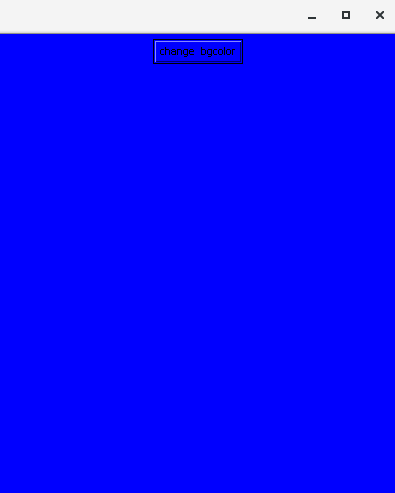
sourceCode
/*

 * Copyright (c) 1996, 2013, Oracle and/or its affiliates. All rights reserved.

 * DO NOT ALTER OR REMOVE COPYRIGHT NOTICES OR THIS FILE HEADER.

 *

 * This code is free software; you can redistribute it and/or modify it

 * under the terms of the GNU General Public License version 2 only, as

 * published by the Free Software Foundation.  Oracle designates this

 * particular file as subject to the "Classpath" exception as provided

 * by Oracle in the LICENSE file that accompanied this code.

 *

 * This code is distributed in the hope that it will be useful, but WITHOUT

 * ANY WARRANTY; without even the implied warranty of MERCHANTABILITY or

 * FITNESS FOR A PARTICULAR PURPOSE.  See the GNU General Public License

 * version 2 for more details (a copy is included in the LICENSE file that

 * accompanied this code).

 *

 * You should have received a copy of the GNU General Public License version

 * 2 along with this work; if not, write to the Free Software Foundation,

 * Inc., 51 Franklin St, Fifth Floor, Boston, MA 02110-1301 USA.

 *

 * Please contact Oracle, 500 Oracle Parkway, Redwood Shores, CA 94065 USA

 * or visit www.oracle.com if you need additional information or have any

 * questions.

 */

package java.awt.event;

/**

 * An abstract adapter class for receiving mouse events.

 * The methods in this class are empty. This class exists as

 * convenience for creating listener objects.

 * <P>

 * Mouse events let you track when a mouse is pressed, released, clicked,

 * moved, dragged, when it enters a component, when it exits and

 * when a mouse wheel is moved.

 * <P>

 * Extend this class to create a {@code MouseEvent}

 * (including drag and motion events) or/and {@code MouseWheelEvent}

 * listener and override the methods for the events of interest. (If you implement the

 * {@code MouseListener},

 * {@code MouseMotionListener}

 * interface, you have to define all of

 * the methods in it. This abstract class defines null methods for them

 * all, so you can only have to define methods for events you care about.)

 * <P>

 * Create a listener object using the extended class and then register it with

 * a component using the component's {@code addMouseListener}

 * {@code addMouseMotionListener}, {@code addMouseWheelListener}

 * methods.

 * The relevant method in the listener object is invoked  and the {@code MouseEvent}

 * or {@code MouseWheelEvent}  is passed to it in following cases:

 * <ul>

 * <li>when a mouse button is pressed, released, or clicked (pressed and  released)

 * <li>when the mouse cursor enters or exits the component

 * <li>when the mouse wheel rotated, or mouse moved or dragged

 * </ul>

 *

 * @author Carl Quinn

 * @author Andrei Dmitriev

 *

 * @see MouseEvent

 * @see MouseWheelEvent

 * @see MouseListener

 * @see MouseMotionListener

 * @see MouseWheelListener

 * @see <a href="http://docs.oracle.com/javase/tutorial/uiswing/events/mouselistener.html">Tutorial: Writing a Mouse Listener</a>

 *

 * @since 1.1

 */

public abstract class MouseAdapter implements MouseListener, MouseWheelListener, MouseMotionListener {

    /**

     * {@inheritDoc}

     */

    public void mouseClicked(MouseEvent e) {}

    /**

     * {@inheritDoc}

     */

    public void mousePressed(MouseEvent e) {}

    /**

     * {@inheritDoc}

     */

    public void mouseReleased(MouseEvent e) {}

    /**

     * {@inheritDoc}

     */

    public void mouseEntered(MouseEvent e) {}

    /**

     * {@inheritDoc}

     */

    public void mouseExited(MouseEvent e) {}

    /**

     * {@inheritDoc}

     * @since 1.6

     */

    public void mouseWheelMoved(MouseWheelEvent e){}

    /**

     * {@inheritDoc}

     * @since 1.6

     */

    public void mouseDragged(MouseEvent e){}

    /**

     * {@inheritDoc}

     * @since 1.6

     */

    public void mouseMoved(MouseEvent e){}

}
resource
- [ JDK ] openjdk.java.net
- [ doc - 参考 ] docs.oracle.com/en/java/javase/11
- [ 规范 - 推荐 ] yq.aliyun.com/articles/69327
- [ 规范 - 推荐 ] google.github.io/styleguide
- [ 源码 ] hg.openjdk.java.net
- [ OS ] www.centos.org
- [ IDE ] www.eclipse.org/downloads/packages
- [ 平台 ] www.cnblogs.com
感谢帮助过 给最苦 的人们。
Java、Groovy和Scala等基于JVM的语言,优秀,值得学习。
规范的命名和代码格式等,有助于沟通和理解。
JVM的配置、监控与优化,比较实用,值得学习。
Java基础 awt Button 鼠标放在按钮上背景颜色改变,鼠标离开背景颜色恢复的更多相关文章
- Java基础 awt Button 点击按钮后在控制台输出文字
JDK :OpenJDK-11 OS :CentOS 7.6.1810 IDE :Eclipse 2019‑03 typesetting :Markdown code ...
- [转]jquery 鼠标放在图片上显示图片的放大镜效果jqzoom_ev-2.3
本文转自:http://blog.csdn.net/weizengxun/article/details/6768183 鼠标放在图片上显示图片的放大镜效果使用jqzoom实现,本例版本2.3 效果图 ...
- 第3节:Java基础 - 必知必会(上)
第3节:Java基础 - 必知必会(上) 本篇是基础篇的第一小节,我们从最基础的java知识点开始学习.本节涉及的知识点包括面向对象的三大特征:封装,继承和多态,并且对常见且容易混淆的重要概念覆盖和重 ...
- Python3 tkinter基础 Button text,fg 按钮上显示的文字 文字的颜色
Python : 3.7.0 OS : Ubuntu 18.04.1 LTS IDE : PyCharm 2018.2.4 Conda ...
- Java基础---AWT
流式布局FlowLayout package net.zyz; import java.awt.Button; import java.awt.FlowLayout; import java.awt. ...
- JavaSE入门学习6:Java基础语法之运算符和语句(上)
继续接着上篇:JavaSE入门学习5:Java基础语法(一)来看Java的基础语法. 五运算符 运算符是一种"功能"符号,用以通知Java进行相关的运算.比方.我们须要将变量age ...
- Java 基础常见知识点&面试题总结(上),2022 最新版!| JavaGuide
你好,我是 Guide.秋招即将到来,我对 JavaGuide 的内容进行了重构完善,公众号同步一下最新更新,希望能够帮助你. 基础概念与常识 Java 语言有哪些特点? 简单易学: 面向对象(封装, ...
- Java基础(二)面向对象(上)
面向对象基础知识 面向对象是相对面向过程而言的 面向对象和面向过程都是一种思想 面向过程强调的是功能行为 面向对象将功能封装进对象,强调具备了功能的对象 面向对象是基于面向过程的 面向对象的特征: 封 ...
- Qt 鼠标悬浮按钮上出现浮窗效果
操作: 鼠标hover于Btn(or other widget),在指定位置显示想要的widget(或其他控件窗口) 方法:重载以下几个api void paintEvent(QPaintEvent ...
随机推荐
- ML-对偶(Duality)问题 KKT 条件
Primal => Dual 现实中我们遇到的原优化问题, 写为标准型的话是这样的. \(min _w f(w) \\ s.t. \\ g_i(w) <=0 \\ h_i(w) = 0\) ...
- flask启动找不到路由问题
解决方法
- Odoo模型的内置方法(可按需重写)
转载请注明原文地址:https://www.cnblogs.com/ygj0930/p/10826222.html ==========模型层面========== 一:_table_exist 检查 ...
- 运维基础——Zabbix:Lack of free swap space on Zabbix server
问题 使用Zabbix监控一些云主机时,可能遇到: Lack of free swap space on Zabbix server 使用命令: free -m 看到: Swap 的total,use ...
- go语言每个工程是不是都要单独设置GOPATH?
go语言每个工程是不是都要单独设置GOPATH?比如我的go项目都统一管理在d:/workspace/go_work/目录下面,该目录下有3个项目project_01,project_02,pro ...
- centos 启动 oracle
source .bash_profile su - oracle //切换到自己的oracle账户 lsnrctl start //启动oracle监听 sqlplus /nolog //登录 ...
- Android中使用ps命令查看进程PID
adb shell "ps | grep com.sina.weibo" 这个命令可以看到微博的应用线程信息. PID:进程号 PPID:父进程号 VSIZE:进程的虚拟内存大小 ...
- upd
今天是中华人民共和国成立70周年,先祝我的祖国母亲生日快乐 由于最近嗓子不太好使,我就不发歌了 分割线 在学校挤了一点本来应该发呆的时间写了点没用的 前一部分是对一点OI知识的复习,后一部分是最近高中 ...
- 导入Excel——解析Excel
读取Excel 思路:先读取整个Excel,即工作簿,再依次读取其中的每个工作表Sheet,最后读取工作表内的表格. 一.读取工作簿利用流读取指定目录中的工作簿,并写入内存. /** * Constr ...
- new的模拟实现
new 一句话介绍 new: new 运算符创建一个用户定义的对象类型的实例或具有构造函数的内置对象类型之一 也许有点难懂,我们在模拟 new 之前,先看看 new 实现了哪些功能. 举个例子: // ...