
spring boot的actuator
actuator官方的介绍
Spring Boot includes a number of additional features to help you monitor and manage your application when it’s pushed to production. You can choose to manage and monitor your application using HTTP endpoints, with JMX or even by remote shell (SSH or Telnet). Auditing, health and metrics gathering can be automatically applied to your application.
actuator是一个强大功能,有助于对应用程序进行监视和管理,通过restful api请求来监管、审计、收集应用的运行情况
1.添加依赖
<dependency>

     <groupId>org.springframework.boot</groupId>

     <artifactId>spring-boot-starter-actuator</artifactId>

</dependency>
2.启动项目
用浏览器打开 http://localhost:8080/actuator
{

    "_links": {

        "self": {

            "href": "http://localhost:8080/actuator",

            "templated": false

        },

        "health": {

            "href": "http://localhost:8080/actuator/health",

            "templated": false

        },

        "health-component": {

            "href": "http://localhost:8080/actuator/health/{component}",

            "templated": true

        },

        "health-component-instance": {

            "href": "http://localhost:8080/actuator/health/{component}/{instance}",

            "templated": true

        },

        "info": {

            "href": "http://localhost:8080/actuator/info",

            "templated": false

        }

    }

}
actuator暴露了三个简单的endpoint
开启所有接口,在application.properties中,添加
management.endpoints.web.exposure.include=*
刷新 http://localhost:8080/actuator页面,会出现很多endpoint
{

    "_links": {

        "self": {

            "href": "http://localhost:8080/actuator",

            "templated": false

        },

        "auditevents": {

            "href": "http://localhost:8080/actuator/auditevents",

            "templated": false

        },

        "beans": {

            "href": "http://localhost:8080/actuator/beans",

            "templated": false

        },

        "caches-cache": {

            "href": "http://localhost:8080/actuator/caches/{cache}",

            "templated": true

        },

        "caches": {

            "href": "http://localhost:8080/actuator/caches",

            "templated": false

        },

        "health-component": {

            "href": "http://localhost:8080/actuator/health/{component}",

            "templated": true

        },

        "health-component-instance": {

            "href": "http://localhost:8080/actuator/health/{component}/{instance}",

            "templated": true

        },

        "health": {

            "href": "http://localhost:8080/actuator/health",

            "templated": false

        },

        ……

    }

}
(1)/actuator/health 查看应用健康指标
{

    "status": "UP"

}
(2)/actuator/info查看应用的定制信息
在配置文件中以 info 开头的配置信息
application.properties包含
info.app.name=abc
info.app.version=1.0.0
返回结果
{

    "app": {

        "name": "abc",

        "version": "1.0.0"

    }

}
(3)/actuator/metrics 查看应用基本指标
返回actuator提供的所有metric的name
/actuator/metrics/{name}查看具体指标
使用 /actuator/metrics/jvm.memory.max,查看JVM最大内存
{

    "name": "jvm.memory.max",

    "description": "The maximum amount of memory in bytes that can be used for memory management",

    "baseUnit": "bytes",

    "measurements": [

        {

            "statistic": "VALUE",

            "value": 5.583142911E9

        }

    ],

    "availableTags": [

        {

            "tag": "area",

            "values": [

                "heap",

                "nonheap"

            ]

        },

        {

            "tag": "id",

            "values": [

                "Compressed Class Space",

                "PS Survivor Space",

                "PS Old Gen",

                "Metaspace",

                "PS Eden Space",

                "Code Cache"

            ]

        }

    ]

}
(4)/actuator/beans 应用中所有Spring Beans的完整列表
    "contexts": {

        "application": {

            "beans": {

                "spring.jpa-org.springframework.boot.autoconfigure.orm.jpa.JpaProperties": {

                    "aliases": [],

                    "scope": "singleton",

                    "type": "org.springframework.boot.autoconfigure.orm.jpa.JpaProperties",

                    "resource": null,

                    "dependencies": []

                },"uploadController": {

                    "aliases": [],

                    "scope": "singleton",

                    "type": "com.example.demo.controller.UploadController$$EnhancerBySpringCGLIB$$b6fa2feb",

                    "resource": "file [E:\\java\\demo\\target\\classes\\com\\example\\demo\\controller\\UploadController.class]",

                    "dependencies": []

                },

                ……

            },

            "parentId": null

        }

    }

}
(5)/actuator/heapdump dump 一份应用的 JVM 堆信息
可以使用 JDK 自带的 Jvm 监控工具 VisualVM 打开该文件查看内存快照
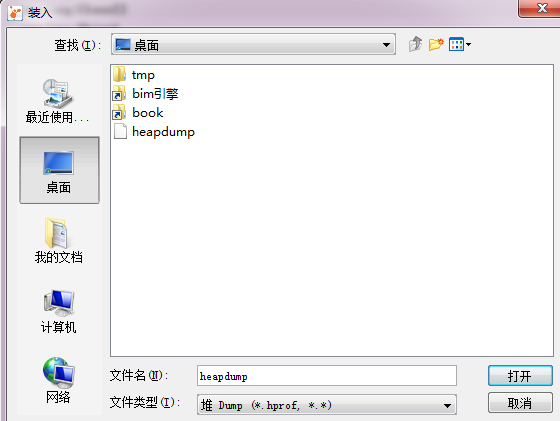

(6)/actuator/scheduledtasks 应用中的定时任务信息
(7)/actuator/env 获取全部环境属性
/actuator/env/{name} 获取特定的环境属性值
/actuator/env/java.version java版本
{

    "property": {

        "source": "systemProperties",

        "value": "1.8.0_151"

    },

    "activeProfiles": [

        "dev"

    ],

    "propertySources": [

        {

            "name": "server.ports"

        },

        {

            "name": "servletConfigInitParams"

        },

        {

            "name": "servletContextInitParams"

        },

        {

            "name": "systemProperties",

            "property": {

                "value": "1.8.0_151"

            }

        },

        {

            "name": "systemEnvironment"

        },

        {

            "name": "random"

        },

        {

            "name": "applicationConfig: [classpath:/application.properties]"

        },

        {

            "name": "Management Server"

        }

    ]

}
还有很多,可以去 https://docs.spring.io/spring-boot/docs/2.0.2.RELEASE/actuator-api/html/ 查看
spring boot的actuator的更多相关文章
- Spring Boot整合actuator实现监控管理
Spring Boot使用actuator监控管理 1.在pom文件中导入相关的依赖 <dependency> <groupId>org.springframework.boo ...
- 从Unauthorized 401错误学习Spring Boot的Actuator
之前用Spring Boot都是别人搭好的框架,然后自己在里面写就行了.对原理.细节上都怎么涉及,毕竟需求都做不完.但是昨天一个访问RESTful接口的401问题搞了我2个小时.网上找的很多用: ma ...
- Spring Boot (28) actuator与spring-boot-admin
在上一篇中,通过restful api的方式查看信息过于繁琐,也不直观,效率低下.当服务过多的时候看起来就过于麻烦,每个服务都需要调用不同的接口来查看监控信息. SBA SBA全称spring boo ...
- Spring Boot (27) actuator服务监控与管理
actuaotr是spring boot项目中非常强大的一个功能,有助于对应用程序进行监控和管理,通过restful api请求来监管.审计.收集应用的运行情况,针对微服务而言它是必不可少的一个环节. ...
- spring boot之actuator简介
当我们的开发工作进入尾声,部署上线之后,对于一个程序而言,可能才刚刚开始,对程序的运行情况的监控要伴随着整个生命周期. 如果这个工作由程序员自己来开发,也未尝不可,但本着不重复制造轮子的思想,我们尽量 ...
- Spring Boot之Actuator的端点
Spring Boot Actuator的关键特性是在应用程序里提供众多Web端点,通过它们了解应用程序 运行时的内部状况.有了Actuator,你可以知道Bean在Spring应用程序上下文里是如何 ...
- Spring Boot|监控-Actuator
Spring Boot 为我们提供了一个生产级特性-Actuator,包含很多实际有用的API,下面我们就一起来看看这些API. 一.Actuator 首先在程序中引入Actuator <!-- ...
- 第11章 Spring Boot使用Actuator
在生产环境中,需要实时或定期监控服务的可用性,spring-Boot的Actuator 功能提供了很多监控所需的接口. Actuator是Spring Boot提供的对应用系统的自省和监控的集成功能, ...
- spring boot监控--actuator
原文地址:http://blog.csdn.net/wh_ouyangshuang/article/details/48048111 spring-boot-actuator模块提供了一个监控和管理生 ...
随机推荐
- Ofbiz项目学习——阶段性小结——服务返回结果
一.返回成功 1.在.DispatcherReturnDemoService类中编写服务[returnSuccess],内容如下: /** * 返回成功结果 * @param dctx * @para ...
- node中https请求 | 实现https的请求,获取图片,然后转成base64字节码
get请求 下面实现https的请求,获取图片,然后转成base64字节码 this.checkCodeUrl = 'https://www.test.com/kaptcha.jsp'; var ht ...
- 公司框架-关于verifyInputgbg()方法的使用注意事项
verifyInputgbg这个方法的主要作用是:一次校验页面上的所有非空的比录项. 今天在使用这个方法的时候,遇到了这样一个问题,自己在页面上明明都录入有值,但是在还是报页面的录入信息不完整.阻断. ...
- isa objc_msgSend
https://developer.apple.com/library/content/documentation/Cocoa/Conceptual/ObjCRuntimeGuide/Articles ...
- UI系统的作用
1.向用户展示信息: 2.将用于与系统的交互解释为指令.
- 命令式&函数式:把大象关进冰箱里问题
面向过程:把大象关进冰箱里: 把冰箱门打开=> 大象放冰箱里=> 冰箱门关上 面向对象: 冰箱.开门() 冰箱.放入(大象) 冰箱.关门() 函数式: 关进(冰箱,大象): 关门(放入(开 ...
- drf常用方法
1.认证 2.权限 3.序列化 4.分页 5.限流
- Mac Sublime Text使用python3运行脚本(command+b)
默认安装好sublime, 使用快捷键command+b的时候, 会使用python2版本运行 下面就改为用python3运行, 也可以python2运行 一. 新建文件 Sublime Text - ...
- 【概率DP】$P2059$ 卡牌游戏
链接 题目描述 N个人坐成一圈玩游戏.一开始我们把所有玩家按顺时针从1到N编号.首先第一回合是玩家1作为庄家.每个回合庄家都会随机(即按相等的概率)从卡牌堆里选择一张卡片,假设卡片上的数字为X,则庄家 ...
- Codeforces 161.D. Distance in Tree-树分治(点分治,不容斥版)-树上距离为K的点对数量-蜜汁TLE (VK Cup 2012 Round 1)
D. Distance in Tree time limit per test 3 seconds memory limit per test 512 megabytes input standard ...