
Netty学习(十)-Netty文件上传
今天我们来完成一个使用netty进行文件传输的任务。在实际项目中,文件传输通常采用FTP或者HTTP附件的方式。事实上通过TCP Socket+File的方式进行文件传输也有一定的应用场景,尽管不是主流,但是掌握这种文件传输方式还是比较重要的,特别是针对两个跨主机的JVM进程之间进行持久化数据的相互交换。
而使用netty来进行文件传输也是利用netty天然的优势:零拷贝功能。很多同学都听说过netty的”零拷贝”功能,但是具体体现在哪里又不知道,下面我们就简要介绍下:
Netty的“零拷贝”主要体现在如下三个方面:
1) Netty的接收和发送ByteBuffer采用DIRECT BUFFERS,使用堆外直接内存进行Socket读写,不需要进行字节缓冲区的二次拷贝。如果使用传统的堆内存(HEAP BUFFERS)进行Socket读写,JVM会将堆内存Buffer拷贝一份到直接内存中,然后才写入Socket中。相比于堆外直接内存,消息在发送过程中多了一次缓冲区的内存拷贝。
2) Netty提供了组合Buffer对象,可以聚合多个ByteBuffer对象,用户可以像操作一个Buffer那样方便的对组合Buffer进行操作,避免了传统通过内存拷贝的方式将几个小Buffer合并成一个大的Buffer。
3) Netty的文件传输采用了transferTo方法,它可以直接将文件缓冲区的数据发送到目标Channel,避免了传统通过循环write方式导致的内存拷贝问题。
具体的分析在此就不多做介绍,有兴趣的可以查阅相关文档。我们还是把重点放在文件传输上。Netty作为高性能的服务器端异步IO框架必然也离不开文件读写功能,我们可以使用netty模拟http的形式通过网页上传文件写入服务器,当然要使用http的形式那你也用不着netty!大材小用。netty4中如果想使用http形式上传文件你还得借助第三方jar包:okhttp。使用该jar完成http请求的发送。但是在netty5 中已经为我们写好了,我们可以直接调用netty5的API就可以实现。所以netty4和5的差别还是挺大的,至于使用哪个,那就看你们公司选择哪一个了!本文目前使用netty4来实现文件上传功能。下面我们上代码:
pom文件:
<dependency>

      <groupId>io.netty</groupId>

        <artifactId>netty-all</artifactId>

      <version>4.1.5.Final</version>

</dependency>
server端:
import io.netty.bootstrap.ServerBootstrap;

import io.netty.channel.Channel;

import io.netty.channel.ChannelFuture;

import io.netty.channel.ChannelInitializer;

import io.netty.channel.ChannelOption;

import io.netty.channel.EventLoopGroup;

import io.netty.channel.nio.NioEventLoopGroup;

import io.netty.channel.socket.nio.NioServerSocketChannel;

import io.netty.handler.codec.serialization.ClassResolvers;

import io.netty.handler.codec.serialization.ObjectDecoder;

import io.netty.handler.codec.serialization.ObjectEncoder;

public class FileUploadServer {

    public void bind(int port) throws Exception {

        EventLoopGroup bossGroup = new NioEventLoopGroup();

        EventLoopGroup workerGroup = new NioEventLoopGroup();

        try {

            ServerBootstrap b = new ServerBootstrap();

            b.group(bossGroup, workerGroup).channel(NioServerSocketChannel.class).option(ChannelOption.SO_BACKLOG, 1024).childHandler(new ChannelInitializer<Channel>() {

                @Override

                protected void initChannel(Channel ch) throws Exception {

                    ch.pipeline().addLast(new ObjectEncoder());

                    ch.pipeline().addLast(new ObjectDecoder(Integer.MAX_VALUE, ClassResolvers.weakCachingConcurrentResolver(null))); // 最大长度

                    ch.pipeline().addLast(new FileUploadServerHandler());

                }

            });

            ChannelFuture f = b.bind(port).sync();

            f.channel().closeFuture().sync();

        } finally {

            bossGroup.shutdownGracefully();

            workerGroup.shutdownGracefully();

        }

    }

    public static void main(String[] args) {

        int port = 8080;

        if (args != null && args.length > 0) {

            try {

                port = Integer.valueOf(args[0]);

            } catch (NumberFormatException e) {

                e.printStackTrace();

            }

        }

        try {

            new FileUploadServer().bind(port);

        } catch (Exception e) {

            e.printStackTrace();

        }

    }

}
server端handler:
import io.netty.channel.ChannelHandlerContext;

import io.netty.channel.ChannelInboundHandlerAdapter;

import java.io.File;

import java.io.RandomAccessFile;

public class FileUploadServerHandler extends ChannelInboundHandlerAdapter {

    private int byteRead;

    private volatile int start = 0;

    private String file_dir = "D:";

    @Override

    public void channelRead(ChannelHandlerContext ctx, Object msg) throws Exception {

        if (msg instanceof FileUploadFile) {

            FileUploadFile ef = (FileUploadFile) msg;

            byte[] bytes = ef.getBytes();

            byteRead = ef.getEndPos();

            String md5 = ef.getFile_md5();//文件名

            String path = file_dir + File.separator + md5;

            File file = new File(path);

            RandomAccessFile randomAccessFile = new RandomAccessFile(file, "rw");

            randomAccessFile.seek(start);

            randomAccessFile.write(bytes);

            start = start + byteRead;

            if (byteRead > 0) {

                ctx.writeAndFlush(start);

            } else {

                randomAccessFile.close();

                ctx.close();

            }

        }

    }

    @Override

    public void exceptionCaught(ChannelHandlerContext ctx, Throwable cause) {

        cause.printStackTrace();

        ctx.close();

    }

}
client端:
import io.netty.bootstrap.Bootstrap;

import io.netty.channel.Channel;

import io.netty.channel.ChannelFuture;

import io.netty.channel.ChannelInitializer;

import io.netty.channel.ChannelOption;

import io.netty.channel.EventLoopGroup;

import io.netty.channel.nio.NioEventLoopGroup;

import io.netty.channel.socket.nio.NioSocketChannel;

import io.netty.handler.codec.serialization.ClassResolvers;

import io.netty.handler.codec.serialization.ObjectDecoder;

import io.netty.handler.codec.serialization.ObjectEncoder;

import java.io.File;

public class FileUploadClient {

    public void connect(int port, String host, final FileUploadFile fileUploadFile) throws Exception {

        EventLoopGroup group = new NioEventLoopGroup();

        try {

            Bootstrap b = new Bootstrap();

            b.group(group).channel(NioSocketChannel.class).option(ChannelOption.TCP_NODELAY, true).handler(new ChannelInitializer<Channel>() {

                @Override

                protected void initChannel(Channel ch) throws Exception {

                    ch.pipeline().addLast(new ObjectEncoder());

                    ch.pipeline().addLast(new ObjectDecoder(ClassResolvers.weakCachingConcurrentResolver(null)));

                    ch.pipeline().addLast(new FileUploadClientHandler(fileUploadFile));

                }

            });

            ChannelFuture f = b.connect(host, port).sync();

            f.channel().closeFuture().sync();

        } finally {

            group.shutdownGracefully();

        }

    }

    public static void main(String[] args) {

        int port = 8080;

        if (args != null && args.length > 0) {

            try {

                port = Integer.valueOf(args[0]);

            } catch (NumberFormatException e) {

                e.printStackTrace();

            }

        }

        try {

            FileUploadFile uploadFile = new FileUploadFile();

            File file = new File("c:/1.txt");

            String fileMd5 = file.getName();// 文件名

            uploadFile.setFile(file);

            uploadFile.setFile_md5(fileMd5);

            uploadFile.setStarPos(0);// 文件开始位置

            new FileUploadClient().connect(port, "127.0.0.1", uploadFile);

        } catch (Exception e) {

            e.printStackTrace();

        }

    }

}
client端handler:
import io.netty.channel.ChannelHandlerContext;

import io.netty.channel.ChannelInboundHandlerAdapter;

import java.io.FileNotFoundException;

import java.io.IOException;

import java.io.RandomAccessFile;

public class FileUploadClientHandler extends ChannelInboundHandlerAdapter {

    private int byteRead;

    private volatile int start = 0;

    private volatile int lastLength = 0;

    public RandomAccessFile randomAccessFile;

    private FileUploadFile fileUploadFile;

    public FileUploadClientHandler(FileUploadFile ef) {

        if (ef.getFile().exists()) {

            if (!ef.getFile().isFile()) {

                System.out.println("Not a file :" + ef.getFile());

                return;

            }

        }

        this.fileUploadFile = ef;

    }

    public void channelActive(ChannelHandlerContext ctx) {

        try {

            randomAccessFile = new RandomAccessFile(fileUploadFile.getFile(), "r");

            randomAccessFile.seek(fileUploadFile.getStarPos());

            lastLength = (int) randomAccessFile.length() / 10;

            byte[] bytes = new byte[lastLength];

            if ((byteRead = randomAccessFile.read(bytes)) != -1) {

                fileUploadFile.setEndPos(byteRead);

                fileUploadFile.setBytes(bytes);

                ctx.writeAndFlush(fileUploadFile);

            } else {

                System.out.println("文件已经读完");

            }

        } catch (FileNotFoundException e) {

            e.printStackTrace();

        } catch (IOException i) {

            i.printStackTrace();

        }

    }

    @Override

    public void channelRead(ChannelHandlerContext ctx, Object msg) throws Exception {

        if (msg instanceof Integer) {

            start = (Integer) msg;

            if (start != -1) {

                randomAccessFile = new RandomAccessFile(fileUploadFile.getFile(), "r");

                randomAccessFile.seek(start);

                System.out.println("块儿长度:" + (randomAccessFile.length() / 10));

                System.out.println("长度:" + (randomAccessFile.length() - start));

                int a = (int) (randomAccessFile.length() - start);

                int b = (int) (randomAccessFile.length() / 10);

                if (a < b) {

                    lastLength = a;

                }

                byte[] bytes = new byte[lastLength];

                System.out.println("-----------------------------" + bytes.length);

                if ((byteRead = randomAccessFile.read(bytes)) != -1 && (randomAccessFile.length() - start) > 0) {

                    System.out.println("byte 长度:" + bytes.length);

                    fileUploadFile.setEndPos(byteRead);

                    fileUploadFile.setBytes(bytes);

                    try {

                        ctx.writeAndFlush(fileUploadFile);

                    } catch (Exception e) {

                        e.printStackTrace();

                    }

                } else {

                    randomAccessFile.close();

                    ctx.close();

                    System.out.println("文件已经读完--------" + byteRead);

                }

            }

        }

    }

    // @Override

    // public void channelRead(ChannelHandlerContext ctx, Object msg) throws

    // Exception {

    // System.out.println("Server is speek :"+msg.toString());

    // FileRegion filer = (FileRegion) msg;

    // String path = "E://Apk//APKMD5.txt";

    // File fl = new File(path);

    // fl.createNewFile();

    // RandomAccessFile rdafile = new RandomAccessFile(path, "rw");

    // FileRegion f = new DefaultFileRegion(rdafile.getChannel(), 0,

    // rdafile.length());

    //

    // System.out.println("This is" + ++counter + "times receive server:["

    // + msg + "]");

    // }

    // @Override

    // public void channelReadComplete(ChannelHandlerContext ctx) throws

    // Exception {

    // ctx.flush();

    // }

    public void exceptionCaught(ChannelHandlerContext ctx, Throwable cause) {

        cause.printStackTrace();

        ctx.close();

    }

    // @Override

    // protected void channelRead0(ChannelHandlerContext ctx, String msg)

    // throws Exception {

    // String a = msg;

    // System.out.println("This is"+

    // ++counter+"times receive server:["+msg+"]");

    // }

}
我们还自定义了一个对象,用于统计文件上传进度的:
import java.io.File;

import java.io.Serializable;

public class FileUploadFile implements Serializable {

    private static final long serialVersionUID = 1L;

    private File file;// 文件

    private String file_md5;// 文件名

    private int starPos;// 开始位置

    private byte[] bytes;// 文件字节数组

    private int endPos;// 结尾位置

    public int getStarPos() {

        return starPos;

    }

    public void setStarPos(int starPos) {

        this.starPos = starPos;

    }

    public int getEndPos() {

        return endPos;

    }

    public void setEndPos(int endPos) {

        this.endPos = endPos;

    }

    public byte[] getBytes() {

        return bytes;

    }

    public void setBytes(byte[] bytes) {

        this.bytes = bytes;

    }

    public File getFile() {

        return file;

    }

    public void setFile(File file) {

        this.file = file;

    }

    public String getFile_md5() {

        return file_md5;

    }

    public void setFile_md5(String file_md5) {

        this.file_md5 = file_md5;

    }

}
输出为:
块儿长度:894

    长度:8052

    -----------------------------894

    byte 长度:894

    块儿长度:894

    长度:7158

    -----------------------------894

    byte 长度:894

    块儿长度:894

    长度:6264

    -----------------------------894

    byte 长度:894

    块儿长度:894

    长度:5370

    -----------------------------894

    byte 长度:894

    块儿长度:894

    长度:4476

    -----------------------------894

    byte 长度:894

    块儿长度:894

    长度:3582

    -----------------------------894

    byte 长度:894

    块儿长度:894

    长度:2688

    -----------------------------894

    byte 长度:894

    块儿长度:894

    长度:1794

    -----------------------------894

    byte 长度:894

    块儿长度:894

    长度:900

    -----------------------------894

    byte 长度:894

    块儿长度:894

    长度:6

    -----------------------------6

    byte 长度:6

    块儿长度:894

    长度:0

    -----------------------------0

    文件已经读完--------0

    Process finished with exit code 0
这样就实现了服务器端文件的上传,当然我们也可以使用http的形式。
server端:
import io.netty.bootstrap.ServerBootstrap;

import io.netty.channel.ChannelFuture;

import io.netty.channel.EventLoopGroup;

import io.netty.channel.nio.NioEventLoopGroup;

import io.netty.channel.socket.nio.NioServerSocketChannel;

public class HttpFileServer implements Runnable {

    private int port;

    public HttpFileServer(int port) {

        super();

        this.port = port;

    }

    @Override

    public void run() {

        EventLoopGroup bossGroup = new NioEventLoopGroup(1);

        EventLoopGroup workerGroup = new NioEventLoopGroup();

        ServerBootstrap serverBootstrap = new ServerBootstrap();

        serverBootstrap.group(bossGroup, workerGroup);

        serverBootstrap.channel(NioServerSocketChannel.class);

        //serverBootstrap.handler(new LoggingHandler(LogLevel.INFO));

        serverBootstrap.childHandler(new HttpChannelInitlalizer());

        try {

            ChannelFuture f = serverBootstrap.bind(port).sync();

            f.channel().closeFuture().sync();

        } catch (InterruptedException e) {

            e.printStackTrace();

        } finally {

            bossGroup.shutdownGracefully();

            workerGroup.shutdownGracefully();

        }

    }

    public static void main(String[] args) {

        HttpFileServer b = new HttpFileServer(9003);

        new Thread(b).start();

    }

}
Server端initializer:
import io.netty.channel.ChannelInitializer;

import io.netty.channel.ChannelPipeline;

import io.netty.channel.socket.SocketChannel;

import io.netty.handler.codec.http.HttpObjectAggregator;

import io.netty.handler.codec.http.HttpServerCodec;

import io.netty.handler.stream.ChunkedWriteHandler;

public class HttpChannelInitlalizer extends ChannelInitializer<SocketChannel> {

    @Override

    protected void initChannel(SocketChannel ch) throws Exception {

        ChannelPipeline pipeline = ch.pipeline();

        pipeline.addLast(new HttpServerCodec());

        pipeline.addLast(new HttpObjectAggregator(65536));

        pipeline.addLast(new ChunkedWriteHandler());

        pipeline.addLast(new HttpChannelHandler());

    }

}
server端hadler:
import static io.netty.handler.codec.http.HttpHeaders.Names.CONTENT_TYPE;

import static io.netty.handler.codec.http.HttpResponseStatus.BAD_REQUEST;

import static io.netty.handler.codec.http.HttpResponseStatus.FORBIDDEN;

import static io.netty.handler.codec.http.HttpResponseStatus.INTERNAL_SERVER_ERROR;

import static io.netty.handler.codec.http.HttpResponseStatus.NOT_FOUND;

import static io.netty.handler.codec.http.HttpVersion.HTTP_1_1;

import io.netty.buffer.Unpooled;

import io.netty.channel.ChannelFuture;

import io.netty.channel.ChannelFutureListener;

import io.netty.channel.ChannelHandlerContext;

import io.netty.channel.ChannelProgressiveFuture;

import io.netty.channel.ChannelProgressiveFutureListener;

import io.netty.channel.SimpleChannelInboundHandler;

import io.netty.handler.codec.http.DefaultFullHttpResponse;

import io.netty.handler.codec.http.DefaultHttpResponse;

import io.netty.handler.codec.http.FullHttpRequest;

import io.netty.handler.codec.http.FullHttpResponse;

import io.netty.handler.codec.http.HttpChunkedInput;

import io.netty.handler.codec.http.HttpHeaders;

import io.netty.handler.codec.http.HttpResponse;

import io.netty.handler.codec.http.HttpResponseStatus;

import io.netty.handler.codec.http.HttpVersion;

import io.netty.handler.codec.http.LastHttpContent;

import io.netty.handler.stream.ChunkedFile;

import io.netty.util.CharsetUtil;

import io.netty.util.internal.SystemPropertyUtil;

import java.io.File;

import java.io.FileNotFoundException;

import java.io.RandomAccessFile;

import java.io.UnsupportedEncodingException;

import java.net.URLDecoder;

import java.util.regex.Pattern;

import javax.activation.MimetypesFileTypeMap;

public class HttpChannelHandler extends SimpleChannelInboundHandler<FullHttpRequest> {

    public static final String HTTP_DATE_FORMAT = "EEE, dd MMM yyyy HH:mm:ss zzz";

    public static final String HTTP_DATE_GMT_TIMEZONE = "GMT";

    public static final int HTTP_CACHE_SECONDS = 60;

    @Override

    protected void channelRead0(ChannelHandlerContext ctx, FullHttpRequest request) throws Exception {

        // 监测解码情况

        if (!request.getDecoderResult().isSuccess()) {

            sendError(ctx, BAD_REQUEST);

            return;

        }

        final String uri = request.getUri();

        final String path = sanitizeUri(uri);

        System.out.println("get file:"+path);

        if (path == null) {

            sendError(ctx, FORBIDDEN);

            return;

        }

        //读取要下载的文件

        File file = new File(path);

        if (file.isHidden() || !file.exists()) {

            sendError(ctx, NOT_FOUND);

            return;

        }

        if (!file.isFile()) {

            sendError(ctx, FORBIDDEN);

            return;

        }

        RandomAccessFile raf;

        try {

            raf = new RandomAccessFile(file, "r");

        } catch (FileNotFoundException ignore) {

            sendError(ctx, NOT_FOUND);

            return;

        }

        long fileLength = raf.length();

        HttpResponse response = new DefaultHttpResponse(HttpVersion.HTTP_1_1, HttpResponseStatus.OK);

        HttpHeaders.setContentLength(response, fileLength);

        setContentTypeHeader(response, file);

        //setDateAndCacheHeaders(response, file);

        if (HttpHeaders.isKeepAlive(request)) {

            response.headers().set("CONNECTION", HttpHeaders.Values.KEEP_ALIVE);

        }

        // Write the initial line and the header.

        ctx.write(response);

        // Write the content.

        ChannelFuture sendFileFuture =

        ctx.write(new HttpChunkedInput(new ChunkedFile(raf, 0, fileLength, 8192)), ctx.newProgressivePromise());

        //sendFuture用于监视发送数据的状态

        sendFileFuture.addListener(new ChannelProgressiveFutureListener() {

            @Override

            public void operationProgressed(ChannelProgressiveFuture future, long progress, long total) {

                if (total < 0) { // total unknown

                    System.err.println(future.channel() + " Transfer progress: " + progress);

                } else {

                    System.err.println(future.channel() + " Transfer progress: " + progress + " / " + total);

                }

            }

            @Override

            public void operationComplete(ChannelProgressiveFuture future) {

                System.err.println(future.channel() + " Transfer complete.");

            }

        });

        // Write the end marker

        ChannelFuture lastContentFuture = ctx.writeAndFlush(LastHttpContent.EMPTY_LAST_CONTENT);

        // Decide whether to close the connection or not.

        if (!HttpHeaders.isKeepAlive(request)) {

            // Close the connection when the whole content is written out.

            lastContentFuture.addListener(ChannelFutureListener.CLOSE);

        }

    }

    @Override

    public void exceptionCaught(ChannelHandlerContext ctx, Throwable cause) {

        cause.printStackTrace();

        if (ctx.channel().isActive()) {

            sendError(ctx, INTERNAL_SERVER_ERROR);

        }

        ctx.close();

    }

    private static final Pattern INSECURE_URI = Pattern.compile(".*[<>&\"].*");

    private static String sanitizeUri(String uri) {

        // Decode the path.

        try {

            uri = URLDecoder.decode(uri, "UTF-8");

        } catch (UnsupportedEncodingException e) {

            throw new Error(e);

        }

        if (!uri.startsWith("/")) {

            return null;

        }

        // Convert file separators.

        uri = uri.replace('/', File.separatorChar);

        // Simplistic dumb security check.

        // You will have to do something serious in the production environment.

        if (uri.contains(File.separator + '.') || uri.contains('.' + File.separator) || uri.startsWith(".") || uri.endsWith(".")

                || INSECURE_URI.matcher(uri).matches()) {

            return null;

        }

        // Convert to absolute path.

        return SystemPropertyUtil.get("user.dir") + File.separator + uri;

    }

    private static void sendError(ChannelHandlerContext ctx, HttpResponseStatus status) {

        FullHttpResponse response = new DefaultFullHttpResponse(HTTP_1_1, status, Unpooled.copiedBuffer("Failure: " + status + "\r\n", CharsetUtil.UTF_8));

        response.headers().set(CONTENT_TYPE, "text/plain; charset=UTF-8");

        // Close the connection as soon as the error message is sent.

        ctx.writeAndFlush(response).addListener(ChannelFutureListener.CLOSE);

    }

    /**

     * Sets the content type header for the HTTP Response

     *

     * @param response

     *            HTTP response

     * @param file

     *            file to extract content type

     */

    private static void setContentTypeHeader(HttpResponse response, File file) {

        MimetypesFileTypeMap m = new MimetypesFileTypeMap();

        String contentType = m.getContentType(file.getPath());

        if (!contentType.equals("application/octet-stream")) {

            contentType += "; charset=utf-8";

        }

        response.headers().set(CONTENT_TYPE, contentType);

    }

}
client端:
import io.netty.bootstrap.Bootstrap;

import io.netty.channel.ChannelFuture;

import io.netty.channel.ChannelInitializer;

import io.netty.channel.ChannelOption;

import io.netty.channel.EventLoopGroup;

import io.netty.channel.nio.NioEventLoopGroup;

import io.netty.channel.socket.SocketChannel;

import io.netty.channel.socket.nio.NioSocketChannel;

import io.netty.handler.codec.http.DefaultFullHttpRequest;

import io.netty.handler.codec.http.HttpHeaders;

import io.netty.handler.codec.http.HttpMethod;

import io.netty.handler.codec.http.HttpRequestEncoder;

import io.netty.handler.codec.http.HttpResponseDecoder;

import io.netty.handler.codec.http.HttpVersion;

import io.netty.handler.stream.ChunkedWriteHandler;

import java.net.URI;

public class HttpDownloadClient {

    /**

     * 下载http资源 向服务器下载直接填写要下载的文件的相对路径

     *        (↑↑↑建议只使用字母和数字对特殊字符对字符进行部分过滤可能导致异常↑↑↑)

     *        向互联网下载输入完整路径

     * @param host 目的主机ip或域名

     * @param port 目标主机端口

     * @param url 文件路径

     * @param local 本地存储路径

     * @throws Exception

     */

    public void connect(String host, int port, String url, final String local) throws Exception {

        EventLoopGroup workerGroup = new NioEventLoopGroup();

        try {

            Bootstrap b = new Bootstrap();

            b.group(workerGroup);

            b.channel(NioSocketChannel.class);

            b.option(ChannelOption.SO_KEEPALIVE, true);

            b.handler(new ChildChannelHandler(local));

            // Start the client.

            ChannelFuture f = b.connect(host, port).sync();

            URI uri = new URI(url);

            DefaultFullHttpRequest request = new DefaultFullHttpRequest(

                    HttpVersion.HTTP_1_1, HttpMethod.GET, uri.toASCIIString());

            // 构建http请求

            request.headers().set(HttpHeaders.Names.HOST, host);

            request.headers().set(HttpHeaders.Names.CONNECTION,

                    HttpHeaders.Values.KEEP_ALIVE);

            request.headers().set(HttpHeaders.Names.CONTENT_LENGTH,

                    request.content().readableBytes());

            // 发送http请求

            f.channel().write(request);

            f.channel().flush();

            f.channel().closeFuture().sync();

        } finally {

            workerGroup.shutdownGracefully();

        }

    }

    private class ChildChannelHandler extends ChannelInitializer<SocketChannel> {

        String local;

        public ChildChannelHandler(String local) {

            this.local = local;

        }

        @Override

        protected void initChannel(SocketChannel ch) throws Exception {

            // 客户端接收到的是httpResponse响应,所以要使用HttpResponseDecoder进行解码

            ch.pipeline().addLast(new HttpResponseDecoder());

            // 客户端发送的是httprequest,所以要使用HttpRequestEncoder进行编码

            ch.pipeline().addLast(new HttpRequestEncoder());

            ch.pipeline().addLast(new ChunkedWriteHandler());

            ch.pipeline().addLast(new HttpDownloadHandler(local));

        }

    }

    public static void main(String[] args) throws Exception {

        HttpDownloadClient client = new HttpDownloadClient();

        //client.connect("127.0.0.1", 9003,"/file/pppp/1.doc","1.doc");

//        client.connect("zlysix.gree.com", 80, "http://zlysix.gree.com/HelloWeb/download/20m.apk", "20m.apk");

        client.connect("www.ghost64.com", 80, "http://www.ghost64.com/qqtupian/zixunImg/local/2017/05/27/1495855297602.jpg", "1495855297602.jpg");

    }

}
client端handler:
import java.io.File;

import java.io.FileOutputStream;

import io.netty.buffer.ByteBuf;

import io.netty.channel.ChannelHandlerContext;

import io.netty.channel.ChannelInboundHandlerAdapter;

import io.netty.handler.codec.http.HttpContent;

//import io.netty.handler.codec.http.HttpHeaders;

import io.netty.handler.codec.http.HttpResponse;

import io.netty.handler.codec.http.LastHttpContent;

import io.netty.util.internal.SystemPropertyUtil;

/**

 * @Author:yangyue

 * @Description:

 * @Date: Created in 9:15 on 2017/5/28.

 */

public class HttpDownloadHandler extends ChannelInboundHandlerAdapter {

    private boolean readingChunks = false; // 分块读取开关

    private FileOutputStream fOutputStream = null;// 文件输出流

    private File localfile = null;// 下载文件的本地对象

    private String local = null;// 待下载文件名

    private int succCode;// 状态码

    public HttpDownloadHandler(String local) {

        this.local = local;

    }

    @Override

    public void channelRead(ChannelHandlerContext ctx, Object msg)

            throws Exception {

        if (msg instanceof HttpResponse) {// response头信息

            HttpResponse response = (HttpResponse) msg;

            succCode = response.getStatus().code();

            if (succCode == 200) {

                setDownLoadFile();// 设置下载文件

                readingChunks = true;

            }

            // System.out.println("CONTENT_TYPE:"

            // + response.headers().get(HttpHeaders.Names.CONTENT_TYPE));

        }

        if (msg instanceof HttpContent) {// response体信息

            HttpContent chunk = (HttpContent) msg;

            if (chunk instanceof LastHttpContent) {

                readingChunks = false;

            }

            ByteBuf buffer = chunk.content();

            byte[] dst = new byte[buffer.readableBytes()];

            if (succCode == 200) {

                while (buffer.isReadable()) {

                    buffer.readBytes(dst);

                    fOutputStream.write(dst);

                    buffer.release();

                }

                if (null != fOutputStream) {

                    fOutputStream.flush();

                }

            }

        }

        if (!readingChunks) {

            if (null != fOutputStream) {

                System.out.println("Download done->"+ localfile.getAbsolutePath());

                fOutputStream.flush();

                fOutputStream.close();

                localfile = null;

                fOutputStream = null;

            }

            ctx.channel().close();

        }

    }

    /**

     * 配置本地参数,准备下载

     */

    private void setDownLoadFile() throws Exception {

        if (null == fOutputStream) {

            local = SystemPropertyUtil.get("user.dir") + File.separator +local;

            //System.out.println(local);

            localfile = new File(local);

            if (!localfile.exists()) {

                localfile.createNewFile();

            }

            fOutputStream = new FileOutputStream(localfile);

        }

    }

    @Override

    public void exceptionCaught(ChannelHandlerContext ctx, Throwable cause)

            throws Exception {

        System.out.println("管道异常:" + cause.getMessage());

        cause.printStackTrace();

        ctx.channel().close();

    }

}
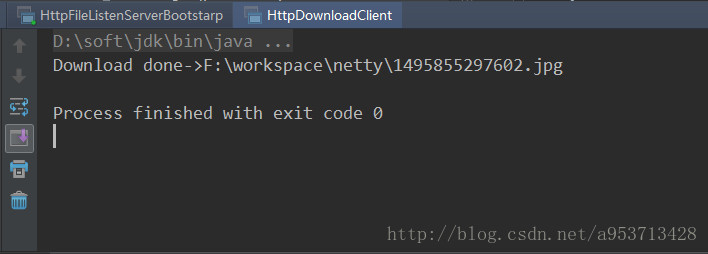
这里客户端我放的是网络连接,下载的是一副图片,启动服务端和客户端就可以看到这个图片被下载到了工程的根目录下。
Netty学习(十)-Netty文件上传的更多相关文章
- springMVC3学习(十二)--文件上传优化CommonsMultipartResolver
基于上一篇文件上传发现效率很慢,我们应该对它进行优化 使用springMVC对文件上传的解析器 来处理文件上传的时候需要在spring的applicationContext里面加上springMVC ...
- SpringMVC:学习笔记(8)——文件上传
SpringMVC--文件上传 说明: 文件上传的途径 文件上传主要有两种方式: 1.使用Apache Commons FileUpload元件. 2.利用Servlet3.0及其更高版本的内置支持. ...
- Django:学习笔记(8)——文件上传
Django:学习笔记(8)——文件上传 文件上传前端处理 本模块使用到的前端Ajax库为Axio,其地址为GitHub官网. 关于文件上传 上传文件就是把客户端的文件发送给服务器端. 在常见情况(不 ...
- Java进阶学习:将文件上传到七牛云中
Java进阶学习:将文件上传到七牛云中 通过本文,我们将讲述如何利用七牛云官方SDK,将我们的本地文件传输到其存储空间中去. JavaSDK:https://developer.qiniu.com/k ...
- 使用Typescript重构axios(二十五)——文件上传下载进度监控
0. 系列文章 1.使用Typescript重构axios(一)--写在最前面 2.使用Typescript重构axios(二)--项目起手,跑通流程 3.使用Typescript重构axios(三) ...
- JavaWeb学习 (二十八)————文件上传和下载
在Web应用系统开发中,文件上传和下载功能是非常常用的功能,今天来讲一下JavaWeb中的文件上传和下载功能的实现. 对于文件上传,浏览器在上传的过程中是将文件以流的形式提交到服务器端的,如果直接使用 ...
- springmvc学习笔记--支持文件上传和阿里云OSS API简介
前言: Web开发中图片上传的功能很常见, 本篇博客来讲述下springmvc如何实现图片上传的功能. 主要讲述依赖包引入, 配置项, 本地存储和云存储方案(阿里云的OSS服务). 铺垫: 文件上传是 ...
- Javaweb学习笔记10—文件上传与下载
今天来讲javaweb的第10阶段学习.文件的上传与下载,今天主要说的是这个功能的实现,不用说了,听名字就是外行人也知道肯定很重要啦. 老规矩,首先先用一张思维导图来展现今天的博客内容. ...
- JavaWeb学习总结,文件上传和下载
在Web应用系统开发中,文件上传和下载功能是非常常用的功能,今天来讲一下JavaWeb中的文件上传和下载功能的实现. 对于文件上传,浏览器在上传的过程中是将文件以流的形式提交到服务器端的,如果直接使用 ...
随机推荐
- HDU 5792:World is Exploding(树状数组求逆序对)
http://acm.hdu.edu.cn/showproblem.php?pid=5792 World is Exploding Problem Description Given a sequ ...
- 01(b)无约束优化(准备知识)
1.解方程转化为优化问题 $n\left\{ \begin{aligned}& {{P}_{1}}(x)=0 \\ & {{P}_{2}}(x)=0 \\ & \text{ ...
- MongoDB知识整理
参考资料: 7 月全球数据库排名:MongoDB 紧追 PostgreSQL MongoDB 教程 MongoDB中文社区
- Egret入门学习日记 --- 第四篇
第四篇(学习篇) 好了,今天继续把昨天的问题解决了. 今天见鬼了. 现在界面又出来了.唯一我动过的地方,应该就是这里: 是的,我点了一下刷新.之后,不管我怎么创建新的EXML文件,放在src目录,还是 ...
- java中String和int相互转换常用方法详解
java中int和String的相互转换常用的几种方法: String > int s="10";int i;第一种方法:i=Integer.parseInt(s);//默 ...
- P2344 奶牛抗议 离散化+前缀和+动态规划+树状数组
[题目背景] Generic Cow Protests, 2011 Feb [题目描述] 约翰家的N 头奶牛正在排队游行抗议.一些奶牛情绪激动,约翰测算下来,排在第i 位的奶牛的理智度为Ai,数字可正 ...
- 20190716 NOIP模拟测试4 考试反思
总分 127分 满分300 第一题 礼物 10分 一道期望题,看起来挺简单,但对于概率与期望这一块我还不怎么会,花了一个小时调他,最后只QJ了一下10%的测试点 第二题 通讯 90分 显然的缩点求解, ...
- 从四个属性的角度来理解C语言的指针也许会更好理解
文章会在文末更新! 关于指针是什么,很多教材已经作出了定义,大多数都会定义为"存放变量内存地址的变量".从这句话中我觉得除了让我知道这个定义有11个字以外,其他就没什么用了.我个人 ...
- 《C Primer Plus(第6版)中文版》勘误
搬运自己2016年11月28日发布于SegmentFault的文章.链接:https://segmentfault.com/a/1190000007626460 本勘误由本人整理并发布,仅针对下方列出 ...
- 写给后端同学的vue
安装环境 安装vue-cli 脚手架 1. 安装nodejs环境 下载地址: (nodejs)[https://nodejs.org/zh-cn/download/] 安装(略) 2. 安装vue-c ...