
SpringBoot之异步定时任务
如果每个Scheduled方法是同步执行的,万一有一个发生死锁,那么其他任务就没法执行,下面介绍异步定时任务
异步定时任务
Spring为任务调度与异步方法执行提供了注解支持,即通过在方法上设置@Async注解,可使得方法被异步调用。
异步调用的实现就是交给Spring的TaskExecutor来完成。
而这个TaskExecutor我们可以自定义
1、配置文件 application.properties
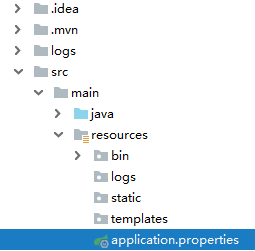
加上内容:
corePoolSize=10
maxPoolSize = 50
queueCapacity = 10
2、添加线程池配置
import org.springframework.beans.factory.annotation.Value;
import org.springframework.context.annotation.Bean;
import org.springframework.context.annotation.Configuration;
import org.springframework.context.annotation.PropertySource;
import org.springframework.scheduling.annotation.EnableAsync;
import org.springframework.scheduling.concurrent.ThreadPoolTaskExecutor;
import java.util.concurrent.Executor;
/**
* 注解式配置文件
*
* @ClassName: AsyncConfig
* @Description: TODO
* @Author Tan
* @Date 2019/7/5
*/
@Configuration //表明该类是一个配置类
@EnableAsync //开启异步事件的支持
@PropertySource(value = "classpath:application.properties")
public class AsyncConfig {
/**
* 线程池维护线程的最少数量
*/
@Value("${corePoolSize}")
private int corePoolSize;
/**
* 线程池维护线程的最大数量
*/
@Value("${corePoolSize}")
private int maxPoolSize;
/**
* 缓存队列
*/
@Value("${corePoolSize}")
private int queueCapacity;
@Bean
public Executor taskExecutor() {
ThreadPoolTaskExecutor executor = new ThreadPoolTaskExecutor();
executor.setCorePoolSize(corePoolSize);
executor.setMaxPoolSize(maxPoolSize);
executor.setQueueCapacity(queueCapacity);
executor.initialize();
return executor;
}
}
3、然后跟之前一样
启动类【多了@EnableAsync】
@EnableAsync // 使Async生效
@EnableScheduling // 开启对定时任务的支持
@SpringBootApplication(exclude = {DataSourceAutoConfiguration.class})
public class WebApplication {
public static void main(String[] args) {
SpringApplication.run(WebApplication.class, args);
}
}
任务类【每个方法加上注解@Async,如果加到类上,表明所有方法都异步执行】
import org.springframework.scheduling.annotation.Async;
import org.springframework.scheduling.annotation.Scheduled;
import org.springframework.stereotype.Component;
/**
* @ClassName: Schedule1
* @Description: 任务
* @Author Tan
* @Date 2019/7/5
*/
@Component
public class Schedule1 {
@Async
//corn从左到右(用空格隔开):秒 分 小时 月份中的日期 月份 星期中的日期 年份
@Scheduled(cron = "0/5 * * * * *")
public void calculate1() {
System.out.println("定时任务1执行开始!");
System.out.println("这里是定时任务1执行的内容。。。。。。");
System.out.println("定时任务1执行成功!");
}
@Async
@Scheduled(cron = "0/5 * * * * *")
public void calculate2() {
System.out.println("定时任务2执行开始!");
System.out.println("这里是定时任务2执行的内容。。。。。。");
System.out.println("定时任务2执行成功!");
}
}
SpringBoot之异步定时任务的更多相关文章
- 【java框架】SpringBoot(4)--SpringBoot实现异步、邮件、定时任务
1.SpringBoot整合任务机制 1.1.SpringBoot实现异步方法 日常开发中涉及很多界面与后端的交互响应,都不是同步的,基于SpringBoot为我们提供了注解方式实现异步方法.使得前端 ...
- SpringBoot几种定时任务的实现方式
定时任务实现的几种方式: Timer:这是java自带的java.util.Timer类,这个类允许你调度一个java.util.TimerTask任务.使用这种方式可以让你的程序按照某一个频度执行, ...
- springboot整合@Scheduled定时任务的使用
1.启动类里面添加注解@EnableScheduling ,例如: @SpringBootApplication@EnableScheduling@MapperScan("com.examp ...
- SpringBoot使用异步线程池实现生产环境批量数据推送
前言 SpringBoot使用异步线程池: 1.编写线程池配置类,自定义一个线程池: 2.定义一个异步服务: 3.使用@Async注解指向定义的线程池: 这里以我工作中使用过的一个案例来做描述,我所在 ...
- SpringBoot中异步请求和异步调用(看这一篇就够了)
原创不易,如需转载,请注明出处https://www.cnblogs.com/baixianlong/p/10661591.html,否则将追究法律责任!!! 一.SpringBoot中异步请求的使用 ...
- springBoot中的定时任务
springBoot中的定时任务 1:在Spring Boot的主类中加入@EnableScheduling注解,启用定时任务的配置 2:新建ScheduledTasks任务类 : package c ...
- SpringBoot中的定时任务与Quartz的整合
SpringBoot集成Quartz 定时任务Quartz : 就是在指定的时间执行一次或者循环执行,在项目的开发中有时候会需要的, 还是很有用的. SpringBoot内置的定时 添加依赖 < ...
- SpringBoot中执行定时任务
一:在SpringBoot中使用定时任务相当的简单.首先,我们在启动类中加入@EnableScheduling来开启定时任务. @SpringBootApplication @EnableSchedu ...
- SpringBoot系列——动态定时任务
前言 定时器是我们项目中经常会用到的,SpringBoot使用@Scheduled注解可以快速启用一个简单的定时器(详情请看我们之前的博客<SpringBoot系列--定时器>),然而这种 ...
随机推荐
- SSL握手中win xp和SNI的那点事
SSL握手中win xp和SNI的那点事 一.背景需求server1-3使用不同的域名对外提供https服务,用nginx作为前端负载均衡器并负责https集中解密工作(以用户访问的域名为依据进行流量 ...
- oracle xmltype + blob + clob
oracle varchar2最大存储长度为4000,所以当字段长度超限时可尝试存储为blob或xmltype格式 xmltype --1.创建xml表 Create TABLE testxml( i ...
- eclispe git config配置文件配置远程仓库
git config基本配置如下: [core] repositoryformatversion = 0 filemode = false logallrefupdates = true [remot ...
- Java入门之人需要注意的5大步骤
作为最抢手的程序开发言语之一,Java在互联网领域中的方位无需赘言.抢手也带来了高薪和许多的作业时机,对那些预备通过学习Java来改动自己命运的同学来说,需求做好以下作业. 1.考虑一下 学习Java ...
- POJ2001Shortest Prefixes(Trie树)
传送门 题目大意:求最短唯一前缀 题解:Trie树 把单词一个个插入,每个字母节点v[]++;然后输出时输出到v[]为1的点, v[]=1说明只有这个单词经过. 代码 : #include<io ...
- [题解向] Manacher简单习题
\(1\) LG1659 [国家集训队]拉拉队排练 求前\(k\)大的奇数长度回文串的长度之积. \(\rm |S|\leq 1e6,K\leq 1e12\) --一开始觉得挺水,就开始二分最少长度能 ...
- 趣谈Linux操作系统学习笔记:第二十一讲
一.分段机制 1.分段机制的原理图 2.段选择子 3.段偏移量 例如,我们将上面的虚拟空间分成以下 4 个段,用 0-3 来编号.每个段在段表中有一个项,在物理空间中,段的排列如下图的右边所示. 4. ...
- nui-app 笔记
https://uniapp.dcloud.io
- Linux 部署redis集群
下载Redis 下载网址 http://www.redis.cn/download.html Redis需要gcc环境(如果已经有该环境跳过此步骤) yum install gcc-c++ 安装Red ...
- win7和win10自带桌面便签哪里找
一些小伙伴习惯使用windows自带的便签功能,但win7和win10区别较大, 导致更新系统后不知道在哪里找,甚至以为没有该功能了, 其实不然,下面我总结了2种方法,希望能帮到有需要的人 win7( ...