
vue实用组件——圆环百分比进度条
有需要的人可以参考一下,如果试用过,发现问题,欢迎留言告知,不胜感激。
功能介绍:
1、若页面无刷新,且第一次传值小于第二次传值或者圆环初始化时执行的是递增动画
2、若页面无刷新,且第一次传值大于第二次传值则为执行递减动画
3、中间展示的百分比数字有缓动动画(速度同圆环进度动画一直)
4、动画完成时会触发动画完成回调
5、外部传值为圆环进度百分比(整数),圆环动画速度(整数)
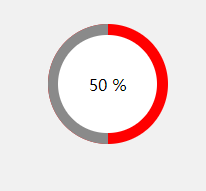
效果如图所示:
<template>
  <div class="percentloop">
    <div class="circle-left">
      <div ref="leftcontent"></div>
    </div>
    <div class="circle-right">
      <div ref="rightcontent"></div>
    </div>
    <div class="number">
      {{ percent }} %
    </div>
  </div>
</template>

<script>
export default {
  props: {
    percentNum: {
      type: [String, Number],
      default: 0
    },
    speed: { // 建议取值为0-3
      type: [String, Number],
      default: 1
    }
  },
  data () {
    return {
      percent: 0,
      initDeg: 0,
      timeId: null,
      animationing: false
    }
  },
  methods: {
    transformToDeg (percent) {
      let deg = 0
      if (percent >= 100) {
        deg = 360
      } else {
        deg = parseInt(360 * percent / 100)
      }
      return deg
    },
    transformToPercent (deg) {
      let percent = 0
      if (deg >= 360) {
        percent = 100
      } else {
        percent = parseInt(100 * deg / 360)
      }
      return percent
    },
    rotateLeft (deg) { // 大于180时,执行的动画
      this.$refs.leftcontent.style.transform = 'rotate(' + (deg - 180) + 'deg)'
    },
    rotateRight (deg) { // 小于180时,执行的动画
      this.$refs.rightcontent.style.transform = 'rotate(' + deg + 'deg)'
    },
    goRotate (deg) {
      this.animationing = true
      this.timeId = setInterval(() => {
        if (deg > this.initDeg) { // 递增动画
          this.initDeg += Number(this.speed)
          if (this.initDeg >= 180) {
            this.rotateLeft(this.initDeg)
            this.rotateRight(180) // 为避免前后两次传入的百分比转换为度数后的值不为步距的整数,可能出现的左右转动不到位的情况。
          } else {
            this.rotateRight(this.initDeg)
          }
        } else { // 递减动画
          this.initDeg -= Number(this.speed)
          if (this.initDeg >= 180) {
            this.rotateLeft(this.initDeg)
          } else {
            this.rotateLeft(180) // 为避免前后两次传入的百分比转换为度数后的值不为步距的整数,可能出现的左右转动不到位的情况。
            this.rotateRight(this.initDeg)
          }
        }
        this.percent = this.transformToPercent(this.initDeg) // 百分比数据滚动动画
        const remainer = Number(deg) - this.initDeg
        if (Math.abs(remainer) < this.speed) {
          this.initDeg += remainer
          if (this.initDeg > 180) {
            this.rotateLeft(deg)
          } else {
            this.rotateRight(deg)
          }
          this.animationFinished()
        }
      }, 10)
    },
    animationFinished () {
      this.percent = this.percentNum // 百分比数据滚动动画
      this.animationing = false
      clearInterval(this.timeId)
      this.$emit('animationFinished') // 动画完成的回调
    }
  },
  created () {
    this.goRotate(this.transformToDeg(this.percentNum))
  },
  watch: {
    'percentNum': function (val) {
      if (this.animationing) return
      this.goRotate(this.transformToDeg(val))
    }
  }
}
</script>

<style scoped lang="scss">
.percentloop {
  position: relative;
  width: 100%;
  height: 100%;
  border-radius: 50%;
  overflow: hidden;
  .circle-left, .circle-right {
    position: absolute;
    top: 0;
    left: 0;
    width: 50%;
    height: 100%;
    background-color: red;
    overflow: hidden;
    &>div {
      width: 100%;
      height: 100%;
      background-color: #8a8a8a;
      transform-origin: right center;
      /*transition: all .5s linear;*/
    }
  }
  .circle-right {
    left: 50%;
    &>div {
      transform-origin: left center;
    }
  }
  .number {
    position: absolute;
    top: 9%;
    bottom: 9%;
    left: 9%;
    right: 9%;
    background-color: #fff;
    border-radius: 50%;
    overflow: hidden;
    display: flex;
    align-items: center;
    justify-content: center;
    color: #000;
  }
}
</style>
vue实用组件——圆环百分比进度条的更多相关文章
- css3圆形百分比进度条的实现原理
原文地址:css3圆形百分比进度条的实现原理 今天早上起来在查看jquery插件机制的时候,一不小心点进了css3圆形百分比进度条的相关文章,于是一发不可收拾,开始折腾了... 关于圆形圈的实现,想必 ...
- amazeui学习笔记--css(常用组件13)--进度条Progress
amazeui学习笔记--css(常用组件13)--进度条Progress 一.总结 1.进度条基本使用:进度条组件,.am-progress 为容器,.am-progress-bar 为进度显示信息 ...
- JS框架_(JQbar.js)柱状图动态百分比进度条特效
百度云盘 传送门 密码:q6rt 柱状图动态百分比进度条效果 <html> <head> <title>jqbar.js柱状图动态百分比进度条特效</titl ...
- HTML5圆形百分比进度条插件circleChart
在页面中引入jquery和circleChart.min.js文件. <script src="path/to/jquery.min.js"></script&g ...
- BitBlt()函数实现带数字百分比进度条控件、静态文本(STATIC)控件实现的位图进度条、自定义进度条控件实现七彩虹颜色带数字百分比
Windows API BitBlt()函数实现带数字百分比进度条控件. 有两个例子:一用定时器实现,二用多线程实现. 带有详细注解. 此例是本人原创,绝对是网上稀缺资源(本源码用Windows AP ...
- 基于Vue的事件响应式进度条组件
写在前面 找了很多Vue 进度条组件!,都不包含拖拽和点击事件,input range倒是原生包含input和change事件,但是直接基于input range做进度条的话,样式部分需要做大量调整和 ...
- Vue项目开发,nprogress进度条加载之超详细讲解及实战案例
Nprogress的默认进度条很细,它的设计灵感主要来源于 谷歌,YouTube 他的安装方式也很简单,你可以有两种使用方式: 直接引入js和css文件 使用npm安装的的方式 直接引入: Npm安装 ...
- vue多文件上传进度条 进度不更新问题
转自 hhttp://www.cnblogs.com/muge10/p/6767493.html 感谢这位兄弟的文章,之前因为这个问题 ,我连续在sgmentflow上提问过多次,完全没人能回答.谢谢 ...
- Vue中使用NProgress实现进度条
简介 NProgress是页面跳转或者发生异步请求是浏览器顶部的进度条 GitHub地址:https://github.com/rstacruz/nprogress 在线演示地址:http://ric ...
随机推荐
- 0.Git介绍
版本控制工具:SVN,Git Git是分布式版本控制系统,SVN是集中式的版本控制系统.(借一位网友的图以示区别) SVN只有一个单一的集中管理的服务器,保存所有文件的修订版本,而协同工作的人们都通过 ...
- Spring中Model、ModelMap及ModelAndView之间的区别
Spring中Model.ModelMap及ModelAndView之间的区别 1. Model(org.springframework.ui.Model)Model是一个接口,包含addAttr ...
- 限制oracle某用户仅能从某IP登录
system用户创建触发器,登录后触发检查 CREATE OR REPLACE TRIGGER system.check_ip_addresses_test AFTER logon ON DATABA ...
- R语言读取EXCEL文件的各种方法
路径问题 原始文件路径C:\Users\air\Desktop\1.txt R中有两种方法读取该路径 C:\\Users\\air\\Desktop\\1.txt C:/Users/air/Deskt ...
- Java中的队列同步器AQS
一.AQS概念 1.队列同步器是用来构建锁或者其他同步组件的基础框架,使用一个int型变量代表同步状态,通过内置的队列来完成线程的排队工作. 2.下面是JDK8文档中对于AQS的部分介绍 public ...
- 字符串匹配(一)----Rabin-Karp算法
题目:假如要判断字符串A"ABA"是不是字符串B"ABABABA"的子串. 解法一:暴力破解法, 直接枚举所有的长度为3的子串,然后依次与A比较,这样就能得出匹 ...
- Java线程中的同步
1.对象与锁 每一个Object类及其子类的实例都拥有一个锁.其中,标量类型int,float等不是对象类型,但是标量类型可以通过其包装类来作为锁.单独的成员变量是不能被标明为同步的.锁只能用在使用了 ...
- [Swift]LeetCode347. 前K个高频元素 | Top K Frequent Elements
Given a non-empty array of integers, return the k most frequent elements. Example 1: Input: nums = [ ...
- 本地连接虚拟机_环境搭建01_VMWARE/XShell/CentOS
今天起准备搭建一套环境用来学习redis,dubbo,docker,nginx. 环境准备: 1.VMware12: https://pan.baidu.com/s/1-LnqfrWw8ZjQdmG ...
- .NET Core实战项目之CMS 第三章 入门篇-源码解析配置文件及依赖注入
作者:依乐祝 原文链接:https://www.cnblogs.com/yilezhu/p/9998021.html 写在前面 上篇文章我给大家讲解了ASP.NET Core的概念及为什么使用它,接着 ...