
SpringBoot整合系列-整合Swagger2
原创作品,可以转载,但是请标注出处地址:https://www.cnblogs.com/V1haoge/p/9959844.html
SpringBoot整合Swagger2
步骤
第一步:添加必要的依赖
<dependency>

    <groupId>io.springfox</groupId>

    <artifactId>springfox-swagger2</artifactId>

    <version>2.7.0</version>

</dependency>

<dependency>

    <groupId>io.springfox</groupId>

    <artifactId>springfox-swagger-ui</artifactId>

    <version>2.7.0</version>

</dependency>
第二步:添加必要的配置
一般无配置项,必要时可以添加自定义配置项,在配置类中读取
第三步:添加配置类(重点)
// swagger2的配置内容仅仅就是需要创建一个Docket实例

@Configuration

@EnableSwagger2 //启用swagger2

public class Swagger2Config {

    @Bean

    public Docket createRestApi() {

        return new Docket(DocumentationType.SWAGGER_2)

                .pathMapping("/")

                .apiInfo(apiInfo())

                .select()

                .apis(RequestHandlerSelectors.basePackage("com.example.springbootdemo"))

                .paths(PathSelectors.any())

                .build();

    }

    private ApiInfo apiInfo() {

        return new ApiInfoBuilder()

                .title("springboordemo")

                .description("Springboot整合Demo")

                .version("0.0.1")

                .build(); // 这部分信息其实可以自定义到配置文件中读取

    }

}
通过@Configuration注解,让Spring-boot来加载该类配置。再通过@EnableSwagger2注解来启用Swagger2Config。
再通过createRestApi方法创建Docket的Bean之后,
apiInfo方法用来创建该Api的基本信息(这些基本信息会展现在文档页面中)。
select() 函数返回一个 ApiSelectorBuilder 实例用来控制哪些接口暴露给Swagger2来展现。
一般采用指定扫描的包路径来定义
Swagger会扫描该包下所有Controller定义的API,并产生文档内容(除了被@ApiIgnore指定的请求)
第四步:在Controller和Bean上添加Swagger注解
@RestController

@RequestMapping("/user")

@Log4j2

@Api(description = "用户接口")

public class UserApi {

    @Autowired

    private UserService service;

    @ApiOperation(value = "添加用户", notes = "根据给定的用户信息添加一个新用户",response = ResponseEntity.class,httpMethod = "PATCH")

    @RequestMapping(value = "/addUser",method = RequestMethod.PATCH)

    public ResponseEntity<User> addUser(final User user) {

        log.info("执行添加用户操作");

        return service.addUser(user);

    }

    @ApiOperation(value = "更新用户状态", notes = "根据给定的用户ID修改用户状态",response = ResponseEntity.class,httpMethod = "POST")

    @RequestMapping(value = "/updateUser", method = RequestMethod.POST)

    public ResponseEntity<User> updateUser(final UseState useState, int useId) {

        log.info("执行修改用户状态操作");

        return service.updateUser(User.builder().useState(useState).useId(useId).build());

    }

    @ApiOperation(value = "更新用户手机号", notes = "根据给定的用户ID修改用户手机号",response = ResponseEntity.class,httpMethod = "POST")

    @RequestMapping(value = "/updateUsePhoneNum", method = RequestMethod.POST)

    public ResponseEntity<User> updateUsePhoneNum(final String usePhoneNum, int useId) {

        log.info("执行修改用户手机号操作");

        return service.updateUsePhoneNum(User.builder().usePhoneNum(usePhoneNum).useId(useId).build());

    }

    @ApiOperation(value = "删除用户", notes = "根据给定的用户ID删除一个用户",response = ResponseEntity.class,httpMethod = "DELETE")

    @RequestMapping(value = "/deleteUser", method = RequestMethod.DELETE)

    public ResponseEntity<User> deleteUser(final int useId) {

        log.info("执行删除用户操作");

        return service.deleteUser(useId);

    }

    @ApiOperation(value = "查询用户", notes = "根据给定的用户ID获取一个用户",response = ResponseEntity.class,httpMethod = "GET")

    @RequestMapping(value = "getUser", method = RequestMethod.GET)

    public ResponseEntity<User> getUser(final int useId) {

        log.info("执行查询单个用户操作");

        return service.getUser(useId);

    }

    @ApiOperation(value = "查询用户", notes = "根据给定的用户信息查询用户",response = ResponseEntity.class,httpMethod = "POST")

    @RequestMapping(value = "getUsers", method = RequestMethod.POST)

    public ResponseEntity<List<User>> getUsers(final User user) {

        log.info("根据条件查询用户");

        return service.getUsers(user);

    }

}
@ApiModel(value = "用户模型")

public class User {

    @ApiModelProperty("用户ID")

    private int useId;

    @ApiModelProperty("用户姓名")

    private String useName;

    @ApiModelProperty("用户性别")

    private UseSex useSex;

    @ApiModelProperty("用户年龄")

    private int useAge;

    @ApiModelProperty("用户身份证号")

    private String useIdNo;

    @ApiModelProperty("用户手机号")

    private String usePhoneNum;

    @ApiModelProperty("用户邮箱")

    private String useEmail;

    @ApiModelProperty("创建时间")

    private LocalDateTime createTime;

    @ApiModelProperty("修改时间")

    private LocalDateTime modifyTime;

    @ApiModelProperty("用户状态")

    private UseState useState;

}
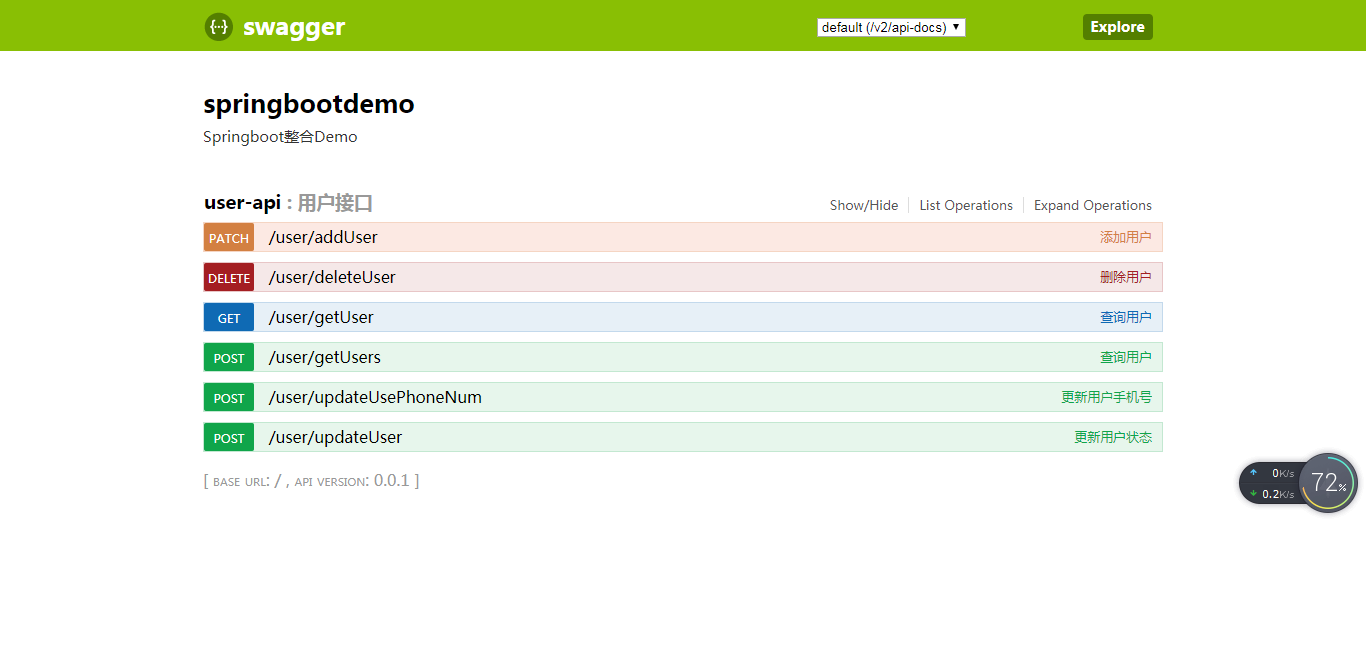
第五步:启动应用,浏览器请求
http://localhost:8080/swagger-ui.html
可得到如下界面:
SpringBoot整合系列-整合Swagger2的更多相关文章
- SpringBoot整合系列-整合MyBatis
原创作品,可以转载,但是请标注出处地址:https://www.cnblogs.com/V1haoge/p/9971036.html SpringBoot整合Mybatis 步骤 第一步:添加必要的j ...
- SpringBoot整合系列--整合MyBatis-plus
原创作品,可以转载,但是请标注出处地址:https://www.cnblogs.com/V1haoge/p/10125279.html SpringBoot整合MyBatis-plus 步骤 第一步: ...
- SpringBoot整合系列-整合SpringMVC
原创作品,可以转载,但是请标注出处地址:https://www.cnblogs.com/V1haoge/p/9984607.html SpringBoot整合Spring MVC 步骤 第一步:添加必 ...
- SpringBoot整合系列-整合JPA
原创作品,可以转载,但是请标注出处地址:https://www.cnblogs.com/V1haoge/p/9959865.html SpringBoot整合JPA进行数据库开发 步骤 第一步:添加必 ...
- SpringBoot整合系列-整合H2
原创作品,可以转载,但是请标注出处地址:https://www.cnblogs.com/V1haoge/p/9959855.html SpringBoot整合H2内存数据库 一般我们在测试的时候习惯于 ...
- SpringBoot整合系列-PageHelper分页插件
原创作品,可以转载,但是请标注出处地址:https://www.cnblogs.com/V1haoge/p/9971043.html SpringBoot整合MyBatis分页插件PageHelper ...
- SpringBoot系列-整合Mybatis(注解方式)
目录 一.常用注解说明 二.实战 三.测试 四.注意事项 上一篇文章<SpringBoot系列-整合Mybatis(XML配置方式)>介绍了XML配置方式整合的过程,本文介绍下Spring ...
- springboot + mybatis + mycat整合
1.mycat服务 搭建mycat服务并启动,windows安装参照. 系列文章: [Mycat 简介] [Mycat 配置文件server.xml] [Mycat 配置文件schema.xml] [ ...
- SpringBoot与Swagger整合
1 SpringBoot与Swagger整合https://blog.csdn.net/jamieblue1/article/details/99847744 2 Swagger详解(SpringBo ...
随机推荐
- 把.zip文件转化为.tar.gz文件
工作中正好用到上传tar.gz文件,没有现成的转换工具,就写了方法转换 #encoding: utf-8import osimport tarfileimport zipfileimport osim ...
- [LeetCode] Leaf-Similar Trees 叶结点相似的树
Consider all the leaves of a binary tree. From left to right order, the values of those leaves form ...
- Multi-Get API
multiGet API并行地在单个http请求中执行多个get请求. Multi-Get Request MultiGetRequest构造函数为空,需要你添加`MultiGetRequest.It ...
- Java-JSON 解析
JSON JSON(JavaScript Object Notation, JS 对象简谱) 是一种轻量级的数据交换格式.它基于 ECMAScript (欧洲计算机协会制定的js规范)的一个子集,采 ...
- Winform将一个窗体显示在另一个窗体中
private void ShowForm(Form Indexform) { Form1 form1 = new Form1(); form1 .TopLevel = false; form1 .P ...
- CSS面试细节整理(一)
最近面试时候发现自己最熟悉的css确实开发中好多细节没注意到,为了防止在栽跟头,打算从头到底捋一遍咯 语法部分: 1.css几种选择器的写法 (1)h1 em {color:red;} (后代选择器) ...
- jenkins配置演示
构建代码的几个名词: make:linux或者windows最原始的编译工具,在Linux下编译程序常用make,windows下对应的工具为nmake.它负责组织构建的过程,负责指挥编译器如何编译, ...
- 为什么 web 开发人员需要迁移到. NET Core, 并使用 ASP.NET Core MVC 构建 web 和 webservice/API
2018 .NET开发者调查报告: .NET Core 是怎么样的状态,这里我们看到了还有非常多的.net开发人员还在观望,本文给大家一个建议.这仅代表我的个人意见, 我有充分的理由推荐.net 程序 ...
- Dubbo 分布式事务一致性实现
我觉得事务的管理不应该属于Dubbo框架, Dubbo只需实现可被事务管理即可, 像JDBC和JMS都是可被事务管理的分布式资源, Dubbo只要实现相同的可被事务管理的行为,比如可以回滚, 其它事务 ...
- 【WebAPI No.4】Swagger实现API文档功能
介绍: Swagger也称为Open API,Swagger从API文档中手动完成工作,并提供一系列用于生成,可视化和维护API文档的解决方案.简单的说就是一款让你更好的书写API文档的框架. 我们为 ...