
the status bar issue of react-native Modal on Android ( RN v0.57.0)
Problem: When use Modal in react-native, the status bar is not included if you make a full-screen mask like a translucent background. I found the below method is able to make the status-bar to be included in.
forgive my poor English, I'm practicing.
what I do is to replace the default Modal implementation on Android as below.
1. make directory like below , and copy code from
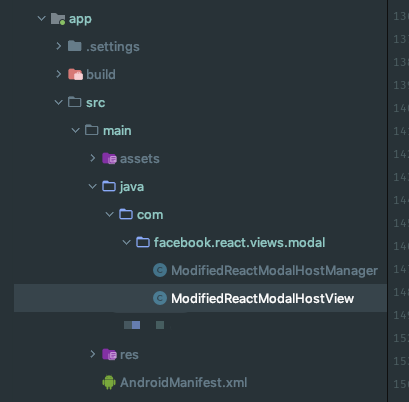
code in file 'ModifiedReactModalHostManager' and 'ModifiedReactModalHostView' is completely copied from
'react-native/com/facebook/react/views/modal/ReactModalHostManager' and
'react-native/com/facebook/react/views/modal/ReactModalHostView'. And replace all 'ReactModalHostView' words with 'ModifiedReactModalHostView' in both files.
2. use a self-defined MainReactPackage instead of the default react-native MainReactPackage.
public class MyMainReactPackage extends MainReactPackage {

    @Override

    public List<ViewManager> createViewManagers(ReactApplicationContext reactContext) {

        List<ViewManager> list = super.createViewManagers(reactContext);

        for (int i = 0; i < list.size(); i++) {

            if (list.get(i) instanceof ReactModalHostManager) {

                list.remove(i);

                list.add(new ModifiedReactModalHostManager());

                break;

            }

        }

        return list;

    }

}
in your ReactApplication class , replace MainReactPackage.
@Override

protected List<ReactPackage> getPackages() {

    return Arrays.<ReactPackage>asList(

            new MyMainReactPackage() // previously is MainReactPackage()

    );

}
as above, replace the ReactModalHostManager with ModifiedReactModalHostManager. Now every Modal in react-native code will use the implementation of ModifiedReactModalHostView rather than the default ReactModalHostView.
3. include the status bar of Modal in ModifiedReactModalHostView.
replace function `private void updateProperties` with code below.
private void updateProperties() {

    Assertions.assertNotNull(mDialog, "mDialog must exist when we call updateProperties");

    Window window = mDialog.getWindow();

    mDialog.getWindow().setFlags(

            WindowManager.LayoutParams.FLAG_LAYOUT_NO_LIMITS,

            WindowManager.LayoutParams.FLAG_LAYOUT_NO_LIMITS

    );

    Activity currentActivity = getCurrentActivity();

    if (currentActivity != null) {

        FrameLayout content = window.getDecorView().findViewById(android.R.id.content);

        LinearLayout.LayoutParams layoutParams = (LinearLayout.LayoutParams) content.getLayoutParams();

        View preContentView = currentActivity.getWindow().findViewById(android.R.id.content);

        if (preContentView != null) {

            layoutParams.height = currentActivity.getWindow().findViewById(android.R.id.content).getHeight();

        }

        content.setLayoutParams(layoutParams);

    }

    if (mTransparent) {

        mDialog.getWindow().clearFlags(WindowManager.LayoutParams.FLAG_DIM_BEHIND);

    } else {

        mDialog.getWindow().setDimAmount(0.5f);

        mDialog.getWindow().setFlags(

                WindowManager.LayoutParams.FLAG_DIM_BEHIND,

                WindowManager.LayoutParams.FLAG_DIM_BEHIND);

    }

}
Then it is OK to build application and test your Modal.
Note that this method is related to your react-native's version, when your rn's version changes, you should also make change to the ModifiedModal to make sure it is suitable.
练英语,练英语的,兄弟们别笑,也是方便遇到这个问题的国际友人们嘛。。。
the status bar issue of react-native Modal on Android ( RN v0.57.0)的更多相关文章
- React Native App设置&Android版发布
React Native系列 <逻辑性最强的React Native环境搭建与调试> <ReactNative开发工具有这一篇足矣> <解决React Native un ...
- React Native移植原生Android
(一)前言 之前已经写过了有关React Native移植原生Android项目的文章,不过因为RN版本更新的原因吧,跟着以前的文章可能会出现一些问题,对于初学者来讲还是会有很多疑难的困惑的,而且官方 ...
- 将React Native集成至Android原生应用
将React Native集成至Android原生应用 Android Studio 2.1 Preview 4生成的空项目 react-native 环境 0.22.2 初次编译后apk有1.1M, ...
- React Native hot reloading & Android & iOS
React Native hot reloading & Android & iOS https://facebook.github.io/react-native/docs/debu ...
- React Native 4 for Android源码分析 一《JNI智能指针之介绍篇》
文/ Tamic: http://blog.csdn.net/sk719887916/article/details/53455441 原文:http://blog.csdn.net/eewolf/a ...
- 关于React Native项目在android上UI性能调试实践
我们尽最大的努力来争取使UI组件的性能如丝般顺滑,但有的时候这根本不可能做到.要知道,Android有超过一万种不同型号的手机,而在框架底层进行软件渲染的时候是统一处理的,这意味着你没办法像iOS那样 ...
- React Native工程修改Android包名
默认初始化的React Native工程,生成Android工程的时候,包名默认是React Native工程的名字,跟一般Android工程com.company.xxx不一样. 这时候就需要手动修 ...
- React Native升级方法——升级到最新版本0.59
React Native最近有大动作,于2019年3月12日发布新版本0.59.主要有两点值得升级:支持React Hooks:升级了JavaScriptCore,使Android性能有大幅提升.据用 ...
- 【React Native开发】React Native移植原生Android项目(4)
),React Native技术交流4群(458982758),请不要反复加群!欢迎各位大牛,React Native技术爱好者加入交流!同一时候博客左側欢迎微信扫描关注订阅号,移动技术干货,精彩文章 ...
随机推荐
- centos7搭建vsftpd并启用虚拟用户
虚拟用户的特点是只能访问服务器为其提供的FTP服务,不能访问系统的其它资源,所以,如果想让用户对FTP服务器站内具有写权限,但又不允许访问系统其他资源,可以使用虚拟用户来提高系统的安全性. 在vsft ...
- 常用命令和sql
常用命令: mvn idea:idea //生成.ipr项目文件 mvn clean install -Dmaven.test.skip=true mvn install:install-file - ...
- day13笔记
1:StringBuffer(掌握) (1)用字符串做拼接,比较耗时并且也耗内存,而这种拼接操作又是比较常见的,为了解决这个问题,Java就提供了 一个字符串缓冲区类.StringBuffer供我们使 ...
- Google 最新推出数据集搜索
继Google在2004年11月推出Google的重量产品Google scholar后,Google在最近推出的另一个重量级产品 Google Dataset Search.众所周知,互联网上的信息 ...
- hibernate 保存的flush怎么用?
hibernate 中的flush方法只有在上面的数据保存用了hibernate的方法保存了,但是在同一个事物当中需要用SQL的方法去查上面保存的数据,这个时候上方的hibernate保存后面就需要用 ...
- .NET--------未能加载文件或程序集“System.Net.Http.Formatting”或它的某一个依赖项。
未能加载文件或程序集“System.Net.Http.Formatting”或它的某一个依赖项.找到的程序集清单定义与程序集引用不匹配. (异常来自 HRESULT:0x80131040) 解决方 ...
- 存储过程 传 datatable
首先 定义 datatable 然后把要传的数据放到table里面 调用 存储过程 传递参数
- 动态流程图关于jointJs的使用
这段时间由于业务需要,需要展现动态的流程图.具体实现效果如图所示: jointJS中的线条以及框都是依赖SVG进行的二次开发.建议初学者先学习svg里相关属性,便于在阅读jointJs的API或者de ...
- 对接https数据(3des加密)
private void checkThread() { Urls urls = new Urls(type);//根据唯一识别类型初始化参数,可根据实际情况修改此构造函数 //访问国家平台接口,取出 ...
- windows与sql身份登录
windows身份验证:1.“.”代表本地2.127.0.0.1代表本地3.本地ip地址,在dos中可查4.localhost代表本地 sql身份验证:首先用windows登上去,之后再安全性中找到登 ...