
基于Filebeat+Kafka+Flink仿天猫双11实时交易额
1. 写在前面
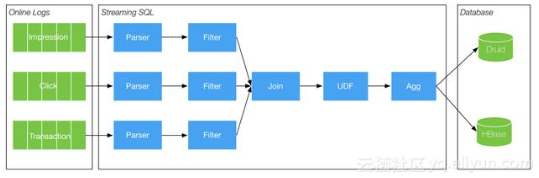
在大数据实时计算方向,天猫双11的实时交易额是最具权威性的,当然技术架构也是相当复杂的,不是本篇博客的简单实现,因为天猫双11的数据是多维度多系统,实时粒度更微小的。当然在技术的总体架构上是相近的,主要的组件都是用到大数据实时计算组件Flink(当然阿里是用了基于Flink深度定制和优化改装的Blink)。下图是天猫双11实时交易额的大体架构模型及数据流向(参照https://baijiahao.baidu.com/s?id=1588506573420812062&wfr=spider&for=pc)
2. 仿天猫双11实时交易额技术架构
利用Linux shell自动化模拟每秒钟产生一条交易额数据,数据内容为用户id,购买商品的付款金额,用户所在城市及所购买的商品

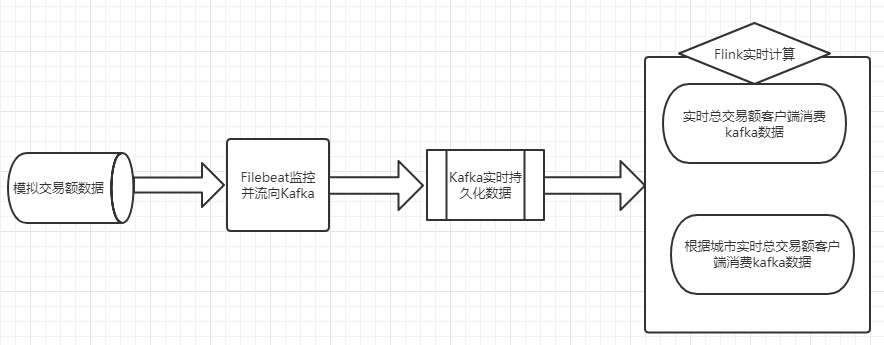
技术架构上利用Filebeat去监控每生产的一条交易额记录,Filebeat将交易额输出到Kafka(关于Filebeat和kafka的安装或应用请参照之前的博客),然后编写Flink客户端程序去实时消费Kafka数据,对数据进行两块计算,一块是统计实时总交易额,一块是统计不同城市的实时交易额
技术架构图
3.具体实现
3.1. 模拟交易额数据double11.sh脚本
#!/bin/bash

i=1

for i in $(seq 1 60)

	do

        customernum=`openssl rand -base64 8 | cksum | cut -c1-8`

        pricenum=`openssl rand -base64 8 | cksum | cut -c1-4`

        citynum=`openssl rand -base64 8 | cksum | cut -c1-2`

        itemnum=`openssl rand -base64 8 | cksum | cut -c1-6`

        echo "customer"$customernum","$pricenum",""city"$citynum",""item"$itemnum >> /home/hadoop/tools/double11/double11.log

        sleep 1

    done
将double11.sh放入Linux crontab
#每分钟执行一次

* * * * * sh /home/hadoop/tools/double11/double11.sh
3.2. 实时监控double11.log
Filebeat实时监控double11.log产生的每条交易额记录,将记录实时流向到Kafka的topic,这里只需要对Filebeat的beat-kafka.yml做简单配置,kafka只需要启动就好

3.3. 核心:编写Flink客户端程序
这里将统计实时总交易额和不同城市的实时交易额区分写成两个类(只提供Flink Java API)
需要导入的maven依赖
    <dependencies>

        <dependency>

            <groupId>junit</groupId>

            <artifactId>junit</artifactId>

            <version>4.11</version>

            <scope>test</scope>

        </dependency>

        <!-- https://mvnrepository.com/artifact/org.apache.flink/flink-clients -->

        <dependency>

            <groupId>org.apache.flink</groupId>

            <artifactId>flink-clients_2.11</artifactId>

            <version>1.0.0</version>

        </dependency>

        <!-- https://mvnrepository.com/artifact/org.apache.flink/flink-streaming-java -->

        <dependency>

            <groupId>org.apache.flink</groupId>

            <artifactId>flink-streaming-java_2.11</artifactId>

            <version>1.0.0</version>

            <scope>provided</scope>

        </dependency>

        <!-- https://mvnrepository.com/artifact/org.apache.flink/flink-java -->

        <dependency>

            <groupId>org.apache.flink</groupId>

            <artifactId>flink-java</artifactId>

            <version>1.0.0</version>

        </dependency>

        <dependency>

            <groupId>org.apache.flink</groupId>

            <artifactId>flink-connector-kafka-0.8_2.11</artifactId>

            <version>1.0.0</version>

        </dependency>

        <!-- https://mvnrepository.com/artifact/com.alibaba/fastjson -->

        <dependency>

            <groupId>com.alibaba</groupId>

            <artifactId>fastjson</artifactId>

            <version>1.2.47</version>

        </dependency>

    </dependencies>
统计实时总交易额代码
package com.fastweb;

import java.util.Properties;

import com.alibaba.fastjson.JSONObject;

import org.apache.flink.api.common.functions.FlatMapFunction;

import org.apache.flink.api.java.tuple.Tuple2;

import org.apache.flink.streaming.api.datastream.DataStream;

import org.apache.flink.streaming.api.environment.StreamExecutionEnvironment;

import org.apache.flink.streaming.connectors.kafka.FlinkKafkaConsumer08;

import org.apache.flink.streaming.util.serialization.SimpleStringSchema;

import org.apache.flink.util.Collector;

public class Double11Sum {

    public static void main(String[] args) throws Exception {

        final StreamExecutionEnvironment env = StreamExecutionEnvironment.getExecutionEnvironment();

//        env.enableCheckpointing(1000);

        Properties properties = new Properties();

        properties.setProperty("bootstrap.servers", "192.168.184.12:9092");

        properties.setProperty("zookeeper.connect", "192.168.184.12:2181");

        properties.setProperty("group.id", "test");

        FlinkKafkaConsumer08<String> myConsumer = new FlinkKafkaConsumer08<String>("test", new SimpleStringSchema(),

                properties);

        DataStream<String> stream = env.addSource(myConsumer);

        DataStream<Tuple2<String, Integer>> counts = stream.flatMap(new LineSplitter()).keyBy(0).sum(1);

        counts.print();

        env.execute("Double 11 Real Time Transaction Volume");

    }

    //统计总的实时交易额

    public static final class LineSplitter implements FlatMapFunction<String, Tuple2<String, Integer>> {

        private static final long serialVersionUID = 1L;

        public void flatMap(String value, Collector<Tuple2<String, Integer>> out) {

            JSONObject object = JSONObject.parseObject(value);

            String message = object.getString("message");

            Integer price = Integer.parseInt(message.split(",")[1]);

            out.collect(new Tuple2<String, Integer>("price", price));

        }

    }

}
统计不同城市的实时交易额
package com.fastweb;

import java.util.Properties;

import com.alibaba.fastjson.JSONObject;

import org.apache.flink.api.common.functions.FlatMapFunction;

import org.apache.flink.api.java.tuple.Tuple2;

import org.apache.flink.streaming.api.datastream.DataStream;

import org.apache.flink.streaming.api.environment.StreamExecutionEnvironment;

import org.apache.flink.streaming.connectors.kafka.FlinkKafkaConsumer08;

import org.apache.flink.streaming.util.serialization.SimpleStringSchema;

import org.apache.flink.util.Collector;

public class Double11SumByCity {

    public static void main(String[] args) throws Exception {

        final StreamExecutionEnvironment env = StreamExecutionEnvironment.getExecutionEnvironment();

//        env.enableCheckpointing(1000);

        Properties properties = new Properties();

        properties.setProperty("bootstrap.servers", "192.168.184.12:9092");

        properties.setProperty("zookeeper.connect", "192.168.184.12:2181");

        properties.setProperty("group.id", "test");

        FlinkKafkaConsumer08<String> myConsumer = new FlinkKafkaConsumer08<String>("test", new SimpleStringSchema(),

                properties);

        DataStream<String> stream = env.addSource(myConsumer);

        DataStream<Tuple2<String, Integer>> cityCounts = stream.flatMap(new CitySplitter()).keyBy(0).sum(1);

        cityCounts.print();

        env.execute("Double 11 Real Time Transaction Volume");

    }

    //按城市分类汇总实时交易额

    public static final class CitySplitter implements FlatMapFunction<String, Tuple2<String, Integer>> {

        private static final long serialVersionUID = 1L;

        public void flatMap(String value, Collector<Tuple2<String, Integer>> out) {

            JSONObject object = JSONObject.parseObject(value);

            String message = object.getString("message");

            Integer price = Integer.parseInt(message.split(",")[1]);

            String city = message.split(",")[2];

            out.collect(new Tuple2<String, Integer>(city, price));

        }

    }

}
代码解释:这里可以方向两个类里面只有flatMap的对数据处理的内部类不同,但两个内部类的结构基本相同,在内部类里面利用fastjson解析了一层获取要得到的数据,这是因为经过Filebeat监控的数据是json格式的,Filebeat这样实现是为了在正式的系统上确保每条数据的来源IP,时间戳等信息
3.4. 验证
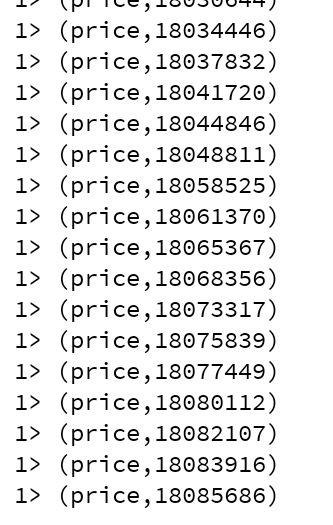
启动Double11Sum类的main方法就可以得到实时的总交易额,按城市分类的实时交易额也一样,这个结果是实时更新的,每条记录都是新的
基于Filebeat+Kafka+Flink仿天猫双11实时交易额的更多相关文章
- 2018天猫双11各类目品牌成交额top10排行榜
2018天猫双11总成交额213,550,497,011元,你知道各类目品牌成交额排行吗?一起来看看吧,赶紧收藏,以后就知道要怎么买了! 相关阅读: 2018天猫双11各类目品牌成交额top10排行榜 ...
- 天猫双11红包前端jQuery
[01] 浏览器支持:IE10+和其他现代浏览器. 效果图: 步骤: HTML部分: <div class="opacity" style=&qu ...
- 我们知道CDN护航了双11十年,却不知道背后有那么多故事……
情不知如何而起,竟一往情深.恰如我们.十年前,因为相信,所以看见.十年后,就在眼前,看见一切. 当2018天猫双11成交额2135亿元的大屏上,打出这么一段字的时候,参与双11护航的阿里云CDN技术掌 ...
- 2684亿!阿里CTO张建锋:不是任何一朵云都撑得住双11
2019天猫双11 成交额2684亿! "不是任何一朵云都能撑住这个流量.中国有两朵云,一朵是阿里云,一朵叫其他云."11月11日晚,阿里巴巴集团CTO张建锋表示,"阿里 ...
- 欠了好久的CRM帖子,双11来读。
又一年双11了,觉得天猫双11越来越没特色了. 从折扣,音符旋律到红包,今年15年却找不出往年的热度,只是商家还是一样的急,备着活动目标计划,做着库存价格打标视觉设计这种苦逼的日子. 欠了好久的CRM ...
- 深入探访支付宝双11十年路,技术凿穿焦虑与想象极限 | CYZONE特写
小蚂蚁说: 双11十年间,交易规模的指数级增长不断挑战人们的想象力,而对蚂蚁技术团队来说,这不仅是一场消费盛宴,而是无数次濒临压力和焦虑极限的体验,更是技术的练兵场.如今双11对蚂蚁金服而言,已经绝不 ...
- 最强CP!阿里云联手支付宝小程序如何助力双11?
作为首次“全面上云”的双11,阿里云征服了每秒订单峰值54.4万笔的世界新记录.正是在阿里云的保驾护航下,即使访问量是平时的5到6倍,小程序也鲜少出现卡顿或者宕机的现象,“依靠阿里云,我们整个天猫双1 ...
- 不仅仅是双11大屏—Flink应用场景介绍
双11大屏 每年天猫双十一购物节,都会有一块巨大的实时作战大屏,展现当前的销售情况. 这种炫酷的页面背后,其实有着非常强大的技术支撑,而这种场景其实就是实时报表分析. 实时报表分析是近年来很多公司采用 ...
- ELK+Filebeat+Kafka+ZooKeeper 构建海量日志分析平台(elk5.2+filebeat2.11)
ELK+Filebeat+Kafka+ZooKeeper 构建海量日志分析平台 参考:http://www.tuicool.com/articles/R77fieA 我在做ELK日志平台开始之初选择为 ...
随机推荐
- Custom DNS on Ubuntu 18.04LTS server
1. Edit resolved config file nano /etc/systemd/resolved.conf 2. Replace #DNS into DNS DNS=9.9.9.9 1. ...
- Kafka分区分配策略(Partition Assignment Strategy
问题 用过 Kafka 的同学用过都知道,每个 Topic 一般会有很多个 partitions.为了使得我们能够及时消费消息,我们也可能会启动多个 Consumer 去消费,而每个 Consumer ...
- python第十二天, 三元表达式, 函数对象,名称空间与作用域,函数的嵌套定义
复习 1. 字符串的比较: 2. 函数的参数:形参与实参 3. 实参的分类:位置实参与关键字实参 4. 形参分类: 1.无值位置形参 2.有值位置形参 3.可变长位置形参 4.有无值关键字形参 5.可 ...
- Ansible-基础
Ansible架构 Inventory 主机清单,可以对主机分组 ansible-hoc ansible的命令,适用临时场景 ansible-playbook ansible是一个场景的集 ...
- socket(TCP)通讯之Python实现
1.Service address = ('localhost', 9102) # AF_INET = ipv4; SOCK_STREAM:TCP s = socket.socket(socket.A ...
- 模拟赛20181015 Uva1078 bfs+四维dp
题意:一张网格图,多组数据,输入n,m,sx,sy,tx,ty大小,起终点 接下来共有2n-1行,奇数行有m-1个数,表示横向的边权,偶数行有m个数,表示纵向的边权 样例输入: 4 4 1 1 ...
- Exp2 后门原理与实践 20164314 郭浏聿
1.实践内容 (1)使用nc实现win,Linux间的后门连接. 热身 (2)使用netcat获取主机操作Shell,cron启动. (3)使用socat获取主机操作Shell, 任务计划启动. (4 ...
- 将base64转为图片
void Base64StringToImage(string imgCode) { try { String inputStr = imgCode; byte[] arr = Convert.Fro ...
- jsp网页连接mysql数据库
1.在mysql数据库中建立数据表 建一张测试表test,插入几条数据: 2.设置JDBC驱动 将 mysql-connector-java-5.0.8-bin.jar 拷到WebContent/WE ...
- Mysql5.7数据导出提示--secure-file-priv选项问题的解决方法
mysql可使用into outfile参数把表中的数据到处到csv,示例如下: select user_id from weibo_comment into outfile '/home/dazha ...