
测试框架httpclent 3.获取cookie的信息,然后带cookies去发送请求
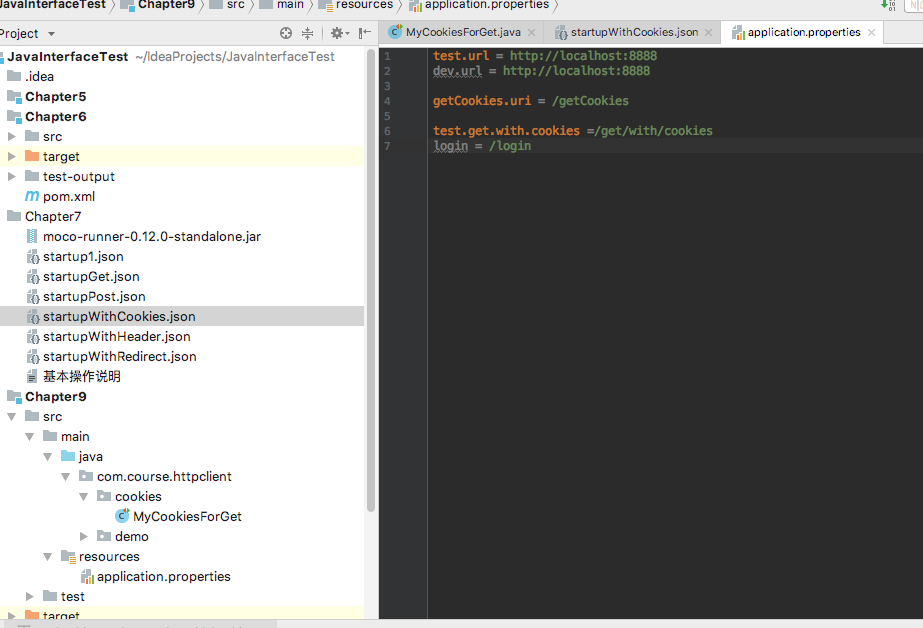
在properties文件里面:
startupWithCookies.json
[

  {

    "description":"这是一个会返回cookies信息的get请求",

    "request":{

      "uri":"/getCookies",

      "method":"get"

    },

    "response":{

      "cookies":{

        "login":"true"

      },

      "text":"恭喜获得cookies信息成功"

    }

  },

  {

    "description":"这是一个带cookies的请求",

    "request":{

      "uri":"/get/with/cookies",

      "method":"get",

      "cookies":{

        "login":"true"

      }

    },

    "response":{

      "text":"这是一个需要携带cookies信息才能访问的get请求"

    }

  },

  {

    "description":"这是一个带cookies的post请求",

    "request":{

      "uri":"/post/with/cookies",

      "method":"post",

      "cookies":{

        "login":"true"

      },

      "json":{

        "name":"huhanshan",

        "age":"18"

      }

    },

    "response":{

      "status":200,

      "json":{

        "huhanshan":"success",

        "status":"1"

      }

    }

  }

]
进入moco和json文件的所在目录:运行以下命令
java -jar ./moco-runner-0.12.0-standalone.jar http -p 8888 -c startupWithCookies.json
Java文件:
package com.course.httpclient.cookies;

import org.apache.http.HttpResponse;

import org.apache.http.client.CookieStore;

import org.apache.http.client.methods.HttpGet;

import org.apache.http.cookie.Cookie;

import org.apache.http.impl.client.DefaultHttpClient;

import org.apache.http.util.EntityUtils;

import org.testng.annotations.BeforeTest;

import org.testng.annotations.Test;

import java.io.IOException;

import java.util.List;

import java.util.Locale;

import java.util.ResourceBundle;

public class MyCookiesForGet {

    private String url;

    private ResourceBundle bundle;

    //用来存储cookies信息的变量

    private CookieStore store;

    @BeforeTest

    public void beforeTest(){

        bundle = ResourceBundle.getBundle("application",Locale.CHINA);

        url = bundle.getString("test.url");

    }

    @Test

    public void testGetGookies() throws IOException {

        String result;

        String uri = bundle.getString("getCookies.uri");

        HttpGet get = new HttpGet(this.url + uri);

        DefaultHttpClient client = new DefaultHttpClient();

        HttpResponse response = client.execute(get);

        result = EntityUtils.toString(response.getEntity(),"utf-8");

        System.out.println(result);

        //获取cookies的信息,因为cookie里面不只是一个,他是一个cookie类型的list

        store = client.getCookieStore();

        List<Cookie> cookieList = store.getCookies();

        for(Cookie cookie : cookieList){

            String name = cookie.getName();

            String value = cookie.getValue();

            System.out.println("name = "+name+",value = "+value);

        }

    }

    @Test(dependsOnMethods = "testGetGookies")

    public void testGetWithCookies() throws IOException {

        String uri = bundle.getString("test.get.with.cookies");

        HttpGet get = new HttpGet(this.url + uri);

        DefaultHttpClient client = new DefaultHttpClient();

        //设置cookies信息

        client.setCookieStore(store);

        HttpResponse response = client.execute(get);

        //获取响应的状态码

        int statusCode = response.getStatusLine().getStatusCode();

        System.out.println("statusCode="+statusCode);

        if(statusCode==200){

            String result = EntityUtils.toString(response.getEntity(),"utf-8");

            System.out.println(result);

        }

    }

}
测试框架httpclent 3.获取cookie的信息,然后带cookies去发送请求的更多相关文章
- 测试框架httpclent 4.HttpClient Post方法实现
startupWithCookies.json [ { "description":"这是一个会返回cookies信息的get请求", "reques ...
- Android -- junit测试框架,logcat获取log信息
1. 相关概念 白盒测试: 知道程序源代码. 根据测试的粒度分为不同的类型 方法测试 function test 单元测试 unit test 集成 ...
- 测试框架httpclent 2.配置优化方法
优化就是为了使代码看起来更简便,如果代码里面的每一个请求都写一次url,那么整体代码看起来很乱,而且一旦某个服务器的端口号或者域名有变动,那么所有的url都需要改变,成本太大.为了让代码看起来更简便, ...
- 测试框架httpclent 1.HttpClient简介及第一个demo
httpclient就是一个模拟 发送http请求的一个工具. 首先在pom.xml文件里面添加工具类 <dependencies> <dependency> <grou ...
- selenium:IE浏览器获取cookie提示Could not retrieve cookies
from selenium import webdriver url = "https://www.baidu.com" dr = webdriver.Ie() dr.get(ur ...
- Mock8 moco框架如何返回一个cookie信息
还是用之前的startupWithCookies.json这个文件,直接往里面添加上面的一个代码: [ { "description":"这是一个会返回cookies信息 ...
- 创建和获取cookie
创建和获取cookie 制作人:全心全意 cookie:在互联网中,cookie是小段的文本信息,在网络服务器上生成,并发送给浏览器.通过使用cookie可以标识用户身份,记录用户名和密码,跟踪重复用 ...
- 模拟用户登录(获取cookie/实例化session)
第一种方法:通过本地浏览器保存的cookie进行登陆 url1 = 'https://passport.cnblogs.com/user/signin?ReturnUrl=https%3A%2F%2F ...
- C#开发BIMFACE系列24 服务端API之获取模型数据9:获取单个房间信息
系列目录 [已更新最新开发文章,点击查看详细] 大厦建筑模型中,基本上包含多个楼层,每个楼层包含多个房间等信息.在<C#开发BIMFACE系列21 服务端API之获取模型数据6:获取单模 ...
随机推荐
- Typora 快捷键
今天学习了一下这个工具.很轻便,很好用的. 无序列表:输入-之后输入空格 有序列表:输入数字+“.”之后输入空格 任务列表:-[空格]空格 文字 标题:ctrl+数字 表格:ctrl+t 生成目录:[ ...
- c/c++ linux 进程间通信系列3,使用socketpair,pipe
linux 进程间通信系列3,使用socketpair,pipe 1,使用socketpair,实现进程间通信,是双向的. 2,使用pipe,实现进程间通信 使用pipe关键点:fd[0]只能用于接收 ...
- User Agent 大全
一.基础知识篇: Http Header之User-Agent User Agent中文名为用户代理,是Http协议中的一部分,属于头域的组成部分,User Agent也简称UA.它是一个特殊字符串头 ...
- 持续代码质量管理-SonarQube Scanner部署
1. SonarQube Scanner地址 上一篇文章我们安装了SonarQube-7.3,让我们可以在页面查看代码质量.但是具体的扫描工作则需要SonarQube Scanner完成. 下载页面 ...
- MySQL之数据备份、pymysql模块
一 IDE工具介绍 生产环境还是推荐使用mysql命令行,但为了方便我们测试,可以使用IDE工具 下载链接:https://pan.baidu.com/s/1bpo5mqj 掌握: #1. 测试+链接 ...
- Pyqt5-Python应用开发——第一个小程序的实现
环境:python 3.6.6 编辑器:pycharm 其他:QtDesigner:Qt Designer,是一个直观可见的全方位 GUI 构造器,它所设计出来的用户界面能够在多种平台上使用.它是 Q ...
- PHP奇淫技巧
https://www.jb51.net/list/list_67_1.htm PHP技巧:https://www.jb51.net/list/list_67_13.htm mysql三范式 1NF: ...
- (四)Exploring Your Cluster
The REST API Now that we have our node (and cluster) up and running, the next step is to understand ...
- JS深度判断两个对象字段相同
代码: /** * 判断此对象是否是Object类型 * @param {Object} obj */ function isObject(obj){ return Object.prototype. ...
- KVM架构及模块简介
1.简介 2.架构 3.KVM模块及QEMU 一.简介 KVM(Kernel Virtual Machine)基于内核的虚拟机.阿维·齐维迪(Avi Kivity)在一家名为Qumranet的初创企业 ...