
springboot+freemarker毕业设计项目错误合集
1.springboot的主程序类必须在最外层。
换句话说,报错:
This application has no explicit mapping for /error, so you are seeing this as a fallback.
Mon Jul 06 21:57:13 CST 2015
There was an unexpected error (type=Not Found, status=404).
No message available
应该检查是否主程序在controller的上级,如
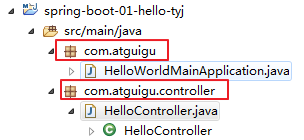
2.利用yml配置时,空格很重要,且不能用Tab键。
注意:直接使用回车换行,可能会出现该情况,报错:
Exception in thread "main" while scanning for the next token
found character '\t(TAB)' that cannot start any token. (Do not use \t(TAB) for indentation)
同时,我出现了获取值为nul的情况。没有找到解决办法,后采用properties方式配置成功。
3.springboot整合jsp在创建项目时需要选择war,而不是jar类型,否则会找不到页面。
同时jsp不应该放在resource目录下,而是应该自己建一个WEB-INFO,因为resource目录是用于打架包时的一些配置读取的。
4.eclipse新建springboot项目,pom第一行提示报错:
org.apache.maven.archiver.MavenArchiver.getManifest(org.apache.maven.project.MavenProject, org.apache.maven.archiver.MavenArchiveConfiguration)
解决办法:help -> Install New Software -> add
localtion:1、https://otto.takari.io/content/sites/m2e.extras/m2eclipse-mavenarchiver/0.17.2/N/LATEST/
2、http://repo1.maven.org/maven2/.m2e/connectors/m2eclipse-mavenarchiver/0.17.2/N/LATEST/
两条路径任选其一。然后一直next 、confirm 安装更新 提示重启eclipse 然后再右键项目maven update project
5.新建springboot项目,引入依赖后项目名称处出现红色感叹号,pom.xml上出现红叉,但是没有提示哪一行出错:
解决办法:右击项目->Build path->configure Build path发现maven denpencencies处出现红叉。
1.在本地找到该出错文件,删除。 2.对该项目右击 maven-> update project 。等待重新导入依赖
6.前端传2个参数,无论在controller还是service都能在后台输出接受值,但是仍然报错:
Caused by: org.apache.ibatis.binding.BindingException: Parameter 'title' not found. Available parameters are [1, 0, param1, param2]
解决办法:1方法写成void insertData(@Param("id")String id, @Param("title")String title);
2或者不改传参,改sql:sql中的参数用 #{0},#{1}代替即可。
7.放在session中的对象,在freemarker中判断值时出现:
----
Tip: If the failing expression is known to be legally refer to something that's sometimes null or missing, either specify a default value like myOptionalVar!myDefault, or use <#if myOptionalVar??>when-present<#else>when-missing</#if>. (These only cover the last step of the expression; to cover the whole expression, use parenthesis: (myOptionalVar.foo)!myDefault, (myOptionalVar.foo)??
----
看一下我的ftl中的写法: <#if usera.utype==4>....</#if> 没有错啊,left.jsp等多处都能用,为什么这里不行?
然后,我加了一个 <#if usera.utype==4?if_exists> 解决了。至今不知道为什么
8.sql中查询select类型为int的主键字段,返回null的异常。
解决办法:
原来:
@Select("select bid from bin where innum=#{value} and status=1")
public int select_if_innum(String innum);
改为:
@Select("select IFNULL(MAX(bid),0)AS bid from bin where innum=#{value} and status=1")
public int select_if_innum(String innum);
----------同理,在两个表关联查询时(我所查找的字段名 在sz表和bin表都有)
原来:
@Select("select s. checkstatus from bin b,sz s where b.pid=s.pid=#{value} and b.innum=s.innum and b.status=1 and s.status=1")
public int findszstatus(int pid);
改为:
@Select("select IFNULL(MAX(s.checkstatus),0)AS checkstatus from bin b,sz s where b.pid=s.pid=#{value} and b.innum=s.innum and b.status=1 and s.status=1")
public int findszstatus(int pid);
9.陶雨洁千万记住!!!以后写前端代码,没用的js、css千万不能留,留下是祸害!!!!
freemarker获取下拉框的值,并通过ajax获取后台数据显示二级显示。但是一开始无论怎样修改获取下拉框的方法都无用显示.val()为null.......
后来发现,把无关的js文件删除后,行了我的妈呀...原来是js动啊提改变了下拉框数据。
PS:1.学到了一个方法,在界面右击选择“检查”,选择控制台Console,可以查看前台错误和值。
2.在controller中想要返回json数据时,要在方法上面加@ResponseBody
3.今天感谢我的徐猪,大功臣!明天请吃饭!想吃啥吃啥!!!
4.我向我的4G内存小红电脑道个歉,不是你的问题,我又误会你了。希望你下次还好好对我,别卡了别黑屏,爱你哟~
10.在controller中把把对象放入map,但是在index的left取不出来该list。
差错后发现,index是由head+left+mainbar组成。而该list在left中使用,controller又返回index故无法显示。解决办法,用session代替map。
11.form表单审核,按钮一个是通过,一个是不通过。
freemarker中代码
 <form action="" name="ch" method="post">

    ...............

    <input type="submit" onclick="checksure()" class="submit" value="通过" />

    <input type="submit" onclick="checkneg()" class="submit" value="不通过" />

    ................

    <script language="javascript">

    function checksure(){

    document.ch.action="checkUsersure?uid=${user.uid}";

    document.ch.submit();

    }

    function checkneg(){

    document.ch.action="checkUserneg?uid=${user.uid}";

    document.ch.submit();

    }

    </script>
12.在数据表中,要记录每条数据是什么时候创建的,不需要应用程序去特意记录,而由数据数据库获取当前时间自动记录创建时间;
自动更新修改时间:
mysql> create table z(a int ,b timestamp on update current_timestamp);
b timestamp on update current_timestamp : 该字段自动更新修改时间
记录首次插入时间:
mysql> create table x (a int, b timestamp default current_timestamp);
b timestamp default current_timestamp : 该字段记录首次插入时间
13.修改css文件中对应的样式,界面显示不变,且检查元素样式内容不变。不知道怎么回事,于是直接在input标签中 加style,我认为应该是覆盖了文件中对应的样式,故成功显示。
14.前台ajax出错,格式检查没有错,但是无法调到后台方法。
删除引入的多余js文件,解决。另外,提醒自己很多前台样式出错,都可以通过网页-->右击鼠标-->检查--->console查看错误。
15.ajax向后台传参数,学知识,要学牢。
前台:先在标签中onchange="Isinnum()"
<script type="text/javascript">

            function Isinnum() {

                //检查该innum的bin是否存在

               var selectedOpt = document.getElementById('innum');

                 var myinnum = selectedOpt.value;

               if (myinnum!=null){//不为空

                    $.ajax({

                        type : 'GET',

                        contentType : 'application/json',

                        url : 'Isbininnum',

                        dataType : 'json',

                        data:{"findinnum": $('#innum').val().toString()},

                        success : function(data) {

                        //能查到bin对象且没有生成sz

                            if(null != data.bid && "" != data.bid  && data.szid==-1)

                            {

                                $("#bid").val(data.bid);

                                $("#f_name").val(data.f_name);

                                $("#m_name").val(data.m_name);

                                $("#cname").val(data.bname);

                                $("#csex").val(data.bsex);

                                $("#cbirth").val(data.bday1);

                                $.ajax({

                                    type : 'GET',

                                    contentType : 'application/json',

                                    url : 'Ispuser',

                                    dataType : 'json',

                                    data:{"findmnum": data.m_num,"findfnum": data.f_num},

                                    success : function(data) {

                                        $("#tele").val(data.tele);

                                        $("#homeplace").val(data.homeplace);

                                        $("#hjplace").val(data.hjplace);

                                     }

                                });

                            }

                            //有该bin但是已经生成了对应的sz

                            else if(null != data.bid && "" != data.bid  && data.szid!=-1)

                            {

                                alert("该首针信息已生成");

                            }

                            //没有该bin

                            else

                            {

                                alert("没有该出生证号");

                            }

                        },

                        error:function(data){

                            alert("没有该出生证信息");

                            $("#bid").val("");

                            $("#f_name").val("");

                            $("#m_name").val("");

                            $("#cname").val("");

                            $("#csex").val("");

                            $("#cbirth").val("");

                            $("#tele").val("");

                            $("#homeplace").val("");

                            $("#hjplace").val("");

                        },

                    });

               }

               else{

                    alert("innum获取空");

               }

            }

    </script>
后台:
// ajax 获取innum对应的bin信息

    @ResponseBody

    @RequestMapping("/Isbininnum")

    public Bin Isbininnum(@RequestParam(required = false) String findinnum,

            HttpServletRequest request) {

        Bin b=new Bin();

        b=binService.selectbin_byinnum(findinnum);

        System.out.println("是这!"+b);

        return b;

    }
// ajax 获取innum对应的bin信息

    @ResponseBody

    @RequestMapping("/Ispuser")

    public PaUser Ispuser(@RequestParam(required = false) String findmnum,

            @RequestParam(required = false) String findfnum,

            HttpServletRequest request) {

        PaUser p=null;

        p=paUserService.findpuser_bynum(findfnum, findmnum);

        return p;

    }
16.bean对象int类型,mysql数据库字段int类型,但是在查询该int类型数据时,若没有符合条件的值,“按理”应该0,但是却返回null异常。
........attempted to return null from a method with a primitive return type (int).
发现问题:在mapper的sql语句出错,这里要提醒sql语句应当现在数据库新建查询无误后,再放入项目中。
select checkstatus from children where cinnum=#{value} and status=1 看起来没有错,但是放在查询中仍然显示null
解决办法:将sql语句修改为
select IFNULL((select checkstatus from children where cinnum=#{value} and status=1),0) as checkstatus
指出,在mysql中用IFNULL,在SQLServer中用ISNULL,在oracle中nvl函数。
17.总结一下在eclipse中打包、在腾讯云服务器上发布springboot的maven项目:
第一步:先购买腾讯云服务器
step1:你可以选择学生优惠套餐https://cloud.tencent.com/act/campus。但是我的过期了没法续租,所以选择按量计费:
产品-->云服务器-->立即选购-->选择按量计费、所属地区、默认网络
step2:选择镜像【我是共享了别人的镜像,已经配置好了java环境、jdk、tomcat、navicat for mysql等】
step3:后面的就是默认选择了
第二步:在eclipse里面打包springboot的maven项目
注意一点---->springboot项目是自带tomcat的,所以在application.properties、pom.xml中要配置信息。
application.properties可配可不配端口:
# EMBEDDED SERVER CONFIGURATION (ServerProperties)

server.port=8010

server.session-timeout=1800

server.context-path=

server.tomcat.max-threads=0

server.tomcat.uri-encoding=UTF-8

server.tomcat.basedir=target/tomcat
pom.xml:
 <build>

        <plugins>

            <!--  添加的  -->

            <plugin>

                <groupId>org.springframework.boot</groupId>

                <artifactId>spring-boot-maven-plugin</artifactId>

            </plugin>

            <!--  添加的  -->

            <plugin>

                <artifactId>maven-assembly-plugin</artifactId>

                <version>2.2</version>

                <configuration>

                    <archive>

                        <manifest>

                            <!-- 我运行这个jar所运行的主类 -->

                            <mainClass>com.tyj.Maintest</mainClass>

                        </manifest>

                    </archive>

                    <descriptorRefs>

                        <descriptorRef>

                            <!-- 必须是这样写 -->

                            jar-with-dependencies

                        </descriptorRef>

                    </descriptorRefs>

                </configuration>

            </plugin>

              <plugin>

             <groupId>org.springframework.boot</groupId>

             <artifactId>spring-boot-maven-plugin</artifactId>

             <configuration>

               <jvmArguments>-Dfile.encoding=UTF-8</jvmArguments>

              <fork>true</fork><!-- 如果没有该项配置,可能devtools不会起作用 -->

            </configuration>

          </plugin>

        </plugins>

    </build>
第三步:打包
进入cmd模式,首先进入项目的pom的目录下,我的是 E:\java\etsqym04
然后输入 mvn package进行打包,第一次打包的话会download一些东西,所以耐心等待
完成之后,我们可以在项目的target目录下看见

把它拷贝到服务器的tomcat的webapps目录下,我的是 C:\Program Files\Tomcat 8.0\webapps【springboot项目完全不用tomcat,放在别的目录也行】
第四步:数据信息
将本地数据库中的信息全部导出、转储在服务器上的navicat for mysql上
注意application.properties中连接数据库的信息,是我们远程服务器上的数据库信息,我遇到了一个错误:
Access denied for user 'root'@'localhost' (using password: YES) ,而且在本地mysql测试连接也显示该错误
后来在已经让root用户可以被所有机器(ip)访问的情况下(授权完成),发现是密码错误,注意:using password: YES 不是代表密码正确,具体看Yes or NO情况
第四步:访问
在服务器上进入cmd模式,进入拷贝jar包的目录,我的是 cd C:\Program Files\Tomcat 8.0\webapps
运行jar包,java -jar etsqym04-0.0.1-SNAPSHOT.jar 【etsqym04-0.0.1-SNAPSHOT是我的jar包名】
在本地浏览器上输入 http://152.136.152.182:8010/ulogin_before 【152.136.152.182是我服务器的IP,8010是我在application.properties中配置server.port端口号】
成功
18.总结一下在Hbuilder中搞一个“APP”
我的方法是- - 嘿嘿,赋首页链接
springboot+freemarker毕业设计项目错误合集的更多相关文章
- Github 错误合集:Failed connect to github.com:8080 || Failed connect to github.com:443; No error
文/skay 地址:http://blog.csdn.net/sk719887916/article/details/40541199 开发中遇到github无法pull和push代码问题,原来git ...
- web自动化测试(java)---测试过程中遇到的错误合集
摸索测试,不管是安装.调测第一个用例都会遇到各种各样的问题,或是自己的问题或是程序本身设置问题 只有把所有问题记录下来,才对得起自己的经历 1.设置firefox的执行文件错误 Exception i ...
- appium安装完成后运行和执行python脚本的错误合集
1.第一个错误如下: main.js: error: argument "--app": Expected one argument. null 这个一般是appium服务端安装的 ...
- spyder错误合集
SyntaxError: invalid syntax是非法语句的意思,检查语法是否出现错误,漏写等 SyntaxError: (unicode error) 'unicodeescape' co ...
- Cadence 错误合集
1.原理图DRC出现如下错误"Duplicate Pin Name "GND" found on Packag" 解决方案:原因是元件引脚重复定义,可以进行重新 ...
- SpringBoot文章合集
SpringBoot文章合集 SpringBoot合集为<尚硅谷雷神SpringBoot2零基础入门(spring boot2)>的学习以及项目中使用知识点进行整理. SpringBoot ...
- 计算机毕业设计选题大合集,含ssm,springboot,小程序,php,python
1基于springboot医院急诊系统 2基于springboot校园闲置物品租售系统 3基于springboot校园闲置物品交易网站 4基于springboot图书网站 5基于springboot外 ...
- 掘金 Android 文章精选合集
掘金 Android 文章精选合集 掘金官方 关注 2017.07.10 16:42* 字数 175276 阅读 50053评论 13喜欢 669 用两张图告诉你,为什么你的 App 会卡顿? - A ...
- Struts+Hibernate+Spring面试题合集及答案
Struts+Hibernate+Spring面试题合集及答案 Struts+Hibernate+Spring面试题合集 1 1. Hibernate部分 2 1.1. Hibernate工作原理 2 ...
随机推荐
- 【踩坑】利用fastjson反序列化需要默认构造函数
利用 fastjson等 反序列化时需要注意,他可能会用到 默认的构造函数,如果没有默认构造函数,某些场景下可能会出现 反序列化熟悉为空的情况,如下图所示:
- airflow 笔记
首先是一个比较好的英文网站,可能要fq:http://site.clairvoyantsoft.com/installing-and-configuring-apache-airflow/ ===== ...
- ArcGis Python脚本——将细碎小面合并到相邻的面积最大的面
参数: polygon_fc 面要素类 area_limit 给定面积值,小于它的面会被合并 给定两个参数即可,这回没有注释. #polygon_fc 面要素类 #area_limit 给定面积值,小 ...
- Jdk和Spring Boot版本选择
==========================版本选择的原则:==========================1. 优先选择官方指定的long-term support(LTS)版本, 非L ...
- mysql的order by注入
最近在做一些漏洞盒子后台项目的总结,在盒子众多众测项目中,注入类的漏洞占比一直较大.其中Order By注入型的漏洞也占挺大一部分比例,这类漏洞也是白帽子乐意提交的类型(奖金高.被过滤概览小).今天给 ...
- request redirection
# encoding:utf-8 import reimport jsonimport randomfrom esdapi.config import BASE_URLfrom requests.se ...
- 【FF14】工匠配方爬取
目标:爬取最终幻想14工匠配方到excel表格.(一个装修仔的尊严) 代码: from bs4 import BeautifulSoup import urllib.request import xl ...
- linux下安装svn1.7
转自 https://blog.csdn.net/u011752559/article/details/11559573?locationNum=11&fps=1 1.下载svn安装包 wge ...
- spring.http.multipart.maxFileSize提示无效报错问题处理
在SpringBoot项目中,配置spring.http.multipart.maxFileSize用于限定最大文件上传大小. 但是,SpringBoot版本不同,关于这一块的配置也不相同. 1.Sp ...
- PyTorch安装
0 - 步骤 参考官网,选择好环境配置按照给定命令安装即可. 1 - 参考资料 https://pytorch.org/