
TinkerPop中的遍历:图的遍历策略
遍历策略
一个TraversalStrategy分析一个遍历,如果遍历符合它的标准,可以相应地改变它。遍历策略在编译时被执行,并构成Gremlin遍历机的编译器的基础。有五类策略分列如下:
- decoration: 在应用程序级别的特性可以嵌入到遍历逻辑中
- optimization: 在TinkerPop3级别有更高效的方式来表达遍历
- provider optimization: 在图的系统/语言/驱动程序级别上有一种更有效的方式来表示遍历
- finalization: 执行遍历之前需要进行一些最终的调整/清理/分析
- verification: 某些遍历对于应用程序或遍历引擎是不合法的
Note
explain()步骤向用户显示每个注册策略如何改变遍历。
如:gremlin> g.V().has('name','marko').explain()
元素ID策略
ElementIdStrategy提供对元素标识符的控制。一些Graph实现(如TinkerGraph)允许在创建元素时指定自定义标识符:
gremlin> g = TinkerGraph.open().traversal()

==>graphtraversalsource[tinkergraph[vertices:0 edges:0], standard]

gremlin> v = g.addV().property(id,'42a').next()

==>v[42a]

gremlin> g.V('42a')

==>v[42a]

来源: http://tinkerpop.apache.org/docs/3.2.6/reference/#traversalstrategy
其他Graph实现(如Neo4j)会自动生成元素标识符,并且不能分配。作为一个帮手,可以使用ElementIdStrategy通过使用顶点和边索引来使标识符赋值成为可能。
如:
gremlin> graph = Neo4jGraph.open('/tmp/neo4j')

==>neo4jgraph[Community [/tmp/neo4j]]

gremlin> strategy = ElementIdStrategy.build().create()

==>ElementIdStrategy

gremlin> g = graph.traversal().withStrategies(strategy)

==>graphtraversalsource[neo4jgraph[Community [/tmp/neo4j]], standard]

gremlin> g.addV().property(id, '42a').id()

==>42a
Note
用于存储分配的标识符的key应该在底层图形数据库中建立索引。如果没有建立索引,那么查找使用这些标识符的元素将执行线性扫描。
事件策略
EventStrategy的目的是在遍历内发生对底层Graph的更改时,将事件引发到一个或多个MutationListener对象。这种策略对记录更改,触发基于更改的某些操作或在遍历期间需要通知某些变异操作的任何应用程序非常有用。如果事务回滚,则重置事件队列。
以下事件引发MutationListener:
New vertex
New edge
Vertex property changed
Edge property changed
Vertex property removed
Edge property removed
Vertex removed
Edge removed
要开始处理来自Traversal的事件,首先要实现MutationListener接口。此实现的一个示例是ConsoleMutationListener,它将输出写入每个事件的控制台。示例如下:
gremlin> graph = TinkerFactory.createModern()

==>tinkergraph[vertices:6 edges:6]

gremlin> l = new ConsoleMutationListener(graph)

==>MutationListener[tinkergraph[vertices:6 edges:6]]

gremlin> strategy = EventStrategy.build().addListener(l).create()

==>EventStrategy

gremlin> g = graph.traversal().withStrategies(strategy)

==>graphtraversalsource[tinkergraph[vertices:6 edges:6], standard]

gremlin> g.addV().property('name','stephen')

Vertex [v[13]] added to graph [tinkergraph[vertices:7 edges:6]]

==>v[13]

gremlin> g.E().drop()

Edge [e[7][1-knows->2]] removed from graph [tinkergraph[vertices:7 edges:6]]

Edge [e[8][1-knows->4]] removed from graph [tinkergraph[vertices:7 edges:5]]

Edge [e[9][1-created->3]] removed from graph [tinkergraph[vertices:7 edges:4]]

Edge [e[10][4-created->5]] removed from graph [tinkergraph[vertices:7 edges:3]]

Edge [e[11][4-created->3]] removed from graph [tinkergraph[vertices:7 edges:2]]

Edge [e[12][6-created->3]] removed from graph [tinkergraph[vertices:7 edges:1]]
Note
EventStrategy并不意味着用于跟踪不同进程间的全局变化。换句话说,一个JVM进程中的突变不会作为不同JVM进程中的事件引发。
分区策略
PartitionStrategy将图的顶点和边分割成String命名的分区(如桶,子图等)。
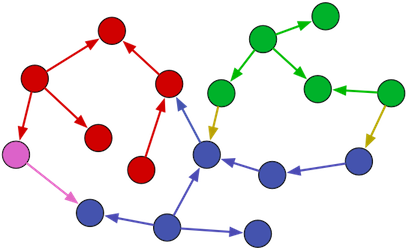
PartitionStrategy中有三种主要配置:
- 分区键(Partition Key) - 以字符串值的属性key来表示的分区。
- 写分区(Write Partition) - 一个字符串,表示将来所有未来写入元素的分区。
- 读分区(Read Partitions) - 一个字符串集合
Set<String>表示可以读取的分区。
使用分区策略的一个例子:
gremlin> graph = TinkerFactory.createModern()

==>tinkergraph[vertices:6 edges:6]

gremlin> strategyA = PartitionStrategy.build().partitionKey("_partition").writePartition("a").readPartitions("a").create()

==>PartitionStrategy

gremlin> strategyB = PartitionStrategy.build().partitionKey("_partition").writePartition("b").readPartitions("b").create()

==>PartitionStrategy

gremlin> gA = graph.traversal().withStrategies(strategyA)

==>graphtraversalsource[tinkergraph[vertices:6 edges:6], standard]

gremlin> gA.addV() // this vertex has a property of {_partition:"a"}

==>v[13]

gremlin> gB = graph.traversal().withStrategies(strategyB)

==>graphtraversalsource[tinkergraph[vertices:7 edges:6], standard]

gremlin> gB.addV() // this vertex has a property of {_partition:"b"}

==>v[15]

gremlin> gA.V()

==>v[13]

gremlin> gB.V()

==>v[15]
通过将元素写入特定分区,然后限制读取分区,开发人员可以在单个地址空间内创建多个图形。此外,通过支持分区之间的引用,可以合并这些多个图(即连接分区)。
Note
如果Graph可以支持元属性,并且在构建PartitionStrategy时将includeMetaProperties值设置为true,则分区也可能扩展到VertexProperty元素。
只读策略
ReadOnlyStrategy 如其名称所示,如果Traversal内有任何改变的步骤,则应用此策略的遍历将抛出IllegalStateException。
子图策略
SubgraphStrategy类似于PartitionStrategy,因为它限制了某些顶点,边和顶点属性的遍历。
下例使用相同的查询对是否使用子图策略的两种情景进行查询,其中子图策略为:创建一个SubgraphStrategy,其中顶点属性不能有一个endTime属性。
gremlin> graph = TinkerFactory.createTheCrew()

==>tinkergraph[vertices:6 edges:14]

gremlin> g = graph.traversal()

==>graphtraversalsource[tinkergraph[vertices:6 edges:14], standard]

gremlin> g.V().as('a').values('location').as('b'). //1\

           select('a','b').by('name').by()

==>[a:marko,b:san diego]

==>[a:marko,b:santa cruz]

==>[a:marko,b:brussels]

==>[a:marko,b:santa fe]

==>[a:stephen,b:centreville]

==>[a:stephen,b:dulles]

==>[a:stephen,b:purcellville]

==>[a:matthias,b:bremen]

==>[a:matthias,b:baltimore]

==>[a:matthias,b:oakland]

==>[a:matthias,b:seattle]

==>[a:daniel,b:spremberg]

==>[a:daniel,b:kaiserslautern]

==>[a:daniel,b:aachen]

gremlin> g = g.withStrategies(SubgraphStrategy.build().vertexProperties(hasNot('endTime')).create()) //2\

==>graphtraversalsource[tinkergraph[vertices:6 edges:14], standard]

gremlin> g.V().as('a').values('location').as('b'). //3\

           select('a','b').by('name').by()

==>[a:marko,b:santa fe]

==>[a:stephen,b:purcellville]

==>[a:matthias,b:seattle]

==>[a:daniel,b:aachen]

来源: http://tinkerpop.apache.org/docs/3.2.6/reference/#_subgraphstrategy
下面的示例使用所有三个过滤器:vertex,edge和vertex property。Vertices必须居住(location属性)在三个以上的地方或者没有居住信息,Edges必须标注为“develops”,VertexProperties必须是当前位置或没有位置(location)属性。
gremlin> graph = TinkerFactory.createTheCrew()

==>tinkergraph[vertices:6 edges:14]

gremlin> g = graph.traversal().withStrategies(SubgraphStrategy.build().

           vertices(or(hasNot('location'),properties('location').count().is(gt(3)))).

           edges(hasLabel('develops')).

           vertexProperties(or(hasLabel(neq('location')),hasNot('endTime'))).create())

==>graphtraversalsource[tinkergraph[vertices:6 edges:14], standard]

gremlin> g.V().valueMap(true)

==>[name:[marko],label:person,location:[santa fe],id:1]

==>[name:[matthias],label:person,location:[seattle],id:8]

==>[name:[gremlin],label:software,id:10]

==>[name:[tinkergraph],label:software,id:11]

gremlin> g.E().valueMap(true)

==>[label:develops,id:13,since:2009]

==>[label:develops,id:14,since:2010]

==>[label:develops,id:21,since:2012]

gremlin> g.V().outE().inV().path().by('name').by(label).by('name')

==>[marko,develops,gremlin]

==>[marko,develops,tinkergraph]

==>[matthias,develops,gremlin]

gremlin>
TinkerPop中的遍历:图的遍历策略的更多相关文章
- TinkerPop中的遍历:图的遍历步骤(3/3)
48 Project Step project() 步骤(map)将当前对象投射到由提供的标签键入的Map<String,Object>中. gremlin> g.V().out(' ...
- TinkerPop中的遍历:图的遍历步骤(1/3)
图遍历步骤(Graph Traversal Steps) 在最一般的层次上,Traversal<S,E>实现了Iterator,S代表起点,E代表结束.遍历由四个主要组成部分组成: Ste ...
- 树的三种DFS策略(前序、中序、后序)遍历
之前刷leetcode的时候,知道求排列组合都需要深度优先搜索(DFS), 那么前序.中序.后序遍历是什么鬼,一直傻傻的分不清楚.直到后来才知道,原来它们只是DFS的三种不同策略. N = Node( ...
- 图的遍历(搜索)算法(深度优先算法DFS和广度优先算法BFS)
图的遍历的定义: 从图的某个顶点出发访问遍图中所有顶点,且每个顶点仅被访问一次.(连通图与非连通图) 深度优先遍历(DFS): 1.访问指定的起始顶点: 2.若当前访问的顶点的邻接顶点有未被访问的,则 ...
- Java中关于HashMap的元素遍历的顺序问题
Java中关于HashMap的元素遍历的顺序问题 今天在使用如下的方式遍历HashMap里面的元素时 1 for (Entry<String, String> entry : hashMa ...
- C++编程练习(9)----“图的存储结构以及图的遍历“(邻接矩阵、深度优先遍历、广度优先遍历)
图的存储结构 1)邻接矩阵 用两个数组来表示图,一个一维数组存储图中顶点信息,一个二维数组(邻接矩阵)存储图中边或弧的信息. 2)邻接表 3)十字链表 4)邻接多重表 5)边集数组 本文只用代码实现用 ...
- Kruskal和prime算法的类实现,图的遍历BFS算法。
一.图的遍历 #include<iostream> #include<queue> #include<vector> using namespace std; in ...
- 图的遍历——DFS(矩形空间)
首先,这里的图不是指的我们一般所说的图结构,而是大小为M*N的矩形区域(也可以看成是一个矩阵).而关于矩形区域的遍历问题经常出现,如“寻找矩阵中的路径”.“找到矩形区域的某个特殊点”等等之类的题目,在 ...
- 图的遍历——DFS和BFS模板(一般的图)
关于图的遍历,通常有深度优先搜索(DFS)和广度优先搜索(BFS),本文结合一般的图结构(邻接矩阵和邻接表),给出两种遍历算法的模板 1.深度优先搜索(DFS) #include<iostrea ...
随机推荐
- 10.Selenium+Python+任务计划程序实现定时发送邮件
一.python具体代码实现 # coding=utf-8 import smtplib from email.mime.text import MIMEText from email.header ...
- mysql下this is incompatible with sql_mode=only_full_group_by解决方案
本地测试没有问题,部署到客户服务器之后报如下错误: com.mysql.jdbc.exceptions.jdbc4.MySQLSyntaxErrorException: Expression #1 o ...
- springmvc 加载静态文件失败
header.jsp,部分代码 <head> <title>QA|VIS_PLATFORM</title> <meta content="width ...
- Azure VM从ASM迁移到ARM(二)
在一中讨论了通过Azure平台的工具进行迁移的方案. 本文将讨论另外一种迁移方式.通过磁盘复制的方式,把部分VM迁移到ARM的Managed Disk模式. 一. 获得ASM中Disk的信息 在管理 ...
- 使用jQuery+css实现选项卡切换功能
<!DOCTYPE HTML PUBLIC "-//W3C//DTD HTML 4.01 Transitional//EN"> <html> <hea ...
- windows任务管理器中的工作设置内存,内存专用工作集,提交大小详解
虽然是中文字,但是理解起来还是很困难,什么叫工作设置内存,什么叫内存专用工作集,什么叫提交大小,区别是什么,让人看了一头雾水. 通俗的讲工作设置内存是程序占用的物理内存(包含与其他程序共享的一部分), ...
- weex和vue开发环境配置详解(配置系统变量等等)
本文详细讲解如何搭建weex和vue开发环境 安装java 现在java安装包,网上的安装包都是国外的,很难下载下来 就用这个链接下载,亲测无毒,http://www.wmzhe.com/soft-3 ...
- 第三章 Java内存模型(下)
锁的内存语义 中所周知,锁可以让临界区互斥执行.这里将介绍锁的另一个同样重要但常常被忽视的功能:锁的内存语义 锁的释放-获取建立的happens-before关系 锁是Java并发编程中最重要的同步机 ...
- DAY9-python并发之多线程理论
一 什么是线程 在传统操作系统中,每个进程有一个地址空间,而且默认就有一个控制线程 线程顾名思义,就是一条流水线工作的过程,一条流水线必须属于一个车间,一个车间的工作过程是一个进程 车间负责把资源整合 ...
- ajax跨域请求-jsonp
1. 同源策略 ajax之所以需要“跨域”,罪魁祸首就是浏览器的同源策略.即,一个页面的ajax只能获取这个页面相同源或者相同域的数据. 如何叫“同源”或者“同域”呢?——协议.域名.端口号都必须相同 ...