
Entity Framework Code-First(10.3):Property Mappings
Property Mappings using Fluent API:
Here, we will learn how to configure properties of an entity class using Fluent API.
We will use the following Student and Standard domain classes of our school application.
public class Student

{

    public Student()

    {

    }

    public int StudentKey { get; set; }

    public string StudentName { get; set; }

    public DateTime DateOfBirth { get; set; }

    public byte[]  Photo { get; set; }

    public decimal Height { get; set; }

    public float Weight { get; set; }

    public Standard Standard { get; set; }

}

public class Standard

{

    public Standard()

    {

    }

    public int StandardKey { get; set; }

    public string StandardName { get; set; }

    public ICollection<Student> Students { get; set; }

}
Configure Primary Key and Composite Primary key:
Our domain classes above, do not follow the Code-First convention for primary key because they don't have Id or {Class Name} + Id property. So, you can configure a key property using HasKey() method of EntityTypeConfiguration using Fluent API as below. RemembermodelBuilder.Entity<TEntity>() returns EntityTypeConfiguration object.
public class SchoolContext: DbContext

{

    public SchoolDBContext(): base()

    {

    }

    public DbSet<Student> Students { get; set; }

    public DbSet<Standard> Standards { get; set; }

    protected override void OnModelCreating(DbModelBuilder modelBuilder)

    {

        //Configure primary key

        modelBuilder.Entity<Student>().HasKey<int>(s => s.StudentKey);

        modelBuilder.Entity<Standard>().HasKey<int>(s => s.StandardKey);

        //Configure composite primary key

        modelBuilder.Entity<Student>().HasKey<int>(s => new { s.StudentKey, s.StudentName });

    }

}
Configure Column Name, Type and Order:
Default Code-First convention creates a column for a property with the same name, order, and datatype. You can override this convention, as shown below.
public class SchoolContext: DbContext

{

    public SchoolDBContext(): base()

    {

    }

    public DbSet<Student> Students { get; set; }

    public DbSet<Standard> Standards { get; set; }

    protected override void OnModelCreating(DbModelBuilder modelBuilder)

    {

        //Configure Column

        modelBuilder.Entity<Student>()

                    .Property(p => p.DateOfBirth)

                    .HasColumnName("DoB")

                    .HasColumnOrder()

                    .HasColumnType("datetime2");

    }

}
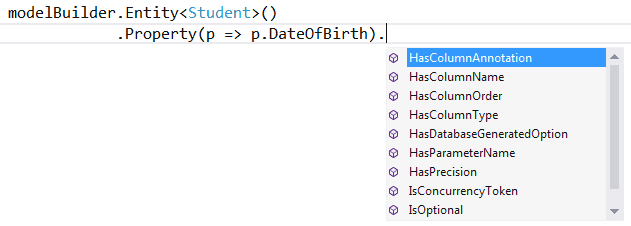
As you can see in the above example, we used the Property() method to configure anything for a property of an entity. Here, we use HasColumnName to change the column name of DateOfBirth property. Also, we call HasColumnOrder and HasColumnType to change the order and datatype of a column.
modelBuilder.Entity<TEntity>().Property(expression) allows you to use different methods to configure a particular property, as shown below.
Configure Null or NotNull column for a property:
Code-First will create NotNull column for a primitive data type property because primitive data type can not be null unless it is marked as nullable using ? sign or Nullable<T>.
Use IsOptional method to create a nullable column for a property. In the same way, use IsRequired method to create a NotNull column.
namespace CodeFirst_FluentAPI_Tutorials

{

    public class SchoolContext: DbContext

    {

        public SchoolDBContext(): base()

        {

        }

        public DbSet<Student> Students { get; set; }

        public DbSet<Standard> Standards { get; set; }

        protected override void OnModelCreating(DbModelBuilder modelBuilder)

        {

                //Configure Null Column

            modelBuilder.Entity<Student>()

                    .Property(p => p.Heigth)

                    .IsOptional();

                //Configure NotNull Column

                modelBuilder.Entity<Student>()

                    .Property(p => p.Weight)

                    .IsRequired();

        }

    }

}
Configure Column Size:
Code-First will set the maximum size of a data type for a column. You can override this convention, as shown below.
namespace CodeFirst_FluentAPI_Tutorials

{

    public class SchoolContext: DbContext

    {

        public SchoolDBContext(): base()

        {

        }

        public DbSet<Student> Students { get; set; }

        public DbSet<Standard> Standards { get; set; }

        protected override void OnModelCreating(DbModelBuilder modelBuilder)

        {

            //Set StudentName column size to 50

            modelBuilder.Entity<Student>()

                    .Property(p => p.StudentName)

                    .HasMaxLength();

            //Set StudentName column size to 50 and change datatype to nchar

            //IsFixedLength() change datatype from nvarchar to nchar

            modelBuilder.Entity<Student>()

                    .Property(p => p.StudentName)

                    .HasMaxLength().IsFixedLength();

            //Set size decimal(2,2)

                modelBuilder.Entity<Student>()

                    .Property(p => p.Height)

                    .HasPrecision(, );

        }

    }

}
As you can see in the above example, we used HasMaxLength method to set the size of a column. IsFixedLength method converts nvarchar to nchar type. In the same way, HasPrecision method changed the precision of the decimal column.
Configure Concurrency Column:
You can configure a property as concurrency column using ConcurrencyToken method, as shown below.
namespace CodeFirst_FluentAPI_Tutorials

{

    public class SchoolContext: DbContext

    {

        public SchoolDBContext(): base()

        {

        }

        public DbSet<Student> Students { get; set; }

        public DbSet<Standard> Standards { get; set; }

        protected override void OnModelCreating(DbModelBuilder modelBuilder)

        {

            //Set StudentName as concurrency column

            modelBuilder.Entity<Student>()

                    .Property(p => p.StudentName)

                    .IsConcurrencyToken();

        }

    }

}
As you can see in the above example, we set StudentName column as concurrency column so that it will be included in the where clause in update and delete commands.
You can also use IsRowVersion() method for byte[] property to make it as a concurrency column.
Entity Framework Code-First(10.3):Property Mappings的更多相关文章
- Entity Framework Code first(转载)
一.Entity Framework Code first(代码优先)使用过程 1.1Entity Framework 代码优先简介 不得不提Entity Framework Code First这个 ...
- ASP.NET MVC深入浅出系列(持续更新) ORM系列之Entity FrameWork详解(持续更新) 第十六节:语法总结(3)(C#6.0和C#7.0新语法) 第三节:深度剖析各类数据结构(Array、List、Queue、Stack)及线程安全问题和yeild关键字 各种通讯连接方式 设计模式篇 第十二节: 总结Quartz.Net几种部署模式(IIS、Exe、服务部署【借
ASP.NET MVC深入浅出系列(持续更新) 一. ASP.NET体系 从事.Net开发以来,最先接触的Web开发框架是Asp.Net WebForm,该框架高度封装,为了隐藏Http的无状态模 ...
- Entity Framework Code First (三)Data Annotations
Entity Framework Code First 利用一种被称为约定(Conventions)优于配置(Configuration)的编程模式允许你使用自己的 domain classes 来表 ...
- Entity Framework Code First (二)Custom Conventions
---------------------------------------------------------------------------------------------------- ...
- Entity Framework Code First (一)Conventions
Entity Framework 简言之就是一个ORM(Object-Relational Mapper)框架. Code First 使得你能够通过C#的类来描述一个模型,模型如何被发现/检测就是通 ...
- Entity Framework Code First (七)空间数据类型 Spatial Data Types
声明:本文针对 EF5+, Visual Studio 2012+ 空间数据类型(Spatial Data Types)是在 EF5 中引入的,空间数据类型表现有两种: Geography (地理学上 ...
- Entity Framework Code First (四)Fluent API - 配置属性/类型
上篇博文说过当我们定义的类不能遵循约定(Conventions)的时候,Code First 提供了两种方式来配置你的类:DataAnnotations 和 Fluent API, 本文将关注 Flu ...
- Entity Framework Code First (八)迁移 Migrations
创建初始模型和数据库 在开始使用迁移(Migrations)之前,我们需要一个 Project 和一个 Code First Model, 对于本文将使用典型的 Blog 和 Post 模型 创建一个 ...
- Entity Framework Code First (六)存储过程
声明:本文只针对 EF6+ 默认情况下,Code First 对实体进行插入.更新.删除操作是直接在表上进行的,从 EF6 开始你可以选择使用存储过程(Stored Procedures) 简单实体映 ...
随机推荐
- Centos7 配置yum源 安装epel
一.什么是epel如果既想获得 RHEL 的高质量.高性能.高可靠性,又需要方便易用(关键是免费)的软件包更新功能,那么 Fedora Project 推出的 EPEL(Extra Packages ...
- mysql中的内连接,外连接实例详解
内连接: 只连接匹配的行左外连接: 包含左边表的全部行(不管右边的表中是否存在与它们匹配的行),以及右边表中全部匹配的行右外连接: 包含右边表的全部行(不管左边的表中是否存在与它们匹配的行),以及左边 ...
- Luogu-4049 [JSOI2007]合金
题目中给出了三种金属的比例,实际上只用考虑两个就可以,第三个可以由另外两个确定qwq 如果把原料和需求看做二维平面上的点,可以发现两种原料能混合成的比例就在他们相连的线段上,也就是说线段上的点都能混合 ...
- developerWorks 图书频道: 深入分析 Java Web 技术内幕,第 10 章
developerWorks 图书频道: 深入分析 Java Web 技术内幕,第 10 章 深入理解 Session 与 Cookie Session 与 Cookie 不管是对 Java Web ...
- Xcode 中代码提示不显示
解决办法: Xcode->Window->Organizer->Projects选中你的项目,点击如下图Derived Data右侧的Delete按钮 DerivedData从字面上 ...
- Unity3D之Mesh(七)绘制长方体
前言: 从现在开始,终于感觉进入一点点正题了!动态创建三维立体模型mesh!依然从简单入手:长方体. 一.基本思路 由于是创建长方体mesh,由之前的研究得知,两个数据必须要有,即:顶点的数据:ver ...
- 5 Python 数据类型—数字
Python Number 数据类型用于存储数值. 数据类型是不允许改变的,这就意味着如果改变 Number 数据类型的值,将重新分配内存空间. var1 = 1 var2 = 10 您也可以使用de ...
- BEC listen and translation exercise 34
In a busy classroom filled with nearly 20 children, Sabriye Tenberken lectures her pupils to always ...
- codeforces 628C C. Bear and String Distance
C. Bear and String Distance time limit per test 1 second memory limit per test 256 megabytes input s ...
- jsp 自定义标签中的Function函数
在taglib中我们发现有一个标签叫做<function>,这次简单介绍<function>标签的基本用法,<function>标签可以做什么呢? 它可以让我们在j ...