
Quartz.Net分布式运用
Quartz.Net的集群部署详解
标签(空格分隔): Quartz.Net Job
最近工作上要用Job,公司的job有些不满足个人的使用,于是就想自己搞一个Job站练练手,网上看了一下,发现Quartz,于是就了解了一下。
第一版
目前个人使用的是Asp.net Core,在core2.0下面进行的开发。
第一版自己简单的写了一个调度器。
public static class SchedulerManage

{

        private static IScheduler _scheduler = null;

        private static object obj = new object();

        public static IScheduler Scheduler

        {

            get

            {

                var scheduler = _scheduler;

                if (scheduler == null)

                {

                    //在这之前有可能_scheduler被改变了scheduler用的还是原来的值

                    lock (obj)

                    {

                        //这里读取最新的内存里面的值赋值给scheduler,保证读取到的是最新的_scheduler

                        scheduler = Volatile.Read(ref _scheduler);

                        if (scheduler == null)

                        {

                            scheduler = GetScheduler().Result;

                            Volatile.Write(ref _scheduler, scheduler);

                        }

                    }

                }

                return scheduler;

            }

        }

        public static async Task<BaseResponse> RunJob(IJobDetail job, ITrigger trigger)

        {

            var response = new BaseResponse();

            try

            {

                var isExist = await Scheduler.CheckExists(job.Key);

                var time = DateTimeOffset.Now;

                if (isExist)

                {

                    //恢复已经存在任务

                    await Scheduler.ResumeJob(job.Key);

                }

                else

                {

                    time = await Scheduler.ScheduleJob(job, trigger);

                }

                response.IsSuccess = true;

                response.Msg = time.ToString("yyyy-MM-dd HH:mm:ss");

            }

            catch (Exception ex)

            {

                response.Msg = ex.Message;

            }

            return response;

        }

        public static async Task<BaseResponse> StopJob(JobKey jobKey)

        {

            var response = new BaseResponse();

            try

            {

                var isExist = await Scheduler.CheckExists(jobKey);

                if (isExist)

                {

                    await Scheduler.PauseJob(jobKey);

                }

                response.IsSuccess = true;

                response.Msg = "暂停成功!!";

            }

            catch (Exception ex)

            {

                response.Msg = ex.Message;

            }

            return response;

        }

        public static async Task<BaseResponse> DelJob(JobKey jobKey)

        {

            var response = new BaseResponse();

            try

            {

                var isExist = await Scheduler.CheckExists(jobKey);

                if (isExist)

                {

                    response.IsSuccess = await Scheduler.DeleteJob(jobKey);

                }

            }

            catch (Exception ex)

            {

                response.IsSuccess = false;

                response.Msg = ex.Message;

            }

            return response;

        }

        private static async Task<IScheduler> GetScheduler()

        {

            NameValueCollection props = new NameValueCollection() {

                {"quartz.serializer.type", "binary" }

            };

            StdSchedulerFactory factory = new StdSchedulerFactory(props);

            var scheduler = await factory.GetScheduler();

            await scheduler.Start();

            return scheduler;

        }

}
简单的实现了,动态的运行job,暂停Job,添加job。弄完以后,发现貌似没啥问题,只要自己把运行的job信息找张表存储一下,好像都ok了。
轮到发布的时候,突然发现现实机器不止一台,是通过Nigix进行反向代理。突然发现以下几个问题:
1,多台机器很有可能一个Job在多台机器上运行。
2,当进行部署的时候,必须得停掉机器,如何在机器停掉以后重新部署的时候自动恢复正在运行的Job。
3,如何均衡的运行所有job。
个人当时的想法
1,第一个问题:由于是经过Nigix的反向代理,添加Job和运行job只能落到一台服务器上,基本没啥问题。个人控制好RunJob的接口,运行了一次,把JobDetail的那张表的运行状态改成已运行,也就不存在多个机器同时运行的情况。
2,在第一个问题解决的情况下,由于我们公司的Nigix反向代理的逻辑是:均衡策略。所以均衡运行所有job都没啥问题。
3,重点来了!!!!
如何在部署的时候恢复正在运行的Job?
由于我们已经有了一张JobDetail表。里面可以获取到哪些正在运行的Job。wome我们把他找出来直接在程序启动的时候运行一下不就好了吗嘛。
下面是个人实现的:
//HostedService,在主机运行的时候运行的一个服务

public class HostedService : IHostedService

{

        public HostedService(ISchedulerJob schedulerCenter)

        {

            _schedulerJob = schedulerCenter;

        }

        private ISchedulerJob _schedulerJob = null;

        public async Task StartAsync(CancellationToken cancellationToken)

        {

            LogHelper.WriteLog("开启Hosted+Env:"+env);

            var reids= new RedisOperation();

            if (reids.SetNx("RedisJobLock", "1"))

            {

                await _schedulerJob.StartAllRuningJob();

            }

            reids.Expire("RedisJobLock", 300);

        }

        public async Task StopAsync(CancellationToken cancellationToken)

        {

            LogHelper.WriteLog("结束Hosted");

            var redis = new RedisOperation();

            if (redis.RedisExists("RedisJobLock"))

            {

                var count=redis.DelKey("RedisJobLock");

                LogHelper.WriteLog("删除Reidskey-RedisJobLock结果:" + count);

            }

        }

}

    //注入用的特性

    [ServiceDescriptor(typeof(ISchedulerJob), ServiceLifetime.Transient)]

    public class SchedulerCenter : ISchedulerJob

    {

        public SchedulerCenter(ISchedulerJobFacade schedulerJobFacade)

        {

            _schedulerJobFacade = schedulerJobFacade;

        }

        private ISchedulerJobFacade _schedulerJobFacade = null;

        public async Task<BaseResponse> DelJob(SchedulerJobModel jobModel)

        {

            var response = new BaseResponse();

            if (jobModel != null && jobModel.JobId != 0 && jobModel.JobName != null)

            {

                response = await _schedulerJobFacade.Modify(new SchedulerJobModifyRequest() { JobId = jobModel.JobId, DataFlag = 0 });

                if (response.IsSuccess)

                {

                    response = await SchedulerManage.DelJob(GetJobKey(jobModel));

                    if (!response.IsSuccess)

                    {

                        response = await _schedulerJobFacade.Modify(new SchedulerJobModifyRequest() { JobId = jobModel.JobId, DataFlag = 1 });

                    }

                }

            }

            else

            {

                response.Msg = "请求参数有误";

            }

            return response;

        }

        public async Task<BaseResponse> RunJob(SchedulerJobModel jobModel)

        {

            if (jobModel != null)

            {

                var jobKey = GetJobKey(jobModel);

                var triggleBuilder = TriggerBuilder.Create().WithIdentity(jobModel.JobName + "Trigger", jobModel.JobGroup).WithCronSchedule(jobModel.JobCron).StartAt(jobModel.JobStartTime);

                if (jobModel.JobEndTime != null && jobModel.JobEndTime != new DateTime(1900, 1, 1) && jobModel.JobEndTime == new DateTime(1, 1, 1))

                {

                    triggleBuilder.EndAt(jobModel.JobEndTime);

                }

                triggleBuilder.ForJob(jobKey);

                var triggle = triggleBuilder.Build();

                var data = new JobDataMap();

                data.Add("***", "***");

                data.Add("***", "***");

                data.Add("***", "***");

                var job = JobBuilder.Create<SchedulerJob>().WithIdentity(jobKey).SetJobData(data).Build();

                var result = await SchedulerManage.RunJob(job, triggle);

                if (result.IsSuccess)

                {

                    var response = await _schedulerJobFacade.Modify(new SchedulerJobModifyRequest() { JobId = jobModel.JobId, JobState = 1 });

                    if (!response.IsSuccess)

                    {

                        await SchedulerManage.StopJob(jobKey);

                    }

                    return response;

                }

                else

                {

                    return result;

                }

            }

            else

            {

                return new BaseResponse() { Msg = "Job名称为空!!" };

            }

        }

        public async Task<BaseResponse> StopJob(SchedulerJobModel jobModel)

        {

            var response = new BaseResponse();

            if (jobModel != null && jobModel.JobId != 0 && jobModel.JobName != null)

            {

                response = await _schedulerJobFacade.Modify(new SchedulerJobModifyRequest() { JobId = jobModel.JobId, JobState = 2 });

                if (response.IsSuccess)

                {

                    response = await SchedulerManage.StopJob(GetJobKey(jobModel));

                    if (!response.IsSuccess)

                    {

                        response = await _schedulerJobFacade.Modify(new SchedulerJobModifyRequest() { JobId = jobModel.JobId, JobState = 2 });

                    }

                }

            }

            else

            {

                response.Msg = "请求参数有误";

            }

            return response;

        }

        private JobKey GetJobKey(SchedulerJobModel jobModel)

        {

            return new JobKey($"{jobModel.JobId}_{jobModel.JobName}", jobModel.JobGroup);

        }

        public async Task<BaseResponse> StartAllRuningJob()

        {

            try

            {

                var jobListResponse = await _schedulerJobFacade.QueryList(new SchedulerJobListRequest() { DataFlag = 1, JobState = 1, Environment=Kernel.Environment.ToLower() });

                if (!jobListResponse.IsSuccess)

                {

                    return jobListResponse;

                }

                var jobList = jobListResponse.Models;

                foreach (var job in jobList)

                {

                    await RunJob(job);

                }

                return new BaseResponse() { IsSuccess = true, Msg = "程序启动时,启动所有运行中的job成功!!" };

            }

            catch (Exception ex)

            {

                LogHelper.WriteExceptionLog(ex);

                return new BaseResponse() { IsSuccess = false, Msg = "程序启动时,启动所有运行中的job失败!!" };

            }

        }

    }
在程序启动的时候,把所有的Job去运行一遍,当中对于多次运行的用到了Redis的分布式锁,现在启动的时候锁住,不让别人运行,在程序卸载的时候去把锁释放掉!!感觉没啥问题,主要是可能负载均衡有问题,全打到一台服务器上去了,勉强能够快速的打到效果。当然高可用什么的就先牺牲掉了。
坑点又来了
大家知道,在稍微大点的公司,运维和开发是分开的,公司用的daoker进行部署,在程序停止的时候,不会调用
HostedService的StopAsync方法!!
当时心里真是一万个和谐和谐奔腾而过!!
个人也就懒得和运维去扯这些东西了。最后的最后就是:设置一个redis的分布式锁的过期时间,大概预估一个部署的时间,只要在部署直接,锁能够在就行了,然后每次部署的间隔要大于锁过期时间。好麻烦,说多了都是泪!!
Quartz.Net的分布式集群运用
Schedule配置
        public async Task<IScheduler> GetScheduler()

        {

            var properties = new NameValueCollection();

            properties["quartz.serializer.type"] = "binary";

            //存储类型

            properties["quartz.jobStore.type"] = "Quartz.Impl.AdoJobStore.JobStoreTX, Quartz";

            //表明前缀

            properties["quartz.jobStore.tablePrefix"] = "QRTZ_";

            //驱动类型

            properties["quartz.jobStore.driverDelegateType"] = "Quartz.Impl.AdoJobStore.SqlServerDelegate, Quartz";

            //数据库名称

            properties["quartz.jobStore.dataSource"] = "SchedulJob";

            //连接字符串Data Source = myServerAddress;Initial Catalog = myDataBase;User Id = myUsername;Password = myPassword;

            properties["quartz.dataSource.SchedulJob.connectionString"] = "Data Source =.; Initial Catalog = SchedulJob;User ID = sa; Password = *****;";

            //sqlserver版本(Core下面已经没有什么20,21版本了)

            properties["quartz.dataSource.SchedulJob.provider"] = "SqlServer";

            //是否集群,集群模式下要设置为true

            properties["quartz.jobStore.clustered"] = "true";

            properties["quartz.scheduler.instanceName"] = "TestScheduler";

            //集群模式下设置为auto,自动获取实例的Id,集群下一定要id不一样,不然不会自动恢复

            properties["quartz.scheduler.instanceId"] = "AUTO";

            properties["quartz.threadPool.type"] = "Quartz.Simpl.SimpleThreadPool, Quartz";

            properties["quartz.threadPool.threadCount"] = "25";

            properties["quartz.threadPool.threadPriority"] = "Normal";

            properties["quartz.jobStore.misfireThreshold"] = "60000";

            properties["quartz.jobStore.useProperties"] = "false";

            ISchedulerFactory factory = new StdSchedulerFactory(properties);

            return await factory.GetScheduler();

        }
然后是测试代码:
        public async Task TestJob()

        {

            var sched = await GetScheduler();

            //Console.WriteLine("***** Deleting existing jobs/triggers *****");

            //sched.Clear();

            Console.WriteLine("------- Initialization Complete -----------");

            Console.WriteLine("------- Scheduling Jobs ------------------");

            string schedId = sched.SchedulerName; //sched.SchedulerInstanceId;

            int count = 1;

            IJobDetail job = JobBuilder.Create<SimpleRecoveryJob>()

                .WithIdentity("job_" + count, schedId) // put triggers in group named after the cluster node instance just to distinguish (in logging) what was scheduled from where

                .RequestRecovery() // ask scheduler to re-execute this job if it was in progress when the scheduler went down...

                .Build();

            ISimpleTrigger trigger = (ISimpleTrigger)TriggerBuilder.Create()

                                                          .WithIdentity("triger_" + count, schedId)

                                                          .StartAt(DateBuilder.FutureDate(1, IntervalUnit.Second))

                                                          .WithSimpleSchedule(x => x.WithRepeatCount(1000).WithInterval(TimeSpan.FromSeconds(5)))

                                                          .Build();

            Console.WriteLine("{0} will run at: {1} and repeat: {2} times, every {3} seconds", job.Key, trigger.GetNextFireTimeUtc(), trigger.RepeatCount, trigger.RepeatInterval.TotalSeconds);

            sched.ScheduleJob(job, trigger);

            count++;

            job = JobBuilder.Create<SimpleRecoveryJob>()

                .WithIdentity("job_" + count, schedId) // put triggers in group named after the cluster node instance just to distinguish (in logging) what was scheduled from where

                .RequestRecovery() // ask scheduler to re-execute this job if it was in progress when the scheduler went down...

                .Build();

            trigger = (ISimpleTrigger)TriggerBuilder.Create()

                                           .WithIdentity("triger_" + count, schedId)

                                           .StartAt(DateBuilder.FutureDate(2, IntervalUnit.Second))

                                           .WithSimpleSchedule(x => x.WithRepeatCount(1000).WithInterval(TimeSpan.FromSeconds(5)))

                                           .Build();

            Console.WriteLine(string.Format("{0} will run at: {1} and repeat: {2} times, every {3} seconds", job.Key, trigger.GetNextFireTimeUtc(), trigger.RepeatCount, trigger.RepeatInterval.TotalSeconds));

            sched.ScheduleJob(job, trigger);

            // jobs don't start firing until start() has been called...

            Console.WriteLine("------- Starting Scheduler ---------------");

            sched.Start();

            Console.WriteLine("------- Started Scheduler ----------------");

            Console.WriteLine("------- Waiting for one hour... ----------");

            Thread.Sleep(TimeSpan.FromHours(1));

            Console.WriteLine("------- Shutting Down --------------------");

            sched.Shutdown();

            Console.WriteLine("------- Shutdown Complete ----------------");

        }
测试添加两个job,每隔5s执行一次。
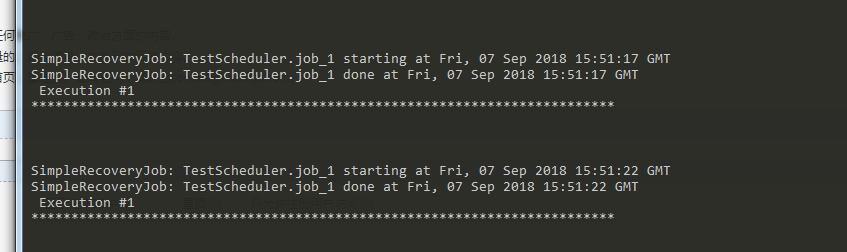
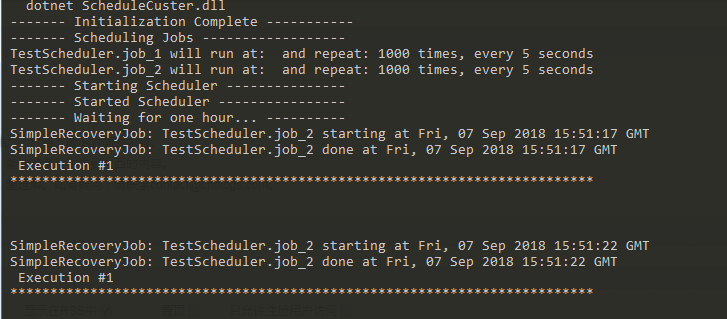
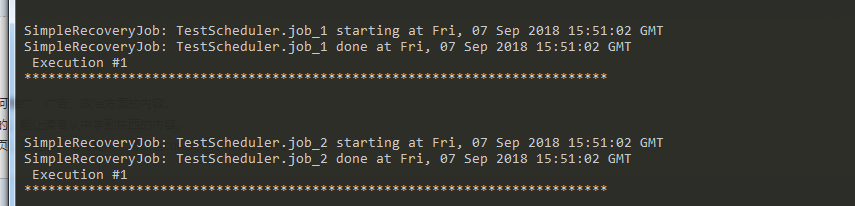
在图中可以看到:job1和job2不会重复执行,当我停了Job2时,job2也在job1当中运行。
这样就可以实现分布式部署时的问题了,Quzrtz.net的数据库结构随便网上找一下,运行一些就好了。
截取几个数据库的数据图:基本上就存储了一些这样的信息
JobDetail

触发器的数据

这个是调度器的

这个是锁的

下一期:
1.Job的介绍:有状态Job,无状态Job。
2.MisFire
3.Trigger,Cron介绍
4.第一部分的改造,自己实现一个基于在HostedService能够进行分布式调度的Job类,其实只要实现了这个,其他的上面讲的都没有问题。弃用Quartz的表的行级锁。因为这并发高了比较慢!!
个人问题
个人还是没有测试出来这个RequestRecovery。怎么用过的!!
Quartz.Net分布式运用的更多相关文章
- 基于spring+quartz的分布式定时任务框架
问题背景 我公司是一个快速发展的创业公司,目前有200人,主要业务是旅游和酒店相关的,应用迭代更新周期比较快,因此,开发人员花费了更多的时间去更=跟上迭代的步伐,而缺乏了对整个系统的把控 没有集群之前 ...
- 3分钟掌握Quartz.net分布式定时任务的姿势
引言 长话短说,今天聊一聊分布式定时任务,我的流水账笔记: ASP.NET Core+Quartz.Net实现web定时任务 AspNetCore结合Redis实践消息队列 细心朋友稍一分析,就知道还 ...
- Quartz实现分布式可动态配置的定时任务
关键词: 1. 定时任务 2. 分布式 3. 可动态配置触发时间 一般通过Quartz实现定时任务很简单.如果实现分布式定时任务需要结合分布式框架选择master节点触发也可以实现.但我们有个实际需求 ...
- Quartz.Net分布式任务管理平台(第二版)
前言:在Quartz.Net项目发布第一版后,有挺多园友去下载使用,我们通过QQ去探讨,其中项目中还是存在一定的不完善.所以有了现在这个版本.这个版本的编写完成其实有段时间了一直没有放上去.现在已经同 ...
- Quartz.Net分布式任务管理平台(续)
感谢@Taking园友得建议,我这边确实多做了一步上传,导致后面还需处理同步上传到其他服务器来支持分布式得操作.所有才有了上篇文章得完善. 首先看一下新的项目结构图: 这个图和上篇文章中 ...
- Quartz.Net分布式任务管理平台
无关主题:一段时间没有更新文章了,与自己心里的坚持还是背驰,虽然这期间在公司做了统计分析,由于资源分配问题,自己或多或少的原因,确实拖得有点久了,自己这段时间也有点松懈,借口就不说那么多 ...
- springboot和quartz整合分布式多节点
虽然单个Quartz实例能给予我们很好的任务job调度能力,但它不能满足典型的企业需求,如可伸缩性.高可靠性满足.假如你需要故障转移的能力并能运行日益增多的 Job,Quartz集群势必成为你应用的一 ...
- Quartz Spring分布式集群搭建Demo
注:关于单节点的Quartz使用在这里不做详细介绍,直接进阶为分布式集群版的 1.准备工作: 使用环境Spring4.3.5,Quartz2.2.3,持久化框架JDBCTemplate pom文件如下 ...
- 使用quartz数据库锁实现定时任务的分布式部署
,1.根据项目引用的quartz依赖版本,确定下载的quartz-distribution安装包,我项目引用的信息如下图所示: 2.解压,在\quartz-2.2.3-distribution\qua ...
随机推荐
- 调整 WiFi 驱动设置让 WiFi 信号更稳定
调整 WiFi 驱动设置让 WiFi 信号更稳定 修改 WiFi 驱动中 的设置,将 Power Saving Mode 的值改为 CAM.
- Linux开放80、8080端口或者开放某个端口
装载系统的时候只开启了22端口.结果再装完Nginx+php+mysql 后不能访问网站. 查看防火墙设置发现没开启80端口 iptables -L -n 由于Linux防火墙默认是关闭的.可以用两种 ...
- electron 安装失败解决办法
1.安装node https://nodejs.org/en/download/2.安装镜像工具npm install -g cnpm --registry=https://registry.npm. ...
- Poj 2395 Out of Hay( 最小生成树 )
题意:求最小生成树中最大的一条边. 分析:求最小生成树,可用Prim和Kruskal算法.一般稀疏图用Kruskal比较适合,稠密图用Prim.由于Kruskal的思想是把非连通的N个顶点用最小的代价 ...
- Angular5学习笔记 - 创建、运行、发布项目(一)
一.安装脚手架 npm install -g cnpm --registry=https://registry.npm.taobao.org #安装阿里镜像 npm install -g @angul ...
- java数组复制的几种常见用法
1.1数组复制的几种常见用法 1.1.1System.arraycopy的用法 int[] src = {1,3,5,7,9,11,13,15,17}; int[] dest = {2,4,6,8,1 ...
- mybatis 学习二 MyBatis简介与配置MyBatis+Spring+MySql
1.2.2建立MySql数据库 在C:\Program Files\MySQL\MySQL Server 5.7\bin下面: 首先连接MySQL: mysql -u root -p ...
- Cordova 3.x 配置文件config.xml强制横屏
官方文档: http://cordova.apache.org/docs/en/3.5.0/config_ref_index.md.html#The%20config.xml%20File 添加 &l ...
- django的settings.py设置session
############ # SESSIONS # ############ SESSION_CACHE_ALIAS = 'default' # Cache to store session data ...
- 2016.7.10 SqlServer语句中类似decode、substr、instr、replace、length等函数的用法
Decode() 对应 case when函数 case CHARINDEX('/',start_point_name) when 0 then start_point_name else subst ...