
Vue.js基础语法(三)
vue学习的一系列,全部来自于表哥---表严肃,是我遇到过的讲课最通透,英文发音最好听的老师,想一起听课就去这里吧 https://biaoyansu.com/i/hzhj1206
1过滤器filter
例如商城中商品的价格,既是动态的,而且重复出现的频率非常高,这就意味着,一些信息是重复的,像前面可以加一个“¥”,后面接一个单位“元”:¥10元。想实现只传价格10,其他信息让其自动生成,vue里提供了过滤器filter来实现。
例1:
<!DOCTYPE html>

<html>

    <head>

        <meta charset="utf-8">

        <title>过滤器</title>

    </head>

    <body>

        <div id="app">

            <div>

                <input v-model="price">

                {{price | currency}}

            </div>

        </div>

    </body>

    <script src="js/vue.js"></script>

    <script>

        Vue.filter('currency', function(val, unit) {

            val = val || 0;

            unit = unit || '元';

            return val + unit;

        });

        var app = new Vue({

            el: '#app',

            data: {

                price: 10

            }

        })

    </script>

</html>
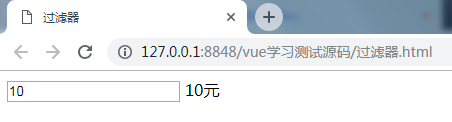
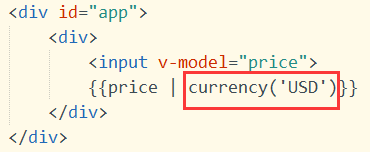
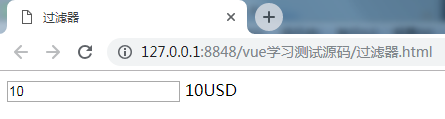
说明:
通过管道符|,将前面的数据price传到后面的过滤器currency中,
Vue.filter(),第一个参数是过滤器的名字,第二个参数是一个function,function也有两个参数(可以自定义的),第一个是传进来的值,第二个是过滤器的值,可以写在括号中传过来,就像调用函数时带着参数一样。
例2:单位换算
<!DOCTYPE html>

<html>

    <head>

        <meta charset="utf-8">

        <title>过滤器2</title>

    </head>

    <body>

        <div id="app">

            <div>

                请输入毫米数:<input type="text" v-model="length">

                <br>换算成米:{{length|meter}}

            </div>

        </div>

    </body>

    <script src="js/vue.js"></script>

    <script>

        Vue.filter('meter', function(val, unit) {

            val = val || 0;

            unit = unit || '米';

            return (val / 1000).toFixed(2) + unit;  //保留两位小数

        });

        var app = new Vue({

            el: '#app',

            data: {

                length: 100

            }

        })

    </script>

</html>
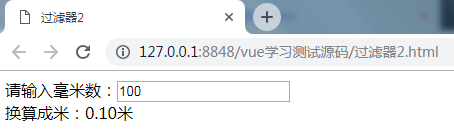
总结:filter就是解决一些格式的问题,可以提升用户体验的。如果filter内部非常复杂,建议写成计算属性computed,因为computed带有缓存,可重用性强。而filter都是做一些简单的事情。
2自定义指令
2.1基础配置
如果vue自带的指令无法满足需求,就要自定义一个指令,用法就像自定义属性一样,只要在元素上加上这个属性,就具有相应的功能,
组件和指令的区别,组件就像一个人物角色,指令就是人物所拥有的技能,一个人物可以有多种技能,不同的人物也可以有相同的技能。
用v-来自定义一个属性,
用directive来定义一个指令,第一个参数是指令名,这里就不用以v-开头了,第二个参数是回调函数,函数中第一个参数el是元素,就是指令所在的元素会自动传进来,这个元素可以用原生api来调用,也可以用jquery来调用$(el),第二个参数binding是指令传进来的值和其他基本信息,值在binding.value中
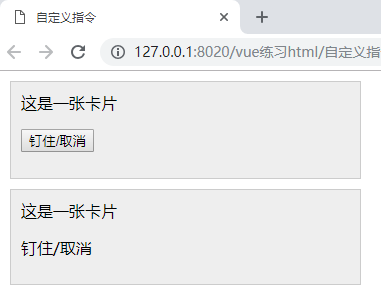
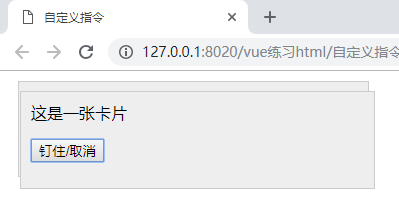
实例:钉住指令
<!DOCTYPE html>

<html>

    <head>

        <meta charset="utf-8" />

        <title>自定义指令</title>

        <style>

            .card {

                border: 1px solid #ccc;padding: 10px;margin: 10px;width: 20%;background: #eee;

            }

        </style>

    </head>

    <body style="height: 2000px;">

        <div id="zyx">

            <div v-pin='card1.pinned' class="card">

                这是一张卡片

                <p><button @click="card1.pinned=!card1.pinned">钉住/取消</button></p>

            </div>

            <div v-pin='card2.pinned' class="card">

                这是一张卡片

                <p><span @click="card2.pinned=!card2.pinned">钉住/取消</span></p>

            </div>

        </div>

        <script src="lib/vue.js"></script>

        <script>

            Vue.directive('pin',function(el,binding){

                console.log(binding);

                //var $el=$(el);

                if(binding.value){

                    el.style.position='fixed';

                    el.style.top='10px';

                    el.style.left='10px';

                }else{

                    el.style.position='static';

                }

            });

            var zyx = new Vue({

                el: '#zyx',

                data: {

                    card1:{

                        pinned:false

                    },

                    card2:{

                        pinned:false

                    }

                }

            });

        </script>

    </body>

</html>
2.2配置传参及修饰符
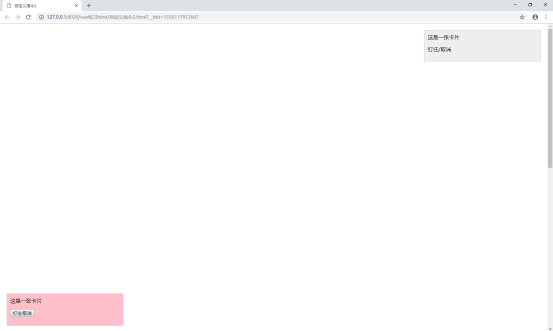
上面的钉住指令,想进一步实现,可以钉在不同的方向位置,可以通过加修饰符,是指令后面加.,然后通过binding.modifiers来获取,
传参是指令后面加:,然后通过binding.arg来获取,
<!DOCTYPE html>

<html>

    <head>

        <meta charset="utf-8" />

        <title>自定义指令2</title>

        <style>

            .card {

                border: 1px solid #ccc;padding: 10px;margin: 10px;width: 20%;background: #eee;

            }

        </style>

    </head>

    <body style="height: 2000px;">

        <div id="zyx">

            <div v-pin:true.bottom.left='card1.pinned' class="card">

                这是一张卡片

                <p><button @click="card1.pinned=!card1.pinned">钉住/取消</button></p>

            </div>

            <div v-pin.top.right='card2.pinned' class="card">

                这是一张卡片

                <p><span @click="card2.pinned=!card2.pinned">钉住/取消</span></p>

            </div>

        </div>

        <script src="lib/vue.js"></script>

        <script>

            Vue.directive('pin',function(el,binding){

                var pined=binding.value; //值

                var posi=binding.modifiers; //修饰符

                var waring=binding.arg;  //参数

                if(pined){

                    el.style.position='fixed';

                    for(var key in posi){

                        if(posi[key]){

                            el.style[key]='10px';

                        }

                    }

                    if(waring==='true'){

                        el.style.background='pink';

                    }

                }else{

                    el.style.position='static';

                }

            });

            var zyx = new Vue({

                el: '#zyx',

                data: {

                    card1:{

                        pinned:false

                    },

                    card2:{

                        pinned:false

                    }

                }

            });

        </script>

    </body>

</html>
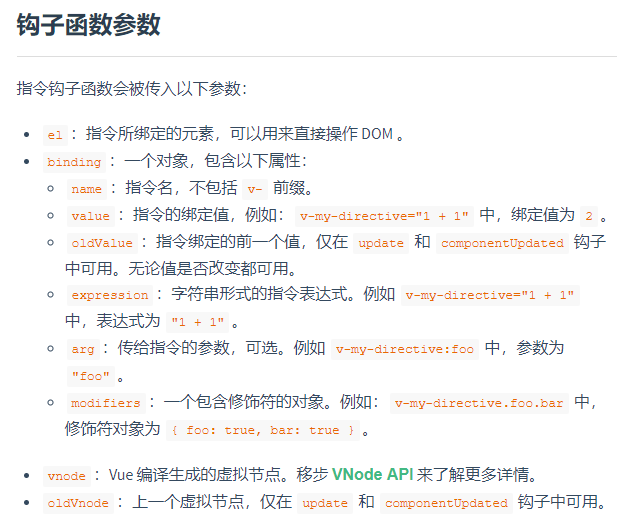
其他参数:(来自vue官网)
3混合mixins
Mixins就像一个重复功能和数据的储存器。
例:页面中有两个组件,一个是点击显示,点击关闭按钮隐藏;一个是鼠标移入显示,移出隐藏,
<!DOCTYPE html>

<html>

    <head>

        <meta charset="utf-8">

        <title>混合mixins</title>

        <style>

            *{padding: 0;margin: 0;}

            body{padding: 10px 0 0 10px;}

            .show-box{border: 1px solid #ccc;background: blanchedalmond;padding: 20px;margin-top: 10px;}

            .tips-word{margin-top: 20px;}

            .close-btn{display: inline-block;width: 20px;height: 20px;border: 1px solid #333;text-align: center;line-height: 20px;margin-left: 10px;cursor: pointer;}

        </style>

    </head>

    <body>

        <div id="app">

            <popup></popup>

            <tooltip></tooltip>

        </div>

    </body>

    <script src="js/vue.js"></script>

    <script>

        Vue.component('popup',{

            template:`

            <div>

                <button @click="toggle">点击</button>

                <div v-if="visible" class="show-box">

                    <span title="关闭" class="close-btn" @click="hide">×</span>

                    显示的内容

                </div>

            </div>

            `,

            data:function(){

                return{

                    visible:false

                }

            },

            methods:{

                toggle:function(){

                    this.visible=!this.visible;

                },

                hide:function(){

                    this.visible=false;

                }

            }

        });

        Vue.component('tooltip',{

            template:`

            <div>

                <p @mouseenter="show" @mouseleave="hide" class="tips-word">鼠标移入</p>

                <div v-if="visible" class="show-box">提示信息</div>

            </div>

            `,

            data:function(){

                return{

                    visible:false

                }

            },

            methods:{

                show:function(){

                    this.visible=true;

                },

                hide:function(){

                    this.visible=false;

                },

            }

        });

        var app=new Vue({

            el:'#app'

        })

    </script>

</html>
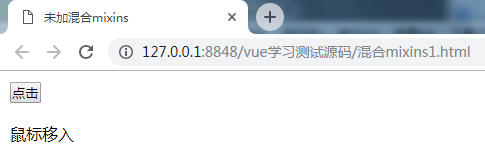
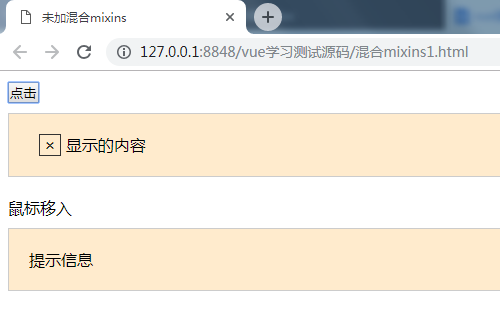
这里面重复的地方非常多,显得代码很啰嗦,实现的功能很简单,却要写这么多重复的东西。
Vue里面提供Mixins机制,可以把一些功能定义到Mixins中。定义一个base,然后把两个组件都要用的放进去,然后把原来那些替换成mixins,他的值是一个数组,值就是定义的base。Vue会自动合并这个对象和组件,组件就自动携带了mixins的功能,
<!DOCTYPE html>

<html>

    <head>

        <meta charset="utf-8">

        <title>混合mixins</title>

        <style>

            *{padding: 0;margin: 0;}

            body{padding: 10px 0 0 10px;}

            .show-box{border: 1px solid #ccc;background: blanchedalmond;padding: 20px;margin-top: 10px;}

            .tips-word{margin-top: 20px;}

            .close-btn{display: inline-block;width: 20px;height: 20px;border: 1px solid #333;text-align: center;line-height: 20px;margin-left: 10px;cursor: pointer;}

        </style>

    </head>

    <body>

        <div id="app">

            <popup></popup>

            <tooltip></tooltip>

        </div>

    </body>

    <script src="js/vue.js"></script>

    <script>

        var base={

            data:function(){

                return{

                    visible:false

                }

            },

            methods:{

                show:function(){

                    this.visible=true;

                },

                hide:function(){

                    this.visible=false;

                },

                toggle:function(){

                    this.visible=!this.visible;

                }

            }

        }

        Vue.component('popup',{

            template:`

            <div>

                <button @click="toggle">点击</button>

                <div v-if="visible" class="show-box">

                    <span title="关闭" class="close-btn" @click="hide">×</span>

                    显示的内容

                </div>

            </div>

            `,

            mixins:[base]

        });

        Vue.component('tooltip',{

            template:`

            <div>

                <p @mouseenter="show" @mouseleave="hide" class="tips-word">鼠标移入</p>

                <div v-if="visible" class="show-box">提示信息</div>

            </div>

            `,

            mixins:[base]

        });

        var app=new Vue({

            el:'#app'

        })

    </script>

</html>
这样代码就简洁多了,页面不管有多少个组件,只要他需要用到base的功能,直接加个mixins就可以了。
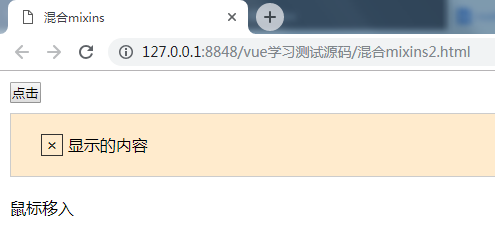
如果想让某个组件中的visible默认等于true呢?在组件中再定义一个data,里面指定visible为true就可以了,这样会把base里面的相应的内容覆盖掉,类似“就近原则”
<!DOCTYPE html>

<html>

    <head>

        <meta charset="utf-8">

        <title>混合mixins</title>

        <style>

            *{padding: 0;margin: 0;}

            body{padding: 10px 0 0 10px;}

            .show-box{border: 1px solid #ccc;background: blanchedalmond;padding: 20px;margin-top: 10px;}

            .tips-word{margin-top: 20px;}

            .close-btn{display: inline-block;width: 20px;height: 20px;border: 1px solid #333;text-align: center;line-height: 20px;margin-left: 10px;cursor: pointer;}

        </style>

    </head>

    <body>

        <div id="app">

            <popup></popup>

            <tooltip></tooltip>

        </div>

    </body>

    <script src="js/vue.js"></script>

    <script>

        var base={

            data:function(){

                return{

                    visible:false

                }

            },

            methods:{

                show:function(){

                    this.visible=true;

                },

                hide:function(){

                    this.visible=false;

                },

                toggle:function(){

                    this.visible=!this.visible;

                }

            }

        }

        Vue.component('popup',{

            template:`

            <div>

                <button @click="toggle">点击</button>

                <div v-if="visible" class="show-box">

                    <span title="关闭" class="close-btn" @click="hide">×</span>

                    显示的内容

                </div>

            </div>

            `,

            mixins:[base],

            data:function(){

                return{

                    visible:true

                }

            },

        });

        Vue.component('tooltip',{

            template:`

            <div>

                <p @mouseenter="show" @mouseleave="hide" class="tips-word">鼠标移入</p>

                <div v-if="visible" class="show-box">提示信息</div>

            </div>

            `,

            mixins:[base]

        });

        var app=new Vue({

            el:'#app'

        })

    </script>

</html>
4插槽slots
例:页面上有两个同样的组件
<!DOCTYPE html>

<html>

    <head>

        <meta charset="utf-8">

        <title>插槽slots</title>

        <style>

            .panel{border: 1px solid #ccc;margin-top: 20px;width: 300px;}

            .panel > *{padding: 10px;}

            .panel .content{border-top: 1px solid #ccc;border-bottom: 1px solid #ccc;}

        </style>

    </head>

    <body>

        <div id="app">

            <panel></panel>

            <panel></panel>

        </div>

        <template id="panel_tpl">

            <div class="panel">

                <div class="title">

                    标题

                </div>

                <div class="content">

                    内容

                </div>

                <div class="footer">更多...</div>

            </div>

        </template>

    </body>

    <script src="js/vue.js"></script>

    <script>

        Vue.component('panel',{

            template:'#panel_tpl'

        })

        var app=new Vue({

            el:'#app',

            data:{

            }

        })

    </script>

</html>
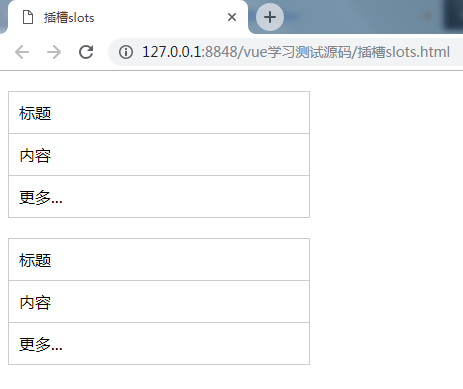
想实现里面的内容动态,就可以把内容换成<slot></slot>,然后在<panel></panel>中写内容,这样就可以分别设置内容了。可以为slot指定一个name,就能定义多个slot了,然后在组件标签中,加上属性slot=”name”,就可以了。写在<slot></slot>中的为默认值。
<!DOCTYPE html>

<html>

    <head>

        <meta charset="utf-8">

        <title>插槽slots</title>

        <style>

            .panel{border: 1px solid #ccc;margin-top: 20px;width: 300px;}

            .panel > *{padding: 10px;}

            .panel .content{border-top: 1px solid #ccc;border-bottom: 1px solid #ccc;}

        </style>

    </head>

    <body>

        <div id="app">

            <panel>

                <div slot="title">标题1</div>

                <div slot="content">内容1</div>

            </panel>

            <panel>

                <div slot="title">标题2</div>

                <div slot="content">内容2</div>

                <div slot="footer">更多2</div>

            </panel>

        </div>

        <template id="panel_tpl">

            <div class="panel">

                <div class="title">

                    <slot name="title"></slot>

                </div>

                <div class="content">

                    <slot name="content"></slot>

                </div>

                <div class="footer">

                    <slot name="footer">更多1</slot>

                </div>

            </div>

        </template>

    </body>

    <script src="js/vue.js"></script>

    <script>

        Vue.component('panel',{

            template:'#panel_tpl'

        })

        var app=new Vue({

            el:'#app',

            data:{

            }

        })

    </script>

</html>
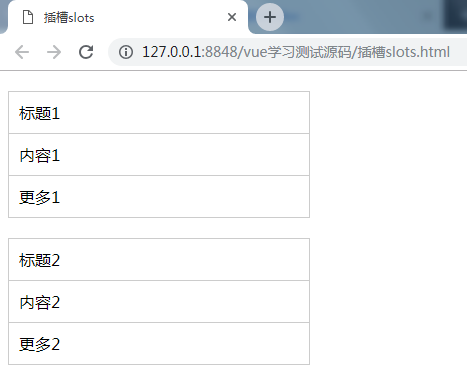
Slot特别常用,灵活、简洁、强大,可以用这种方式实现组件的嵌套。
Vue.js基础语法(三)的更多相关文章
- Vue.js基础语法(一)
vue学习的一系列,全部来自于表哥---表严肃,是我遇到过的讲课最通透,英文发音最好听的老师,想一起听课就去这里吧 https://biaoyansu.com/i/hzhj1206 前言: 前端解析数 ...
- Vue.js基础语法(二)组件
vue学习的一系列,全部来自于表哥---表严肃,是我遇到过的讲课最通透,英文发音最好听的老师,想一起听课就去这里吧 https://biaoyansu.com/i/hzhj1206 把一段经常要用的东 ...
- Vue.js 数据绑定语法详解
Vue.js 数据绑定语法详解 一.总结 一句话总结:Vue.js 的模板是基于 DOM 实现的.这意味着所有的 Vue.js 模板都是可解析的有效的 HTML,且通过一些特殊的特性做了增强.Vue ...
- JavaScript进阶 - 第2章 你要懂的规则(JS基础语法)
第2章 你要懂的规则(JS基础语法) 2-1什么是变量 什么是变量? 从字面上看,变量是可变的量:从编程角度讲,变量是用于存储某种/某些数值的存储器.我们可以把变量看做一个盒子,盒子用来存放物品,物品 ...
- Python 基础语法(三)
Python 基础语法(三) --------------------------------------------接 Python 基础语法(二)------------------------- ...
- Vue.js 模板语法
本章节将详细介绍 Vue.js 模板语法,如果对 HTML +Css +JavaScript 有一定的了解,学习起来将信手拈来. Vue.js 使用了基于 HTML 的模版语法,允许开发者声明式地将 ...
- 【JS基础语法】---学习roadmap---6 parts
JS基础语法---roadmap Part 1 - 2: Part 3 - 4: Part 5 - 6
- vue.js初学(三)模板语法
1:介绍 vue.js允许开发者声明式地将Dom元素绑定至Vue实例的底层,所有的模板都是合法的html,所以能够被遵循规范的浏览器和html解析器解析 在底层的实现上,vue将模板编译成虚拟Dom渲 ...
- 两万字Vue.js基础学习笔记
Vue.js学习笔记 目录 Vue.js学习笔记 ES6语法 1.不一样的变量声明:const和let 2.模板字符串 3.箭头函数(Arrow Functions) 4. 函数的参数默认值 5.Sp ...
随机推荐
- Percona Toolkit安装、使用
percona-toolkit是一组高级命令行工具的集合,用来执行各种通过手工执行非常复杂和麻烦的mysql和系统任务,这些任务包括: l 检查master和slave数据的一致性 l 有效地对记 ...
- City Game UVALive - 3029(悬线法求最大子矩阵)
题意:多组数据(国外题好像都这样),每次n*m矩形,F表示空地,R表示障碍 求最大子矩阵(悬线法模板) 把每个格子向上延伸的空格看做一条悬线 以le[i][j],re[i][j],up[i][j]分别 ...
- P1592 互质
题意:输入两个正整数n和k,求与n互质的第k个正整数. $n≤10^6,k≤10^8$ 可以枚举出互质的数,居然发现,有循环节.... 比如10 与其互质的1 3 7 9 11 13 17 ...
- linux下的静态库和动态库
一.linux下的静态库 静态库中的被调用的函数的代码会在编译时一起被复制到可执行文件中去的!!可执行文件在运行不需要静态库的存在! 二.linux下动态库的构建和使用 1.动态库的构建 ...
- manjaro linux KDE桌面网易云音乐点击托盘图标无反应
这是一个很奇怪的问题,它的解决方法更奇怪... 找到网易云,右键,选择“编辑应用程序” 在打开的窗口中选中应用程序一栏 将“命令”的内容替换为: 1 env XDG_CURRENT_DESKTOP=D ...
- shell脚本安装jdk
#!/bin/bash BASE_SERVER=192.168.1.11 yum install -y wget wget $BASE_SERVER/soft-all/jdk-7u45-linux-x ...
- Ubuntu wubi.exe 安装到Windows 正在下载ubuntu-11.04-desktop-i386.iso
下载一个Ubuntu的iso镜像,用虚拟光驱加载后,点击 wubi.exe->安装到Windows 设置好后,进入安装,又自动开始下载iso镜像了,提示:正在下载ubuntu-11.04-des ...
- Ant junitreport with Maven
大家可能都知道在Ant里可以使用junit和junitreport两个task来完成对测试结果生成HTML格式的报告. Maven里的Surefire-report的插件只能对Java测试报告支持的比 ...
- php fsockopen使用
函数说明:fsockopen — 打开一个网络连接或者一个Unix套接字连接 语法: resource fsockopen ( string $hostname [, int $port = -1 [ ...
- Luogu P5122 [USACO18DEC]Fine Dining 最短路
先跑一遍n为起点最短路,再新开一个点,向有干草垛的点连一根边权为d[u]-w的有向边(很重要..我当时连的无向边,然后我死了.),相当于用价值抵消一部分边权, 然后以这个新的点为起点跑最短路就好了.. ...