
转 Python 多进程multiprocessing.Process之satrt()和join()
1、
https://blog.csdn.net/wonengguwozai/article/details/80325745
今天项目中涉及到了使用多进程处理数据,在廖雪峰的python教程上学习了一下多进程相关,其中涉及到了start和join函数,解释的不是很清晰,在网上找了博客,敲了下博客提供的代码,瞬间理解了。感谢原文:https://blog.csdn.net/HeatDeath/article/details/72842899
由于Python是跨平台的,自然也应该提供一个跨平台的多进程支持。
multiprocessing模块就是跨平台版本的多进程模块。
multiprocessing模块提供了一个Process类来代表一个进程对象。
创建子进程时,只需要传入一个执行函数和函数的参数,创建一个Process实例
start()方法启动,这样创建进程比fork()还要简单。
join()方法可以等待子进程结束后再继续往下运行,通常用于进程间的同步。(进一步地解释,哪个子进程调用了join方法,主进程就要等该子进程执行完后才能继续向下执行,具体可见下边的分析图)
使用 join()
- # -*- coding:utf-8 -*-
- from multiprocessing import Process
- import os
- import time
- def run_proc(name):
- time.sleep(10)
- print('Run child process %s (%s)...' % (name, os.getpid()))
- def hello_world():
- # time.sleep(5)
- time.sleep(20)
- print('hello world!')
- print('Run child process (%s)...' % (os.getpid()))
- if __name__ == '__main__':
- print ('Parent process %s.' % os.getpid())
- p1 = Process(target=run_proc, args=('test',))
- p2 = Process(target=hello_world)
- print 'Process will start.'
- p1.start()
- p2.start()
- p1.join()
- print('Process end.')
输出:
- Parent process 11860.
- Process will start.
- Run child process test (11232)...
- Process end.
- hello world!
- Run child process (2288)...
- Process finished with exit code 0
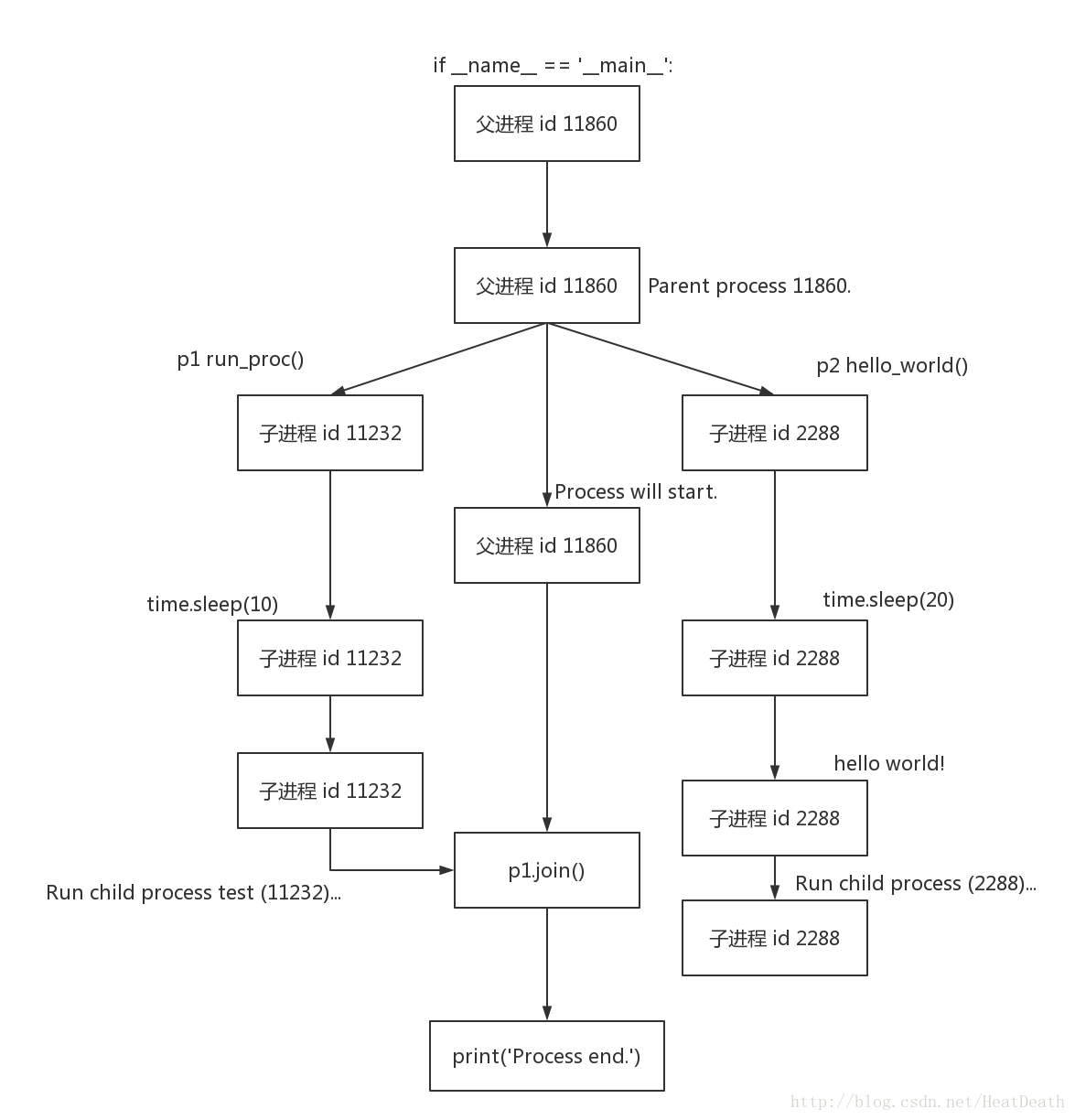
子进程的开始时间
- # -*- coding:utf-8 -*-
- from multiprocessing import Process
- import os
- import time
- def run_proc(name):
- print(time.time())
- time.sleep(10)
- print('Run child process %s (%s)...' % (name, os.getpid()))
- def hello_world():
- print(time.time())
- # time.sleep(5)
- time.sleep(20)
- print('hello world!')
- print('Run child process (%s)...' % (os.getpid()))
- if __name__ == '__main__':
- print ('Parent process %s.' % os.getpid())
- p1 = Process(target=run_proc, args=('test',))
- p2 = Process(target=hello_world)
- print 'Process will start.'
- p1.start()
- p2.start()
- p1.join()
- print('Process end.')
输出:
- Parent process 7220.
- Process will start.
- 1496374096.56
- 1496374096.56
- Run child process test (2196)...
- Process end.
- hello world!
- Run child process (832)...
- Process finished with exit code 0
可以认为 子进程 p1 与 子进程 p2 同时开始
去掉 join(),使用 map
- # -*- coding:utf-8 -*-
- from multiprocessing import Process
- import os
- import time
- def run_proc(name):
- print(time.time())
- time.sleep(10)
- print('Run child process %s (%s)...' % (name, os.getpid()))
- def hello_world():
- print(time.time())
- # time.sleep(5)
- time.sleep(20)
- print('hello world!')
- print('Run child process (%s)...' % (os.getpid()))
- if __name__ == '__main__':
- print ('Parent process %s.' % os.getpid())
- p1 = Process(target=run_proc, args=('test',))
- p2 = Process(target=hello_world)
- print 'Process will start.'
- # p1.start()
- # p2.start()
- # p1.join()
- p_list = (p1, p2)
- map(Process.start, p_list)
- print('Process end.')
输出:
- Parent process 8580.
- Process will start.
- Process end.
- 1496374397.24
- 1496374397.24
- Run child process test (7148)...
- hello world!
- Run child process (8348)...
- Process finished with exit code 0
2.
https://blog.csdn.net/yagamil/article/details/51284851
threads=[]
f=[fast,slow]
l=len(f)
for i in range(l):
t=MyThread(f[i],(),str(i))
threads.append(t)
for i in range(l):
threads[i].start()
for i in range(l):
#pass
threads[i].join()
print threads[i].getName()
print "Done on main"
exit()
join的主要功能是阻塞线程,也就是使用了join后,后面的语句需要等当前进程完成之后才能 执行。
那么看看下面的例子
class MyThread(threading.Thread):
def __init__(self,fun,arg,name=""):
threading.Thread.__init__(self)
self.fun=fun
self.arg=arg
self.name=name
#self.result
def run(self):
self.result=apply(self.fun,self.arg)
def getName(self):
return self.name
def getResult(self):
return self.result
上面是一个多线程的类。 待会用来调用的。
下面是main函数
def fast():
print "in fast"
sleep(15)
print "done in fast"
def slow():
print "in slow"
sleep(10)
print "done in slow"
threads=[]
f=[fast,slow]
l=len(f)
for i in range(l):
t=MyThread(f[i],(),str(i))
threads.append(t)
for i in range(l):
threads[i].start()
for i in range(l):
#pass
threads[i].join()
print threads[i].getName()
print "Done on main"
exit()
运行之后
输出的结果是
in fast
in slow
done in slow
done in fast
0
1
Done on main
看到了吗?
运行到thread[i].join() 这一行, 下一句没有马上被执行,需要等到done in fast 完成之后才执行, 而为什么done in slow却提前被执行了呢?
因为上面执行了threads[i].start() 后 两个线程已经同时开启了,但是由于在slow线程里只sleep了10秒,而fast线程sleep了15秒,所以会先打印done in slow。
print threads[i].getName()
而上面这句则需要等线程1执行之后才会执行,
等执行完了上面那句之后,才会执行线程2的 join(), 由于此时的线程已经早已执行完毕,所以这句也没有起到阻塞作用,故会马上执行 下面只一句
print threads[i].getName()
---------------------
作者:重复的生活
来源:CSDN
原文:https://blog.csdn.net/yagamil/article/details/51284851
版权声明:本文为博主原创文章,转载请附上博文链接!
转 Python 多进程multiprocessing.Process之satrt()和join()的更多相关文章
- python多进程——multiprocessing.Process
简介 multiprocessing是一个使用类似于threading模块的API支持生成进程的包.该multiprocessing软件包提供本地和远程并发.因此,该multiprocessing模块 ...
- Python 多进程 multiprocessing.Pool类详解
Python 多进程 multiprocessing.Pool类详解 https://blog.csdn.net/SeeTheWorld518/article/details/49639651
- Python多进程multiprocessing使用示例
mutilprocess简介 像线程一样管理进程,这个是mutilprocess的核心,他与threading很是相像,对多核CPU的利用率会比threading好的多. import multipr ...
- Python 多进程multiprocessing
一.python多线程其实在底层来说只是单线程,因此python多线程也称为假线程,之所以用多线程的意义是因为线程不停的切换这样比串行还是要快很多.python多线程中只要涉及到io或者sleep就会 ...
- python ---多进程 Multiprocessing
和 threading 的比较 多进程 Multiprocessing 和多线程 threading 类似, 他们都是在 python 中用来并行运算的. 不过既然有了 threading, 为什么 ...
- python多进程-----multiprocessing包
multiprocessing并非是python的一个模块,而是python中多进程管理的一个包,在学习的时候可以与threading这个模块作类比,正如我们在上一篇转载的文章中所提,python的多 ...
- python多进程multiprocessing Pool相关问题
python多进程想必大部分人都用到过,可以充分利用多核CPU让代码效率更高效. 我们看看multiprocessing.pool.Pool.map的官方用法 map(func, iterable[, ...
- 操作系统OS,Python - 多进程(multiprocessing)、多线程(multithreading)
多进程(multiprocessing) 参考: https://docs.python.org/3.6/library/multiprocessing.html 1. 多进程概念 multiproc ...
- python多进程(multiprocessing)
最近有个小课题,需要用到双进程,翻了些资料,还算圆满完成任务.记录一下~ 1.简单地双进程启动 同时的调用print1()和print2()两个打印函数,代码如下: #/usr/bin/python ...
随机推荐
- STM32 C++编程 003 USART(串口)类
使用 C++ 语言给 STM32 编写一个 Usart 类 我使用的STM32芯片:STM32F103ZET6 我们使用的STM32库版本:V3.5.0 注意: 想学习本套 STM32 C++编程 的 ...
- 导出Excel解决方案之一NOPI
一.概要 导出Excel这个功能相信很多人都做过,但是实现这个功能解决方案有好几种,今天我未大家介绍一种比较新的,其实也不新了- -!它叫NPOI,可以完美操作EXCEl的导入和导出操作,让我们一起看 ...
- 抓包工具 Fiddler 使用:弱网络环境模拟限速测试流程
转自:http://www.51testing.com/html/80/n-3726980.html 抓包工具 Fiddler 使用:弱网络环境模拟限速测试流程 发表于:2018-6-06 11: ...
- winform播放视频(windows media player)
1.找到windows media player 工具箱常规下边右键,右键弹窗点击“选择项”,选择工具箱窗口点击“COM组件”,找到 Windows Media Player 勾选,点击确定 2.使用 ...
- 动态合并GridView数据行DataRow的列
前段时间,Insus.NET一直在演示GridView控件Header头行或列:<动态变更GridView控件列名>和<动态合并或定制GridView控件Header头某些列> ...
- ffmpeg windows下编译ffmpeg
windows下编译ffmpeg 今天由于工作需求需重新编译ffmpeg,百度,goole了一大堆,看眼花缭乱的,但几乎都是三种方案,大部分都是直接转发,一字不漏,错误的缺文件的还是照转,可是问题都大 ...
- css 选择器;盒模型
一.引入方式:(1)CSS 层叠样式表 作用:修饰网页结构 (2)css的三种引入方式 - 行内样式 注意:行内样式的优先级是最高的 - 内接样式 - 外接样式 二.css选择器 基础选择器 * 通配 ...
- Shell---自动测试局域网内的网络连通情况
#!/bin/bash );do RE=`ping .$i` echo $RE >>result.log done
- C/C++ 遇到0xcccccccc访问冲突
最近一直在纠结这个问题. 最近写代码,总是遇到这个问题,一旦遇到这个问题,以前好使的代码也就不好使了.很费解,上网搜集了下资料.... 这个0xcccccccc是DEBUG模式下,编译器为没有初始化的 ...
- LinkedList实现原理
原文链接:https://www.jianshu.com/p/56c77c517e71 本文对LinkedList的实现讨论都基于JDK8版本 Java中的LinkedList类实现了List接口和D ...