
转 Python 多进程multiprocessing.Process之satrt()和join()
1、
https://blog.csdn.net/wonengguwozai/article/details/80325745
今天项目中涉及到了使用多进程处理数据,在廖雪峰的python教程上学习了一下多进程相关,其中涉及到了start和join函数,解释的不是很清晰,在网上找了博客,敲了下博客提供的代码,瞬间理解了。感谢原文:https://blog.csdn.net/HeatDeath/article/details/72842899
由于Python是跨平台的,自然也应该提供一个跨平台的多进程支持。
multiprocessing模块就是跨平台版本的多进程模块。
multiprocessing模块提供了一个Process类来代表一个进程对象。
创建子进程时,只需要传入一个执行函数和函数的参数,创建一个Process实例
start()方法启动,这样创建进程比fork()还要简单。
join()方法可以等待子进程结束后再继续往下运行,通常用于进程间的同步。(进一步地解释,哪个子进程调用了join方法,主进程就要等该子进程执行完后才能继续向下执行,具体可见下边的分析图)
使用 join()
- # -*- coding:utf-8 -*-
- from multiprocessing import Process
- import os
- import time
- def run_proc(name):
- time.sleep(10)
- print('Run child process %s (%s)...' % (name, os.getpid()))
- def hello_world():
- # time.sleep(5)
- time.sleep(20)
- print('hello world!')
- print('Run child process (%s)...' % (os.getpid()))
- if __name__ == '__main__':
- print ('Parent process %s.' % os.getpid())
- p1 = Process(target=run_proc, args=('test',))
- p2 = Process(target=hello_world)
- print 'Process will start.'
- p1.start()
- p2.start()
- p1.join()
- print('Process end.')
输出:
- Parent process 11860.
- Process will start.
- Run child process test (11232)...
- Process end.
- hello world!
- Run child process (2288)...
- Process finished with exit code 0
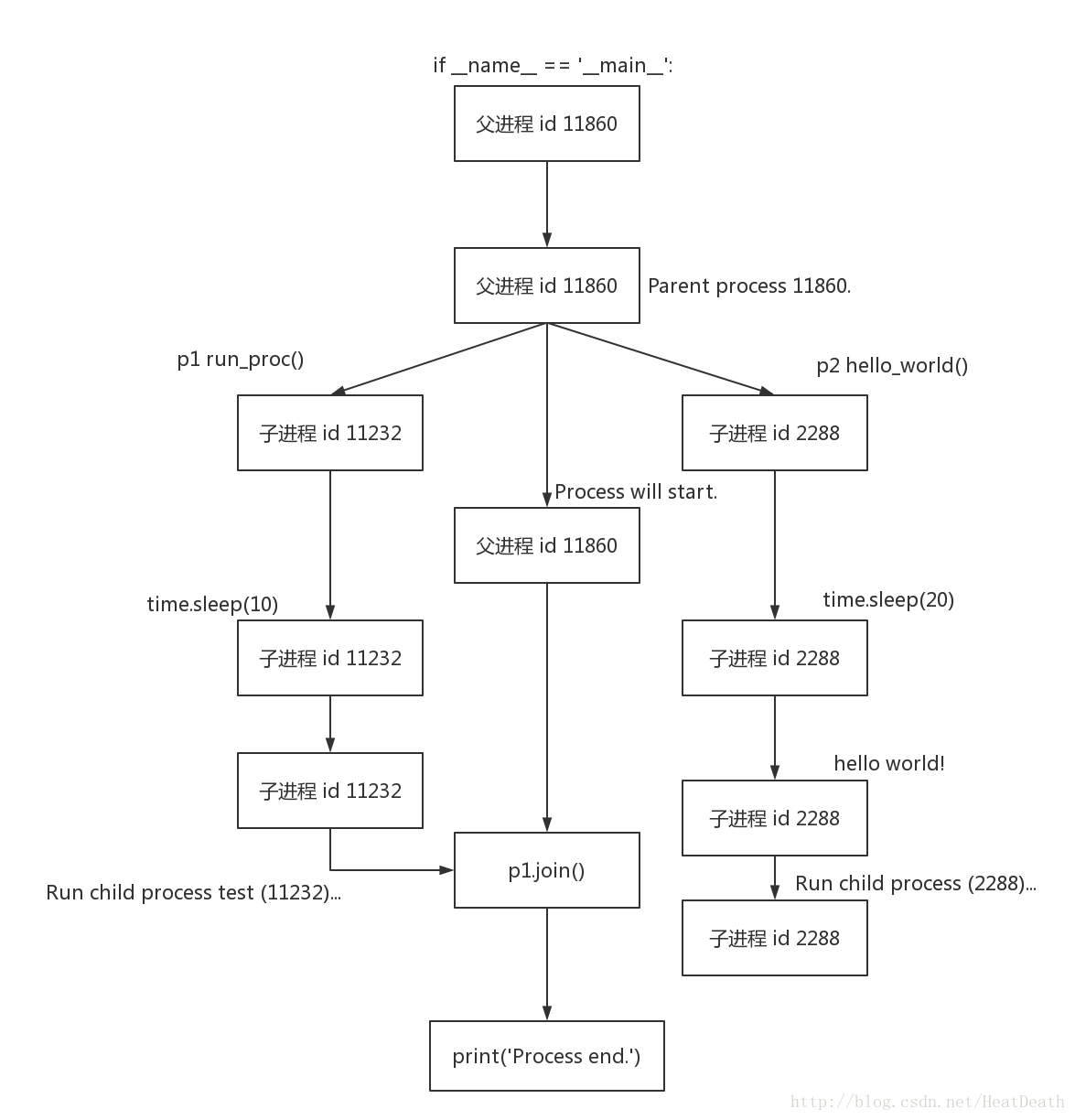
子进程的开始时间
- # -*- coding:utf-8 -*-
- from multiprocessing import Process
- import os
- import time
- def run_proc(name):
- print(time.time())
- time.sleep(10)
- print('Run child process %s (%s)...' % (name, os.getpid()))
- def hello_world():
- print(time.time())
- # time.sleep(5)
- time.sleep(20)
- print('hello world!')
- print('Run child process (%s)...' % (os.getpid()))
- if __name__ == '__main__':
- print ('Parent process %s.' % os.getpid())
- p1 = Process(target=run_proc, args=('test',))
- p2 = Process(target=hello_world)
- print 'Process will start.'
- p1.start()
- p2.start()
- p1.join()
- print('Process end.')
输出:
- Parent process 7220.
- Process will start.
- 1496374096.56
- 1496374096.56
- Run child process test (2196)...
- Process end.
- hello world!
- Run child process (832)...
- Process finished with exit code 0
可以认为 子进程 p1 与 子进程 p2 同时开始
去掉 join(),使用 map
- # -*- coding:utf-8 -*-
- from multiprocessing import Process
- import os
- import time
- def run_proc(name):
- print(time.time())
- time.sleep(10)
- print('Run child process %s (%s)...' % (name, os.getpid()))
- def hello_world():
- print(time.time())
- # time.sleep(5)
- time.sleep(20)
- print('hello world!')
- print('Run child process (%s)...' % (os.getpid()))
- if __name__ == '__main__':
- print ('Parent process %s.' % os.getpid())
- p1 = Process(target=run_proc, args=('test',))
- p2 = Process(target=hello_world)
- print 'Process will start.'
- # p1.start()
- # p2.start()
- # p1.join()
- p_list = (p1, p2)
- map(Process.start, p_list)
- print('Process end.')
输出:
- Parent process 8580.
- Process will start.
- Process end.
- 1496374397.24
- 1496374397.24
- Run child process test (7148)...
- hello world!
- Run child process (8348)...
- Process finished with exit code 0
2.
https://blog.csdn.net/yagamil/article/details/51284851
threads=[]
f=[fast,slow]
l=len(f)
for i in range(l):
t=MyThread(f[i],(),str(i))
threads.append(t)
for i in range(l):
threads[i].start()
for i in range(l):
#pass
threads[i].join()
print threads[i].getName()
print "Done on main"
exit()
join的主要功能是阻塞线程,也就是使用了join后,后面的语句需要等当前进程完成之后才能 执行。
那么看看下面的例子
class MyThread(threading.Thread):
def __init__(self,fun,arg,name=""):
threading.Thread.__init__(self)
self.fun=fun
self.arg=arg
self.name=name
#self.result
def run(self):
self.result=apply(self.fun,self.arg)
def getName(self):
return self.name
def getResult(self):
return self.result
上面是一个多线程的类。 待会用来调用的。
下面是main函数
def fast():
print "in fast"
sleep(15)
print "done in fast"
def slow():
print "in slow"
sleep(10)
print "done in slow"
threads=[]
f=[fast,slow]
l=len(f)
for i in range(l):
t=MyThread(f[i],(),str(i))
threads.append(t)
for i in range(l):
threads[i].start()
for i in range(l):
#pass
threads[i].join()
print threads[i].getName()
print "Done on main"
exit()
运行之后
输出的结果是
in fast
in slow
done in slow
done in fast
0
1
Done on main
看到了吗?
运行到thread[i].join() 这一行, 下一句没有马上被执行,需要等到done in fast 完成之后才执行, 而为什么done in slow却提前被执行了呢?
因为上面执行了threads[i].start() 后 两个线程已经同时开启了,但是由于在slow线程里只sleep了10秒,而fast线程sleep了15秒,所以会先打印done in slow。
print threads[i].getName()
而上面这句则需要等线程1执行之后才会执行,
等执行完了上面那句之后,才会执行线程2的 join(), 由于此时的线程已经早已执行完毕,所以这句也没有起到阻塞作用,故会马上执行 下面只一句
print threads[i].getName()
---------------------
作者:重复的生活
来源:CSDN
原文:https://blog.csdn.net/yagamil/article/details/51284851
版权声明:本文为博主原创文章,转载请附上博文链接!
转 Python 多进程multiprocessing.Process之satrt()和join()的更多相关文章
- python多进程——multiprocessing.Process
简介 multiprocessing是一个使用类似于threading模块的API支持生成进程的包.该multiprocessing软件包提供本地和远程并发.因此,该multiprocessing模块 ...
- Python 多进程 multiprocessing.Pool类详解
Python 多进程 multiprocessing.Pool类详解 https://blog.csdn.net/SeeTheWorld518/article/details/49639651
- Python多进程multiprocessing使用示例
mutilprocess简介 像线程一样管理进程,这个是mutilprocess的核心,他与threading很是相像,对多核CPU的利用率会比threading好的多. import multipr ...
- Python 多进程multiprocessing
一.python多线程其实在底层来说只是单线程,因此python多线程也称为假线程,之所以用多线程的意义是因为线程不停的切换这样比串行还是要快很多.python多线程中只要涉及到io或者sleep就会 ...
- python ---多进程 Multiprocessing
和 threading 的比较 多进程 Multiprocessing 和多线程 threading 类似, 他们都是在 python 中用来并行运算的. 不过既然有了 threading, 为什么 ...
- python多进程-----multiprocessing包
multiprocessing并非是python的一个模块,而是python中多进程管理的一个包,在学习的时候可以与threading这个模块作类比,正如我们在上一篇转载的文章中所提,python的多 ...
- python多进程multiprocessing Pool相关问题
python多进程想必大部分人都用到过,可以充分利用多核CPU让代码效率更高效. 我们看看multiprocessing.pool.Pool.map的官方用法 map(func, iterable[, ...
- 操作系统OS,Python - 多进程(multiprocessing)、多线程(multithreading)
多进程(multiprocessing) 参考: https://docs.python.org/3.6/library/multiprocessing.html 1. 多进程概念 multiproc ...
- python多进程(multiprocessing)
最近有个小课题,需要用到双进程,翻了些资料,还算圆满完成任务.记录一下~ 1.简单地双进程启动 同时的调用print1()和print2()两个打印函数,代码如下: #/usr/bin/python ...
随机推荐
- HDOJ 1121 Complete the Sequence
[题目大意]有一个数列P,它的第i项是当x=i时,一个关于x的整式的值.给出数列的前S项,你需要输出它的第S+1项到第S+C项,并且使整式的次数最低.多测. [数据范围]数据组数≤5000,S+C≤1 ...
- Ubuntu Java Env
From http://www.cnblogs.com/BigIdiot/archive/2012/03/26/2417547.html Java 环境变量 用户环境变量通常被存储在下面的文件中: ~ ...
- Bulma 源码结构
源码基于 Bulma 0.4.0 版本. 一.入口文件 bulma.sass bulma.sass 是 Bulma 使用 SASS 编译的入口文件. sass bulma.sass css/bulma ...
- Ping命令的设计与实现
ping命令的设计与实现 发表于 C++ Socket TCP/IP 2016-05-15 19:07 字数: 10796 阅读量: 528 ping 命令使用的相关 TCP/IP 协议 ping 命 ...
- matlab处理:批处理图像分块
有一个图像分块的代码,可以直接将一幅图像分为5*5的小块,代码如下: %[FileName,PathName] = uigetfile('*.*','Select the image'); Im=im ...
- 论道HTML5 PDF扫描版
论道HTML5先简要介绍了如何用HTML5和CSS3制作网站,然后全面介绍了API和Canvas2D,接着介绍了如何在手机浏览器上开发HTML5相关的应用.WebSocketAPI相关的三个案例和时下 ...
- android studio中Fragment使用webview返回上一页的问题
在Fragment中使用了腾讯的X5 webview,虽然好用,但是在Fragment中传递消息困难,想要返回上一页,还得各种消息传递什么的,麻烦.可是在Fragment中又不能使用onKeyDown ...
- C++: I/O流详解(三)——串流
一.串流 串流类是 ios 中的派生类 C++的串流对象可以连接string对象或字符串 串流提取数据时对字符串按变量类型解释:插入数据时把类型 数据转换成字符串 串流I/O具有格式化功能 例: #i ...
- C#修饰符讲解大全
1.修饰符是什么? 修饰符是用于限定类型以及类型成员的声明的一种符号.[百度百科] 2.修饰符分类 13种修饰符,按功能可分为三类:访问修饰符,类修饰符和成员修饰符.[百度百科] 作 用:限定类型以及 ...
- Linux之创建777权限的文件
服务器中运行项目的时候,有时候会出现图片上传失败,查看报错原因才知道是文件夹没有写入权限导致上传失败. 方案1: 在使用Linux命令更改对应目录的权限 方案2: 在代码中创建文件夹的时候给予对应的7 ...