
字节流:FileInputStream和FileOutputStream的使用
/**
 * 测试FileInputStream和FileOutputStream的使用
 *
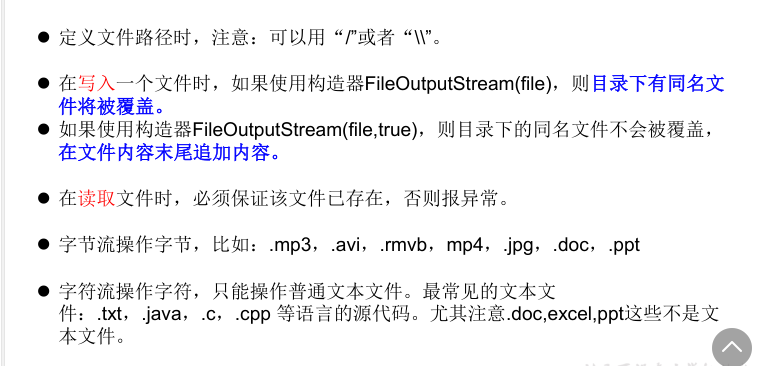
 * 结论:
 * 1. 对于文本文件(.txt,.java,.c,.cpp),使用字符流处理
 * 2. 对于非文本文件(.jpg,.mp3,.mp4,.avi,.doc,.ppt,...),使用字节流处理
 * @author CH
 * @create 2021 下午 2:13
 */
//使用字节流FileInputStream处理文本文件,可能出现乱码。

    @Test

    public void testFileInputStream() {

        FileInputStream fis = null;

        try {

            //1. 造文件

            File file = new File("hello.txt");

            //2.造流

            fis = new FileInputStream(file);

            //3.读数据

            byte[] buffer = new byte[5];

            int len;//记录每次读取的字节的个数

            while((len = fis.read(buffer)) != -1){

                String str = new String(buffer,0,len);

                System.out.print(str);

            }

        } catch (IOException e) {

            e.printStackTrace();

        } finally {

            if(fis != null){

                //4.关闭资源

                try {

                    fis.close();

                } catch (IOException e) {

                    e.printStackTrace();

                }

            }

        }

    }

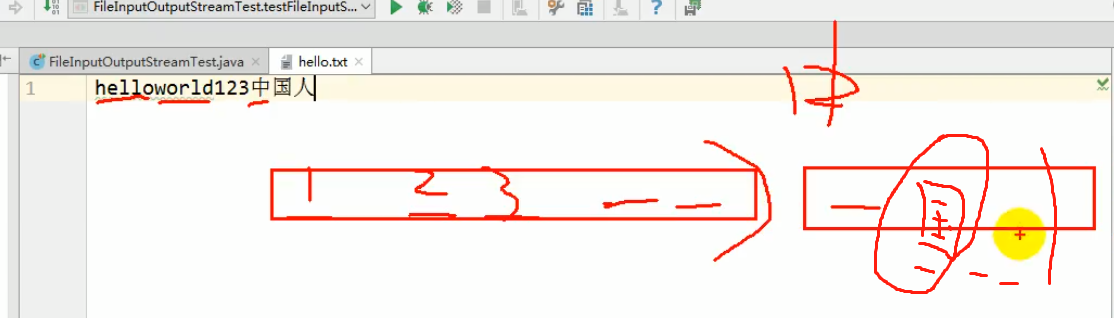
分析:输出流buffer五个字节,国字正好夹在中间,所以没有乱码

/*

    实现对图片的复制操作

     */

    @Test

    public void testFileInputOutputStream()  {

        FileInputStream fis = null;

        FileOutputStream fos = null;

        try {

            //

            File srcFile = new File("爱情与友情.jpg");

            File destFile = new File("爱情与友情2.jpg");

            //

            fis = new FileInputStream(srcFile);

            fos = new FileOutputStream(destFile);

            //复制的过程

            byte[] buffer = new byte[5];

            int len;

            while((len = fis.read(buffer)) != -1){

                fos.write(buffer,0,len);

            }

        } catch (IOException e) {

            e.printStackTrace();

        } finally {

            if(fos != null){

                //

                try {

                    fos.close();

                } catch (IOException e) {

                    e.printStackTrace();

                }

            }

            if(fis != null){

                try {

                    fis.close();

                } catch (IOException e) {

                    e.printStackTrace();

                }

            }

        }

    }

//指定路径下文件的复制

    public void copyFile(String srcPath,String destPath){

        FileInputStream fis = null;

        FileOutputStream fos = null;

        try {

            //

            File srcFile = new File(srcPath);

            File destFile = new File(destPath);

            //

            fis = new FileInputStream(srcFile);

            fos = new FileOutputStream(destFile);

            //复制的过程

            byte[] buffer = new byte[1024];

            int len;

            while((len = fis.read(buffer)) != -1){

                fos.write(buffer,0,len);

            }

        } catch (IOException e) {

            e.printStackTrace();

        } finally {

            if(fos != null){

                //

                try {

                    fos.close();

                } catch (IOException e) {

                    e.printStackTrace();

                }

            }

            if(fis != null){

                try {

                    fis.close();

                } catch (IOException e) {

                    e.printStackTrace();

                }

            }

        }

    }
 @Test

    public void testCopyFile(){

        long start = System.currentTimeMillis();

        String srcPath = "C:\\Users\\Administrator\\Desktop\\01.jvm结构_1.avi";

        String destPath = "C:\\Users\\Administrator\\Desktop\\0111.jvm结构_1.avi";

//        String srcPath = "hello.txt";

//        String destPath = "hello3.txt";

        copyFile(srcPath,destPath);

        long end = System.currentTimeMillis();

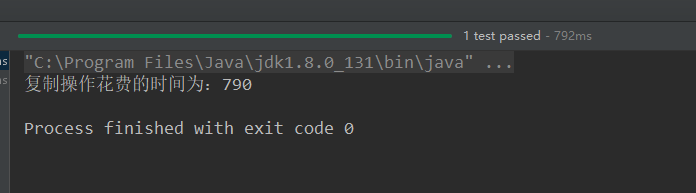
        System.out.println("复制操作花费的时间为:" + (end - start));//618

    }

字节流:FileInputStream和FileOutputStream的使用的更多相关文章
- Java IO(五)字节流 FileInputStream 和 FileOutputStream
Java IO(五)字节流 FileInputStream 和 FileOutputStream 一.介绍 字节流 InputStream 和 OutputStream 是字节输入流和字节输出流的超类 ...
- java中OutputStream字节流与字符流InputStreamReader 每一种基本IO流BufferedOutputStream,FileInputStream,FileOutputStream,BufferedInputStream,BufferedReader,BufferedWriter,FileInputStream,FileReader,FileWriter,InputStr
BufferedOutputStream,FileInputStream,FileOutputStream,BufferedInputStream,BufferedReader,BufferedWri ...
- java的文件流:字节流(FileInputStream、FileOutputStream)和字符流(FileReader、FileWriter)。
java的输入输出建立在4个抽象类的基础上:InputStream.OutputStream.Reader.Writer.InputSream和OutputStream被设计成字节流类,而Reader ...
- java基础知识回顾之javaIO类---FileInputStream和FileOutputStream字节流复制图片
package com.lp.ecjtu; import java.io.FileInputStream; import java.io.FileNotFoundException; import j ...
- java-IO流-字节流-概述及分类、FileInputStream、FileOutputStream、available()方法、定义小数组、BufferedInputStream、BufferedOutputStream、flush和close方法的区别、流的标准处理异常代码
1.IO流概述及其分类 * 1.概念 * IO流用来处理设备之间的数据传输 * Java对数据的操作是通过流的方式 * Java用于操作流的类都在IO包中 * ...
- (16)IO流之输入字节流FileInputStream和输出字节流FielOutputStream
IO流技术解决的问题:设备与设备之间的传输问题,内存-->硬盘,硬盘-->内存,等等 IO流技术 如果按照数据的流向划分可以划分为:输入流和输出流 输入输出的标准是以程序为参考物的,如果流 ...
- FileInputStream和FileOutputStream详解
一.引子 文件,作为常见的数据源.关于操作文件的字节流就是 FileInputStream & FileOutputStream.它们是Basic IO字节流中重要的实现类.二.FileInp ...
- [八]JavaIO之FileInputStream 与 FileOutputStream
接下来介绍 FileInputStream 和 FileOutputStream 现在看名字应该可以看得出来: 他就是从一个文件中读取数据 或者将数据写入到一个文件中 FileInputStream ...
- J03-Java IO流总结三 《 FileInputStream和FileOutputStream 》
1. FileInputStream FileInputStream是一个文件输入节点流,它是一个字节流,它的作用是将磁盘文件的内容读取到内存中. FileInputStream的父类是Inpu ...
- Java修炼——FileInputStream和FileOutputStream
文件字节流FileInputStream是读文件内容 有一下五个方法 1) abstract int read( ); 2) int read( byte b[ ] ); 3) int read( b ...
随机推荐
- C# 请求 form-data格式的 接口 POSTMAN form-data
HttpClient _httpClient = new HttpClient(); var postContent = new MultipartFormDataContent(); string ...
- Help document of CAD Plus
中文使用帮助 Help for Mobile Update time: 2023-07-29; This article will help you how to use the CAD Plus a ...
- 2024最新免费IP地址SSL证书申请
为IP地址申请免费的SSL证书相对较为困难,因为多数证书颁发机构(CA)提供的免费SSL证书主要是基于域名的.不过,还是可以尝试以下方法来申请免费的IP地址SSL证书: 一.确认IP地址与了解需求 确 ...
- csv导出特殊字符问题
昨天听到隔壁组讨论说按照逗号分割implode导出到csv文件,传递文件数据给别人的时候,别人按照都好explode分割回来多一个单元格,他们调查了一下发现是内容里面就是有逗号导致的,居然就这么卡住了 ...
- 功能齐全的 WPF 自定义控件资源库(收藏版)
前言 推荐一款界面美观.功能齐全的 WPF 自定义控件资源库.这款资源库通过封装一系列常用的控件,简化开发流程,加快项目交付速度. 控件介绍 资源库封装了一些常用的控件,将其整合到一个自定义的控件库中 ...
- Git学习【1】 -- 基本常用命令
目录 1.设置用户名 2.设置用户邮箱 3.初始化文件夹 4.如何修改文件 5.如何删除文件 6. 远程github操作 7. 设置密码 安装完Git,如何玩呢?下面是一些初始化和初级的常用命令. 新 ...
- 2024web漏洞扫描神器xray安装及使用_2024-11-28
一.功能 开源的Web漏洞扫描工具,支持以下漏洞 XSS漏洞检测 (key: xss) SQL 注入检测 (key: sqldet) 命令/代码注入检测 (key: cmd-injection) 目录 ...
- 【集成-Nacos】SpringBoot集成Nacos
注意:以下主要演示动态配置 Nacos 是什么? Nacos /nɑ:kəʊs/ 是 Dynamic Naming and Configuration Service的首字母简称,一个更易于构建云原生 ...
- 禁用SAP Hana错误密码锁定用户功能
背景 公司项目适配多种数据库其中包含SAP Hana,由于有同事的数据库连接工具保存了某个在用的数据库的旧密码,导致时不时会被锁用户.通过查询官方文档已解决,这里统一记录一下. 禁用密码锁定方法 以下 ...
- Mysql之myisam引擎
这里是早起整理的myisam优势,因为当时刚毕业那会web1.0时代还没过时,很多的门户网站实际上就只是内容展示的时候,或者发布文章公告的场景.所以对于这样的读多写少的场景,大多数使用的还是myisa ...