
【QML Model-View】ListView几个简单的设计
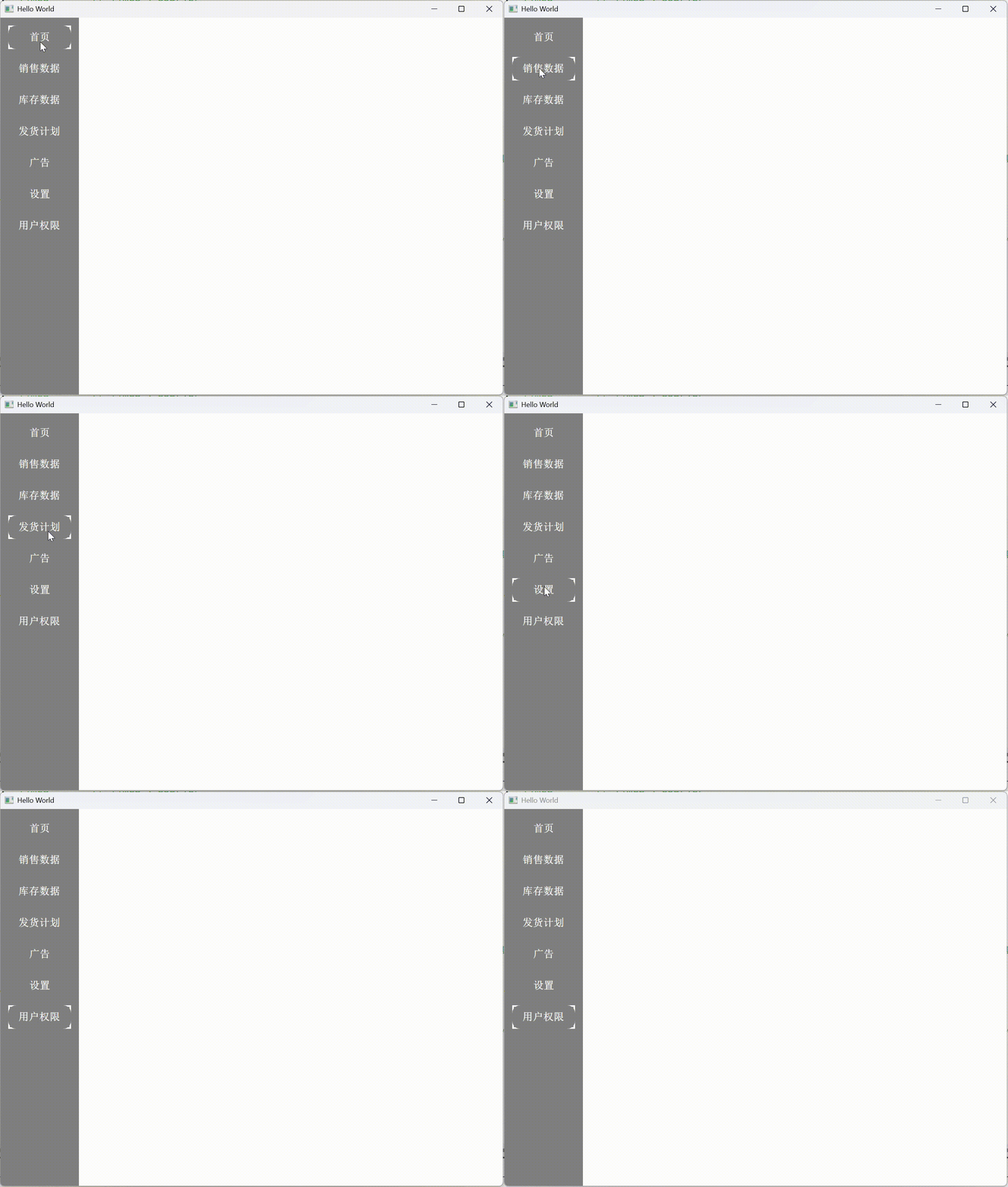
1、
 1 import QtQuick 2.15

 2 import QtQuick.Controls 2.15

 3

 4 Rectangle {

 5     width:100; height: parent.height

 6     color: "grey"

 7

 8     ListView {

 9         id: list

10         width: 90; height: parent.height

11         x: 10; y:10

12         spacing: 10

13         clip: true

14

15         model: ['首页', '销售数据', '库存数据', '发货计划', '广告', '设置', '用户权限']

16         delegate: Rectangle{

17             width: 80; height: 30

18             color: 'grey'

19             radius: 10

20

21             Text{

22                 id: itemText

23                 anchors.centerIn: parent

24                 color: 'white'

25                 text: modelData

26                 font.pointSize:10

27                 font.bold: true

28                 font.family: "Times"      // Times 、Courier

29

30             }

31

32             MouseArea{

33                 anchors.fill: parent

34                 onClicked: {

35                     list.currentIndex = index

36                 }

37             }

38         }

39

40         highlight: Rectangle{                          //  highlight 通常用于在某些组件(如 ListView、ComboBox 等具有可选择项的组件)中,当某个项被选中时,提供一个可视化的高亮效果。这里使用 Rectangle 作为高亮显示的元素。

41             color: "transparent"

42             border.width: 2

43             border.color: 'white'

44         }

45

46         highlightMoveDuration: 0                       // highlightMoveDuration 用于控制高亮效果在不同项之间移动时的动画持续时间,单位是毫秒。

47

48

49     }

50

51

52 }
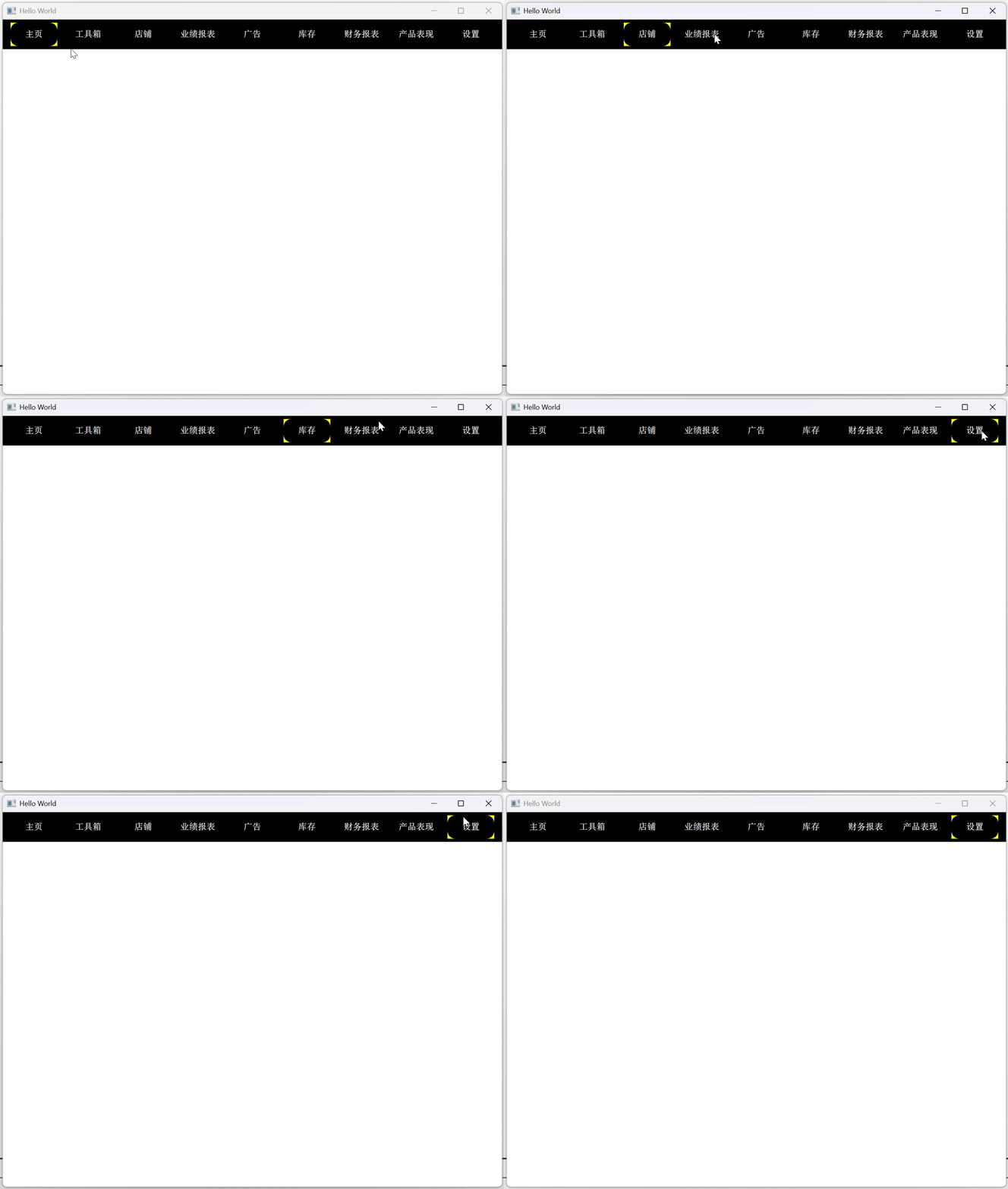
2、
 1 import QtQuick 2.15

 2 import QtQuick.Controls 2.15

 3

 4

 5 Rectangle{

 6     width: parent.width; height: 38

 7     color: 'black'

 8

 9     ListView{

10         id: list

11         x: 10

12         anchors.verticalCenter: parent.verticalCenter

13         width: parent.width; height: 30

14         model: ['主页', '工具箱', '店铺', '业绩报表', '广告', '库存', '财务报表', '产品表现', '设置']

15         clip: true

16

17         delegate: Rectangle{

18             width: 60; height: 30

19             color: 'black'

20             radius: 10

21

22             Text{

23                 text: modelData

24                 color: "white"

25                 anchors.centerIn: parent

26                 font.bold: true

27                 font.pointSize: 8

28                 font.family: "Times"

29             }

30

31             MouseArea{

32                 anchors.fill: parent

33                 onClicked: {

34                     list.currentIndex = index //可以实现高亮切换

35                 }

36             }

37         }

38         spacing: 10

39         highlight: Rectangle{

40             color: "transparent"

41             border.width: 3

42             border.color: "yellow"

43         }

44         highlightMoveDuration: 0

45         orientation: ListView.Horizontal

46

47     }

48 }
3、
  1 import QtQuick 2.15

  2 import QtQuick.Controls 2.15

  3 import QtQuick.Layouts 1.3

  4

  5 Rectangle {

  6     width: 360

  7     height: 300

  8     color: "#EEEEEE"

  9

 10     // 1.定义delegate,内嵌三个Text对象来展示Model定义的ListElement的三个role

 11     Component {

 12         id: phoneDelegate

 13         Item {

 14             id: wrapper

 15             width: parent.width

 16             height: 30

 17

 18             // 实现了鼠标点选高亮的效果

 19             MouseArea {

 20                 anchors.fill: parent;

 21                 onClicked: wrapper.ListView.view.currentIndex = index

 22             }

 23

 24             // 内嵌三个Text对象,水平布局

 25             RowLayout {

 26                 anchors.left: parent.left

 27                 anchors.verticalCenter: parent.verticalCenter

 28                 spacing: 8

 29

 30                 Text {

 31                     id: col1;

 32                     text: name;

 33                     // 是否是当前条目

 34                     color: wrapper.ListView.isCurrentItem ? "red" : "black"       // ListView.isCurrentItem 是 ListView 中委托项(delegate)的一个属性,当该项为当前选中项时返回 true,否则返回 false。

 35                     font.pixelSize: wrapper.ListView.isCurrentItem ? 22 : 18

 36                     Layout.preferredWidth: 120

 37                 }

 38

 39                 Text {

 40                     text: cost;

 41                     color: wrapper.ListView.isCurrentItem ? "red" : "black"

 42                     font.pixelSize: wrapper.ListView.isCurrentItem ? 22 : 18

 43                     Layout.preferredWidth: 80

 44                 }

 45

 46                 Text {

 47                     text: manufacturer;

 48                     color: wrapper.ListView.isCurrentItem ? "red" : "black"

 49                     font.pixelSize: wrapper.ListView.isCurrentItem ? 22 : 18

 50                     Layout.fillWidth: true

 51                 }

 52             }

 53         }

 54     } // phoneDelegate-END

 55

 56     // 2.定义ListView

 57     ListView {

 58         id: listView

 59         anchors.fill: parent

 60

 61         // 使用先前设置的delegate

 62         delegate: phoneDelegate

 63

 64         // 3.ListModel专门定义列表数据的,它内部维护一个 ListElement 的列表。

 65         model: ListModel {

 66             id: phoneModel

 67

 68             // 一个 ListElement 对象就代表一条数据

 69             ListElement{

 70                 name: "iPhone 3GS"

 71                 cost: "1000"

 72                 manufacturer: "Apple"

 73             }

 74             ListElement{

 75                 name: "iPhone 4"

 76                 cost: "1800"

 77                 manufacturer: "Apple"

 78             }

 79             ListElement{

 80                 name: "iPhone 4S"

 81                 cost: "2300"

 82                 manufacturer: "Apple"

 83             }

 84             ListElement{

 85                 name: "iPhone 5"

 86                 cost: "4900"

 87                 manufacturer: "Apple"

 88             }

 89             ListElement{

 90                 name: "B199"

 91                 cost: "1590"

 92                 manufacturer: "HuaWei"

 93             }

 94             ListElement{

 95                 name: "MI 2S"

 96                 cost: "1999"

 97                 manufacturer: "XiaoMi"

 98             }

 99             ListElement{

100                 name: "GALAXY S5"

101                 cost: "4699"

102                 manufacturer: "Samsung"

103             }

104         }

105

106         // 背景高亮

107         focus: true

108         highlight: Rectangle{

109             color: "lightblue"

110         }

111

112

113     }

114

115

116 }

4、简单应用
  1 import QtQuick 2.15

  2 import QtQuick.Controls 2.15

  3 import QtQuick.Layouts 1.3

  4

  5 Rectangle {

  6     width: 360

  7     height: 300

  8     color: "#EEEEEE"

  9

 10     // 1.定义header

 11     Component {

 12         id: headerView

 13         Item {

 14             width: parent.width

 15             height: 30

 16             RowLayout {

 17                 anchors.left: parent.left

 18                 anchors.verticalCenter: parent.verticalCenter

 19                 spacing: 8

 20

 21                 Text {

 22                     text: "Name"

 23                     font.bold: true

 24                     font.pixelSize: 20

 25                     Layout.preferredWidth: 120

 26                 }

 27

 28                 Text {

 29                     text: "cost"

 30                     font.bold: true

 31                     font.pixelSize: 20

 32                     Layout.preferredWidth: 120

 33                 }

 34

 35                 Text {

 36                     text: "manu"

 37                     font.bold: true

 38                     font.pixelSize: 20

 39                     Layout.preferredWidth: 120

 40                 }

 41

 42                 // 省略。。。

 43             }

 44         }

 45     }

 46

 47     // 2.定义delegate

 48     Component {

 49         id: phoneDelegate

 50         Item {

 51             id: wrapper

 52             width: parent.width

 53             height: 30

 54

 55             MouseArea {

 56                 anchors.fill: parent

 57                 onClicked: {

 58                     wrapper.ListView.view.currentIndex = index

 59                     console.log("index=", index)

 60                 }

 61                 onDoubleClicked: {

 62                     wrapper.ListView.view.model.remove(index)

 63                 }

 64             }

 65

 66             RowLayout {

 67                 anchors.left: parent.left

 68                 anchors.verticalCenter: parent.verticalCenter

 69                 spacing: 8

 70

 71                 Text {

 72                     id: col1;

 73                     text: name;

 74                     color: wrapper.ListView.isCurrentItem ? "red" : "black"

 75                     font.pixelSize: wrapper.ListView.isCurrentItem ? 22 : 18

 76                     Layout.preferredWidth: 120

 77                 }

 78

 79                 Text {

 80                     text: cost;

 81                     color: wrapper.ListView.isCurrentItem ? "red" : "black"

 82                     font.pixelSize: wrapper.ListView.isCurrentItem ? 22 : 18

 83                     Layout.preferredWidth: 120

 84                 }

 85

 86                 Text {

 87                     text: manu;

 88                     color: wrapper.ListView.isCurrentItem ? "red" : "black"

 89                     font.pixelSize: wrapper.ListView.isCurrentItem ? 22 : 18

 90                     Layout.preferredWidth: 120

 91                 }

 92

 93             }

 94         }

 95     }

 96

 97

 98

 99     // 3.定义model

100     Component {

101         id: phoneModel

102         ListModel {

103             ListElement{

104                 name: "iPhone 3GS"

105                 cost: "1000"

106                 manu: "Apple"

107             }

108             ListElement{

109                 name: "iPhone 4"

110                 cost: "1800"

111                 manu: "Apple"

112             }

113             ListElement{

114                 name: "iPhone 4S"

115                 cost: "2300"

116                 manu: "Apple"

117             }

118             ListElement{

119                 name: "iPhone 5"

120                 cost: "4900"

121                 manu: "Apple"

122             }

123             ListElement{

124                 name: "B199"

125                 cost: "1590"

126                 manu: "HuaWei"

127             }

128             ListElement{

129                 name: "MI 2S"

130                 cost: "1999"

131                 manu: "XiaoMi"

132             }

133             ListElement{

134                 name: "GALAXY S5"

135                 cost: "4699"

136                 manu: "Samsung"

137             }

138

139         }

140     }

141

142     //

143     Component {

144         id: footerView

145         Text {

146             width: parent.width

147             font.italic: true

148             font.bold: true

149             font.pointSize: 8

150             color: "blue"

151             height: 30

152             verticalAlignment: Text.AlignVCenter

153         }

154     }

155

156

157     // 4.定义ListView

158     ListView {

159         id: listView

160         anchors.fill: parent

161

162         delegate: phoneDelegate

163         model: phoneModel.createObject(listView)

164         header: headerView

165         footer: footerView

166         focus: true

167         highlight: Rectangle{

168             color: "lightblue"

169         }

170

171         onCurrentIndexChanged:{

172             if( listView.currentIndex >=0 ){

173                 var data = listView.model.get(listView.currentIndex);

174                 // ListModel 的get()方法接受一个 int 类型的参数,用来获取指定索引位置的数据,返回一 个 QML 对象。然后,我们就可以像访问属性那样访问数据的 role 了

175                 listView.footerItem.text = data.name + " , " + data.cost + " , " + data.manu

176             }

177         }

178

179     }

180

181

182     // 如果你想删除一条或多条数据,可以使用 ListModel 的remove(int index, int count)方法,它有两个整型参数,第一个参数指明要删除的数据的索引位置,第二个参数表示要删除的数据条数,默认值为 1。

183     // 如果你想清空一个 Model,可以直接调用 clear() 方法。

184

185

186

187 }

5、ListView-增删改查
  1 import QtQuick 2.15

  2 import QtQuick.Controls 2.15

  3 import QtQuick.Layouts 1.3

  4

  5 Rectangle {

  6     width: 360

  7     height: 300

  8     color: "#EEEEEE"

  9

 10     // 1.定义header

 11     Component {

 12         id: headerView

 13         Item {

 14             width: parent.width

 15             height: 30

 16             RowLayout {

 17                 anchors.left: parent.left

 18                 anchors.verticalCenter: parent.verticalCenter

 19                 spacing: 8

 20

 21                 Text {

 22                     text: "Name"

 23                     font.bold: true

 24                     font.pixelSize: 20

 25                     Layout.preferredWidth: 120

 26                 }

 27

 28                 Text {

 29                     text: "cost"

 30                     font.bold: true

 31                     font.pixelSize: 20

 32                     Layout.preferredWidth: 120

 33                 }

 34

 35                 Text {

 36                     text: "manu"

 37                     font.bold: true

 38                     font.pixelSize: 20

 39                     Layout.preferredWidth: 120

 40                 }

 41

 42                 // 省略。。。

 43             }

 44         }

 45     }

 46

 47     // 2.定义delegate

 48     Component {

 49         id: phoneDelegate

 50         Item {

 51             id: wrapper

 52             width: parent.width

 53             height: 30

 54

 55             MouseArea {

 56                 anchors.fill: parent

 57                 onClicked: {

 58                     wrapper.ListView.view.currentIndex = index

 59                     mouse.accepted = true

 60                 }

 61                 onDoubleClicked: {

 62                     wrapper.ListView.view.model.remove(index)

 63                     mouse.accepted = true

 64                 }

 65             }

 66

 67             RowLayout {

 68                 anchors.left: parent.left

 69                 anchors.verticalCenter: parent.verticalCenter

 70                 spacing: 8

 71

 72                 Text {

 73                     id: col1;

 74                     text: name;

 75                     color: wrapper.ListView.isCurrentItem ? "red" : "black"

 76                     font.pixelSize: wrapper.ListView.isCurrentItem ? 22 : 18

 77                     Layout.preferredWidth: 120

 78                 }

 79

 80                 Text {

 81                     text: cost;

 82                     color: wrapper.ListView.isCurrentItem ? "red" : "black"

 83                     font.pixelSize: wrapper.ListView.isCurrentItem ? 22 : 18

 84                     Layout.preferredWidth: 120

 85                 }

 86

 87                 Text {

 88                     text: manu;

 89                     color: wrapper.ListView.isCurrentItem ? "red" : "black"

 90                     font.pixelSize: wrapper.ListView.isCurrentItem ? 22 : 18

 91                     Layout.preferredWidth: 120

 92                 }

 93

 94             }

 95         }

 96     }

 97

 98

 99

100     // 3.定义model

101     Component {

102         id: phoneModel

103         ListModel {

104             ListElement{

105                 name: "iPhone 3GS"

106                 cost: "1000"

107                 manu: "Apple"

108             }

109             ListElement{

110                 name: "iPhone 4"

111                 cost: "1800"

112                 manu: "Apple"

113             }

114             ListElement{

115                 name: "iPhone 4S"

116                 cost: "2300"

117                 manu: "Apple"

118             }

119             ListElement{

120                 name: "iPhone 5"

121                 cost: "4900"

122                 manu: "Apple"

123             }

124             ListElement{

125                 name: "B199"

126                 cost: "1590"

127                 manu: "HuaWei"

128             }

129             ListElement{

130                 name: "MI 2S"

131                 cost: "1999"

132                 manu: "XiaoMi"

133             }

134             ListElement{

135                 name: "GALAXY S5"

136                 cost: "4699"

137                 manu: "Samsung"

138             }

139

140         }

141     }

142

143     //

144     Component {

145         id: footerView

146         Item{

147             id: footerRootItem

148             width: parent.width

149             height: 30

150             property alias text: txt.text   // property alias text: txt.text 是 QML 中用于定义属性别名(alias)的语句。属性别名允许你将一个对象的某个属性关联到另一个属性上,从而提供一个更方便的访问方式。

151

152             // 自定义信号

153             signal clean()

154             signal add()

155

156

157             Text {

158                 id :txt

159                 anchors.left:parent.left

160                 anchors.top:parent.top

161                 anchors.bottom: parent.bottom

162                 font.italic: true

163                 font.bold: true

164                 font.pointSize: 8

165                 color: "blue"

166                 height: 30

167                 verticalAlignment: Text.AlignVCenter

168             }

169

170             Button {

171                 id: clearAll

172                 anchors.right: parent.right

173                 anchors.verticalCenter: parent.verticalCenter

174                 text: "Clear"

175                 onClicked: footerRootItem.clean()

176             }

177

178             Button {

179                 id: addOne

180                 anchors.right: clearAll.left

181                 anchors.rightMargin: 4

182                 anchors.verticalCenter: parent.verticalCenter

183                 text: "Add"

184                 onClicked: footerRootItem.add()

185             }

186         }

187

188     }

189

190

191     // 4.定义ListView

192     ListView {

193         id: listView

194         anchors.fill: parent

195

196         delegate: phoneDelegate

197         model: phoneModel.createObject(listView)

198         header: headerView

199         footer: footerView

200         focus: true

201         highlight: Rectangle{

202             color: "lightblue"

203         }

204

205         onCurrentIndexChanged:{

206             if( listView.currentIndex >=0 ){

207                 var data = listView.model.get(listView.currentIndex);

208                 // ListModel 的get()方法接受一个 int 类型的参数,用来获取指定索引位置的数据,返回一 个 QML 对象。然后,我们就可以像访问属性那样访问数据的 role 了

209                 listView.footerItem.text = data.name + " , " + data.cost + " , " + data.manu

210             }

211             else{

212                 listView.footerItem.text = ""

213             }

214         }

215

216         function addOne() {

217             model.append(

218                         {

219                             "name": "MX3",

220                             "cost": "1799",

221                             "manu": "MeiZu"

222                         }

223                         )

224         }

225

226

227         // 连接信号槽

228         Component.onCompleted: {

229             listView.footerItem.clean.connect(listView.model.clear)

230             listView.footerItem.add.connect(listView.addOne)

231         }

232

233

234     }

235

236

237     // 如果你想删除一条或多条数据,可以使用 ListModel 的remove(int index, int count)方法,它有两个整型参数,第一个参数指明要删除的数据的索引位置,第二个参数表示要删除的数据条数,默认值为 1。

238     // 如果你想清空一个 Model,可以直接调用 clear() 方法。

239

240     // 要想修改 Model 的数据,可以使用 ListModel 的setProperty(int index,string property, variant value)方法。

241     // 该方法有三个参数,第一个是数据的索引,第二个是数据内 role 的名字,第三个是mle的值。比如要修改 “MI 2S" 的价格,可以这样:listView.model.setProperty(5, "cost", 16999)

242

243     // 如果想替换某一条数据,可以使用set(int index, jsobject dict)方法。我们经常用对象的字面量表示法构造一个对象传递给 set() 方法。比如想把 “iPhone 3GS” 替换为 “Z5S mini”,可以这样:

244     // listView.model.set(0, {"name" : "25S mini ", "cost" : 1999, "manufacturer"  : "ZhongXing"})

245

246

247     // 要向 Model 的尾部添加数据,可以使用append()方法。append() 的参数是 jsobject,在 ECMAScript 中可以使用对象的字面量表示法来构造这个 jsobject,即花括号加 key-value 对的 集合,

248     // 类似于这样:{"name" : "zhangsan", "age" : 28},key-value 对之间使用逗号分隔。

249

250

251 }

6、ListView-动画+上移下移
1 import QtQuick 2.15
2 import QtQuick.Controls 2.15
3 import QtQuick.Layouts 1.3
4
5 Rectangle {
6 width: 500
7 height: 400
8 color: "#EEEEEE"
9
10 // 1.定义header
11 Component {
12 id: headerView
13 Item {
14 width: parent.width
15 height: 30
16 RowLayout {
17 anchors.left: parent.left
18 anchors.verticalCenter: parent.verticalCenter
19 spacing: 8
20
21 Text {
22 text: "Name"
23 font.bold: true
24 font.pixelSize: 20
25 Layout.preferredWidth: 120
26 }
27
28 Text {
29 text: "cost"
30 font.bold: true
31 font.pixelSize: 20
32 Layout.preferredWidth: 120
33 }
34
35 Text {
36 text: "manu"
37 font.bold: true
38 font.pixelSize: 20
39 Layout.preferredWidth: 120
40 }
41
42 // 省略。。。
43 }
44 }
45 }
46
47 // 2.定义delegate
48 Component {
49 id: phoneDelegate
50 Item {
51 id: wrapper
52 width: parent.width
53 height: 30
54
55 MouseArea {
56 anchors.fill: parent
57 onClicked: {
58 wrapper.ListView.view.currentIndex = index
59 mouse.accepted = true
60 }
61 onDoubleClicked: {
62 wrapper.ListView.view.model.remove(index)
63 mouse.accepted = true
64 }
65 }
66
67 RowLayout {
68 anchors.left: parent.left
69 anchors.verticalCenter: parent.verticalCenter
70 spacing: 8
71
72 Text {
73 id: col1;
74 text: name;
75 color: wrapper.ListView.isCurrentItem ? "red" : "black"
76 font.pixelSize: wrapper.ListView.isCurrentItem ? 22 : 18
77 Layout.preferredWidth: 120
78 }
79
80 Text {
81 text: cost;
82 color: wrapper.ListView.isCurrentItem ? "red" : "black"
83 font.pixelSize: wrapper.ListView.isCurrentItem ? 22 : 18
84 Layout.preferredWidth: 120
85 }
86
87 Text {
88 text: manu;
89 color: wrapper.ListView.isCurrentItem ? "red" : "black"
90 font.pixelSize: wrapper.ListView.isCurrentItem ? 22 : 18
91 Layout.preferredWidth: 120
92 }
93
94 }
95 }
96 }
97
98
99
100 // 3.定义model
101 Component {
102 id: phoneModel
103 ListModel {
104 ListElement{
105 name: "iPhone 3GS"
106 cost: "1000"
107 manu: "Apple"
108 }
109 ListElement{
110 name: "iPhone 4"
111 cost: "1800"
112 manu: "Apple"
113 }
114 ListElement{
115 name: "iPhone 4S"
116 cost: "2300"
117 manu: "Apple"
118 }
119 ListElement{
120 name: "iPhone 5"
121 cost: "4900"
122 manu: "Apple"
123 }
124 ListElement{
125 name: "B199"
126 cost: "1590"
127 manu: "HuaWei"
128 }
129 ListElement{
130 name: "MI 2S"
131 cost: "1999"
132 manu: "XiaoMi"
133 }
134 ListElement{
135 name: "GALAXY S5"
136 cost: "4699"
137 manu: "Samsung"
138 }
139
140 }
141 }
142
143 //
144 Component {
145 id: footerView
146 Item{
147 id: footerRootItem
148 width: parent.width
149 height: 30
150 property alias text: txt.text // property alias text: txt.text 是 QML 中用于定义属性别名(alias)的语句。属性别名允许你将一个对象的某个属性关联到另一个属性上,从而提供一个更方便的访问方式。
151
152 // 自定义信号
153 signal clean()
154 signal add()
155 signal insert()
156 signal moveUp()
157 signal moveDown()
158
159 Button {
160 id: clearAll
161 anchors.right: parent.right
162 anchors.verticalCenter: parent.verticalCenter
163 text: "Clear"
164 onClicked: footerRootItem.clean()
165 }
166
167 // 新增按钮
168 Button {
169 id: addOne
170 anchors.right: clearAll.left
171 anchors.rightMargin: 4
172 anchors.verticalCenter: parent.verticalCenter
173 text: "Add"
174 onClicked: footerRootItem.add()
175 }
176
177 // 插入按钮
178 Button {
179 id: insertOne
180 anchors.right: addOne.left
181 anchors.rightMargin: 4
182 anchors.verticalCenter: parent.verticalCenter
183 text: "Insert"
184 onClicked: footerRootItem.insert()
185 }
186
187 // 下移按钮
188 Button {
189 id: moveDown;
190 anchors.right: insertOne.left
191 anchors.rightMargin: 4
192 anchors.verticalCenter: parent.verticalCenter
193 text: "Down"
194 onClicked: footerRootItem.moveDown()
195 }
196
197 // 上移按钮
198 Button {
199 id: moveUp;
200 anchors.right: moveDown.left
201 anchors.rightMargin: 4
202 anchors.verticalCenter: parent.verticalCenter
203 text: "Up"
204 onClicked: footerRootItem.moveUp()
205 }
206
207 Text {
208 id :txt
209 anchors.left:parent.left
210 anchors.top:moveUp.bottom
211 font.italic: true
212 font.bold: true
213 font.pointSize: 8
214 color: "blue"
215 height: 30
216 verticalAlignment: Text.AlignVCenter
217 }
218
219
220 }
221
222 }
223
224
225 // 4.定义ListView
226 ListView {
227 id: listView
228 anchors.fill: parent
229
230 delegate: phoneDelegate
231 model: phoneModel.createObject(listView)
232 header: headerView
233 footer: footerView
234 focus: true
235 highlight: Rectangle{
236 color: "lightblue"
237 }
238
239 onCurrentIndexChanged:{
240 if( listView.currentIndex >=0 ){
241 var data = listView.model.get(listView.currentIndex);
242 // ListModel 的get()方法接受一个 int 类型的参数,用来获取指定索引位置的数据,返回一 个 QML 对象。然后,我们就可以像访问属性那样访问数据的 role 了
243 listView.footerItem.text = data.name + " , " + data.cost + " , " + data.manu
244 }
245 else{
246 listView.footerItem.text = ""
247 }
248 }
249
250 // 在ListView第一次实例化或者因Model变化而需要创建Item时应用
251 populate: Transition { // 这里的动画效果是让新创建的列表项产生淡入的视觉效果,增强用户体验。 populate 是 ListView 的一个属性,专门用于定义在列表项创建时所应用的过渡动画。
252 NumberAnimation { // Transition 是 QML 里用于定义过渡动画的容器元素,它可以包含一个或多个动画元素,这些动画元素可以按照顺序(使用 SequentialAnimation)
253 // 或者并行(使用 ParallelAnimation)执行
254 property: "opacity"
255 from: 0
256 to: 1.0
257 duration: 1000
258 }
259 }
260
261 // add过渡动画(新增Item触发)
262 add: Transition {
263 ParallelAnimation{
264 NumberAnimation {
265 property: "opacity"
266 from: 0
267 to: 1.0
268 duration: 1000
269 }
270 NumberAnimation {
271 properties: "x,y"
272 from: 0
273 duration: 1000
274 }
275 }
276 }
277
278 // 用于指定通用的、由于Model变化导致Item被迫移位时的动画效果
279 displaced: Transition { // displaced 是 ListView 的一个属性,专门用于定义当列表项因数据模型变化而被迫移位时所应用的过渡动画。
280 SpringAnimation {
281 // SpringAnimation 是 QML 中一种特殊的动画类型,它模拟了弹簧的物理行为。当一个对象的属性值发生变化时,
282 // SpringAnimation 会让该属性以类似弹簧的方式移动到新的值,具有弹性和缓冲的效果
283 property: "y"
284 spring: 3 // 它代表弹簧的弹性系数
285 damping: 0.1 // 阻尼系数
286 epsilon: 0.25 // 动画结束的误差范围
287 }
288 }
289
290 // remove过渡动画(移除Item触发)
291 remove: Transition { // Transition 元素是 QML 中用于定义过渡动画的容器,它可以包含一个或多个动画元素
292 SequentialAnimation{ // 用于按顺序执行其子动画
293 NumberAnimation {
294 properties: "y" // 指定要进行动画处理的属性,这里是 y 坐标。意味着当列表项被移除时,它的 y 坐标会在动画过程中逐渐变化。
295 to: 0
296 duration: 600 // 指定动画结束时属性的值,这里将 y 坐标设置为 0。所以列表项会在 600 毫秒的时间内逐渐移动到 y 坐标为 0 的位置。
297 }
298 NumberAnimation {
299 property: "opacity" // 指定要进行动画处理的属性,这里是 opacity(不透明度)。
300 to: 0
301 duration: 400
302 }
303 }
304 }
305
306 // move过渡动画(移动Item触发)
307 move: Transition {
308 NumberAnimation {
309 property: "y"
310 duration: 700
311 easing.type: Easing.InQuart // easing 是 NumberAnimation 的一个属性,它用于控制动画的速度变化方式
312 // Easing.InQuart 是一种缓动类型,属于四次方缓动函数。在这种缓动类型下,动画开始时速度较慢,然后逐渐加速。
313 }
314 }
315
316
317 function addOne() {
318 model.append(
319 {
320 "name": "MX3",
321 "cost": "1799",
322 "manu": "MeiZu"
323 }
324 )
325 }
326
327 // 插入函数
328 function insertOne() {
329 // 获取当前选中条目的索引
330 var currentIndex = listView.currentIndex;
331 // 如果没有选中条目,默认插入到第一个位置
332 if (currentIndex < 0) {
333 currentIndex = 0;
334 } else {
335 // 插入到当前选中条目下方,即索引加 1 的位置
336 currentIndex++;
337 }
338
339 model.insert(currentIndex,
340 {
341 "name": "HTC One E8",
342 "cost": "2999",
343 "manu": "HTC"
344 })
345 }
346
347 // 上移函数
348 function moveUp() {
349 if(currentIndex - 1 >= 0){
350 model.move(currentIndex, currentIndex - 1, 1)
351 }
352 }
353
354 // 下移函数
355 function moveDown() {
356 if(currentIndex + 1 < model.count){
357 model.move(currentIndex, currentIndex + 1, 1)
358 }
359 }
360
361
362 // 连接信号槽
363 Component.onCompleted: {
364 listView.footerItem.clean.connect(listView.model.clear)
365 listView.footerItem.add.connect(listView.addOne)
366 listView.footerItem.insert.connect(listView.insertOne)
367 listView.footerItem.moveUp.connect(listView.moveUp)
368 listView.footerItem.moveDown.connect(listView.moveDown)
369 }
370
371 ScrollBar.vertical: ScrollBar {}
372
373
374 }
375
376
377 // 如果你想删除一条或多条数据,可以使用 ListModel 的remove(int index, int count)方法,它有两个整型参数,第一个参数指明要删除的数据的索引位置,第二个参数表示要删除的数据条数,默认值为 1。
378 // 如果你想清空一个 Model,可以直接调用 clear() 方法。
379
380 // 要想修改 Model 的数据,可以使用 ListModel 的setProperty(int index,string property, variant value)方法。
381 // 该方法有三个参数,第一个是数据的索引,第二个是数据内 role 的名字,第三个是mle的值。比如要修改 “MI 2S" 的价格,可以这样:listView.model.setProperty(5, "cost", 16999)
382
383 // 如果想替换某一条数据,可以使用set(int index, jsobject dict)方法。我们经常用对象的字面量表示法构造一个对象传递给 set() 方法。比如想把 “iPhone 3GS” 替换为 “Z5S mini”,可以这样:
384 // listView.model.set(0, {"name" : "25S mini ", "cost" : 1999, "manufacturer" : "ZhongXing"})
385
386
387 // 要向 Model 的尾部添加数据,可以使用append()方法。append() 的参数是 jsobject,在 ECMAScript 中可以使用对象的字面量表示法来构造这个 jsobject,即花括号加 key-value 对的 集合,
388 // 类似于这样:{"name" : "zhangsan", "age" : 28},key-value 对之间使用逗号分隔。
389
390
391 }

【QML Model-View】ListView几个简单的设计的更多相关文章
- MVC(Model View Controller)框架
MVC框架 同义词 MVC一般指MVC框架 MVC全名是Model View Controller,是模型(model)-视图(view)-控制器(controller)的缩写,一种软件设计典范,用一 ...
- (一) Qt Model/View 的简单说明
(一) Qt Model/View 的简单说明 .预定义模型 (二)使用预定义模型 QstringListModel例子 (三)使用预定义模型QDirModel的例子 (四)Qt实现自定义模型基于QA ...
- Qt Model/View 的简单说明
目录: (一) Qt Model/View 的简单说明 .预定义模型 (二)使用预定义模型 QstringListModel例子 (三)使用预定义模型QDirModel的例子 (四)Qt实现自定义模型 ...
- 第15.23节 PyQt(Python+Qt)入门学习:Model/View架构中QListView视图配套Model的开发使用
老猿Python博文目录 专栏:使用PyQt开发图形界面Python应用 老猿Python博客地址 一.概述 QListView理论上可以和所有QAbstractItemModel派生的类如QStri ...
- Qt Model/View(官方翻译,图文并茂)
http://doc.trolltech.com/main-snapshot/model-view-programming.html 介绍 Qt 4推出了一组新的item view类,它们使用mode ...
- (转)Qt Model/View 学习笔记 (七)——Delegate类
Qt Model/View 学习笔记 (七) Delegate 类 概念 与MVC模式不同,model/view结构没有用于与用户交互的完全独立的组件.一般来讲, view负责把数据展示 给用户,也 ...
- (转)Qt Model/View 学习笔记 (五)——View 类
Qt Model/View 学习笔记 (五) View 类 概念 在model/view架构中,view从model中获得数据项然后显示给用户.数据显示的方式不必与model提供的表示方式相同,可以与 ...
- (转)Qt Model/View 学习笔记 (四)——创建新的Models
创建新的Models 介绍 model/view组件之间功能的分离,允许创建model利用现成的views.这也可以使用标准的功能 图形用户接口组件像QListView,QTableView和QTre ...
- (转)Qt Model/View 学习笔记 (三)——Model类
Model类 基本概念 在model/view构架中,model为view和delegates使用数据提供了标准接口.在Qt中,标准接口QAbstractItemModel类中被定义.不管数据在底层以 ...
- (转)Qt Model/View 学习笔记 (二)——Qt Model/View模式举例
Qt Model/View模式举例 Qt提供了两个标准的models:QStandardItemModel和QDirModel.QStandardItemModel是一个多用途的model,可用于表示 ...
随机推荐
- 把数据库表的信息添加到list集合里面
把数据库表里面的信息添加到集合里面并且打印出来: 数据库表的内容: java代码逻辑处理: 1 public static void main(String[] args) { 2 3 Connec ...
- VS2022 下载超详细安装教程(附安装包及秘钥):全能开发工具部署指南
目录 一.VS2022软件核心功能与优势 二.VS2022下载及安装准备 1. 系统要求: 2. VS2022下载: 三.VS2022详细安装步骤 1. 解压VS2022安装包 2. 运行VS2022 ...
- 开源 vGPU 方案 HAMi: core&memory 隔离测试
本文主要对开源的 vGPU 方案 HAMi 的 GPU Core&Memory 隔离功能进行测试. 省流: HAMi vGPU 方案提供的 Core&Memory 隔离基本符合预期: ...
- Xamarin.Andorid 调用相机拍照
https://www.jianshu.com/p/29b349ff7f1a 第一步:XML布局文件 <?xml version="1.0" encoding="u ...
- c#基础(视频)
可空类型 类型后面+?就可以声明可空类型了,可空类型和普通的类型是两种类型,赋值时需要进行类型转换 例如 double? num=null: 面向对象 三大特征 封装 打包,便于管理 继承 拿来主义, ...
- Java MCP 实战:构建跨进程与远程的工具服务
一.MCP 协议简介 MCP(Model Context Protocol,模型上下文协议)是由Anthropic推出的一种开放标准协议,旨在为大语言模型(LLM)与外部数据源.工具和服务提供标准化. ...
- 前端开发系列016-基础篇之Javascript面向对象(五)
一.严格模式 说明 在JavaScript中有严格模式和非严格模式两种运行环境 关键字 "use strict"; 实现严格模式 只需要在脚本代码中添加上上述关键字即可. 关键字具 ...
- 安装Visio2016
在网上不知道看了多少个下载站,都是一堆的骗子,下的都是游戏软件或是其他的什么东西.然后顺便会给你安装一堆垃圾. 其中有一个有良心的,至少还放上了Visio2013软件包.在多方寻找之后终于发现了一下可 ...
- vsftpd 的配置项目
基本配置说明: 1)local_root=/ftpfile(当本地用户登入时,将被更换到定义的目录下,默认值为各用户的家目录) 2)anon_root=/ftpfile(使用匿名登入时,所登入的目录) ...
- opengl 视图
简介 我的印象中,对于纯C的三维投影实现是要确定viewpoint,即摄像机的视角和朝向,但是在opengl中可以不这么设置可以采用默认设置 如果没有调用gluLookAt()函数,那么摄像机就会采用 ...