
mvc5 + ef6 + autofac搭建项目(四)
在列表页面,点击新增,弹出窗口实现视屏上传,这里存在一个问题,就是大文件上传的问题,iis出于安全问题,有限制,当然这不是大问题,解决也很容易:
见截图:
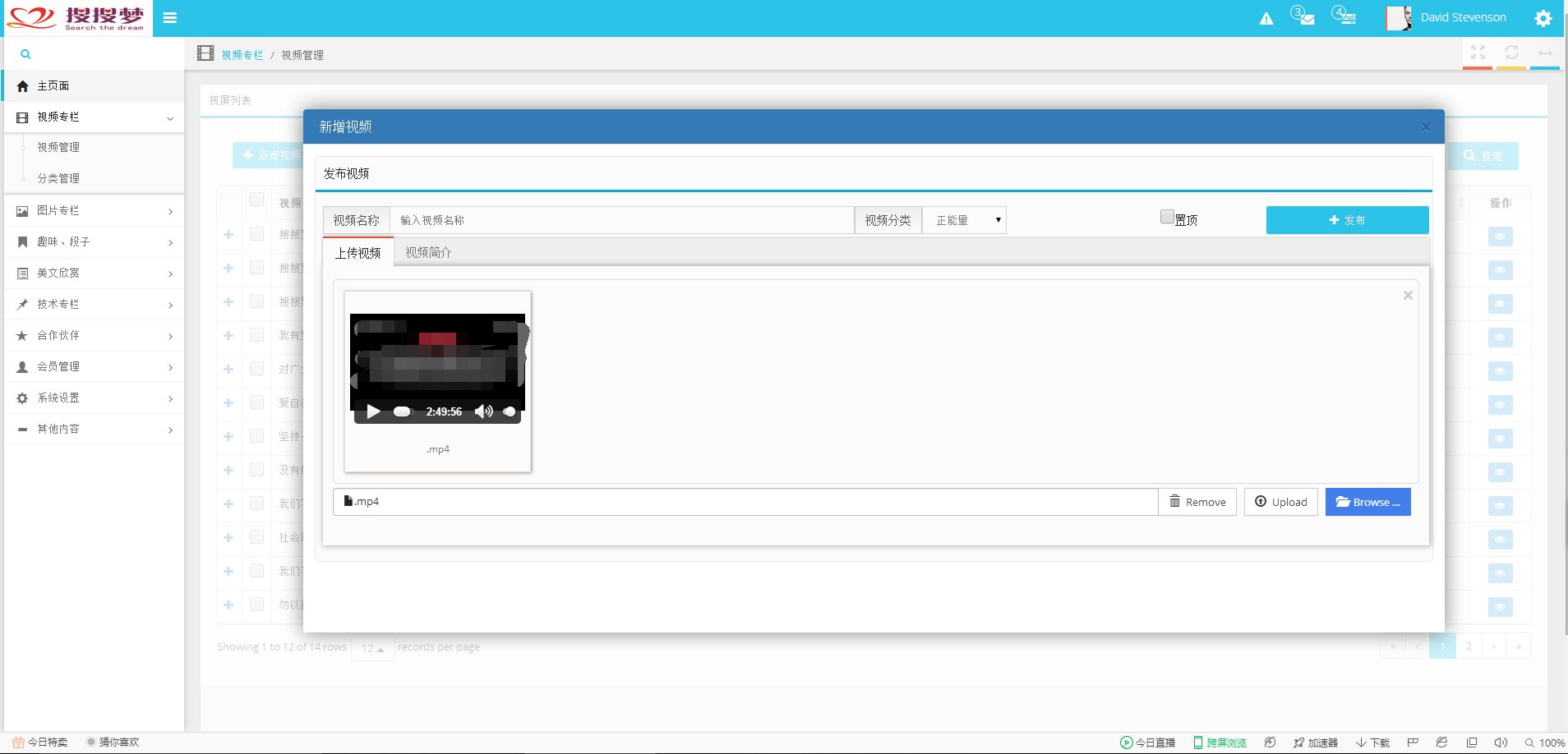
请忽略视屏文件,看得懂的请装作不懂。
源码
@{

    ViewBag.Title = "发布新视频";

    Layout = "~/Views/Shared/_LayoutDialogContext.cshtml";

}

<div class="row">

    <div class="col-lg-12 col-sm-12 col-xs-12">

        <div class="well with-header">

            <div class="header bordered-sky">发布视频</div>

            <div class="row">

                <div id="toolbar" style="padding-left: 5px">

                    <div class="buttons-preview">

                        <form id="uploadForm" action="" method="post" enctype="multipart/form-data">

                            <div class="">

                                <div class="input-group">

                                    <span class="input-group-addon ">视频名称</span>

                                    <input type="text" class="form-control txt-video-title" name="videoTitle" placeholder="输入视频名称" />

                                    <span class="input-group-addon ">视频分类</span>

                                    <span class="table-cell">@Html.DropDownList("VideoCategoryList", null, new { @class = "drop" })</span>

                                    <span class="table-cell">

                                        <input type="checkbox" value="-1" id="chkToTop" name="chkToTop" />置顶</span>

                                        <a href="javascript:void(0);" style="display: table-cell;" class="btn btn-azure btn-publish"><i class="fa fa-plus"></i> 发布</a>

</div>

                                <div class="tabbable">

                                    <ul class="nav nav-tabs" id="myTab">

                                        <li class="tab-red active">

                                            <a data-toggle="tab" href="#videoInfo">

                                                上传视频

                                            </a>

                                        </li>

                                        @*<li class="tab-red">

                                                <a data-toggle="tab" href="#picture">

                                                    上传图片

                                                </a>

                                            </li>*@

                                        <li class="">

                                            <a data-toggle="tab" href="#baseInfo">

                                                视频简介

                                            </a>

                                        </li>

                                    </ul>

                                    <div class="tab-content">

                                        <div id="videoInfo" class="tab-pane active">

                                            <p>

                                                <input id="inputVideo" name="inputVideo" data-min-file-count="1" type="file" class="file file-loading" data-allowed-file-extensions='["MP4", "FLV"]'>

                                            </p>

                                        </div>

                                        @*<div id="picture" class="tab-pane">

                                                <p>

                                                    <input id="inputPicture" name="inputPicture" multiple data-min-file-count="3" type="file" class="file file-loading" data-allowed-file-extensions='["jpg", "jpeg","png","gif","bmp"]'>

                                                </p>

                                            </div>*@

                                        <div id="baseInfo" class="tab-pane ">

                                            <textarea rows="8" style="width:100%" id="videoDesc" name="videoDesc"></textarea>

                                        </div>

                                    </div>

                                </div>

                            </div>

                        </form>

                    </div>

                </div>

            </div>

        </div>

    </div>

</div>

<style>

    .input-group {

        margin-bottom: 5px;

    }

    #thelist {

        font-size: 10px;

    }

    .table-cell {

        display: table-cell;

        vertical-align: top;

    }

    .drop {

        height: 34px;

    }

</style>

<link href="~/Scripts/js/bootstrap/fileupload/css/fileinput.css" rel="stylesheet" />

<script src="~/Scripts/js/bootstrap/fileupload/js/fileinput.js"></script>

<script src="~/Scripts/js/bootstrap/fileupload/js/fileinput_locale_zh.js"></script>

<script type="text/javascript">

    $(function () {

        $("#inputVideo").fileinput({

            //uploadUrl: '#', // you must set a valid URL here else you will get an error

            //allowedFileExtensions: ['jpg', 'png', 'gif'],

            overwriteInitial: false,

            maxFileSize: 3000,

            maxFilesNum: 1,

            //allowedFileTypes: ['image', 'video', 'flash'],

            slugCallback: function (filename) {

                return filename.replace('(', '_').replace(']', '_');

            }

        });

        //高宽属性社会资

        resize();

        $(window).resize(function () {

            resize();

        });

        initialUploadBase();

        submitFile();

    });

    function resize() {

        var height = $('.bootstrap-dialog').parent('body').height();

        var width = $('.bootstrap-dialog').parent('body').width();

        if (width > 500)

            width = width - 250

        $('.modal-dialog').css({ "width": width });

        $('.modal-dialog .modal-content').css({ "height": height - 120 });

    }

    ///初始化图片上传(样式)

    function initialUploadBase() {

        //图片上传

        $('#inputPicture').fileinput({

            language: 'zh',//语言设置

            uploadUrl: '',//上传路径

            allowedFileExtensions: ['jpg', 'png', 'gif', 'jpeg'],//接收的文件后缀

            showUpload: false, //是否显示上传按钮

            showCaption: false,//是否显示标题

            browseClass: "btn btn-primary", //按钮样式

            previewFileIcon: "<i class='glyphicon glyphicon-king'></i>"

        });

        //视频上传

        $('#inputPicture').fileinput({

            language: 'zh',//语言设置

            uploadUrl: '',//上传路径

            allowedFileExtensions: ['MP4', 'flv'],//接收的文件后缀

            showUpload: false, //是否显示上传按钮

            showCaption: false,//是否显示标题

            browseClass: "btn btn-primary", //按钮样式

            previewFileIcon: "<i class='glyphicon glyphicon-king'></i>"

        });

    }

    //提交文件

    function submitFile() {

        $('.btn-publish').click(function () {

            //var title = $('.txt-video-title').val();

            var uploadFormData = new FormData($('#uploadForm')[0]);//序列化表单,$("form").serialize()只能序列化数据,不能序列化文件

            $.ajax({

                type: 'POST',

                data: uploadFormData,

                url: '/Video/UpLoad',//TypeError: 'append' called on an object that does not implement interface FormData.

                processData: false,

                contentType: false,

                async: false,

                success: function (data) {

                    if (typeof (data) == undefined) {

                        alert("用户信息已丢失,请重新登录!"); window.parent().location.href = "/Account/Login";

                    }

                    if (data.ErrorMsg == "") {

                        alert('上传成功!');

                    }

                }

            });

        });

    }

</script>
1.bt3的弹窗,实现也很简单,在上一篇(三)中,第一段代码中有一段 showBigDialog('/Video/Insert', '新增视频');,实现 见代码:
var showBigDialog = function (remoteRoute, title) {

    BootstrapDialog.show({

        title: title,

        message: function (dialog) {

            var $message = $('<div></div>');

            var pageToLoad = dialog.getData('pageToLoad');

            $message.load(pageToLoad);

            return $message;

        }, draggable: true,

        data: {

            'pageToLoad': remoteRoute

        }

    });
这里当初实现(搞好久了,记不太清楚了,今天闹情绪,才拿出来贴贴)有一个问题,就是如何才弹出层中加载另外一视图的问题:中个问题问得好啊,但是很傻,因为上面已经写的很明了,那么另一个问题来了,加载的另一个视图,怎么自适应大小呢?
直接写死了?尼玛,这怎么可能?换一个显示频是不是就挤坏了?不得不说,这个问题问得也很有技术含量,但是,上面也实现了,当然,需要在屏幕变化之后,重新刷新弹窗,如果是 自适应显示频的兼容处理,那么,该处未实现。
不得不说,bt3的拆件的确很猛,支持图片的上传预览,视频的预览和播放
上传实现代码:
/// <summary>

        ///     上传新视频,(包含文件上传)

        /// </summary>

        /// <returns></returns>

        public JsonResult UpLoad()

        {

            if (null != Session[Consts.SYSTEMUERSESSION])

            {

                string videoName = Request["videoTitle"];//视频标题

                string videoDesc = Request["videoDesc"];//视频简介

                string chkToTop = Request["chkToTop"];//是否置顶

                string videoPictureUrl = "";

                string videoInfoUrl = "";//视频上传之后的虚拟路径

                string videoCategoryKey = Request["VideoCategoryList"];//视频分类外键ID

                FileUpLoadResult fileUpLoadVideo = null;//用于输出结果

                #region 视频上传,生成默认展示图片(自动剪切)

                try

                {

                    string fileSavePath = DateTime.Now.ToString("yyyyMMdd");//当天时间最为文件夹

                    string fileName = DateTime.Now.ToString("yyyyMMddHHmmssfff");//生成的文件名称

                    string videoPath = Consts.VIDEOINFOSAVEPATH + fileSavePath + "/";

                    string gengeratedPicPath = Consts.VIDEOPICTURESAVEPATH + fileSavePath + "/";

                    Thread.Sleep(100);

                    fileUpLoadVideo = Request.UpLoad(videoPath, 0, gengeratedPicPath, fileName, "480x360");

                }

                catch (Exception ex)

                {

                    fileUpLoadVideo = new FileUpLoadResult()

                    {

                        Status = false,

                        FileSavePath = null,

                        ErrorMsg = ex.Message

                    };

                }

                #endregion

                #region 装箱、入库

                if (fileUpLoadVideo.FileSavePath != null)

                {

                    ColumnVideo video = new ColumnVideo()

                    {

                        Id = CombHelper.NewComb(),

                        VideoName = videoName,

                        VideoDesc = videoDesc,

                        ShowPictureUrl = fileUpLoadVideo.ShowImagePath,//显示图片文件路径

                        VideoUrl = fileUpLoadVideo.FileSavePath.FirstOrDefault(),

                        IsEnabled = true,

                        VideoFrom = "原创",

                        VideoSize = 0,

                        VideoLength = 0,

                        ViewTimes = 888,

                        GoodClickTimes = 888,

                        BadClickTimes = 10,

                        AddDate = DateTime.Now,

                        FavoriteTimes = 888,

                        ToTop = string.IsNullOrEmpty(chkToTop) ? 0 : int.Parse(chkToTop),

                        CustomerKey = ((Customer)Session[Consts.SYSTEMUERSESSION]).Id,

                        ColumnsCategoryKey = new Guid(videoCategoryKey)

                    };

                    if (_videoService.Insert(video))

                    {

                        fileUpLoadVideo = new FileUpLoadResult()

                        {

                            Status = true,

                            FileSavePath = new string[] { videoPictureUrl, videoInfoUrl },

                            ErrorMsg = ""

                        };

                    }

                }

                #endregion

                return Json(fileUpLoadVideo, JsonRequestBehavior.AllowGet);

            }

            return null;

        }
上传注意点:关于文件过大问题,测试过程中发现,超过32M的文件一上传就阳痿,这尼玛不是蛋疼么,怎么就萎了呢,不怕不怕,这么撸一把就好了:
 <system.web>

    <!--配置缓存-->

    .............

    <!--配置缓存-->

    <compilation debug="true" targetFramework="4.5.2" />

    <httpRuntime targetFramework="4.5.2" maxRequestLength="" executionTimeout="" delayNotificationTimeout="" requestValidationMode="2.0"/>

    .........
这样一搞一下,100M以上的文件上传也是秒射的,
mvc5 + ef6 + autofac搭建项目(四)的更多相关文章
- mvc5 + ef6 + autofac搭建项目(四).1视屏上传生成截图
即上一篇中上传涉及到的 一个视频生成截图的问题,这个很简单,这是上一篇中的代码片段 #region 视频上传,生成默认展示图片(自动剪切) try { string fileSavePath = Da ...
- mvc5 + ef6 + autofac搭建项目(三)
前面已经基本完成了框架的搭建,后面就是实现了,后面主要说下前端的东西bootstrap的使用和相关插件. 看图: 实现比较简单,在主页面只引入共用部分的 js等相关包,毕竟不是所有页面都需要列表以及其 ...
- mvc5 + ef6 + autofac搭建项目(repository+uow)(一)
直奔主题了,不那么啰嗦. 整体框架的参考来源是 O# 的框架,在此感谢锋哥一直以来的开源,让我们有的学 如下图: (图一) 一下分三个步骤说明,分别为 dbContext,repository,uo ...
- mvc5 + ef6 + autofac搭建项目(repository+uow)(二)
续上篇: DBContext 在上篇 图一类库根目录创建的 DbContextBase /// <summary> /// 数据库上下文基类 /// </summary> // ...
- MVC5+EF6 入门完整教程四
上篇文章主要讲了如何配置EF, 我们回顾下主要过程: 创建Data Model à 创建Database Context à创建databaseInitializerà配置entityFramewor ...
- 【第四篇】ASP.NET MVC快速入门之完整示例(MVC5+EF6)
目录 [第一篇]ASP.NET MVC快速入门之数据库操作(MVC5+EF6) [第二篇]ASP.NET MVC快速入门之数据注解(MVC5+EF6) [第三篇]ASP.NET MVC快速入门之安全策 ...
- MVC5+EF6 完整教程
随笔分类 - MVC ASP.NET MVC MVC5+EF6 完整教程17--升级到EFCore2.0 摘要: EF Core 2.0上周已经发布了,我们也升级到core 文章内容基于vs2017, ...
- 【番外篇】ASP.NET MVC快速入门之免费jQuery控件库(MVC5+EF6)
目录 [第一篇]ASP.NET MVC快速入门之数据库操作(MVC5+EF6) [第二篇]ASP.NET MVC快速入门之数据注解(MVC5+EF6) [第三篇]ASP.NET MVC快速入门之安全策 ...
- 【第一篇】ASP.NET MVC快速入门之数据库操作(MVC5+EF6)
目录 [第一篇]ASP.NET MVC快速入门之数据库操作(MVC5+EF6) [第二篇]ASP.NET MVC快速入门之数据注解(MVC5+EF6) [第三篇]ASP.NET MVC快速入门之安全策 ...
随机推荐
- (转载)C++ const成员初始化问题
(转载)http://www.189works.com/article-45135-1.html Const成员如其它任何成员一样,简单考虑其出现在三个位置:全局作用域.普通函数内部.类里面. 下面请 ...
- Delphi TcxTreelist 表格左边总是缩进去 ,好像有偏移 解决方法
1. TcxTreelist的表格总是总是缩进去,如下效果 : 但是,新建一个没有偏移 ,经过观察,原来在 属性Images造成的, 把imgToolbars去除就可以了. 效果:
- [转]NHibernate之旅(2):第一个NHibernate程序
本节内容 开始使用NHibernate 1.获取NHibernate 2.建立数据库表 3.创建C#类库项目 4.设计Domain 4-1.设计持久化类 4-2.编写映射文件 5.数据访问层 5-1. ...
- bzoj 2243 [SDOI2011]染色(树链剖分,线段树)
2243: [SDOI2011]染色 Time Limit: 20 Sec Memory Limit: 512 MBSubmit: 4637 Solved: 1726[Submit][Status ...
- HTML5与CSS3权威指南.pdf9
第21章 Media Queries相关样式 该模块中允许添加媒体查询(media query)表达式,用以指定媒体类型,根据媒体类型来选择使用的样式(显示器.便携设备.电视机) 使用方法@media ...
- JavaScript高级程序设计48.pdf
设备中的键盘事件 任天堂Wii等设备可以通过键码知道用户按下了哪个键 复合事件 复合事件是DOM3级事件新添加的一类事件,用于处理IME的输入序列.IME(Input Method Editor,输入 ...
- Bzoj 1609: [Usaco2008 Feb]Eating Together麻烦的聚餐 二分
1609: [Usaco2008 Feb]Eating Together麻烦的聚餐 Time Limit: 10 Sec Memory Limit: 64 MBSubmit: 1272 Solve ...
- 8-10-Exercise
链接:第三次练习 A.ZOJ 3203 Light Bulb 这道题............哎~既可以用数学直接推导出来,也可以三分求,还可以二分求~~~~ NO1.数学公式 这种方法搞的不是很清楚 ...
- Linux下多任务间通信和同步-信号
Linux下多任务间通信和同步-信号 嵌入式开发交流群280352802,欢迎加入! 1.概述 信号是在软件层次上对中断机制的一种模拟,是一种异步通信方式.信号可以直接进行用户空间进程和内核进程之间的 ...
- linux下安装php的swoole扩展模块(安装后php加载不出来?)
应开发同事要求,需要安装php的扩展模块swoole.swoole是一种PHP高级Web开发框架,框架不是为了提升网站的性能,而是为了提升网站的开发效率,以最少的性能损耗,换取最大的开发效率. 假设服 ...