
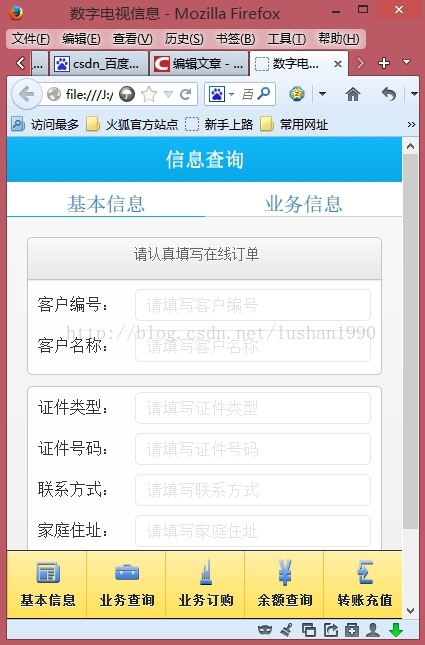
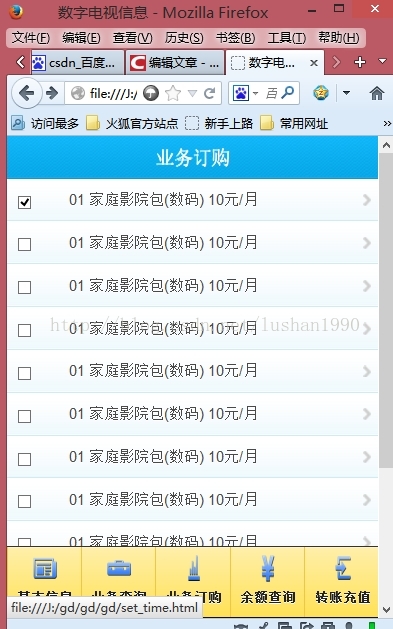
jquerymobile知识点:实现toolbar下方显示,自定义图标!
css:
.nav-glyphish-example .ui-btn .ui-btn-inner { padding-top: 40px !important; }

.nav-glyphish-example .ui-btn .ui-icon { width: 30px!important; height: 30px!important; margin-left: -15px !important; box-shadow: none!important; -moz-box-shadow: none!important; -webkit-box-shadow: none!important; -webkit-border-radius: none !important; border-radius: none !important; }

#chat .ui-icon { background:  url(images/ico_message_enter.png) 50% 50% no-repeat; background-size: 24px 22px; }

#email .ui-icon { background:  url(images/ico_business_enter.png) 50% 50% no-repeat; background-size: 24px 16px;  }

#login .ui-icon { background:  url(images/ico_order_enter.png) 50% 50% no-repeat;  background-size: 12px 26px; }

#beer .ui-icon { background:  url(images/ico_balance_enter.png) 50% 50% no-repeat;  background-size: 22px 27px; }

#coffee .ui-icon { background:  url(images/ico_recharge_enter.png) 50% 50% no-repeat;  background-size: 20px 24px; }

#skull .ui-icon { background:  url(images/21-skull.png) 50% 50% no-repeat;  background-size: 22px 24px; }
html:
<div data-role="footer" class="nav-glyphish-example" data-position="fixed">

  <div data-role="navbar" class="nav-glyphish-example" data-grid="d">

    <ul>

      <li><a href="baseInfo.html" id="chat" data-ajax="false" data-theme="e" data-icon="custom" data-id="baseInfo" class="next_btn" data-transition="slide">基本信息</a></li>

      <li><a href="yewuCheck.html" data-ajax="false" id="email" data-theme="e" data-icon="custom" data-id="yewuCheck" data-transition="slide">业务查询</a></li>

      <li><a href="yewuOrder.html" data-ajax="false" id="login" data-theme="e" data-icon="custom" data-id="yewuOrder" data-transition="slide">业务订购</a></li>

      <li><a href="yueCheck.html" data-ajax="false" id="beer" data-theme="e" data-icon="custom" data-id="yueCheck" data-transition="slide">余额查询</a></li>

      <li><a href="zhuanZhang.html" data-ajax="false" id="coffee" data-theme="e" data-icon="custom" data-id="zhuanZhang" data-transition="slide">转账充值</a></li>

   </ul>

  </div>

</div>
jquerymobile知识点:实现toolbar下方显示,自定义图标!的更多相关文章
- Android ToolBar自定义图标,关联DrawerLayout
Android5.0出现了一个可以代替ActionBar的控件ToolBar,使用更加灵活,一般我们使用ToolBar来和DrawerLayout配合使用,官方提供了一个开关类ActionBarDra ...
- Assign a Custom Image 设置自定义图标
In this lesson, you will learn how to associate a business class with a custom image. This image wil ...
- 分别用ToolBar和自定义导航栏实现沉浸式状态栏
一.ToolBar 1.在build.gradle中添加依赖,例如: compile 'com.android.support:appcompat-v7:23.4.0' 2.去掉应用的ActionBa ...
- 为bootstrap添加更多自定义图标
From: http://blog.csdn.net/mengxiangfeiyang/article/details/45224731 Twitter Bootstrap 真是前端开发的瑞士军刀,作 ...
- Windows 8.1——将网站固定到开始菜单,自定义图标、颜色和Windows推送通知
记得在IE 9和Windows 7刚出来那会儿我写过一篇文章来介绍如何自定义网站将其固定到Windows的任务栏上,同时自定义图标及任务内容.那个功能在IE 9中被称之为JumpList.http:/ ...
- IconVault – 创建自定义图标字体的神器推荐
图标字体简单来说就是外观呈现为图标的字体,同时具有矢量图形的特征,在不同的设备上使用图标的时候就不用加载不同尺寸的图片文件,能够减少 HTTP 请求数,提高页面加载速度. IconVault 这款在线 ...
- Sencha Touch 2.2.1 Custom Icon 自定义图标
ST2.2版本竟然又改变了sass中自定义图标的添加方式,在2.2以前采用的是这种base64的方式,详见:http://www.cnblogs.com/qidian10/archive/2012/1 ...
- Delphi 7使用自定义图标关联文件类型
Delphi 7使用自定义图标关联文件类型 5.2 Delphi编程(40) 版权声明:本文为博主原创文章,未经博主允许不得转载. 在开发过程中,我们经常需要属于自己的文件类型,自定义的后缀名不仅可 ...
- Android开发app如何设定应用图标下的应用名称为汉字以及自定义图标
一.应用名称为汉字 二.自定义图标
- 将网站固定到开始菜单,自定义图标、颜色和Windows推送通知
Windows 8.1——将网站固定到开始菜单,自定义图标.颜色和Windows推送通知 记得在IE 9和Windows 7刚出来那会儿我写过一篇文章来介绍如何自定义网站将其固定到Windows的任务 ...
随机推荐
- 配置Apache服务器 数据库mySQL
Mac 配置 apache php 详细解说 一.开启apache 并切改变引导 1.打开终端 输入:sudo apachectl start 回车,关闭终端 2.打开浏览器,地址栏输入 ...
- avalon 中require.config源码分析
/********************************************************************* * 配置系统 在系统运行的开始就需要读取系统中requir ...
- python面向对象高级编程
正常情况下,当我们定义了一个class,创建了一个class的实例后,我们可以给该实例绑定任何属性和方法,这就是动态语言的灵活性.先定义class: >>> class Studen ...
- ECshop 在迁移到 PHP7 时遇到的兼容性问题
在 PHP7 上安装 ECShop V2.7.3时,报错! Deprecated: Methods with the same name as their class will not be cons ...
- 如何通过REST获取JENKINS的编译进度?
第二版功能需要实现, 我看了一下,获取百分比进度不太可能了,,因为JENKINS本身都没有具体的百分比进度.. 那,,只好实现获取实时值,如果完成就显示完成. URL: http://1.2.3.4/ ...
- 【BZOJ 3529】 [Sdoi2014]数表 (莫比乌斯+分块+离线+树状数组)
3529: [Sdoi2014]数表 Description 有一张N×m的数表,其第i行第j列(1 < =i < =礼,1 < =j < =m)的数值为能同时整除i和j的所有 ...
- 使用Eclipse创建模板并格式化代码
eclipse设置方式: window-preferences-->java-code Style-formatter 在编写完代码后使用代码格式化程序对代码进行格式化,有利于版本冲突时进行对比 ...
- HDU 5938 Four Operations 【贪心】(2016年中国大学生程序设计竞赛(杭州))
Four Operations Time Limit: 2000/1000 MS (Java/Others) Memory Limit: 65536/32768 K (Java/Others)T ...
- HDU-- Buy Tickets
告知每次要插到第 i 个位置上,问最后它们的顺序是什么. 这一题,不是考线段树,是考如何想出用线段树...思维很巧妙,倒过来做的话就能确定此人所在的位置.... Buy Tickets Time ...
- Bootstrap框架中的字形图标的理解
最近项目中准备使用 Bootstrap 框架,看中了Ace Admin 这套皮肤,看其代码的时候,发现使用了字形图标.下面内容来源于网络,根据自己对新知识的学习曲线重新整合了一下: 一,字形图标的定义 ...