
Azure构建PredictionIO和Spark的推荐引擎服务
Azure构建PredictionIO和Spark的推荐引擎服务
1. 在Azure构建Ubuntu 16.04虚拟机
假设前提条件您已有 Azure 帐号,登陆 Azure https://portal.azure.com 。
点击左上部的 +New 按钮,在搜索框中输入 Ubuntu ,或者点击 Virtual Machine 选择 Ubuntu Server 14.04 LTS,然后点击 Create 创建虚拟机。
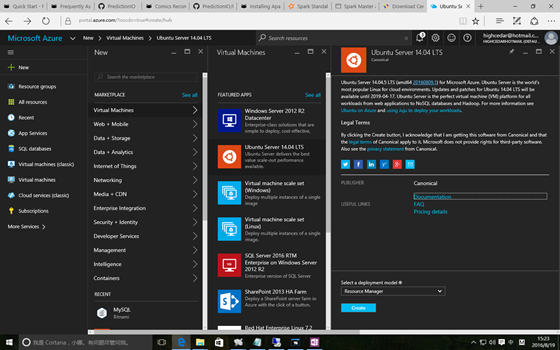
创建完成虚拟机后,在虚拟机的设置中找到 Azure 为其分配的 IP 地址,通过 Bitvise SSH Client 远程登陆虚拟机开始快速搭建推荐引擎服务之旅。
2. 以 PredictionIO 源码编译的方式安装
之所以本文以源码编译的方式安装 PredictionIO ,是因为其他方式我都未尝试成功。
2.1 编译
Run the following to download and build Apache PredictionIO (incubating) from its source code.
$ git clone https://github.com/apache/incubator-predictionio.git

$ cd incubator-predictionio

$ git checkout master

$ ./make-distribution.sh
You should see something like the following when it finishes building successfully.
... PredictionIO-0.9.6/sbt/sbt PredictionIO-0.9.6/conf/
PredictionIO-0.9.6/conf/pio-env.sh PredictionIO binary distribution
created at PredictionIO-0.9.6.tar.gz Extract the binary distribution
you have just built.
$ tar zxvf PredictionIO-0.9.6.tar.gz2.2 安装依赖
Let us install dependencies inside a subdirectory of the Apache PredictionIO (incubating) installation. By following this convention, you can use Apache PredictionIO (incubating)'s default configuration as is.
$ mkdir PredictionIO-0.9.6/vendors2.3 安装Spark依赖包
Apache Spark is the default processing engine for PredictionIO. Download and extract it.
$ wget http://d3kbcqa49mib13.cloudfront.net/spark-1.5.1-bin-hadoop2.6.tgz

$ tar zxvfC spark-1.5.1-bin-hadoop2.6.tgz PredictionIO-0.9.6/vendors
If you decide to install Apache Spark to another location, you must edit PredictionIO-0.9.6/conf/pio-env.sh and change the SPARK_HOME variable to point to your own Apache Spark installation.
2.4 数据存储
官方给的例子是采用 PostgreSQL 或者Hbase + Elasticsearch,我选择 MySQL 作为数据存储,因为在将来的数据可视化方面会采用 Caravel 自动化生成仪表板展现数据,在后续的文章中我会再详细介绍这方面。
在mysql官方网站下载 mysql-connector-java-5.1.37.jar 并保存至 PredictionIO-0.9.6/lib 文件夹中。
修改pi配置文件 pio-env.sh
#!/usr/bin/env bash

# Copy this file as pio-env.sh and edit it for your site's configuration.

# PredictionIO Main Configuration

#

# This section controls core behavior of PredictionIO. It is very likely that

# you need to change these to fit your site.

# SPARK_HOME: Apache Spark is a hard dependency and must be configured.

SPARK_HOME=$PIO_HOME/vendors/spark-1.5.1-bin-hadoop2.6

#POSTGRES_JDBC_DRIVER=$PIO_HOME/lib/postgresql-9.4-1204.jdbc41.jar

MYSQL_JDBC_DRIVER=$PIO_HOME/lib/mysql-connector-java-5.1.37.jar

# ES_CONF_DIR: You must configure this if you have advanced configuration for

# your Elasticsearch setup.

# ES_CONF_DIR=/opt/elasticsearch

# HADOOP_CONF_DIR: You must configure this if you intend to run PredictionIO

# with Hadoop 2.

# HADOOP_CONF_DIR=/opt/hadoop

# HBASE_CONF_DIR: You must configure this if you intend to run PredictionIO

# with HBase on a remote cluster.

# HBASE_CONF_DIR=$PIO_HOME/vendors/hbase-1.0.0/conf

# Filesystem paths where PredictionIO uses as block storage.

PIO_FS_BASEDIR=$HOME/.pio_store

PIO_FS_ENGINESDIR=$PIO_FS_BASEDIR/engines

PIO_FS_TMPDIR=$PIO_FS_BASEDIR/tmp

# PredictionIO Storage Configuration

#

# This section controls programs that make use of PredictionIO's built-in

# storage facilities. Default values are shown below.

#

# For more information on storage configuration please refer to

# https://docs.prediction.io/system/anotherd

# Storage Repositories

# Default is to use PostgreSQL

PIO_STORAGE_REPOSITORIES_METADATA_NAME=pio_meta

PIO_STORAGE_REPOSITORIES_METADATA_SOURCE=MYSQL

PIO_STORAGE_REPOSITORIES_EVENTDATA_NAME=pio_event

PIO_STORAGE_REPOSITORIES_EVENTDATA_SOURCE=MYSQL

PIO_STORAGE_REPOSITORIES_MODELDATA_NAME=pio_model

PIO_STORAGE_REPOSITORIES_MODELDATA_SOURCE=MYSQL

# Storage Data Sources

# PostgreSQL Default Settings

# Please change "pio" to your database name in PIO_STORAGE_SOURCES_PGSQL_URL

# Please change PIO_STORAGE_SOURCES_PGSQL_USERNAME and

# PIO_STORAGE_SOURCES_PGSQL_PASSWORD accordingly

#PIO_STORAGE_SOURCES_PGSQL_TYPE=jdbc

#PIO_STORAGE_SOURCES_PGSQL_URL=jdbc:postgresql://localhost/pio

#PIO_STORAGE_SOURCES_PGSQL_USERNAME=pio

#PIO_STORAGE_SOURCES_PGSQL_PASSWORD=pio

# MySQL Example

PIO_STORAGE_SOURCES_MYSQL_TYPE=jdbc

PIO_STORAGE_SOURCES_MYSQL_URL=jdbc:mysql://10.18.218.9:13306/xuesongpio

PIO_STORAGE_SOURCES_MYSQL_USERNAME=root

PIO_STORAGE_SOURCES_MYSQL_PASSWORD=******

# Elasticsearch Example

# PIO_STORAGE_SOURCES_ELASTICSEARCH_TYPE=elasticsearch

# PIO_STORAGE_SOURCES_ELASTICSEARCH_CLUSTERNAME=<elasticsearch_cluster_name>

# PIO_STORAGE_SOURCES_ELASTICSEARCH_HOSTS=localhost

# PIO_STORAGE_SOURCES_ELASTICSEARCH_PORTS=9300

# PIO_STORAGE_SOURCES_ELASTICSEARCH_HOME=$PIO_HOME/vendors/elasticsearch-1.4.4

# Local File System Example

# PIO_STORAGE_SOURCES_LOCALFS_TYPE=localfs

# PIO_STORAGE_SOURCES_LOCALFS_PATH=$PIO_FS_BASEDIR/models

atastore/

# HBase Example

# PIO_STORAGE_SOURCES_HBASE_TYPE=hbase

# PIO_STORAGE_SOURCES_HBASE_HOME=$PIO_HOME/vendors/hbase-1.0.0
2.5声明 PrecidtionIO 和 Java 的环境变量
我是在 /root/.bahsrc 里增加如下代码:
PIO_HOME=/root/PredictionIO-0.9.6

JAVA_HOME=/usr/lib/jvm/java-8-oracle

JRE_HOME=$JAVA_HOME/jre

PATH=$PATH:$PIO_HOME/bin:$JAVA_HOME/bin:$JRE_HOME/bin

export PIO_HOME

export JAVA_HOME

export PATH
3. 创建推荐引擎服务
3.1 启动 PredictionIO Event Server
因为我在运行 PredictionIO 过程中发现它还是挺吃内存的,不管是 PredictionIO 还是 Spark,因此我特别分配的16的内存运行 Event server
JAVA_OPTS=-Xmx16g bin/pio eventserver & 3.2 启动 Spark
通过 PredictionIO 内置的脚本启动 Spark 进行模型训练时总是出现问题,所以采用手动启动 Spark 集群的方式规避此问题。
You can start a standalone master server by executing:
PredictionIO-0.9.6/vendors/spark-1.5.1-bin-hadoop2.6/sbin/start-master.shOnce started, the master will print out a spark://HOST:PORT URL for itself, which you can use to connect workers to it, or pass as the "master" argument to SparkContext. You can also find this URL on the master's web UI, which is http://localhost:8080 by default.
Similarly, you can start one or more workers and connect them to the master via:
./sbin/start-slave.sh <master-spark-URL>即
PredictionIO-0.9.6/vendors/spark-1.5.1-bin-hadoop2.6/sbin/start-slave.shspark://localhost:8080Once you have started a worker, look at the master's web UI (http://localhost:8080 by default). You should see the new node listed there, along with its number of CPUs and memory (minus one gigabyte left for the OS).

3.3 Create a new Engine from an Engine Template
Now let's create a new engine called MyRecommendation by downloading the Recommendation Engine Template. Go to a directory where you want to put your engine and run the following:
$ pio template get PredictionIO/template-scala-parallel-recommendation MyRecommendation

$ cd MyRecommendation
A new directory MyRecommendation is created, where you can find the downloaded engine template.
3.4 Generate an App ID and Access Key
You will need to create a new App in PredictionIO to store all the data of your app. The data collected will be used for machine learning modeling.
Let's assume you want to use this engine in an application named "MyApp1". Run the following to create a new app "MyApp1":
$ pio app new MyApp1You should find the following in the console output:
... [INFO] [App]InitializedEventStoreforthisappID:1.[INFO][App]InitializedEventStoreforthisappID:1.[INFO][App] Created new app: [INFO] [App]Name:MyApp1[INFO][App]Name:MyApp1[INFO][App] ID: 1
[INFO] [App$] Access Key:
3mZWDzci2D5YsqAnqNnXH9SB6Rg3dsTBs8iHkK6X2i54IQsIZI1eEeQQyMfs7b3F Note
that App ID, **Access Key* are created for this App "MyApp1". You will need the Access Key when you collect data with EventServer for this App.
You can list all of the apps created its corresponding ID and Access Key by running the following command:
$ pio app listYou should see a list of apps created. For example:
[INFO] [App]Name|ID|AccessKey|AllowedEvent(s)[INFO][App]Name|ID|AccessKey|AllowedEvent(s)[INFO][App]
MyApp1 | 1 |
3mZWDzci2D5YsqAnqNnXH9SB6Rg3dsTBs8iHkK6X2i54IQsIZI1eEeQQyMfs7b3F |
(all) [INFO] [App]MyApp2|2|io5lz6Eg4m3Xe4JZTBFE13GMAf1dhFl6ZteuJfrO84XpdOz9wRCrDU44EUaYuXq5|(all)[INFO][App]MyApp2|2|io5lz6Eg4m3Xe4JZTBFE13GMAf1dhFl6ZteuJfrO84XpdOz9wRCrDU44EUaYuXq5|(all)[INFO][App] Finished listing 2 app(s).
3.5 Import More Sample Data
This engine requires more data in order to train a useful model. Instead of sending more events one by one in real time, for quickstart demonstration purpose, we are going to use a script to import more events in batch.
A Python import script import_eventserver.py is provided in the template to import the data to Event Server using Python SDK. Please upgrade to the latest Python SDK.
First, you will need to install Python SDK in order to run the sample data import script. To install Python SDK, run:
$ pip install predictionioYou may need sudo access if you have permission issue. (ie. sudo pip install predictionio)
Replace the value of access_key parameter by your Access Key and run:
These commands must be executed in the Engine directory, for example: MyRecomendation.
$ cd MyRecommendation

$ curl https://raw.githubusercontent.com/apache/spark/master/data/mllib/sample_movielens_data.txt --create-dirs -o data/sample_movielens_data.txt

$ python data/import_eventserver.py --access_key $ACCESS_KEY
You should see the following output:
Importing data... 1501 events are imported.
3.6 编译模型
Start with building your MyRecommendation engine. Run the following command:
$ pio build --verboseThis command should take few minutes for the first time; all subsequent builds should be less than a minute. You can also run it without --verbose if you don't want to see all the log messages.
Upon successful build, you should see a console message similar to the following.
[INFO] [Console$] Your engine is ready for training.
3.7 训练模型
在上文中提到 Spark 集群是由我们手工启动的,因此在模型训练时指定 Spark master UI 和运行时内存参数。
To train your engine, run the following command:
pio train -- --master spark://localhost:7077 --driver-memory 16G --executor-memory 24G
Deploy Engine
To increase the heap space, specify the "-- --driver-memory " parameter in the command. For example, set the driver memory to 8G when deploy the engine:
$ pio deploy -- --driver-memory 8GWhen the engine is deployed successfully and running, you should see a console message similar to the following:
[INFO] [HttpListener] Bound to /0.0.0.0:8000 [INFO] [MasterActor] Bind
successful. Ready to serve.
Do not kill the deployed engine process.
By default, the deployed engine binds to http://localhost:8000. You can visit that page in your web browser to check its status.

3.8 Use the Engine
Now, You can try to retrieve predicted results. To recommend 4 movies to user whose id is 1, you send this JSON { "user": "1", "num": 4 } to the deployed engine and it will return a JSON of the recommended movies. Simply send a query by making a HTTP request or through the EngineClient of an SDK.
With the deployed engine running, open another temrinal and run the following curl command or use SDK to send the query:
$ curl -H "Content-Type: application/json" \

-d '{ "user": "1", "num": 4 }' http://localhost:8000/queries.json
或者执行 Python 程序,程序代码如下:
import predictionio

engine_client = predictionio.EngineClient(url="http://localhost:8000")

print engine_client.send_query({"user": "1", "num": 4})
The following is sample JSON response:
{

"itemScores":[

{"item":"22","score":4.072304374729956},

{"item":"62","score":4.058482414005789},

{"item":"75","score":4.046063009943821},

{"item":"68","score":3.8153661512945325}

]

}
Congratulations, MyRecommendation is now running!
本文被批评文档格式不好,特意用 markdown 重新编辑一遍,请笑纳。
Azure构建PredictionIO和Spark的推荐引擎服务的更多相关文章
- 基于Azure构建PredictionIO和Spark的推荐引擎服务
基于Azure构建PredictionIO和Spark的推荐引擎服务 1. 在Azure构建Ubuntu 16.04虚拟机 假设前提条件您已有 Azure 帐号,登陆 Azure https://po ...
- Spark学习笔记——构建基于Spark的推荐引擎
推荐模型 推荐模型的种类分为: 1.基于内容的过滤:基于内容的过滤利用物品的内容或是属性信息以及某些相似度定义,来求出与该物品类似的物品. 2.协同过滤:协同过滤是一种借助众包智慧的途径.它利用大量已 ...
- 基于Spark ALS构建商品推荐引擎
基于Spark ALS构建商品推荐引擎 一般来讲,推荐引擎试图对用户与某类物品之间的联系建模,其想法是预测人们可能喜好的物品并通过探索物品之间的联系来辅助这个过程,让用户能更快速.更准确的获得所需 ...
- PredictionIO+Universal Recommender快速开发部署推荐引擎的问题总结(3)
PredictionIO+Universal Recommender虽然可以帮助中小企业快速的搭建部署基于用户行为协同过滤的个性化推荐引擎,单纯从引擎层面来看,开发成本近乎于零,但仍然需要一些前提条件 ...
- [转] 基于 Apache Mahout 构建社会化推荐引擎
来源:http://www.ibm.com/developerworks/cn/java/j-lo-mahout/index.html 推荐引擎简介 推荐引擎利用特殊的信息过滤(IF,Informat ...
- 深层解析:构建facebook应用商店推荐引擎
Under the Hood: Building the App Center recommendation engine As more apps on Facebook Platform ha ...
- 基于 Apache Mahout 构建社会化推荐引擎
基于 Apache Mahout 构建社会化推荐引擎 http://www.ibm.com/developerworks/cn/views/java/libraryview.jsp 推荐引擎利用特殊的 ...
- Spark机器学习3·推荐引擎(spark-shell)
Spark机器学习 准备环境 jblashttps://gcc.gnu.org/wiki/GFortranBinaries#MacOS org.jblas:jblas:1.2.4-SNAPSHOT g ...
- 转】用Mahout构建职位推荐引擎
原博文出自于: http://blog.fens.me/hadoop-mahout-recommend-job/ 感谢! 用Mahout构建职位推荐引擎 Hadoop家族系列文章,主要介绍Hadoop ...
随机推荐
- POJ Round Numbers(数位DP)
题目大意: Round Number: 将一个整数转化为二进制数字后,(不含前导0) 要是0的个数 大于等于1的个数 则是 Round Number 问从L-R之中有多少个Round Number ...
- SSE及相关技术(web sockets, long polling等)
server-sent events--One Way Messaging 允许网页获得来自服务器的更新,并且自动更新 Server-Sent Events: allow a web page to ...
- Delphi——Window 消息 - 转载▼
Delphi是Borland公司的一种面向对象的可视化软件开发工具. Delphi集中了Visual C++和Visual Basic两者的优点:容易上手.功能强大,特别是在界面设计.数据库编程.网络 ...
- otl获得sql出错位置(oracle)
项目的一个需要,要获得sql出错的位置,从而给出类似sqlplus的错误提示(如下) sql出错原因易获得,记录在otl_exception::msg,但出错位置就不是那么容易了. 默认情况下otl异 ...
- Java实现文件的预览
最近项目需要用到文件的预览功能,就开始在网上收集资料,学习了几种文件预览的方法.我集成到我项目内测试的有以下三种,最后使用的是第三种: 直接使用别人提供的服务 例如:office web 365 使用 ...
- H5页开发规范/通用规范
兼容目标 主流移动设备:iPhone 4+ .三星.魅族.华为.红米.小米1S 以上及主流 Android 千元机型:请特别关注iPhone4/4s.魅族MX4.华为P6等机型 操作系统:iOS 7. ...
- motan源码分析八:涉及到底层的客户端调用
之前我们分析了客户端调用服务端的源码,但是没有涉及到通讯层和序列化层,本文将之前讲过的内容做一次串联. 1.上层通过动态代理调用refer的call,每个refer又对应一个nettyclient,下 ...
- 指针-->字符串
1. 以字符串形式出现的,编译器都会为该字符串自动添加一个0作为结束符. 如在代码中写"abc",那么编译器帮你存储的是"abc\0". 2. "ab ...
- Tomcat jdbc pool配置
Tomcat jdbc pool是apache在tomcat7版本中启用的新连接池,用它来解决以往DBCP无法解决的一些问题. Tomcat jdbc pool的优点: (1) tomcat j ...
- iText
iText是著名的开放项目,是用于生成PDF文档的一个java类库.通过iText不仅可以生成PDF或rtf的文档,而且可以将XML.Html文件转化为PDF文件. 官方网站:http://itext ...