
6.纯css绘制叮当猫
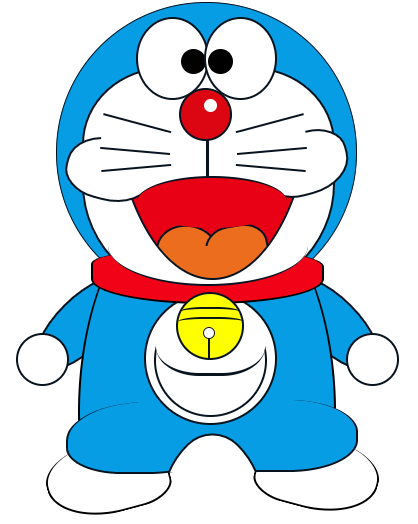
<!DOCTYPE html>

<html>

<head>

    <meta charset="utf-8">

    <title>叮当猫</title>

    <link rel="stylesheet" type="text/css" href="../css/ddm.css">

</head>

<body>

    <div class="ddm">

        <!-- 蓝色的头 -->

        <div class="head"></div>

        <!-- 白色的脸 -->

        <div class="line face"></div>

        <!-- 左眼 -->

        <div class="line eye-left">

            <div class="eyeball-left"></div>

        </div>

        <!-- 右眼 -->

        <div class="line eye-right">

            <div class="eyeball-right"></div>

        </div>

        <!-- 鼻子 -->

        <div class="line nose">

            <div class="nose-white"></div>

        </div>

        <!-- 左胳膊 -->

        <div class="line arm-left"></div>

        <!-- 右胳膊 -->

        <div class="line arm-right"></div>

        <!-- 左手 -->

        <div class="line hand-left"></div>

        <!-- 右手 -->

        <div class="line hand-right"></div>

        <!-- 身体主体部分 -->

        <div class="body">

            <div class="body-top"></div>

        </div>

        <!-- 左脚 -->

        <div class="foot-left"></div>

        <!-- 右脚 -->

        <div class="foot-right"></div>

        <!-- 左腿 -->

        <div class="leg-left1"></div>

        <!-- 右腿 -->

        <div class="leg-left2"></div>

        <!-- 裆部 -->

        <div class="leg-quyu">

            <div class="line pig"></div>

        </div>

        <!-- 衣服上的图案 -->

        <div class="line cloth1">

            <div class="line cloth2"></div>

            <div class="cloth3"></div>

        </div>

        <!-- 红色围巾下部分 -->

        <div class="nick2"></div>

        <!-- 红色围巾上部分 -->

        <div class="nick3"></div>

        <!-- 红色的大嘴 -->

        <div class="mouse-size">

            <div class="line mouse1"></div>

        </div>

        <!-- 左舌头 -->

        <div class="line toe1"></div>

        <!-- 右舌头 -->

        <div class="line toe2"></div>

        <!-- 舌头超出嘴的部分隐藏 -->

        <div class="toe-quyu">

            <div class="line mouse2"></div>

        </div>

        <!-- 左脸泡 -->

        <div class="line huxu1"></div>

        <!-- 右脸泡 -->

        <div class="line huxu5"></div>

        <!-- 嘴巴上部区域设置成白色-->

        <div class="mouse-quxian"></div>

        <!-- 嘴上的黑色圆弧 -->

        <div class="huxu"></div>

        <!-- 左第一根胡须 -->

        <div class="huxu2"></div>

        <!-- 左第二根胡须 -->

        <div class="huxu3"></div>

        <!-- 左第三根胡须 -->

        <div class="huxu4"></div>

        <!-- 右第一根胡须 -->

        <div class="huxu6"></div>

        <!-- 右第二根胡须 -->

        <div class="huxu7"></div>

        <!-- 右第三根胡须 -->

        <div class="huxu8"></div>

        <!-- 鼻子下面的竖线 -->

        <div class="nose-line"></div>

        <!-- 铃铛 -->

        <div class="line ring">

            <div class="ring1"></div>

            <div class="ring2"></div>

            <div class="ring3"></div>

            <div class="ring4"></div>

        </div>

    </div>

</body>

</html>
*{

    margin:;

    padding:;

}

.ddm{

    position: relative;

    width: 300px;

    height: 300px;

    margin: 20px auto;

}

.ddm *{

    position: absolute;

}

.line{/*通用属性:线框是1.5px的*/

    border-style: solid;

    border-color: rgba(7,19,31,1);

    border-width: 1.5px;

}

.head{/*蓝色的头*/

    width: 300px;

    height: 300px;

    background-color: rgba(6,157,228,1);

    border-radius: 50%;

    border-style: solid;

    border-color: rgba(7,19,31,1);

    border-width: 0.58px;

}

.face{/*白色的脸*/

    width: 250px;

    height: 230px;

    background-color: rgba(255,255,255,1);

    border-radius: 40% 40% 60% 60%;

    top: 65px;

    left: 26px;

}

.eye-left{/*左眼*/

    width: 70px;

    height: 80px;

    background-color: rgba(255,255,255,1);

    border-radius: 50%;

    left: 80px;

    top: 15px;

}

.eyeball-left{/*左眼球*/

    width: 25px;

    height: 25px;

    background-color: rgba(2,2,2,1);

    border-radius: 50%;

    left: 43px;

    top: 30px;

}

.eye-right{/*右眼*/

    width: 70px;

    height: 80px;

    background-color: rgba(255,255,255,1);

    border-radius: 50%;

    left: 148px;

    top: 15px;

}

.eyeball-right{/*右眼球*/

    width: 25px;

    height: 25px;

    background-color: black;

    border-radius: 50%;

    left: 2px;

    top: 30px;

}

.nose{/*鼻子*/

    width: 50px;

    height: 50px;

    background-color: rgba(220,6,18,1);

    border-radius: 50%;

    top: 86px;

    left: 123px;

}

.nose-white{/*鼻子上的白点*/

    width: 13px;

    height: 13px;

    background-color: rgba(255,255,255,1);

    border-radius: 50%;

    top: 9px;

    left: 23px;

}

.arm-left{/*左胳膊*/

    width: 50px;

    height: 120px;

    background-color: rgba(6,157,228,1);

    border-radius: 50%;

    transform: rotate(45deg);

    top: 260px;

    left: 0px;

}

.arm-right{/*右胳膊*/

    width: 50px;

    height: 120px;

    background-color: rgba(6,157,228,1);

    border-radius: 50%;

    transform: rotate(-45deg);

    top: 260px;

    left: 250px;

}

/*左手*/

.hand-left{

    width: 50px;

    height: 50px;

    background-color: rgb(255,255,255,1);

    top: 331px;

    left: -40px;

    border-radius: 50%;

}

/*右手*/

.hand-right{

    width: 50px;

    height: 50px;

    background-color: rgb(255,255,255,1);

    top: 331px;

    left: 290px;

    border-radius: 50%;

}

/*身体主体部分*/

.body{

    width: 260px;

    height: 160px;

    top: 280px;

    left: 22px;

    overflow: hidden;

}

.body-top{

    width: 255px;

    height: 460px;

    border-width: 0 1.5px;

    border-style: none solid;

    border-color: none rgba(7,19,31,1);

    border-radius: 50%;

    top: -100px;

    background-color: rgba(6,157,228,1);

}

/*左脚*/

.foot-left{

    width: 120px;

    height: 70px;

    border-radius: 60% 80% 40% 80%;

    border-width: 0 1.5px 1.5px 1.5px;

    border-style: none solid solid solid;

    border-color: none rgba(7,19,31,1) rgba(7,19,31,1) rgba(7,19,31,1);

    top: 440px;

    left: -10px;

    transform: rotate(-15deg);

}

/*右脚*/

.foot-right{

    width: 120px;

    height: 70px;

    border-radius: 80% 60% 80% 40%;

    border-width: 0 1.5px 1.5px 1.5px;

    border-style: none solid solid solid;

    border-color: none rgba(7,19,31,1) rgba(7,19,31,1) rgba(7,19,31,1);

    top: 436px;

    left: 200px;

    transform: rotate(15deg);

}

/*左腿*/

.leg-left1{

    width: 150px;

    height: 70px;

    border-radius: 60% 50% 50% 40%;

    top: 400px;

    left: 10px;

    background-color: rgba(6,157,228,1);

    border-bottom: 1.5px solid rgba(7,19,31,1);

    border-left: 1.5px solid rgba(7,19,31,1);

}

/*右腿*/

.leg-left2{

    width: 150px;

    height: 70px;

    border-radius: 60% 50% 50% 40%;

    top: 398px;

    left: 150px;

    background-color: rgba(6,157,228,1);

    border-bottom: 1.5px solid rgba(7,19,31,1);

    border-right: 1.5px solid rgba(7,19,31,1);

}

/*裆部*/

.leg-quyu{

    width: 100px;

    height: 40px;

    top: 430px;

    left: 105px;

    overflow: hidden;

    /*background-color: yellow;*/

}

.pig{

    width: 120px;

    height: 120px;

    background-color: rgba(255,255,255,1);

    border-radius: 120% 50%;

    transform: rotate(-45deg);

    top: 12px;

    left: -10px;

}

/*衣服上的图案*/

.cloth1{

    width: 130px;

    height: 130px;

    background-color: rgb(255,255,255,1);

    top: 290px;

    left: 88px;

    border-radius: 50%;

}

.cloth2{

    width: 110px;

    height: 110px;

    background-color: rgb(255,255,255,1);

    top: 10px;

    left: 8px;

    border-radius: 50%;

}

.cloth3{

    width: 109px;

    height: 70px;

    background-color: rgb(255,255,255,1);

    top: 10px;

    left: 10px;

    border-bottom: 2.5px solid rgba(7,19,31,1);

    border-radius: 40%;

}

.nick2{/*红色围巾下部分*/

    width: 230px;

    height: 50px;

    background-color: rgba(241,2,23,1);

    top: 250px;

    left: 35px;

    border-radius: 30% 35% 60% 60%;

    border-color:none rgba(7,19,31,1) rgba(7,19,31,1) rgba(7,19,31,1);

    border-style:none solid solid solid;

    border-width:0 1.5px 1.5px 1.5px;

}

.nick3{/*红色围巾上部分*/

    width: 200px;

    height: 80px;

    background-color: white;

    top: 202px;

    left: 52px;

    border-radius: 50%;

    border-bottom-color:rgba(7,19,31,1);

    border-bottom-style:solid;

    border-bottom-width:1.5px;

}

/*红色的大嘴*/

.mouse-size{

    width: 200px;

    height: 120px;

    overflow: hidden;

    top: 160px;

    left: 55px;

}

.mouse1{

    width: 400px;

    height: 200px;

    background-color: rgba(232,1,21,1);

    border-radius:  50%;

    transform: rotate(90deg);

    top: -185px;

    left: -100px;

}

.toe1{/*左边的舌头*/

    width: 50px;

    height: 60px;

    background-color: rgba(236,109,30,1);

    border-radius: 50%;

    transform: rotate(-80deg);

    top: 218px;

    left: 105px;

}

.toe2{/*右边的舌头*/

    width: 50px;

    height: 60px;

    background-color: rgba(236,109,30,1);

    border-radius: 40%;

    transform: rotate(80deg);

    top: 218px;

    left: 155px;

}

/*舌头超出嘴的部分隐藏*/

.toe-quyu{

    width: 114px;

    height: 35px;

    border-radius:0 0 40% 40%;

    background-color: rgba(255,255,255,1);

    top: 244px;

    left: 100px;

    overflow: hidden;

}

.mouse2{

    width: 400px;

    height: 200px;

    background-color: rgba(236,109,30,1);

    border-radius:  50%;

    transform: rotate(90deg);

    top: -269px;

    left: -145px;

}

.huxu1{/*左脸泡*/

    width: 85px;

    height: 60px;

    border-radius: 50% 40%;

    background-color: rgba(255,255,255,1);

    transform: rotate(15deg);

    top: 136px;

    left: 10px;

}

.huxu5{/*右脸泡*/

    width: 85px;

    height: 60px;

    border-radius: 50% 40%;

    background-color: rgba(255,255,255,1);

    transform: rotate(-15deg);

    top: 130px;

    left: 205px;

}

.mouse-quxian{/*嘴巴上部区域设置成白色*/

    width: 140px;

    height: 40px;

    background-color: rgba(255,255,255,1);

    top: 150px;

    left: 88px;

}

.huxu{/*嘴上的黑色圆弧*/

    width: 150px;

    height: 50px;

    border-radius: 50%;

    background-color:rgba(232,1,21,1);

    top: 174px;

    left: 81px;

    border-top-style: solid;

    border-top-color: rgba(7,19,31,1);

    border-top-width: 1.5px;

}

.huxu2{/*左第一根胡须*/

    width: 70px;

    height: 10px;

    border-top-width: 1.5px;

    border-top-style: solid;

    border-top-color: rgba(7,19,31,1);

    top: 120px;

    left: 45px;

    transform: rotate(15deg);

}

.huxu3{/*左第二根胡须*/

    width: 70px;

    height: 20px;

    background-color: rgba(255,255,255,1);

    border-bottom-width: 1.5px;

    border-bottom-style: solid;

    border-bottom-color: rgba(7,19,31,1);

    top: 128px;

    left: 45px;

    transform: rotate(5deg);

}

.huxu4{/*左第三根胡须*/

    width: 70px;

    height: 5px;

    border-bottom-width: 1.5px;

    border-bottom-style: solid;

    border-bottom-color: rgba(7,19,31,1);

    top: 160px;

    left: 45px;

    transform: rotate(-5deg);

}

.huxu6{/*右第一根胡须*/

    width: 70px;

    height: 10px;

    border-top-width: 1.5px;

    border-top-style: solid;

    border-top-color: rgba(7,19,31,1);

    top: 120px;

    left: 180px;

    transform: rotate(-15deg);

}

.huxu7{/*右第二根胡须*/

    width: 70px;

    height: 20px;

    background-color: rgba(255,255,255,1);

    border-bottom-width: 1.5px;

    border-bottom-style: solid;

    border-bottom-color: rgba(7,19,31,1);

    top: 128px;

    left: 180px;

    transform: rotate(-5deg);

}

.huxu8{/*右第三根胡须*/

    width: 70px;

    height: 5px;

    border-bottom-width: 1.5px;

    border-bottom-style: solid;

    border-bottom-color: rgba(7,19,31,1);

    top: 160px;

    left: 180px;

    transform: rotate(5deg);

}

.nose-line{/*鼻子下面的竖线*/

    width: 5px;

    height: 38px;

    border-left-width: 3px;

    border-left-color: rgba(7,19,31,1);

    border-left-style: solid;

    top: 138px;

    left: 150px;

}

/*铃铛*/

.ring{

    width: 65px;

    height: 65px;

    background-color: yellow;

    border-radius: 50%;

    top: 290px;

    left: 120px;

}

.ring1{

    width: 60px;

    height: 10px;

    border-top: 2px solid rgba(7,19,31,1);

    border-radius: 40%;

    top: 13px;

    left: 2px;

}

.ring2{

    width: 66px;

    height: 10px;

    border-top: 2px solid rgba(7,19,31,1);

    border-radius: 40%;

    top: 23px;

    left: 0px;

}

.ring3{

    width: 10px;

    height: 20px;

    border-left: 2px solid rgba(7,19,31,1);

    top: 44px;

    left: 30px;

}

.ring4{

    width: 10px;

    height: 10px;

    border: 1px solid rgba(7,19,31,1);

    background-color: rgba(255,255,255,1);

    border-radius: 50%;

    top: 33px;

    left: 25px;

}
6.纯css绘制叮当猫的更多相关文章
- CSS 魔法系列:纯 CSS 绘制三角形(各种角度)
我们的网页因为 CSS 而呈现千变万化的风格.这一看似简单的样式语言在使用中非常灵活,只要你发挥创意就能实现很多比人想象不到的效果.特别是随着 CSS3 的广泛使用,更多新奇的 CSS 作品涌现出来. ...
- 摘记 史上最强大的40多个纯CSS绘制的图形(一)
今天在国外的网站上看到了很多看似简单却又非常强大的纯CSS绘制的图形,里面有最简单的矩形.圆形和三角形,也有各种常见的多边形,甚至是阴阳太极和网站小图标,真的非常强大,分享给大家. Square(正方 ...
- 史上最强大的40多个纯CSS绘制的图形
Square(正方形) #square { width: 100px; height: 100px; background: red; } Rectangle(矩形) #rectangle { wid ...
- 40多个纯CSS绘制的图形
本文由码农网 – 陈少华原创,转载请看清文末的转载要求. 今天在国外的网站上看到了很多看似简单却又非常强大的纯CSS绘制的图形,里面有最简单的矩形.圆形和三角形,也有各种常见的多边形,甚至是阴阳太极和 ...
- 碉堡了! 纯 CSS 绘制《辛普森一家》人物头像
这篇文章给大家分享一组纯 CSS 绘制的<辛普森一家>人物头像.<辛普森一家>(The Simpsons)是马特·格勒宁为美国福克斯广播公司创作的一部动画情景喜剧.该剧通过对霍 ...
- CSS 魔法系列:纯 CSS 绘制各种图形《系列六》
我们的网页因为 CSS 而呈现千变万化的风格.这一看似简单的样式语言在使用中非常灵活,只要你发挥创意就能实现很多比人想象不到的效果.特别是随着 CSS3 的广泛使用,更多新奇的 CSS 作品涌现出来. ...
- CSS 魔法系列:纯 CSS 绘制各种图形《系列五》
我们的网页因为 CSS 而呈现千变万化的风格.这一看似简单的样式语言在使用中非常灵活,只要你发挥创意就能实现很多比人想象不到的效果.特别是随着 CSS3 的广泛使用,更多新奇的 CSS 作品涌现出来. ...
- CSS 魔法系列:纯 CSS 绘制图形(各种形状的钻石)
我们的网页因为 CSS 而呈现千变万化的风格.这一看似简单的样式语言在使用中非常灵活,只要你发挥创意就能实现很多比人想象不到的效果.特别是随着 CSS3 的广泛使用,更多新奇的 CSS 作品涌现出来. ...
- CSS 魔法系列:纯 CSS 绘制图形(心形、六边形等)
<CSS 魔法系列>继续给大家带来 CSS 在网页中以及图形绘制中的使用.这篇文章给大家带来的是纯 CSS 绘制五角星.六角形.五边形.六边形.心形等等. 我们的网页因为 CSS 而呈现千 ...
随机推荐
- 自动化部署脚本--linux执行sh脚本
自动化部署脚本文件目录: 运行主程序:./install.sh #!/bin/bash SCRIPTPATH=$(cd "$(dirname "$0")"; p ...
- LeetCode117----填充同一层兄弟节点
给定一个二叉树 struct TreeLinkNode { TreeLinkNode *left; TreeLinkNode *right; TreeLinkNode *next; } 填充它的每个 ...
- C++抽象类实践
实践如下: #include <iostream> using namespace std; class Service { public: // 有一个虚函数即为抽象类 int id; ...
- VC++获取CPU序列号 CPU ID
CString strCPUID; unsigned long s1, s2; __asm{ mov eax, 01h xor edx, edx cpuid mov s1, edx mov s2, e ...
- 在Tomcat中配置MySQL数据源
打开context.xml文件,路劲为:apache-tomcat-7.0.61\conf,添加如下代码: <Resource auth="Container" driver ...
- Ubuntu下查找nginx日志
使用awk检测nginx日志, 按小时计数 awk '{split($4,array,"[");if(array[2]>="29/May/2016:00:00:26 ...
- VSCode添加 console.log 快捷键
file - preferences - keyboard shortcuts - keybindings.json: 添加: { "key": "ctrl+ ...
- 阶段3 2.Spring_02.程序间耦合_1 编写jdbc的工程代码用于分析程序的耦合
创建新项目.不选择骨架 打包方式选择是jar 增加mysql的包依赖 创建demo类来讲解程序的耦合 原来里面提供了sql语句.拿到mysql没执行
- git 如何把master分支代码合并到自己的分支
master分支的代码领先自己的分支,git 如何把master分支代码合并到自己的分支 1.首先切换到主分支 git checkout master 2.使用git pull 把领先的主分支代码pu ...
- ios模拟器快捷键
shift+cmd+h 返回桌面 cmd+5或者4或者3 可以直接调节大小 cmd+R运行项目 cmd+R弹出键盘 ios模拟器弹出键盘 在xcode6中, 模拟器中的键盘和电脑的键盘可以进行绑定 ...