
python3 实现简单ftp服务功能(服务端 For Linux)
转载请注明出处!
功能介绍:
可执行的命令:
ls
pwd
cd
put
rm
get
mkdir
1、用户加密认证
2、允许多用户同时登陆
3、每个用户有自己的家目录,且只可以访问自己的家目录
4、运行在自己家目录下随意切换目录
5、允许上传下载文件,且文件一致
6、传输过程中显示进度条
server main 代码:
# Author by Andy

# _*_ coding:utf-8 _*_

import os, sys, json, hashlib, socketserver, time

base_dir = os.path.dirname(os.path.dirname(os.path.abspath(__file__)))

sys.path.append(base_dir)

from conf import userdb_set

class Ftp_server(socketserver.BaseRequestHandler):

    user_home_dir = ''

    def auth(self, *args):

        '''验证用户名及密码'''

        cmd_dic = args[0]

        username = cmd_dic["username"]

        password = cmd_dic["password"]

        f = open(userdb_set.userdb_set(), 'r')

        user_info = json.load(f)

        if username in user_info.keys():

            if password == user_info[username]:

                self.request.send(''.encode())

                os.chdir('/home/%s' % username)

                self.user_home_dir = os.popen('pwd').read().strip()

                data = "%s login successed" % username

                self.loging(data)

            else:

                self.request.send(''.encode())

                data = "%s login failed" % username

                self.loging(data)

                f.close

        else:

            self.request.send(''.encode())

            data = "%s login failed" % username

            self.loging(data)

            f.close

            ###################################################################################################

    def get(self, *args):

        '''给客户端传输文件'''

        request_code = {

            '': 'file is ready to get',

            '': 'file not found!'

        }

        cmd_dic = args[0]

        self.loging(json.dumps(cmd_dic))

        filename = cmd_dic["filename"]

        if os.path.isfile(filename):

            self.request.send(''.encode('utf-8'))  # 确认文件存在

            self.request.recv(1024)

            self.request.send(str(os.stat(filename).st_size).encode('utf-8'))

            self.request.recv(1024)

            m = hashlib.md5()

            f = open(filename, 'rb')

            for line in f:

                m.update(line)

                self.request.send(line)

            self.request.send(m.hexdigest().encode('utf-8'))

            print('From server:Md5 value has been sended!')

            f.close()

        else:

            self.request.send(''.encode('utf-8'))

            ###################################################################################################

    def cd(self, *args):

        '''执行cd命令'''

        user_current_dir = os.popen('pwd').read().strip()

        cmd_dic = args[0]

        self.loging(json.dumps(cmd_dic))

        path = cmd_dic['path']

        if path.startswith('/'):

            if self.user_home_dir in path:

                os.chdir(path)

                new_dir = os.popen('pwd').read()

                user_current_dir = new_dir

                self.request.send('Change dir successfully!'.encode("utf-8"))

                data = 'Change dir successfully!'

                self.loging(data)

            elif os.path.exists(path):

                self.request.send('Permission Denied!'.encode("utf-8"))

                data = 'Permission Denied!'

                self.loging(data)

            else:

                self.request.send('Directory not found!'.encode("utf-8"))

                data = 'Directory not found!'

                self.loging(data)

        elif os.path.exists(path):

            os.chdir(path)

            new_dir = os.popen('pwd').read().strip()

            if self.user_home_dir in new_dir:

                self.request.send('Change dir successfully!'.encode("utf-8"))

                user_current_dir = new_dir

                data = 'Change dir successfully!'

                self.loging(data)

            else:

                os.chdir(user_current_dir)

                self.request.send('Permission Denied!'.encode("utf-8"))

                data = 'Permission Denied!'

                self.loging(data)

        else:

            self.request.send('Directory not found!'.encode("utf-8"))

            data = 'Directory not found!'

            self.loging(data)

            ###################################################################################################

    def rm(self, *args):

        request_code = {

            '': 'file exist,and Please confirm whether to rm',

            '': 'file not found!'

        }

        cmd_dic = args[0]

        self.loging(json.dumps(cmd_dic))

        filename = cmd_dic['filename']

        if os.path.exists(filename):

            self.request.send(''.encode("utf-8"))  # 确认文件存在

            client_response = self.request.recv(1024).decode()

            if client_response == '':

                os.popen('rm -rf %s' % filename)

                self.request.send(('File %s has been deleted!' % filename).encode("utf-8"))

                self.loging('File %s has been deleted!' % filename)

            else:

                self.request.send(('File %s not deleted!' % filename).encode("utf-8"))

                self.loging('File %s not deleted!' % filename)

        else:

            self.request.send(''.encode("utf-8"))

            ###################################################################################################

    def pwd(self, *args):

        '''执行pwd命令'''

        cmd_dic = args[0]

        self.loging(json.dumps(cmd_dic))

        server_response = os.popen('pwd').read().strip().encode("utf-8")

        self.request.send(server_response)

    ###################################################################################################

    def ls(self, *args):

        '''执行ls命名'''

        cmd_dic = args[0]

        self.loging(json.dumps(cmd_dic))

        path = cmd_dic['path']

        cmd = 'ls -l %s' % path

        server_response = os.popen(cmd).read().encode("utf-8")

        self.request.send(server_response)

    ###################################################################################################

    def put(self, *args):

        '''接收客户端文件'''

        cmd_dic = args[0]

        self.loging(json.dumps(cmd_dic))

        filename = cmd_dic["filename"]

        filesize = cmd_dic["size"]

        if os.path.isfile(filename):

            f = open(filename + '.new', 'wb')

        else:

            f = open(filename, 'wb')

        request_code = {

            '': 'Ready to recceive data!',

            '': 'Not ready to received data!'

        }

        self.request.send(''.encode())

        receive_size = 0

        while True:

            if receive_size < filesize:

                data = self.request.recv(1024)

                f.write(data)

                receive_size += len(data)

            else:

                data = "File %s has been uploaded successfully!" % filename

                self.loging(data)

                print(data)

                break

                ###################################################################################################

    def mkdir(self, *args):

        request_code = {

            '': 'Directory has been made!',

            '': 'Directory is aleady exist!'

        }

        cmd_dic = args[0]

        self.loging(json.dumps(cmd_dic))

        dir_name = cmd_dic['dir_name']

        if os.path.exists(dir_name):

            self.request.send(''.encode("utf-8"))

        else:

            os.popen('mkdir %s' % dir_name)

            self.request.send(''.encode("utf-8"))

            ###################################################################################################

    def loging(self, data):

        '''日志记录'''

        localtime = time.asctime(time.localtime(time.time()))

        log_file = '/root/ftp/ftpserver/log/server.log'

        with open(log_file, 'a', encoding='utf-8') as f:

            f.write('%s-->' % localtime + data + '\n')

            ###################################################################################################

    def handle(self):

        # print("您本次访问使用的IP为:%s" %self.client_address[0])

        # localtime = time.asctime( time.localtime(time.time()))

        # print(localtime)

        while True:

            try:

                self.data = self.request.recv(1024).decode()  #

                # print(self.data)

                cmd_dic = json.loads(self.data)

                action = cmd_dic["action"]

                # print("用户请求%s"%action)

                if hasattr(self, action):

                    func = getattr(self, action)

                    func(cmd_dic)

            except Exception as e:

                self.loging(str(e))

                break

def run():

    HOST, PORT = '0.0.0.0', 6969

    print("The server is started,and listenning at port 6969")

    server = socketserver.ThreadingTCPServer((HOST, PORT), Ftp_server)

    server.serve_forever()

if __name__ == '__main__':

    run()
设置用户口令代码:
#Author by Andy

#_*_ coding:utf-8 _*_

import os,json,hashlib,sys

base_dir = os.path.dirname(os.path.dirname(os.path.abspath(__file__)))

userdb_file = base_dir+"\data\\userdb"

# print(userdb_file)

def userdb_set():

    if os.path.isfile(userdb_file):

        # print(userdb_file)

        return userdb_file

    else:

        print('请先为您的服务器创建用户!')

        user_data = {}

        dict={}

        Exit_flags = True

        while Exit_flags:

            username = input("Please input username:")

            if username != 'exit':

                password = input("Please input passwod:")

                if password != 'exit':

                        user_data.update({username:password})

                        m = hashlib.md5()

                        # m.update('hello')

                        # print(m.hexdigest())

                        for i in user_data:

                            # print(i,user_data[i])

                            m.update(user_data[i].encode())

                            dict.update({i:m.hexdigest()})

                else:

                    break

            else:

                break

        f = open(userdb_file,'w')

        json.dump(dict,f)

        f.close()

    return userdb_file
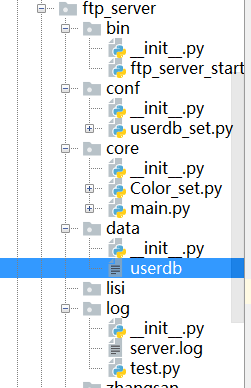
目录结构:
python3 实现简单ftp服务功能(服务端 For Linux)的更多相关文章
- python3 实现简单ftp服务功能(客户端)
转载请注明出处! 可执行的命令: lspwdcd put rm get mkdir 上传下载,显示进度百分比以及平均上传下载速度 客户端 main代码: #Author by Andy #_*_ co ...
- Python3实现简单的爬虫功能
python3简单实现一个爬去网站图片的小功能: 有时候想要下载自己喜欢的多个图片时,不需要一个个点击来下载,使用python脚本批量拉取,并保存到本地. 1. 首先找到自己要下载图片的url 2. ...
- 简单 TCP/IP 服务功能
本主题使用每台 Windows 计算机上提供的 Echo 和 Quote of the Day 服务.在所有 Windows 版本中都提供了简单 TCP/IP 服务功能.该功能会提供了以下服务:Cha ...
- Python实现FTP服务功能
本文从以下三个方面, 阐述Python如何搭建FTP服务器 一. Python搭建FTP服务器 二. FTP函数释义 三. 查看目录结构 四. 上传下载程序 一. Python搭建FTP服务器 1. ...
- Glue4Net简单部署基于win服务的Socket程序
smark 专注于高并发网络和大型网站架规划设计,提供.NET平台下高吞吐的网络通讯应用技术咨询和支持 Glue4Net简单部署基于win服务的Socket程序 在写一些服务应用的时候经常把要它部署到 ...
- crtmp Server 开启rtsp服务功能
Crtmp Server 包含了rtsp 服务功能,如果需要一个简单轻量的rtsp服务,Crtmp Server会是不错的选择. 默认情况下,rtsp功能是关闭的,需要在配置文件中打开.window环 ...
- 简单Spring Cloud 微服务框架搭建
微服务是现在比较流行的技术,对于程序猿而言,了解并搭建一个基本的微服务框架是很有必要滴. 微服务包含的内容非常多,一般小伙伴们可以根据自己的需求不断添加各种组件.框架. 一般情况下,基本的微服务框架包 ...
- FTP 文件传输服务
昨晚心血来潮,尝试用python写了一个ftp文件传输服务,可以接收指令,从远程ftp服务器同步指定目录数据,最后没用上,开源出来. https://github.com/jadepeng/ftp_t ...
- FTP文件传输服务
FTP文件传输服务 一 .FTP 连接及传输的模式 l 控制连接:TCP21,用于发送FTP命令信息. l 数据连接:TCP 20, 用于上传下载数据. · 数据连接建立的类型: ·主动模式: 服 ...
随机推荐
- pycharm html 注释
修改方式:如图修改成值None以后,command+/快捷键,html注释的符号就是<!-- 注释内容 -->:为Jinja2的时候,注释符号就是{# 注释内容 #} 修改成None时,H ...
- JavaScript之BOM+DOM
BOM 浏览器对象模型, 用于把浏览器相关的组件封装为对象进行操作. BOM是包含了DOM的. window对象 弹出框相关 确认: 取消: 与打开关闭window有关的方法 定时器相关 暂停选老婆 ...
- PHP curl_multi_add_handle函数
curl_multi_add_handle — 向curl批处理会话中添加单独的curl句柄 说明 int curl_multi_add_handle ( resource $mh , resourc ...
- PHP curl_exec函数
curl_exec — 执行一个cURL会话 说明 mixed curl_exec ( resource $ch ) 执行给定的cURL会话. 这个函数应该在初始化一个cURL会话并且全部的选项都被设 ...
- JS在页面加载之后运行
通用的页面加载后再运行JS有两种方式:1.在DOM加载完毕后,页面全部内容(如图片等)完全加载完毕前运行JS. 2.在页面全部内容加载完成(包括引用文件,图片等)之后再加载JS 1.在DOM加载后 ...
- 三、PCB设计与Allegro基本概念
PCB:印制电路板 如--update更新时无法变为0 4.区域规则--设置区域规则--赋予区域轮廓 5.铜皮 把.sav改为.dsn--就可以恢复出突然关闭的.dsn文件 生成规则钻孔文件(.drl ...
- 【2019 Multi-University Training Contest 2】
01: 02: 03: 04: 05:https://www.cnblogs.com/myx12345/p/11584100.html 06: 07: 08:https://www.cnblogs.c ...
- [CSP-S模拟测试]:beauty(搜索)
题目描述 距离产生美.一棵包含$n$个点的树,有$2k$个不同的关键点,我们现在需要将这些点两两配对,对于一种形如:$$(u_1,v_1),(u_2,v_2),...,(u_k,v_k)$$的配对方案 ...
- [CSP-S模拟测试]:math(裴蜀定理)
题目传送门(内部题22) 输入格式 第一行有$2$个整数$n,k$.第二行有$n$个正整数$a_i$. 输出格式 第一行有一个整数$s$,表示可以生成的非负整数的个数.第二行有$s$个可以生成的非负整 ...
- Linux环境下对大小写敏感,linux环境升级node
linux对大小写敏感 在window下可以正常运行的代码,在linux环境下报错,找不到文件,因为window下对大小写不敏感,linux对大小写敏感 linux环境下node升级 1.安装nvm ...