
微信小程序(15)--上传图片公用组件(2)
接下来开始写写上传图片的公用组件,可以自定义上传几张图片。
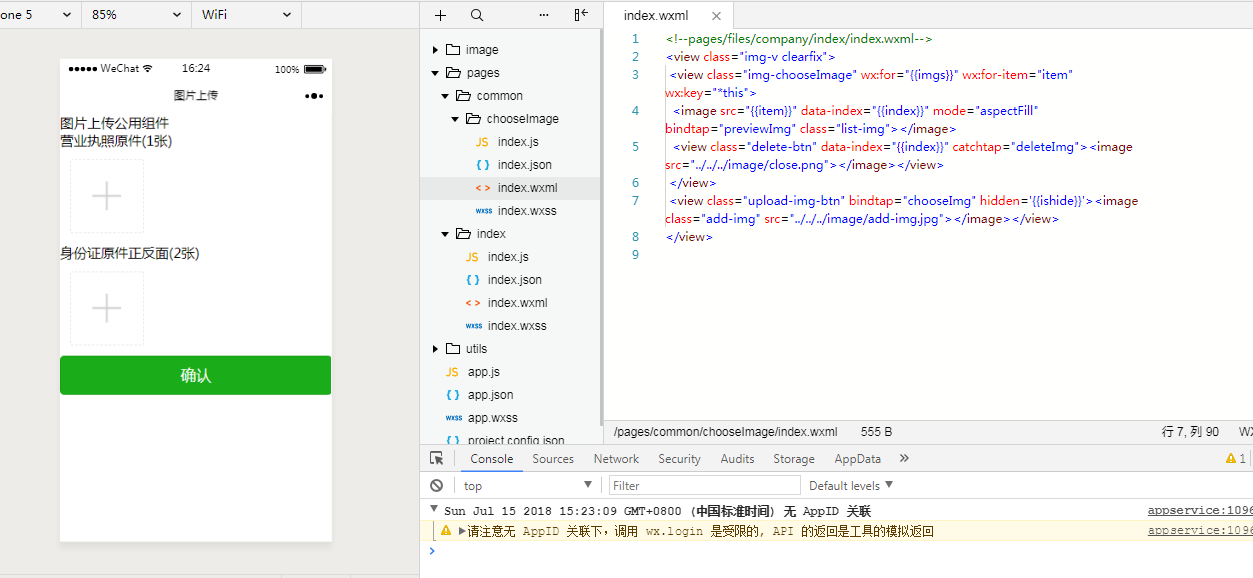
chooseImage文件夹里面的index.wxml和index.js,涉及图片上传,删除,预览。
<view class="img-v clearfix">

 <view class="img-chooseImage" wx:for="{{imgs}}" wx:for-item="item" wx:key="*this">

  <image src="{{item}}" data-index="{{index}}" mode="aspectFill" bindtap="previewImg" class="list-img"></image>

  <view class="delete-btn" data-index="{{index}}" catchtap="deleteImg"><image  src="../../../image/close.png"></image></view>

 </view>

 <view class="upload-img-btn" bindtap="chooseImg" hidden='{{ishide}}'><image class="add-img" src="../../../image/add-img.jpg"></image></view>

</view>
Component({

  options: {

    multipleSlots: true // 在组件定义时的选项中启用多slot支持

  },

  properties: {

    count: String   //父子传参

  },

  /**

   * 页面的初始数据

   */

  data: {

    imgs: [],

    count:,

    ishide:false

  },

  // 上传图片

  methods: {

    chooseImg: function (e) {

      var that = this;

      var imgs = this.data.imgs;

      if (imgs.length >= ) {

        this.setData({

          lenMore:

        });

        setTimeout(function () {

          that.setData({

            lenMore:

          });

        }, );

        return false;

      }

      wx.chooseImage({

        sizeType: ['original', 'compressed'], // 可以指定是原图还是压缩图,默认二者都有

        sourceType: ['album', 'camera'], // 可以指定来源是相册还是相机,默认二者都有

        success: function (res) {

          // 返回选定照片的本地文件路径列表,tempFilePath可以作为img标签的src属性显示图片

          var tempFilePaths = res.tempFilePaths;

          var imgs = that.data.imgs;

          // console.log(tempFilePaths + '----');

          console.log(that.data.count);

          for (var i = ; i < tempFilePaths.length; i++) {

            if (imgs.length > that.data.count-) {

              that.setData({

                imgs: imgs

              });

              return false;

            } else {

              imgs.push(tempFilePaths[i]);

              if (imgs.length > that.data.count-){

                that.setData({

                  ishide: true

                });

              }

            }

          }

          // console.log(imgs);

          that.setData({

            imgs: imgs

          });

          that.triggerEvent("chooseImg");//触发回调

        }

      });

    },

    // 删除图片

    deleteImg: function  (e) {

      var imgs = this.data.imgs;

      var index = e.currentTarget.dataset.index;

      imgs.splice(index, );

      this.setData({

        imgs: imgs

      });

      if (imgs.length < this.data.count) {

        // console.log(imgs.length);

        this.setData({

          ishide: false

        });

      }

      this.triggerEvent("deleteImg");//触发回调

    },

    // 预览图片

    previewImg: function  (e) {

      //获取当前图片的下标

      var index = e.currentTarget.dataset.index;

      //所有图片

      var imgs = this.data.imgs;

      wx.previewImage({

        //当前显示图片

        current: imgs[index],

        //所有图片

        urls: imgs

      })

    }

  }

})
index文件夹的index.json和index.wxml和index.js
{

  "navigationBarTitleText": "图片上传",

  "usingComponents": {

    "pop": "../common/chooseImage/index",

    "popnum": "../common/chooseImage/index"

  }

}
 <view class="perfect-title">图片上传公用组件</view>

  <view class="pop-box">

    <view class="upload-title">营业执照原件(1张)</view>

      <view style="margin:30rpx;">

        <pop id="pop" bind:chooseImg="chooseImg" bind:deleteImg="deleteImg" bind:previewImg="previewImg" count="{{count}}"></pop>

      </view>

  </view>

  <view class="pop-box">

    <view class="upload-title">身份证原件正反面(2张)</view>

      <view style="margin:30rpx;">

        <popnum id="popnum" bind:chooseImg="chooseImgnum" bind:deleteImg="deleteImgnum" bind:previewImg="previewImg" count="{{countnum}}"></popnum>

      </view>

  </view>

  <view class="btn-area" id="buttonContainer2">

    <button type="primary" bindtap="submitBtn">确认</button>

  </view>
Page({

  /**

   * 页面的初始数据

   */

  data: {

   imgs:[],

   imgsnum: [],

   count:,

   countnum:

  },

  /**

   * 生命周期函数--监听页面加载

   */

  onLoad: function (options) {

    //获得pop组件

    this.pop = this.selectComponent("#pop");

    this.popnum = this.selectComponent("#popnum");

  },

  chooseImg: function (e) {

    // console.log(this.pop.data.imgs);

    this.setData({

      imgs: this.pop.data.imgs

    })

  },

  deleteImg: function (e) {

    // console.log(this.pop.data.imgs);

    this.setData({

      imgs: this.pop.data.imgs

    })

  },

  chooseImgnum: function (e) {

    // console.log(this.pop.data.imgs);

    this.setData({

      imgsnum: this.popnum.data.imgs

    })

  },

  deleteImgnum: function (e) {

    // console.log(this.pop.data.imgs);

    this.setData({

      imgsnum: this.popnum.data.imgs

    })

  },

  submitBtn: function(){

    console.log(this.data.imgs);

    console.log(this.data.imgsnum);

  },

  /**

   * 生命周期函数--监听页面初次渲染完成

   */

  onReady: function () {

  }

})
微信小程序(15)--上传图片公用组件(2)的更多相关文章
- 微信小程序批量上传图片 All In One
微信小程序批量上传图片 All In One open-data https://developers.weixin.qq.com/miniprogram/dev/component/open-dat ...
- [小程序开发] 微信小程序audio音频播放组件+api_wx.createAudioContext
引言: audio是微信小程序中的音频组件,可以轻松实现小程序中播放/停止音频等自定义动作. 附上微信小程序audio组件的相关属性说明:https://mp.weixin.qq.com/debug/ ...
- 微信小程序页面调用自定义组件内的事件
微信小程序页面调用自定义组件内的事件 page page.json { "usingComponents": { "my-component": ". ...
- 微信小程序(二十)-UI组件(Vant Weapp)-01按装配置
1.官网 https://vant-contrib.gitee.io/vant-weapp/#/intro https://gitee.com/vant-contrib/vant-weapp 2.按装 ...
- 关于微信小程序 modal弹框组件的介绍
微信小程序 modal: 这里对微信小程序中 modal组件进行详细解析,我想开发微信小程序的小伙伴可以用到,这里小编就记录下modal的知识要点. modal modal类似于javascript中 ...
- 微信小程序开发—快速掌握组件及API的方法
微信小程序框架为开发者提供了一系列的组件和API接口. 组件主要完成小程序的视图部分,例如文字.图片显示.API主要完成逻辑功能,例如网络请求.数据存储.音视频播放控制,以及微信开放的微信登录.微信支 ...
- 微信小程序开发—快速掌握组件及API的方法---转载
微信小程序框架为开发者提供了一系列的组件和API接口. 组件主要完成小程序的视图部分,例如文字.图片显示.API主要完成逻辑功能,例如网络请求.数据存储.音视频播放控制,以及微信开放的微信登录.微信支 ...
- (干货)微信小程序之上传图片和图片预览
这几天一直负责做微信小程序这一块,也可以说是边做边学习吧,把自己做的微信小程序的一些功能分享出来,与大家探讨一下,相互学习相互进步. 先看下效果图 只写了一下效果样式的话希望大家不要太在意,下面马路杀 ...
- 微信小程序开发05-日历组件的实现
接上文:微信小程序开发04-打造自己的UI库 github地址:https://github.com/yexiaochai/wxdemo 我们这里继续实现我们的日历组件,这个日历组件稍微有点特殊,算是 ...
- 微信小程序/网站 上传图片到腾讯云COS
COS简介: 腾讯云提供的一种对象存储服务,供开发者存储海量文件的分布式存储服务.可以将自己开发的应用的存储部分全部接入COS的存储桶中,有效减少应用服务器的带宽,请求等.个人也可以通过腾讯云账号免费 ...
随机推荐
- web--响应式导航菜单
响应式导航菜单 代码如下 HTML代码: <!DOCTYPE html> <html lang="en"> <head> <meta ch ...
- TCP: time wait bucket table overflow
.TCP: time wait bucket table overflow tcp的连接数超出了服务器设置的连接数 1 2 3 4 5 6 [root@test log]# netstat -antp ...
- js undefined三目运算
js ajax传值中 "id":$('#id').val(), 如果#id不存在,使用$('#id').val()||‘’,可避免向后台传入undefined
- vue项目中router路由配置
介绍 路由:控制组件之间的跳转,不会实现请求.不用页面刷新,直接跳转-切换组件>>> 安装 本地环境安装路由插件vue-router: cnpm install vue-rou ...
- SpringBoot自定义Jackson配置
为了在SpringBoot工程中集中解决long类型转成json时JS丢失精度问题和统一设置常见日期类型序列化格式,我们可以自定义Jackson配置类,具体如下: import com.fasterx ...
- ht-8 对arrayList中的自定义对象排序( Collections.sort(List<T> list, Comparator<? super T> c))
package com.iotek.set; import java.util.ArrayList; import java.util.Collections; import java.util.Co ...
- c#代码规则,C#程序中元素的命名规范
俩种命名方法 1.Pascal 命名法,第一个字母大写其它字母小写Userid 2.Camel命名法,所有单第一方写大写,其它小写,骆峰命名法,userId C#程序中元素的命名规范项目名:公司名.项 ...
- 【CF1243B2】Character Swap (Hard Version)【思维】
题意:给定两个字符串,问是否存在交换方案使得两个字符串相同,方案为交换次数小于等于2n,且每次只交换s1与s2中的一个字符 题解:考虑从前往后枚举,当第i位不同时,考虑找后边的第j位,若存在这样的第j ...
- 顺序表 C++ 类模板实现
顺序表的C++语言描述 基本运算的算法——置空表.求表的长度.取结点.定位运算.插入运算.删除运算.建立顺序表.输出顺序表 #include <iostream>using namespa ...
- 学习日记12、list集合中根据某个字段进行去重复操作
List<T_CusBankCardInfoModel> blist = B_BLL.GetListByCusId(CusIds).Distinct(new ModelComparer() ...